The best Tidio alternative for a Shopify store whose main channel is WhatsApp is WhatFlow WhatsApp Business API. It runs on Meta's official WhatsApp Cloud API, puts every chat in a shared team inbox with no seat fees, and includes every feature on its Free plan. You're not billed per conversation, per seat or per AI resolution.
If your customers mostly chat on your website instead, Shopify Inbox is the free, obvious swap. I've listed both, plus five more, with prices and ratings checked on each app's Shopify App Store listing and pricing page on November 18, 2026.
Why do Shopify stores look for Tidio alternatives?
Tidio is popular for good reason. It's rated 4.8 from 1,360 reviews, it has a Free plan, and it bundles live chat, the Lyro AI chatbot and Flows automation. Its listing also describes one inbox for email, Instagram, WhatsApp and Messenger.
Stores compare it because of how the pieces are priced, as of November 2026:
Billable conversations. The Free plan covers 50, Starter 100 and Growth starts at 250, according to Tidio's pricing page. On the Shopify listing, Customer Service is $29/month for 100 conversations, with 250 to 1,000 conversations at $59.
AI and automation are separate products. Lyro AI Chatbot is $39/month for up to 200 Lyro conversations, and Flows is $29/month for up to 40,000 visitors.
Seat ceiling. Self-serve plans allow up to 10 seats. More than that means the custom Plus plan, which starts at $300/month plus usage.
Branding. Removing Tidio branding is a $16.67/month add-on on Growth.
None of that is hidden or unfair. But if a big share of those conversations happen on WhatsApp, you may be paying a website-chat pricing model for a channel that lives on the customer's phone.
Here's a hypothetical. Say your store handles 400 customer conversations a month and 300 of them start on WhatsApp. On Tidio's Shopify listing, that volume sits in the $59 Customer Service tier (250 to 1,000 conversations). If you also want Lyro answering FAQs, that's a second subscription from $39/month for 200 Lyro conversations. Hire an eleventh agent for peak season and you're past the self-serve seat limit. On WhatFlow, those 300 WhatsApp chats run on whichever plan covers your message volume, with no seat count, and Meta charges for any templates you send.
What should you look for in a Tidio alternative?
Before you compare apps, decide what job the replacement has to do. For a WhatsApp-heavy store I'd check six things:
Customers should see your verified business, not a shared number.
Templates for after the 24-hour window. Without them you can't follow up once a customer goes quiet.
A shared inbox with assignment. Two agents should never answer the same chat.
Shopify order context. Agents need the order in front of them, not in another tab.
Automation hooks. Shopify Flow support means you can tag orders and route chats without code.
A billing unit you can predict. Conversations, seats, tickets, AI resolutions or messages: know which one grows with your business.
Tidio alternatives compared
Ratings and prices are from each app's Shopify App Store listing, checked November 18, 2026. Meta's WhatsApp message charges are extra on any app that sends WhatsApp messages.
App
Best for
Starting price
Shopify App Store rating (Nov 2026)
WhatsApp official API?
WhatFlow WhatsApp Business API
WhatsApp-first stores and support teams
Free plan; paid from $4.99/month
5.0 (85 ratings)
Yes, Meta WhatsApp Cloud API
Shopify Inbox
Free website chat with an AI sales associate
Free
4.5 (5,820)
WhatsApp not mentioned on listing
Gorgias
A full helpdesk for multi-channel teams
$10/month
4.3 (709)
WhatsApp on all helpdesk plans, per help center
LiveChat (by Text)
Polished website chat for sales teams
$25/month
4.4 (49)
Listed under "Works with"
Chaty
A free multi-channel chat button
Free (500 visitors/month)
4.9 (336)
No, click-to-chat only
Spur
WhatsApp, Instagram and live chat with an AI agent
$39/month
5.0 (118)
Yes, per its listing
Zoko
Selling and support inside WhatsApp
$49.99/month
4.9 (479)
Yes, per its pricing page
Tidio (for reference)
Website chat with Lyro AI and Flows
Free; paid from $29/month
4.8 (1,360)
WhatsApp included, per pricing page
1. WhatFlow WhatsApp Business API
Who it's for: Shopify stores where WhatsApp, not the website widget, is how customers actually reach you. That describes a lot of the stores I talk to in India, Pakistan, the Gulf, Brazil and Indonesia.
WhatFlow is built on the official Meta WhatsApp Cloud API and connects through Meta Embedded Signup in Shopify admin. It's ready for growing teams: green-tick-eligible profiles through Meta, a shared team inbox with assignment and filters, and native Shopify Flow automation.
Standout features:
No seat fees and no per-conversation billing. Plans differ only by messaging allowance, and every feature is on every plan.
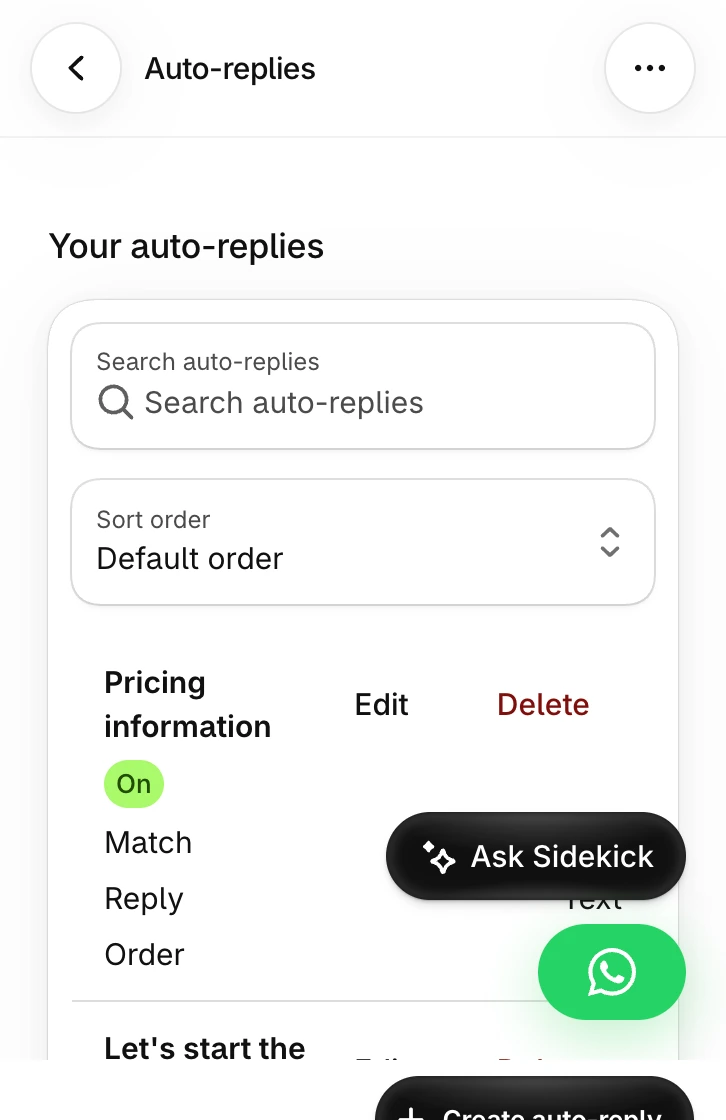
Auto-replies for after-hours messages, canned responses and live catalog sharing from the inbox.
Order updates, COD confirmation, cart recovery and broadcasts from the same app.
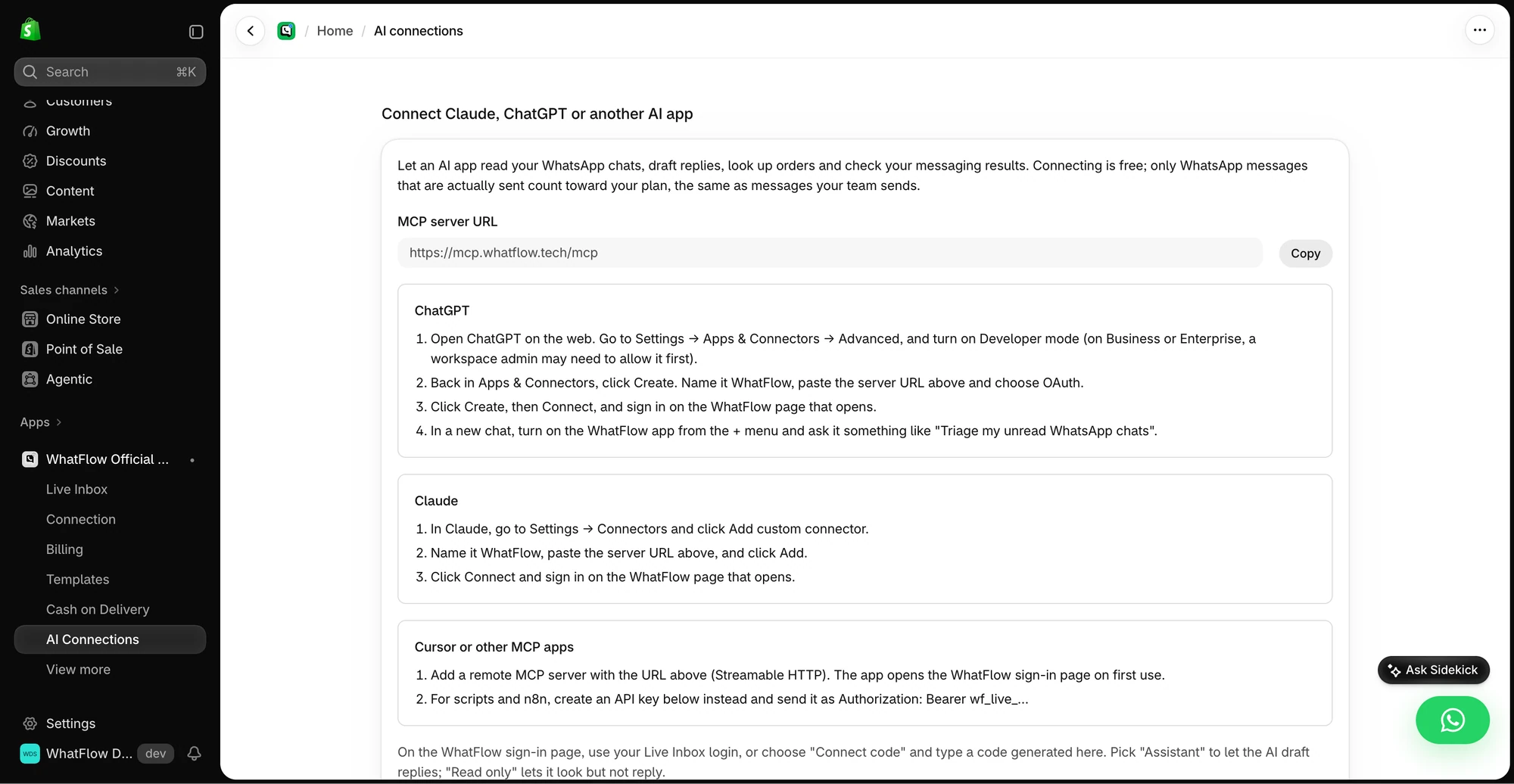
No built-in AI bot. Instead you connect Shopify Sidekick or your own AI (Claude, ChatGPT, Cursor) over MCP, with a draft mode so a person approves each reply. No per-resolution fees.
The AI Connections setup screen on our demo store. No assistant was connected.
Pricing and rating (November 2026): a Free plan and paid plans from $4.99/month, 7-day trial on paid plans. See WhatFlow pricing. Meta's message charges pass through at zero markup. Rated 5.0/5 from 85 ratings (checked November 24, 2026).
Honest limitation: WhatFlow has no website live chat widget and no AI bot that answers on its own. If you want Lyro-style automated answers on your site, Tidio or Spur fits that better. Full comparison: WhatFlow vs Tidio.
2. Shopify Inbox
Who it's for: stores that want free on-site chat and nothing else to manage.
Shopify Inbox gives you live chat, email chat, an AI sales associate that answers from your catalog and policies, personalised replies for shoppers signed in with Shop, and chat assignment.
Pricing and rating (November 2026): free. Rated 4.5 from 5,820 reviews.
Honest limitation: the listing doesn't mention WhatsApp, Instagram or Messenger, so it's website chat only. See WhatFlow vs Shopify Inbox.
3. Gorgias
Who it's for: support teams that have outgrown a chat widget and need a full helpdesk.
Gorgias covers email, SMS, chat, phone, social and a help center. Its help center says WhatsApp works on all helpdesk plans.
Pricing and rating (November 2026): Starter $10/month (50 tickets, 3 agents), Basic $60 (300 tickets), Pro $360 (2,000), Advanced $900 (5,000). AI Agent is an add-on. 7-day trial. Rated 4.3 from 709 reviews.
Honest limitation: ticket-based billing, so busy months cost more. See WhatFlow vs Gorgias.
4. LiveChat (by Text)
Who it's for: stores that treat website chat as a sales channel and want a polished agent app.
LiveChat is a website chat tool with AI features, traffic tracking and 200+ integrations. WhatsApp appears in its "Works with" list.
Pricing and rating (November 2026): the Shopify listing shows Starter at $25/month, Team $59 and Business $89, each with a 14-day trial. LiveChat's own pricing page now shows Text plans priced per user, from $19/user/month billed annually. Rated 4.4 from 49 reviews.
Honest limitation: per-user pricing on the website, and WhatsApp isn't in the channel list on its plan comparison. See WhatFlow vs LiveChat.
5. Chaty
Who it's for: stores that use Tidio mostly as a contact button and want something lighter.
Chaty adds a click-to-chat widget for WhatsApp, Messenger, Telegram, email and 20+ other channels, with a WhatsApp pop-up and preset messages.
Pricing and rating (November 2026): Free for 500 visitors/month, Basic $15/month, Pro $39, Growth $79, priced by monthly visitors. Rated 4.9 from 336 ratings.
Honest limitation: it's a button, not an inbox or chatbot. Chats continue in your own WhatsApp. See WhatFlow vs Chaty.
6. Spur
Who it's for: stores that like Tidio's AI-first approach but want it on WhatsApp and Instagram.
Spur's AI agent recommends products and shares order tracking across WhatsApp, Instagram, Messenger and live chat, with cart recovery, COD confirmation and campaigns. Its listing says it uses the official WhatsApp Business API.
Pricing and rating (November 2026): AI Start $39/month (2 seats, 2,000 AI credits), up to AI Max at $499. 14-day trial. Rated 5.0 from 118 reviews.
Honest limitation: seats and AI credits are both capped per plan. See WhatFlow vs Spur.
7. Zoko
Who it's for: WhatsApp-first stores that want shoppers to browse and buy in the chat.
Zoko syncs your Shopify catalog to WhatsApp and gives you a multi-agent inbox with calls, voice notes and translation, plus broadcasts and cart recovery.
Pricing and rating (November 2026): Starter $49.99/month with unlimited agents and a $0.015 per-conversation markup, then Plus at $79.99 with 5 agents included. 7-day trial. Rated 4.9 from 479 reviews.
Honest limitation: add-ons (Instagram, premium flows, AI bots) add up. See WhatFlow vs Zoko.
How to switch from Tidio
Check where your conversations come from. If most start on WhatsApp, move that traffic first.
Swap the widget. Add a WhatsApp button to your theme, then remove Tidio's script so shoppers see one entry point.
Connect your WhatsApp number to the new app through Meta Embedded Signup.
Rebuild your FAQ answers as canned responses, and set an after-hours auto-reply.
Recreate any Flows as Shopify Flow workflows or inbox auto-replies.
Run a week side by side, then cancel Tidio before the next billing date.
An after-hours auto-reply that sets expectations:
Thanks for messaging us! We're offline right now and back at 9am. Leave your order number and question here and we'll reply first thing.
The auto-replies list on our demo store, with the control to create one.
One difference from website chat: once the 24-hour customer service window closes, WhatsApp only lets a business send a Meta-approved template, and Meta charges per delivered template message. See Meta's pricing page. The upside is that the conversation stays on the customer's phone instead of vanishing with the browser tab; I've written more on WhatsApp vs website live chat.
Run WhatsApp for your Shopify store with WhatFlow
Free plan available. Templates, COD confirmation, Shopify Flow automations and a shared team inbox with no seat fees. Every feature is included on every plan, including Free.
Your customers message you on WhatsApp: WhatFlow. No seats, no per-conversation billing, every feature free to start.
You just want free website chat: Shopify Inbox.
You need a full helpdesk: Gorgias.
Website chat is a sales channel for you: LiveChat.
You only need a contact button: Chaty.
You want an AI agent on WhatsApp and Instagram: Spur.
You want shoppers buying inside WhatsApp: Zoko.
Plenty of stores end up with two tools: Shopify Inbox on the site and WhatFlow for WhatsApp, both free to start. If you're using AI to help with replies, our guide to AI-drafted support replies for small Shopify teams covers the rules worth setting first.
If most of your customers message you on WhatsApp, WhatFlow WhatsApp Business API is the best Tidio alternative: it runs on Meta's official WhatsApp Cloud API, has a team inbox with no seat fees and includes every feature on its Free plan. If you mainly want free website chat, Shopify Inbox is the simplest swap.
How does Tidio charge?
As of November 2026, Tidio bills by billable conversation. Its Shopify listing shows a Free plan, Customer Service at $29/month for 100 conversations, Lyro AI Chatbot at $39/month for 200 Lyro conversations and Flows at $29/month, with up to 10 seats on self-serve plans.
Is there a free alternative to Tidio?
Yes. Shopify Inbox is free and includes live chat and an AI sales associate. For WhatsApp, WhatFlow has a Free plan with every feature, and its theme-matched chat buttons are free forever; Meta's message charges still apply when you send templates.
Does Tidio work with WhatsApp?
Yes. Tidio's Shopify listing describes one inbox for email, Instagram, WhatsApp and Messenger, and its pricing page marks WhatsApp as included on every plan as of November 2026.