The best Shopify order tracking apps in 2026 are CWILL Order Tracking (formerly ParcelPanel) and 17TRACK for highly rated, low-cost branded tracking pages, and AfterShip for an established tool with 1,100+ carriers. None of the tracking apps I checked sends WhatsApp notifications, so stores whose customers live on WhatsApp add WhatFlow for shipping updates on top.
I'm Safwan, co-founder of WhatFlow. Tracking is a two-part job, and it helps to separate the parts. The first is the tracking itself: pulling carrier data, showing a branded page, predicting delivery. That's what the apps below do well. The second is telling the customer, in a place they'll see it, before they message you asking "where is my order?" That second part is where WhatsApp earns its keep in markets like India, the Gulf and Brazil.
How we picked
On November 18, 2026 I opened each app's Shopify App Store listing and took ratings, review counts, plans, quotas and notification channels from it. I only included apps I could verify there that day. Ratings and prices are as of November 2026, so check the listing before you install. WhatFlow is our app; it isn't a tracking app, and I've listed it for the notification layer only. The limitations below come from what each listing says, not from tests I ran on every carrier.
Check your carriers first. CWILL lists 1,600+ carriers, 17TRACK 3,300+ and AfterShip 1,100+. If you ship with a regional courier, search for it before installing anything.
Count your monthly orders. Free plans here cap at 20 to 50 orders or shipments a month, and paid plans charge for extra quota. Say you ship 400 orders a month: you're past every free tier, and as of November 2026 that volume sits on Track123 Advanced ($49, 2,000 orders), CWILL Professional ($59, 2,000 orders) or AfterShip Premium ($70, 500 shipments).
Decide what the tracking page should do. Some apps add product recommendations, discount upsells or estimated delivery dates before purchase. If you just want customers to see where the parcel is, a simpler plan is fine.
Decide where customers hear about it. Every tracking app here sends email, and some send SMS. If your customers read WhatsApp first, plan for a WhatsApp notification layer. Our comparison of WhatsApp vs SMS for shipping updates explains the difference.
1. WhatFlow WhatsApp Business API (WhatsApp shipping updates)
Who it's for: stores whose customers expect delivery news on WhatsApp, and support teams tired of answering "where is my order?" by hand.
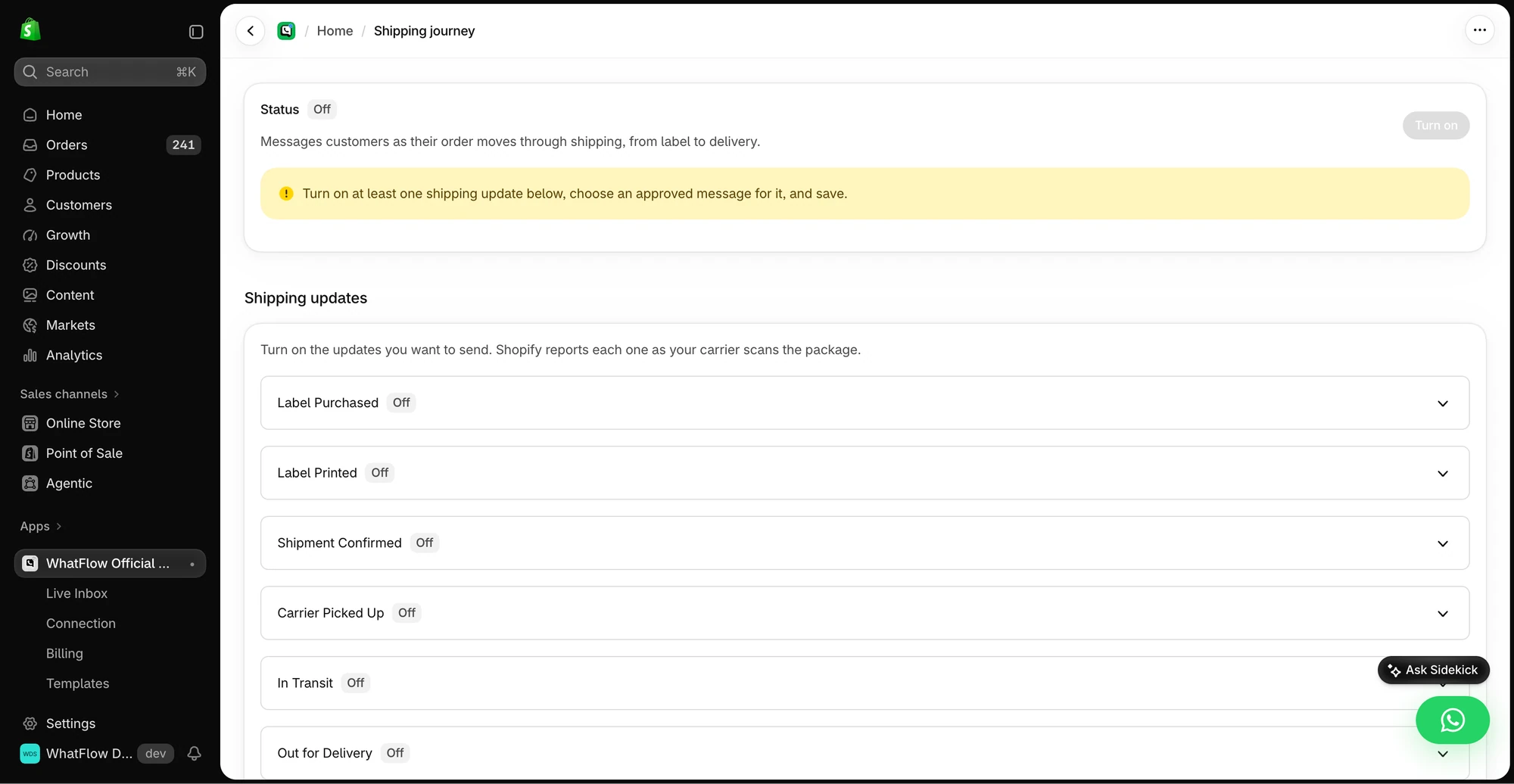
WhatFlow's Shipping Journey sends a WhatsApp message at the fulfillment stages you pick, such as label created, carrier pickup, in transit and delivered. Each stage uses an approved WhatsApp template, so it can go out even when the customer hasn't messaged you recently. Our help doc on setting up shipping updates and review requests walks through it.
Shipping Journey stages in a WhatFlow demo store, including label, carrier pickup and in transit.
I'd start with one stage that matters, usually carrier pickup or delivered, confirm your carrier and Shopify actually send that event, and test the tracking link on a phone. Four messages per order that customers learn to ignore are worse than one they read. A pickup template might look like this:
Hi Sara, good news: order #1042 has left our warehouse with Aramex 🚚 Track it here: [tracking link]. Reply to this message if anything looks wrong and our team will help.
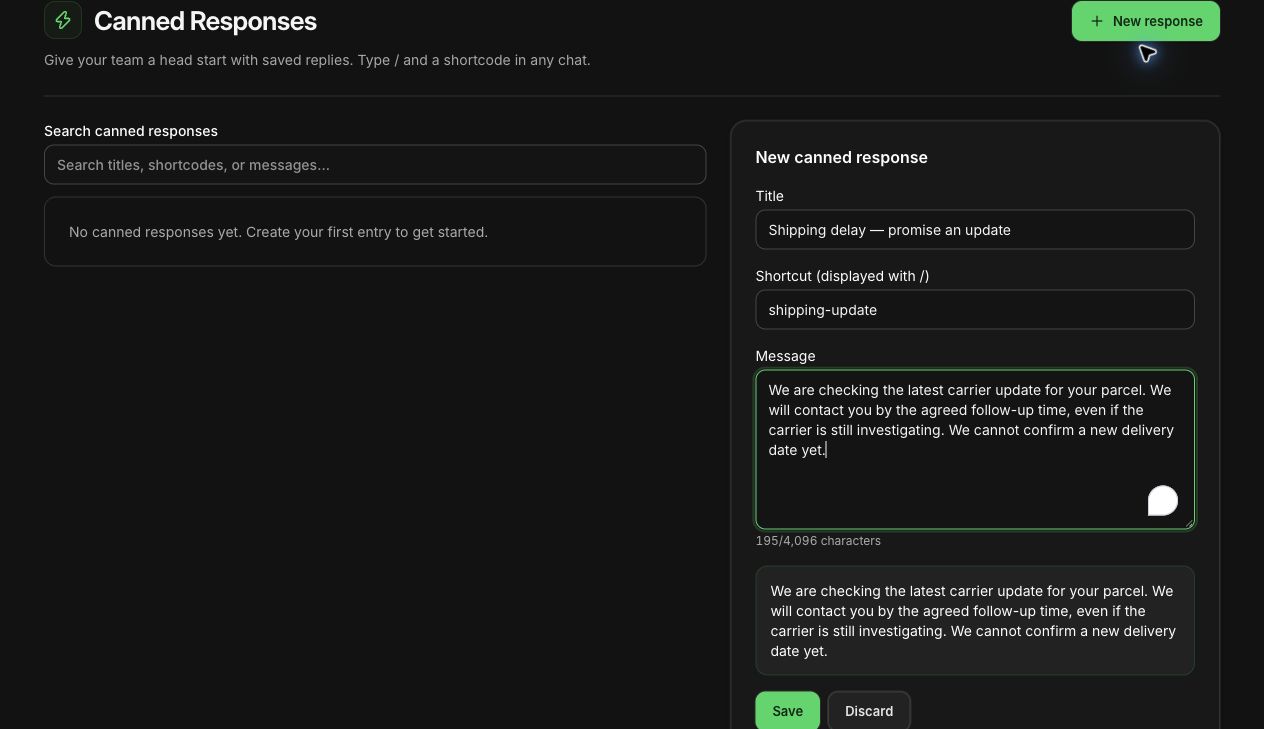
When a customer replies, the chat lands in WhatFlow's shared team inbox, where an agent can answer with a saved reply. For delays, our guide to handling Shopify shipping delays on WhatsApp has messages that calm people down.
An unsaved shipping-delay saved reply in the WhatFlow inbox, in a demo store. Nothing was sent.
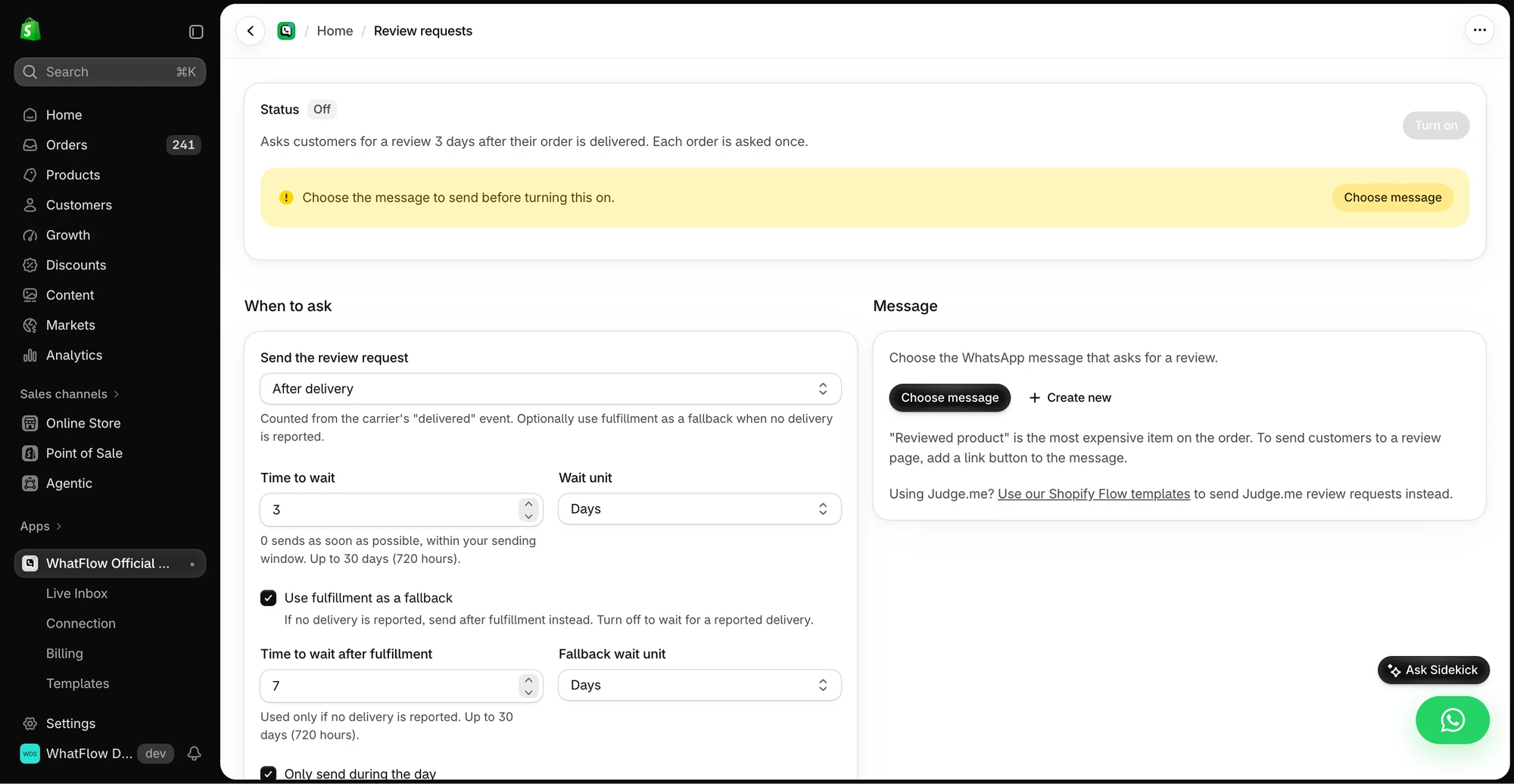
The same app times review requests after delivery, so customers aren't asked to review a parcel that's still in a van, and you can trigger order messages from your own logic with native Shopify Flow triggers and actions.
Review request timing and message selection controls in a WhatFlow demo store.
Pricing and rating (as of November 2026): a Free plan with every feature and paid plans from $4.99/month; see WhatFlow pricing. Shipping updates are utility templates, and Meta charges for them separately at cost. As of November 2026, Meta's utility rate is $0.0014 per message in India, $0.0068 in Brazil, $0.0107 in Saudi Arabia, $0.022 in the UK and $0.0034 in North America. Rated 4.9/5 from 72 ratings when we checked on November 18, 2026.
Honest limitation: WhatFlow doesn't build a branded tracking page, generate return labels or detect carrier exceptions automatically. It sends the message when Shopify and your carrier report the event, which is why most stores pair it with one of the apps below.
2. CWILL Order Tracking (formerly ParcelPanel)
Who it's for: stores that want a branded tracking page that also sells, at a low price.
CWILL, formerly ParcelPanel and ParcelWILL, includes real-time tracking, a branded and localised tracking page, a shipment dashboard and a dropshipping mode on Free. Paid plans add custom shipment statuses, estimated delivery dates, AI product recommendations, shipping protection, shipping notifications and discount upsells. Professional adds auto-translation, Klaviyo and PayPal integrations, an API and webhooks, and removes CWILL branding. It lists 1,600+ carriers.
Pricing and rating (as of November 2026): Free for 20 orders a month; Essential at $11/month (200 orders); Professional at $59/month (2,000 orders); Enterprise at $479/month (25,000 orders). Paid plans have a 7-day trial and charge $0.05 per extra order. Rated 4.9 from 3,210 reviews.
Honest limitation: the free plan's 20 orders a month is the smallest free quota here.
3. AfterShip Order Tracking
Who it's for: established stores that want a well-known tracking tool with analytics and a custom domain.
AfterShip's Free plan includes 1,100+ carrier integrations, a tracking dashboard, a branded tracking page and carrier estimated delivery dates. Essentials adds your logo, automatic carrier detection and email and SMS notifications. Premium adds a tracking page on your own domain, AI-powered delivery estimates and product recommendations, full analytics and an API with webhooks.
Pricing and rating (as of November 2026): Free for 50 shipments a month; Essentials at $11/month (100 shipments, $0.08 per extra); Premium at $70/month (500 shipments, $0.12 per extra). Paid plans have a 7-day trial. Rated 4.6 from 1,513 reviews.
Honest limitation: email and SMS notifications start on Essentials, and per-shipment overage is higher than most apps here. One recent review on the listing complains about overage charges and cancellation.
4. 17TRACK Order Tracking
Who it's for: dropshippers and stores shipping internationally that need the widest carrier list.
17TRACK starts tracking after fulfillment and lists a branded tracking page with estimated delivery, automated email notifications, a one-click dropshipping mode that hides supplier origin details, and shipping analytics. It lists access to 3,300+ carriers.
Pricing and rating (as of November 2026): Free for 50 shipments a month; Basic at $9/month (200); Pro at $49/month (1,000); Premium at $159/month (2,000). Rated 4.9 from 4,600 reviews, the largest review count among tracking apps here.
Honest limitation: the listing names email as its notification channel, not SMS. The page also shows a critical one-star review reporting tracking failures for FedEx numbers, so test your own carriers.
5. Track123 Order Tracking
Who it's for: small stores that want a cheap tracking app that plugs into their marketing stack.
Track123 lists a branded tracking page and order lookup page, real-time tracking with estimated delivery, carrier masking, a dropshipping mode, Apple Wallet tracking, product recommendations, analytics and exports. Integrations include Klaviyo, Omnisend, Slack and Gorgias, plus an API and webhooks. It sends email and SMS notifications.
Pricing and rating (as of November 2026): Starter is free for 50 orders a month; Growth at $9/month (300 orders); Advanced at $49/month (2,000 orders). Paid plans have a 7-day trial and charge $0.05 per extra order. Rated 4.9 from 1,732 reviews.
Honest limitation: the listing doesn't state how many carriers it supports, so confirm yours before switching.
6. TrackingMore Order Tracking
Who it's for: stores that need multilingual tracking pages and high-volume enterprise plans.
TrackingMore lists real-time tracking, a branded multilingual tracking page, estimated delivery dates, auto carrier detection, dropshipping mode, discount upsells, delivery performance analytics, last-mile detection, automatic PayPal sync and 24/7 support.
Pricing and rating (as of November 2026): Free for 50 shipments a month; Basic at $9/month (200 orders); Pro at $55/month (2,000 orders); Enterprise at $1,189/month (70,000 orders). Paid plans have a 7-day trial and charge $0.05 per extra order. Rated 4.4 from 374 reviews.
Honest limitation: its rating is lower than the other large tracking apps here, and notifications are email only.
7. Malomo Order Tracking
Who it's for: US brands that already run Klaviyo, Attentive or Postscript and want tracking events to feed those flows.
Malomo lists branded tracking and order lookup pages, real-time and global multi-carrier tracking, estimated delivery dates, problem-order notifications and reporting, and transactional messaging for upsells. It works with Attentive, Gorgias, Klaviyo, Postscript, Rebuy and Recharge, and notifications go out by email and SMS.
Pricing and rating (as of November 2026): the listing shows a Free plan only. Rated 5.0 from just 6 reviews.
Honest limitation: six reviews is too few to judge reliability, and the listing doesn't explain what limits apply.
How to run a tracking app and WhatsApp updates together
The common mistake I see is two apps notifying the same customer about the same event: an email from the tracking app and a WhatsApp from WhatFlow, both saying "your order shipped". Split the jobs instead.
Let the tracking app own the data and the page. Keep its branded tracking page live and use its link in every message.
Pick the stages WhatsApp should cover. Carrier pickup and delivered are the two customers care about most. Leave the rest to the tracking page.
Turn off the duplicate notification. If WhatsApp handles "delivered", switch off that email or SMS in the tracking app, or keep email only for customers without a WhatsApp opt-in.
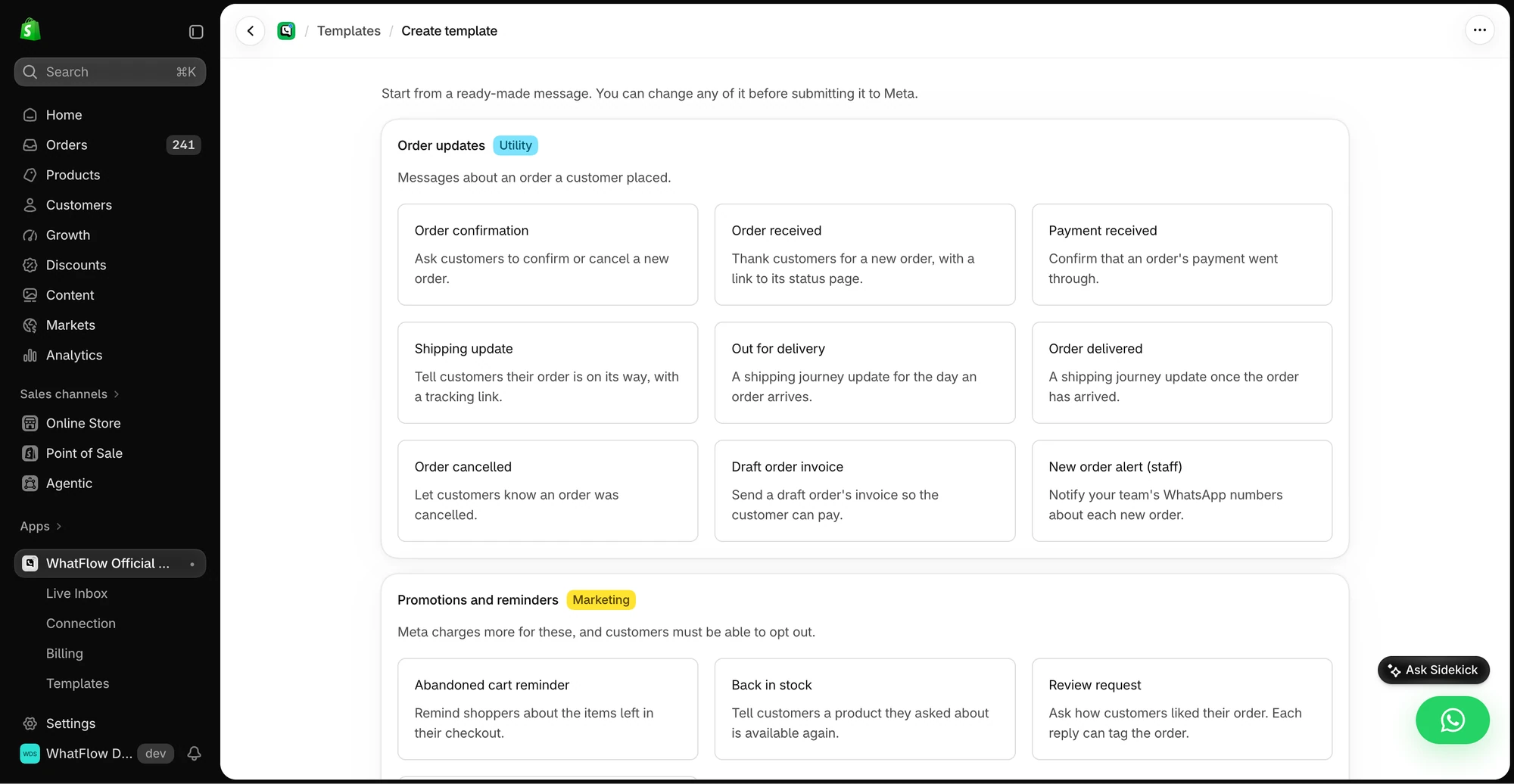
Write and approve the templates. Each stage needs a utility template approved by Meta. Our template guide covers categories, variables and approval.
Test with a real order. Fulfil an order to your own number, check the message arrives at the right stage, and tap the link on your phone.
The WhatFlow message editor with event choices for order updates and reminders, in a demo store.
A delivered-stage message can do two jobs at once, confirming the drop-off and opening the door to support:
Hi Sara, Aramex shows order #1042 as delivered today 📦 If it's not with you or something's damaged, just reply here and we'll sort it out.
That last line matters. In my experience, a customer who can reply in the same thread tends to message you first, before reaching for a chargeback or a one-star review. If you dropship with longer delivery times, our guide to dropshipping customer trust explains how to set expectations before the first update goes out.
Which should you choose?
Say you run a skincare store in Riyadh shipping 600 orders a month with two couriers. Install CWILL or Track123 for the tracking page (both have paid plans that cover that volume), then use WhatFlow to send a WhatsApp message at carrier pickup and delivered. Customers get the news where they'll read it, and the tracking link in the message opens your branded page.
Or say you're a US dropshipper with suppliers abroad. 17TRACK's dropshipping mode and 3,300+ carriers make sense, with email notifications, and you can add WhatsApp later for customers who prefer it.
Quick picks:
Best overall tracking page on a budget: CWILL or Track123.
Widest carrier list: 17TRACK.
Established brand with analytics and a custom domain: AfterShip Premium.
Klaviyo or Postscript-led US brand: Malomo, if you're comfortable with a small review base.
Customers who read WhatsApp, not email: add WhatFlow's shipping updates to any of the above.
Free plan available. Templates, COD confirmation, Shopify Flow automations and a shared team inbox with no seat fees. Every feature is included on every plan, including Free.
Tracking data tells you when a parcel was delivered, which is the right moment to ask for a review. Send it too early and you get "it hasn't arrived yet" replies. Our guide on when to send a review request after delivery breaks timing down by product type, and the wider post-purchase app roundup covers what else to run after checkout. During peak season, pair all of this with clear holiday shipping cut-off messages.
As of November 2026, CWILL Order Tracking (formerly ParcelPanel) and 17TRACK are the highest-rated tracking apps with thousands of reviews, and AfterShip is the best-known name. Pick on carrier coverage, tracking page design and order quota.
Do Shopify order tracking apps send WhatsApp notifications?
None of the six tracking app listings we checked on November 18, 2026 named WhatsApp as a notification channel; they list email, and several list SMS. WhatFlow adds WhatsApp shipping updates for stages such as label created, carrier pickup, in transit and delivered.
Is there a free order tracking app for Shopify?
Yes. As of November 2026, CWILL, AfterShip, 17TRACK, Track123 and TrackingMore all list free plans, with monthly limits between 20 and 50 orders or shipments, and Malomo's listing shows a free plan.
Can I send Shopify shipping updates on WhatsApp to US customers?
Meta's current US restriction applies to marketing template messages. Shipping updates are sent as utility templates, which Meta charges at $0.0034 per message in North America as of November 2026.
Does WhatFlow replace a tracking app?
No. WhatFlow sends WhatsApp updates at each shipping stage and handles the replies in a team inbox, but it doesn't build a branded tracking page or detect carrier exceptions. Most stores use it alongside a tracking app.