
Publisher disclosure: this comparison is written by WhatFlow. Competitor capabilities are based on the linked public documentation; the WhatFlow screenshots come from our demo store. Examples are illustrative, and results depend on your store and configuration.
WhatFlow and Email order updates at a glance
| Consideration | WhatFlow | Email order updates |
|---|---|---|
| Best job for each channel | Time-sensitive updates: confirmed, shipped, out for delivery, delayed. Customers can reply in the same thread. | Receipts, invoices and full order records the customer may want to keep or forward. |
| Cost | WhatFlow from $0 (Free) or $4.99/month for 2,000 messages, plus Meta's per-template charge. Count 2 to 4 updates per order. | Low per email; Shopify's built-in notifications are included with your store. |
| Shopify workflow | Shopify Flow triggers (order created, fulfilled, cancelled) send WhatFlow templates with mapped order fields. | Shopify's notification templates, or an email app's flows. |
| When the customer replies | Lands in WhatFlow's team inbox with assignment and saved replies, no seat fees. | Lands in a support mailbox, often away from the rest of your chat support. |
| Visibility | A phone notification next to the customer's personal chats. | One email among many, sometimes in a promotions or updates tab. |
Send your important Shopify order updates on WhatsApp and let email handle receipts and records. Customers see a WhatsApp message within minutes and can reply in the same thread; an email update often waits in a tab they don't check. WhatFlow sends order updates from Shopify Flow using your order data, and every reply lands in a team inbox with no seat fees.
At a glance
- WhatsApp + WhatFlow: confirmed, shipped, out for delivery, delayed. Short, timely, two-way.
- Email: the receipt, the invoice, the full record.
- Automation: Shopify Flow triggers fire WhatFlow template actions with order fields mapped in.
- Replies: WhatsApp replies go to a shared inbox; email replies go to a mailbox.
Why does WhatsApp beat email for order updates?
Two reasons: people see it, and they can answer it.
Say a customer orders a birthday gift on Monday that needs to arrive by Friday. On Wednesday the courier marks a delay. An email saying so might be read Thursday night. A WhatsApp message gets read in time to do something:
Hi Mei, quick update on order #2874: the courier has a one-day delay, so it's now due Friday by 6pm. If that's too late for the birthday, reply here and we'll look at options.
She replies "Friday is fine, thanks", and nobody has to open a ticket. That's the difference. For more delay messages, see handling Shopify shipping delays on WhatsApp.
Which order updates should go on WhatsApp?
Pick the ones that help the customer act or plan. A sensible set:
Event | WhatsApp? | Email? |
|---|---|---|
Order confirmed | Yes, short | Yes, full receipt |
Shipped with tracking | Yes | Optional |
Out for delivery | Yes | No |
Delayed or partial shipment | Yes | Optional |
Cancelled or refunded | Yes | Yes, for the record |
Each event gets one owner. Don't send the same "shipped" note on both channels at the same minute. Coordinating email, SMS and WhatsApp covers the overlap, and the post-purchase journey guide shows how updates fit together.
How do you set this up in Shopify?
With Shopify Flow, which is free, and WhatFlow's actions inside it:
- Trigger: Order fulfilled.
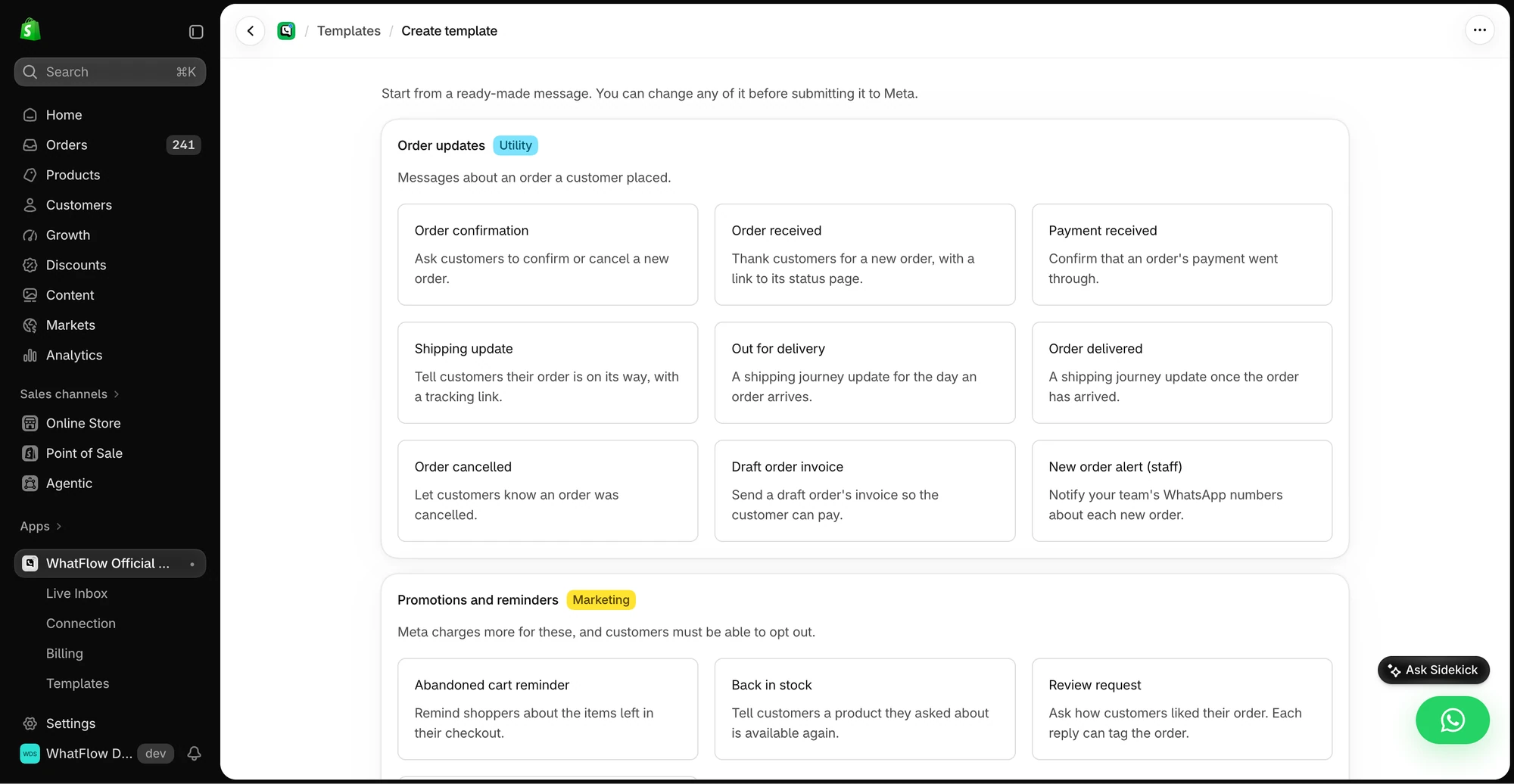
- Action: WhatFlow, Send WhatsApp Template, mapping first name, order number and tracking link.
- Optional condition: Only if the customer opted in to WhatsApp.
The step-by-step version is in sending WhatsApp templates from Shopify Flow.
What do WhatsApp order updates cost?
A worked example with hypothetical numbers. Say you ship 1,500 orders a month and send three updates each: 4,500 messages. That fits WhatFlow's Plus plan, $9.99/month with 5,000 messages included (as of November 2026). Every feature is on every plan, so you're only choosing an allowance.
Meta adds a per-message charge. Order updates are usually utility templates, and since October 1, 2026 Meta charges utility templates even when they're sent inside an open 24-hour customer service window, so budget for every update you send. Free-form replies to customer questions are free for the first 1,000 per business number each month, then charged. WhatsApp Business API pricing explained covers the details; our plans are on the pricing page.
That's also why "fewer, better" wins. Three useful updates beat six noisy ones on cost and on customer patience.
Is WhatFlow ready for a high-volume store?
Yes. WhatFlow WhatsApp Business API runs on the official Meta WhatsApp Cloud API with Meta-approved templates. It's built for big operations: inbox assignment and filters, no seat fees at any team size, Shopify Flow automation at scale, COD confirmation, live catalog sharing and Shopify admin extensions. A small store gets the same features on the Free plan.
When does email-only still make sense?
Keep email as the only channel for customers who haven't opted in to WhatsApp, and for documents customers need to keep: receipts, invoices, return labels from your returns app. Shopify's built-in notification emails do that job well. The broader trade-offs are in WhatsApp vs email for Shopify.
The bottom line
Email keeps the record; WhatsApp keeps the customer informed. WhatFlow sends the updates from Shopify Flow, lets customers reply, and puts every reply in a no-seat-fee inbox. WhatFlow WhatsApp Business API is rated 5.0/5 from 55 ratings on the Shopify App Store (as of November 5, 2026). For the carrier-text comparison, see WhatsApp vs SMS shipping updates.
Questions worth asking
Should Shopify order updates go on WhatsApp or email?
Send the time-sensitive updates (shipped, out for delivery, delayed) on WhatsApp and keep email for receipts and records. WhatFlow sends them from Shopify Flow and lets customers reply into a team inbox.
How many WhatsApp order updates should I send per order?
Usually two to four: order confirmed, shipped with tracking, and delivered or delayed. Skip anything that doesn't help the customer act or plan.
Are WhatsApp order updates on WhatFlow's free plan?
Yes. Order and shipping update messages, like every WhatFlow feature, are on every plan including Free. Plans differ only by message allowance.
Does Meta charge for WhatsApp order updates?
Yes. Order updates are usually utility templates, billed per delivered message by Meta. Since October 1, 2026, utility templates are charged even inside an open 24-hour customer service window.
Sources and methodology
We checked these primary sources on November 5, 2026. Vendor pages describe advertised capabilities, rather than independent performance tests. Confirm current pricing, plan limits and availability with each provider.
- WhatFlow plans and Shopify integrations
WhatFlow listing: order confirmations, shipping and delivery updates, and plan pricing, checked November 5, 2026.
- WhatsApp Business Platform pricing
Meta's overview of WhatsApp Business Platform pricing by category and country.
- Google: New Gmail protections for a safer, less spammy inbox (October 3, 2023)
Google's October 2023 announcement of Gmail bulk-sender requirements; background on email deliverability.
- WhatsApp Business Platform pricing (Meta developer docs)
Meta charges per delivered template message by category and recipient country. Since October 1, 2026, service replies are free only for the first 1,000 per business number each month, and utility templates inside the customer service window are charged.
- Shopify Flow (Shopify Help Center)
Shopify Flow is free and available on Basic, Grow, Advanced and Plus plans, as of November 2026.