The best Shopify apps for post-purchase support in 2026 are WhatFlow WhatsApp Business API for order and shipping updates customers can reply to, OrderEditing.com for self-service address and item changes, CWILL Order Tracking for a branded tracking page, Zapiet for pickup and local delivery, and Judge.me for review requests. Shopify Flow ties them together for free.
How we picked these post-purchase apps
I'm Safwan, co-founder of WhatFlow. We publish this list and our own app is in it; it's first because post-purchase messaging is a big part of what it does. For everything else I've picked the apps I'd recommend to a friend. All listings were checked on the Shopify App Store on November 11, 2026, so prices and ratings are as of November 2026. I dropped one app from the earlier version of this post because it had no reviews yet.
Here's the test case I'd run before installing anything: a shopper messages five minutes after ordering to say the flat number is wrong. Who sees it? Where do they change it? How does the warehouse find out? If you can't answer that in one sentence, start there. Our walkthrough on changing a Shopify shipping address after an order covers the manual version.
1. WhatFlow WhatsApp Business API
Who it's for: Stores that want order confirmations, shipping updates and review requests on WhatsApp, with replies handled by a team inside Shopify.
Standout features:
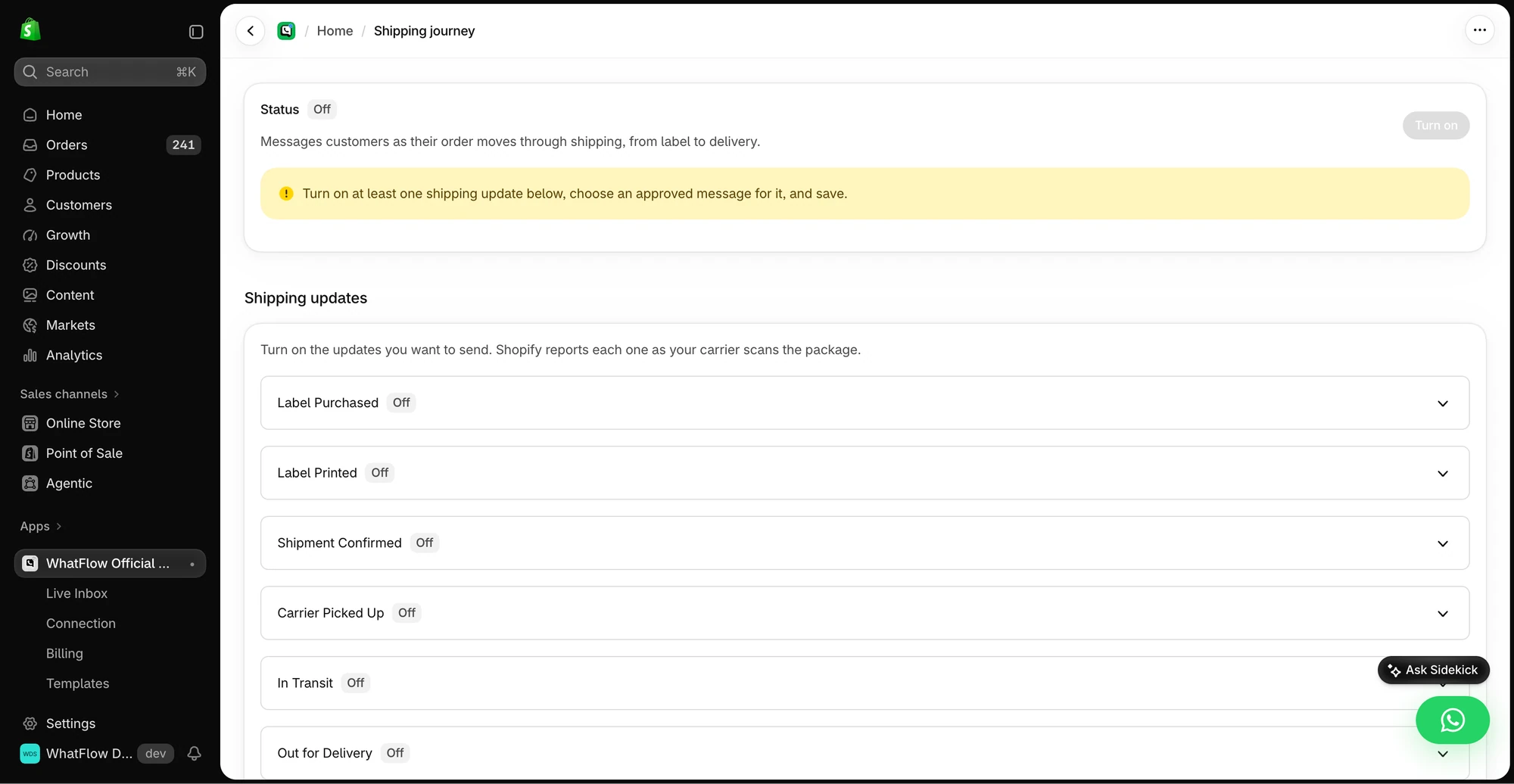
Shipping journey messages for each stage you choose: label created, carrier pickup, in transit, delivered.
Review requests timed around delivery, with a fulfilment fallback, sent as a link to your review app's form.
COD confirmation with reply buttons, back-in-stock alerts and manual one-off messages from a Shopify order.
A shared inbox with assignment, labels and saved replies, and no seat fees.
Native Shopify Flow triggers and actions, so a reply can tag the order or alert someone.
Shipping Journey settings in the WhatFlow demo store; nothing was sent.
Pricing and rating (as of November 2026): Free plan with every feature (first 100 messages, then $0.01 each); paid plans from $4.99 to $99 a month with a 7-day trial. Meta bills its template charges separately with no markup, and since October 1, 2026, utility templates are charged even inside an open service window (Meta pricing). Rated 4.9/5 from 59 ratings.
Honest limitation: WhatFlow doesn't generate return labels or process refunds. It's the conversation layer; returns logic lives in Shopify or a returns app. Setup details are in our shipping updates and review requests guide.
2. OrderEditing.com
Who it's for: Stores doing a few hundred or more orders a month where "please change my order" requests eat support time.
Standout features: Customers change address, products, shipping method or discount codes themselves, or cancel. Bad addresses get flagged with suggested fixes, and edits keep the original order number. It also offers one-click post-purchase upsells.
Pricing and rating (as of November 2026): From $99 a month (100 to 2,500 orders) with a 7-day trial, up to $599 for 10,000 to 20,000 orders. Address validation is billed per order. Rated 5.0 from 351 ratings.
Honest limitation: No free plan, and $99 a month is a lot for a small store. Below that volume, a quick WhatsApp reply and a manual edit usually costs less.
3. CWILL Order Tracking
Who it's for: Any store that gets "where is my order?" messages.
Standout features: A branded tracking page, automatic shipping notifications, alerts for exceptions and stalled shipments, and carrier performance analytics.
Pricing and rating (as of November 2026): Free for 20 orders a month; Essential $11, Professional $59, Enterprise $479. Rated 5.0 from 3,210 reviews.
Honest limitation: If you also send WhatsApp shipping updates, decide which tool owns each event so customers don't get the same news twice.
4. Zapiet - Pickup + Delivery
Who it's for: Stores with a shop, warehouse or kitchen that offer pickup or their own local delivery.
Standout features: Date and time slot picker, curbside and multi-location pickup with cutoffs and limits, delivery zones by postcode or distance, and dispatch to DoorDash Drive, Uber Direct, Stuart or your own drivers.
Pricing and rating (as of November 2026): Essential $49.99 a month, Advanced $79.99, Professional $179.99, all with a 14-day trial. Rated 4.9 from 1,904 reviews.
Honest limitation: No free plan, and the entry plan covers one location and 250 orders a month.
5. Judge.me Product Reviews
Who it's for: Every store that wants reviews, which is every store.
Standout features: Unlimited reviews, photos and videos, review widgets, and Google review sync on the free plan. Awesome adds AI features, coupons and referrals, Google Shopping and 130+ integrations.
Pricing and rating (as of November 2026): Free forever; Awesome $15 a month with a 15-day trial. Rated 5.0 from 50,000 reviews.
Honest limitation: If you also send review requests from WhatFlow, pick one sender. WhatFlow can send the Judge.me request link over WhatsApp through Shopify Flow; just don't email the same customer the same ask.
6. Shopify Flow
Who it's for: Every store that runs more than two of these apps.
Standout features: Hundreds of templates and custom logic with actions on tags, metafields, Slack and Google Sheets.
Pricing and rating (as of November 2026): Free. Rated 4.7 from 15,464 reviews.
Honest limitation: Flow needs an owner. Someone should know what each workflow does and switch it off when it misfires.
Post-purchase apps compared
App
Post-purchase job
Free plan
Paid from
Rating (Nov 2026)
WhatFlow WhatsApp Business API
WhatsApp updates, replies, review asks
Yes, all features
$4.99/mo
4.9 (59)
OrderEditing.com
Customer self-service edits
No
$99/mo
5.0 (351)
CWILL Order Tracking
Tracking page, notifications
20 orders
$11/mo
5.0 (3,210)
Zapiet
Pickup and local delivery
No
$49.99/mo
4.9 (1,904)
Judge.me
Reviews
Yes
$15/mo
5.0 (50,000)
Shopify Flow
Automation glue
Free
n/a
4.7 (15,464)
What a simple post-purchase sequence looks like
For a hypothetical skincare store shipping a serum, here's how the apps share the work:
Order placed: WhatFlow sends the confirmation on WhatsApp.
Address wrong: customer replies in the thread; your agent fixes it in Shopify (or the customer uses OrderEditing.com if you run it).
Carrier pickup and delivery: one tool sends the shipping updates; CWILL hosts the tracking link.
A week or two after delivery: WhatFlow sends the Judge.me review link.
The delivery update can be as plain as this:
Hi {{1}}, your order #{{2}} was delivered today. Anything not right? Just reply here and we'll sort it.
That last line matters. It turns an update into a support channel. We compared WhatsApp and email for order updates if you're still deciding the channel.
How much do WhatsApp order updates cost?
Two parts, both small for most stores. The app: WhatFlow's Free plan covers the first 100 messages a month, and Starter at $4.99 covers 2,000. Then Meta's charge per delivered template, which depends on the customer's country. As of November 2026, a utility template costs $0.0014 in India, $0.0034 in North America, $0.015 in Pakistan and $0.022 in the UK.
Say you ship 800 orders a month to customers in India and send three updates per order (confirmation, out for delivery, delivered). That's 2,400 utility templates, or about $3.36 in Meta charges, plus WhatFlow's Plus plan at $9.99 for 5,000 messages. The WhatFlow pricing page has the full country table and a calculator, so you can run your own numbers before you switch anything on.
The one thing I'd avoid is sending every possible stage. Confirmation, a shipping update with tracking, and delivered is plenty for most products. More messages mean more cost and more chances the customer mutes you.
How to choose post-purchase apps
Give each event one sender. Write a sheet: event, app, who answers replies.
Start with the question you get most. Tracking questions point to a tracking page; address changes point to editing or WhatsApp.
Make replies easy. A no-reply email pushes customers to your Instagram DMs.
Free plan available. Templates, COD confirmation, Shopify Flow automations and a shared team inbox with no seat fees. Every feature is included on every plan, including Free.
WhatsApp order updates, a tracking page and one review request. Add order editing or pickup scheduling when the volume of those requests justifies the bill.
A good sign you've got it right: your inbox gets fewer "where is my order?" messages and more replies like "Thanks, got it!" If the opposite happens after you switch something on, look at which message triggered the questions and fix the wording or the timing before adding another app.
Frequently asked questions
What is a post-purchase app on Shopify?
A post-purchase app handles what happens after checkout: order and shipping updates, address or item changes, tracking pages, pickup scheduling and review requests. Most stores need two or three of them, not one of each kind.
What's the best way to send Shopify order updates on WhatsApp?
Use an app on the official WhatsApp Business API, such as WhatFlow, that sends Meta-approved utility templates for each shipping stage and puts customer replies in a shared inbox next to the Shopify order.
Can customers edit their Shopify order after checkout?
Not on their own with Shopify's default setup. An app like OrderEditing.com lets them change the address, items or shipping method within a window you set; smaller stores often handle the same request over WhatsApp.
When should I send a review request after a Shopify order?
After the customer has received the product and had time to use it, not at dispatch. Skip anyone with an open complaint until it's resolved.
Verifies WhatFlow's order confirmations, delivery updates and feedback requests, plans from Free to $99, and 4.9/5 from 59 reviews as of November 11, 2026.