A good back-in-stock message names the exact product and variant that's back, links straight to it, and is honest about how many units came in. It reminds the customer they asked for the alert and is the only message they get about it. Below are 22 back-in-stock message examples for WhatsApp, SMS, email and push, grouped by situation, plus how to set up restock alerts.
What is a back-in-stock message?
A back-in-stock message (also called a restock alert) is a notification you send to a customer who asked to hear when a sold-out product or variant becomes available again. It's one of the few marketing-style messages people actively request, which is why it tends to get read. Treat that request carefully. They asked about one item, not your whole catalogue.
What to include in a restock alert
The exact item. "The Oat Linen Shirt in M", not "an item you liked".
A direct link to that variant. If they asked for medium olive, land them on medium olive.
A reminder they asked. "You asked us to tell you" stops the "who is this?" reaction.
Honest stock. If 20 units came in and 300 people are waiting, say it's a small batch.
What's changed, if anything. New colourway, slightly different fit, new price.
An easy way out. "Reply STOP" on WhatsApp and SMS, an unsubscribe link in email.
Notice what's missing: a discount, a "you might also like" carousel, and a countdown timer. The product coming back is the news.
WhatsApp rules for back-in-stock alerts
A restock alert goes out days or weeks after the customer's last message, so the 24-hour customer service window (the period after a customer messages you when free-form replies are allowed) is long closed. That means a Meta-approved template is required. Meta's pricing docs also say you can only message WhatsApp users who've opted in.
On category, expect marketing. Meta's template categorization guidelines class messages that promote or recommend products as marketing, and a restock alert sends someone back to a product page to buy. As of November 2026, Meta's marketing rate is $0.0118 per message in India, $0.0473 in Pakistan and $0.025 in North America. More on why in our marketing vs utility explainer.
In the template examples, {{1}} is the customer's first name, {{2}} the product and variant, and {{3}} the link to that variant, unless a note says otherwise. They're filled automatically when the alert sends.
Sign-up confirmations
Send these the moment someone asks. If they asked in a WhatsApp chat, you're inside the window and can reply free-form. Our WhatsApp greeting message examples cover that first chat.
1. WhatsApp: confirming a request made in chat
It's sold out in M right now, sorry. More are due in about two weeks. Want one WhatsApp message the moment it's back? Reply YES and that's the only message you'll get about it.
2. WhatsApp: after they reply YES
Done. We'll message you once when the Oat Linen Shirt in M is back. Reply STOP any time if you change your mind.
3. Product-page consent line
Notify me on WhatsApp when this is back in stock. One message for this item. Reply STOP any time.
4. SMS: sign-up confirmation
Shop Linen: You're on the list for the Oat Linen Shirt (M). We'll text once when it's back. Reply STOP to opt out.
5. Email: sign-up confirmation
Subject: You're on the list for the Oat Linen Shirt
Hi Rhea, thanks for asking. We'll email you once when the Oat Linen Shirt is back in size M. Nothing else, just that.
Hi {{1}}, good news: {{2}} is back in stock. You asked us to let you know, so here's the link: {{3}}
7. WhatsApp template: with a button
Hi {{1}}, the {{2}} you asked about is back. Tap below to see it.
[View product]
The button opens the variant link. Tap it on a real phone before you submit the template.
8. WhatsApp template: from a person
Hi {{1}}, it's {{4}} from {{5}}. Your {{2}} came back in this morning's delivery. Here it is: {{3}}
{{4}} is a staff first name and {{5}} the store name.
9. SMS: standard alert
Shop Linen: The Oat Linen Shirt (M) is back! shoplinen.co/oat-m Reply STOP to opt out.
10. Email: standard alert
Subject: It's back: Oat Linen Shirt in M
Hi Rhea, the Oat Linen Shirt you asked about is back in size M.
[Shop the Oat Linen Shirt]
This is the one email we promised. You won't hear from us about it again.
11. Push notification
Back in stock: Oat Linen Shirt (M)
The size you asked for just came in. Tap to see it.
Push titles get cut off fast on phones, so put the product in the title and keep the body to one line.
Low-stock and limited restocks
Honesty here saves you a wave of disappointed messages.
12. WhatsApp template: small batch
Hi {{1}}, {{2}} is back, but only a small batch came in and lots of people are waiting. If you still want one, here's the link: {{3}}
13. WhatsApp template: last restock
Hi {{1}}, {{2}} is back for what's likely the last time this season. Here's the link if you'd like one: {{3}}
Only say "last" if it's true.
14. SMS: limited
Kiln & Clay: The Ember Mug in Moss is back, small batch only. kilnclay.co/moss Reply STOP to opt out.
15. Email: limited
Subject: A small restock of the Ember Mug
Hi Ravi, 24 Ember Mugs in Moss came out of the kiln today. You asked to hear first, so here's the link before we post it anywhere else.
[See the Ember Mug]
Variants, changes and pre-orders
16. WhatsApp template: a different variant is back
Hi {{1}}, {{2}} isn't back in your size yet, but {{3}} has just come in. If you'd like to check it: {{4}}
{{2}} is the requested variant, {{3}} the one that's available and {{4}} its link. Use this sparingly, and keep the original request open.
17. WhatsApp template: back with a change
Hi {{1}}, {{2}} is back. One heads-up: the new batch has a slightly longer sleeve. Reply if you'd like a photo to compare. Link: {{3}}
18. WhatsApp template: available to pre-order
Hi {{1}}, {{2}} isn't in stock yet, but you can pre-order it now. It ships around {{3}}. Link: {{4}}
{{3}} is the expected ship date.
19. Email: back at a new price
Subject: The Commuter Lunch Bag is back (with a price change)
Hi Aisha, the Commuter Lunch Bag is back in Navy. The price has gone up to Rs 3,200 because our fabric costs rose. We'd rather tell you now than surprise you at checkout.
Follow-ups and edge cases
20. WhatsApp free-form: customer replies to the alert
Yes, the M fits true to size. If you're between M and L, most people go M. Want me to hold one for an hour while you decide?
Their reply opens the 24-hour window, so this is a normal message, not a template.
21. WhatsApp template: sold out again before they bought
Hi {{1}}, sorry, {{2}} sold out again faster than expected. We've kept your request open and will message you once more when the next batch arrives.
22. SMS: COD-friendly alert
Noor Textiles: The Lawn Suit in Rose is back. Cash on delivery available. noortextiles.pk/rose Reply STOP to opt out.
How to set up restock alerts in WhatFlow
WhatFlow WhatsApp Business API runs on Meta's official WhatsApp Cloud API, and back-in-stock alerts are included on every plan, Free too. The storefront and restock doc has the full steps.
1. Approve your restock template
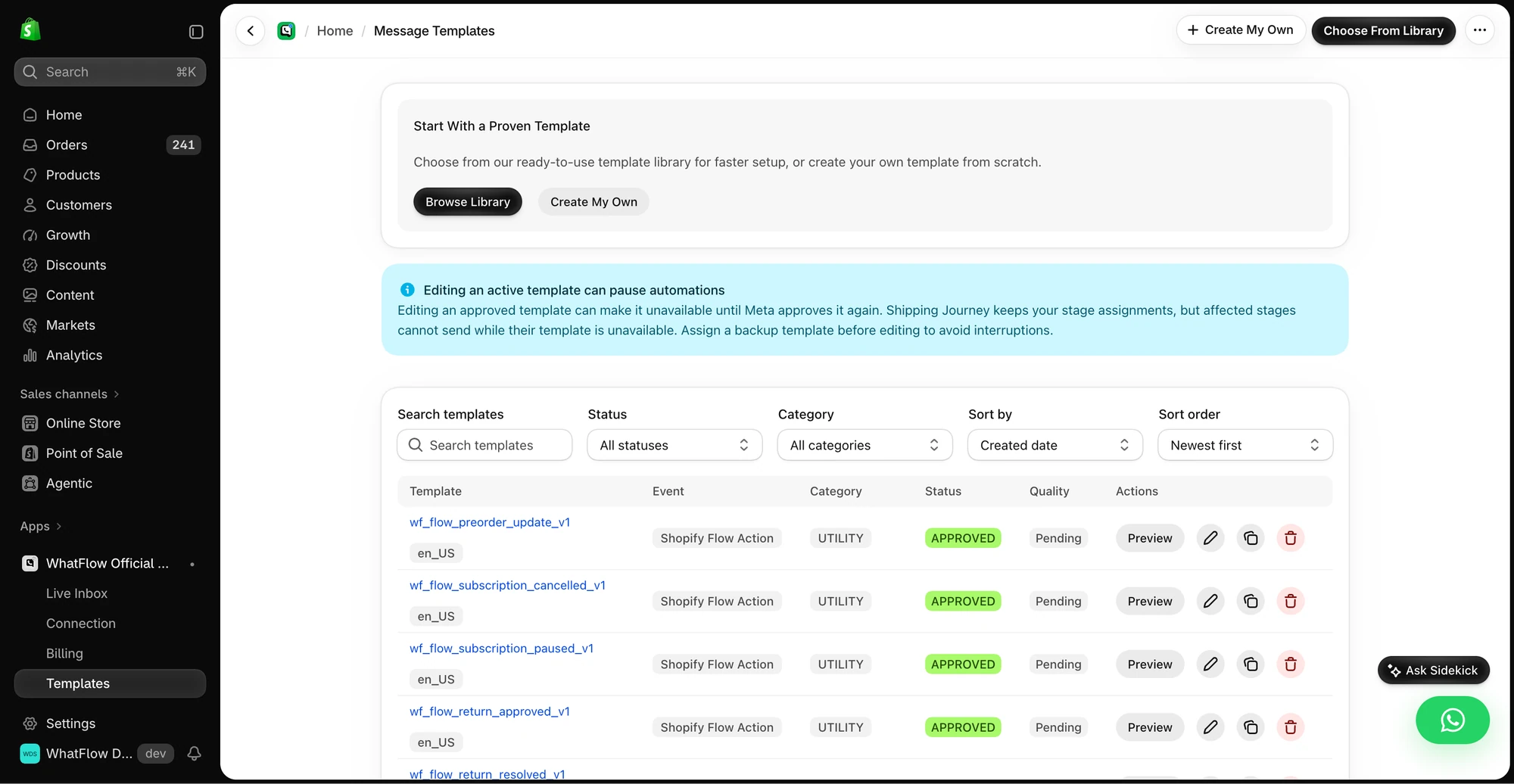
Write the alert in WhatFlow's template editor (examples 6 to 8 are a good start) and submit it to Meta. Check its category and status in Templates before attaching it to anything. If Meta rejects it, the usual fixes for rejected templates apply.
WhatFlow's template manager in a demo store, showing category, approval status and preview.
2. Add the back-in-stock button and choose the message
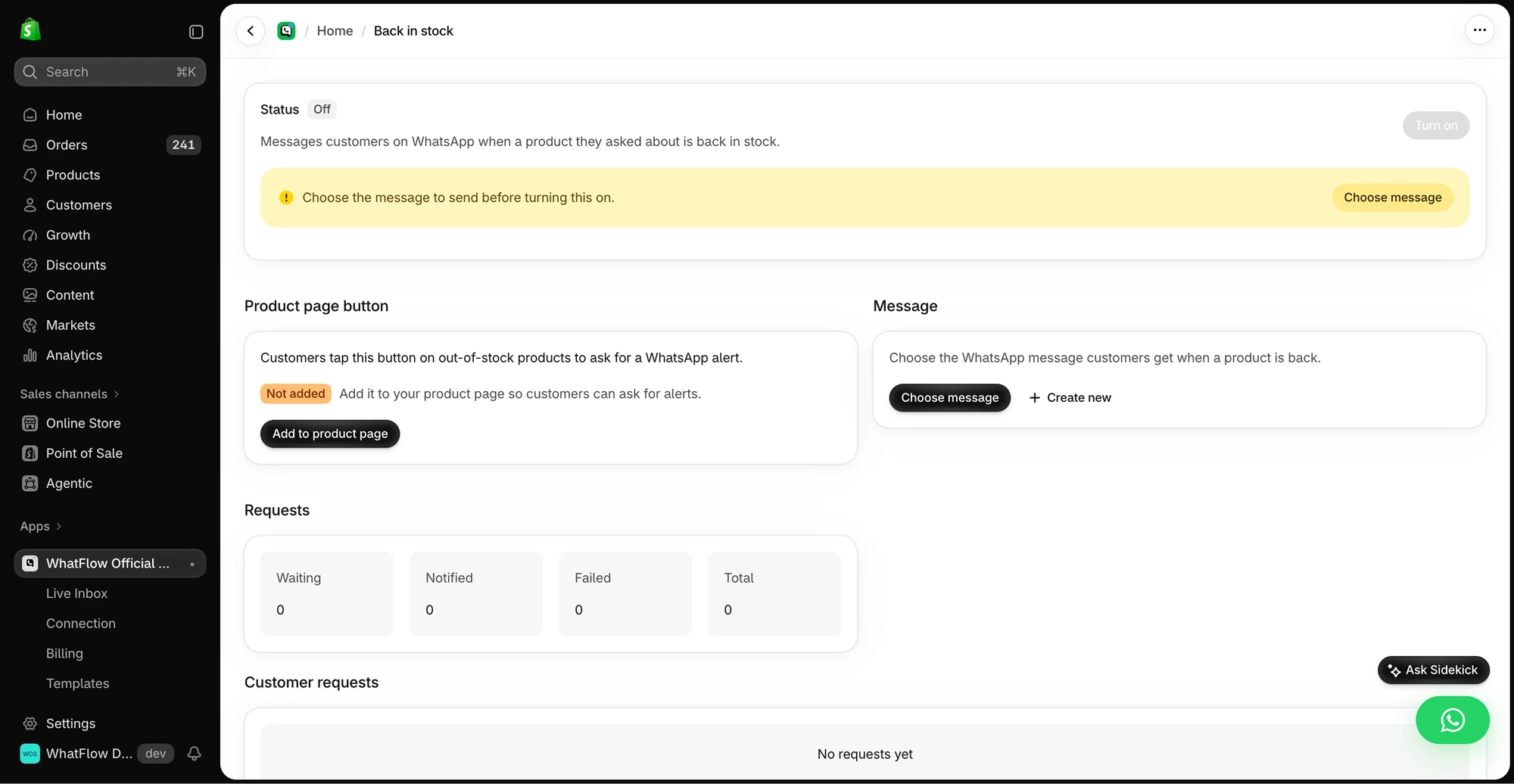
Open Back in stock in WhatFlow.
Follow the instructions for adding its product-page button.
Choose the approved restock message.
On a test product, switch between an available variant and an out-of-stock one, and check the button appears only where it should.
Submit a request from a number you control and find it in the request queue.
WhatFlow's back-in-stock setup in a demo store: product-page button, request queue and message selection. Nothing was sent.
3. Rehearse the restock
Restock the test variant and check the alert lands on that exact variant. Review opt-out and eligibility conditions before you go live, and keep the subscription about the product requested. If you want to send broader offers later, ask for separate permission.
Linking the product page, not the variant. The customer lands on the default size, sees "sold out" and leaves.
A sequence instead of an alert. They asked for one message. Three feels like spam, and on WhatsApp the blocks and reports that follow can lower your number's quality rating.
Alerting everyone for five units. Say it's a small batch, or alert in waves, oldest request first.
2am alerts. Flow fires when inventory changes, which might be an overnight stock sync. Receive inventory in working hours if timing matters.
Bundling a discount. It's not needed, and it gives people a reason to wait for the next restock.
Treating the sign-up as general marketing consent. It isn't. Our guide to how often to message customers covers the wider cadence.
Not testing a real restock. Run one with your own number before any live product.
Run WhatsApp for your Shopify store with WhatFlow
Free plan available. Templates, COD confirmation, Shopify Flow automations and a shared team inbox with no seat fees. Every feature is included on every plan, including Free.
Pick the variant your customers ask about most, add the back-in-stock button, and run a full test restock with your own phone. Once the alert lands on the right variant with the right name, switch it on for the rest of the catalogue. After the restocked item sells, a thank-you message is a good follow-up.
Frequently asked questions
What should a back-in-stock message say?
The exact product and variant that's back, a direct link to it, and an honest note on quantity if stock is limited. Remind the customer they asked for the alert, and keep it to one message per request.
Is a WhatsApp back-in-stock alert a marketing or utility template?
Meta decides the category, but expect marketing. Meta's guidelines class messages that promote or recommend products as marketing, and a restock alert points the customer back to a product to buy.
Do I need permission to send back-in-stock alerts on WhatsApp?
Yes. The customer must opt in to receive the alert on WhatsApp, and because it's sent outside an open chat window it must use a Meta-approved template. An email sign-up isn't WhatsApp consent.
How many back-in-stock reminders should I send?
One alert per request. If stock is very limited you can say so in that message, but a second 'still thinking about it?' nudge is usually more than the customer signed up for.
Does WhatFlow send back-in-stock alerts on WhatsApp?
Yes. WhatFlow WhatsApp Business API has a back-in-stock product-page button, a request queue and an alert that uses your approved restock template, on every plan including Free.