
Publisher disclosure: this comparison is written by WhatFlow. Competitor capabilities are based on the linked public documentation; the WhatFlow screenshots come from our demo store. Examples are illustrative, and results depend on your store and configuration.
WhatFlow and Unsegmented bulk messaging at a glance
| Consideration | WhatFlow | Unsegmented bulk messaging |
|---|---|---|
| Best-fit experience | Target with Shopify data through Flow conditions and opted-in broadcasts, then handle replies in a shared inbox with no seat fees. | One message to everyone. Fine for a genuinely universal notice, but most offers only matter to some customers. |
| Costs to include | Your message plan plus Meta's fees, paid only on the customers you chose to message. | Meta charges per delivered marketing template, so sending to everyone means paying for everyone, including people who'll ignore or block it. |
| Shopify workflow | Shopify Flow checks the order or customer, then sends the right template. Replies arrive in the team inbox with order context. | Usually a CSV upload. The sender doesn't know what the customer bought. |
| Starting point | Free plan with every feature, plus theme-matched WhatsApp buttons that are free forever. | Write one rule for who should get the message and who shouldn't before you send anything. |
Send WhatsApp messages to the customers they're for, not your whole list. A targeted message ("you bought the cast-iron pan, here's the seasoning oil") gets replies. A generic blast to everyone gets ignored, blocked, and billed. WhatFlow lets you target with Shopify data today through Shopify Flow and opted-in broadcasts, and your team answers the replies in a shared inbox with no seat fees.
Bulk sending still has a place for the rare message that genuinely applies to everyone.
At a glance
Targeted with WhatFlow | Generic bulk sending | |
|---|---|---|
Who gets it | Customers who match a Shopify rule | Everyone on the list |
Meta fees | Paid on chosen recipients only | Paid on every delivery |
Block and report risk | Lower, because it's relevant | Higher |
Replies | Team inbox with order context | Often a single phone |
Shopify data | Used via Flow conditions | Usually a CSV |
Why generic bulk sending backfires on WhatsApp
WhatsApp isn't email. People read it next to messages from family. An irrelevant promotion feels personal in a bad way, and people block or report it. Meta tracks that through your number's quality rating, which affects how many customers you can message per day (quality rating and messaging limits explains how).
There's also the cost. Meta charges for every delivered marketing template (Meta pricing). Send to 10,000 people when the offer fits 1,500, and you've paid for 8,500 messages that were never going to work.
And everyone you message has to have opted in. Targeting doesn't replace permission (WhatsApp Business Policy); it just makes sure the people who agreed to hear from you get something worth reading.
How to target with WhatFlow today
You have two good options right now.
1. Shopify Flow conditions. WhatFlow adds WhatsApp actions to Shopify Flow, so Shopify's own data decides who gets what. For example:
- Trigger: order fulfilled.
- Condition: order contains a product tagged "cast-iron".
- Wait 14 days.
- Action: send WhatFlow template "seasoning tips + oil offer".
Hi {{first_name}}, how's the new pan treating you? A quick tip: a thin coat of oil after each wash keeps it non-stick. Our seasoning oil is 15% off this week for pan owners: {{link}}. Reply STOP to opt out.
That message only reaches customers who bought a pan, at the moment it's useful. Here's the full method: send WhatsApp templates from Shopify Flow.
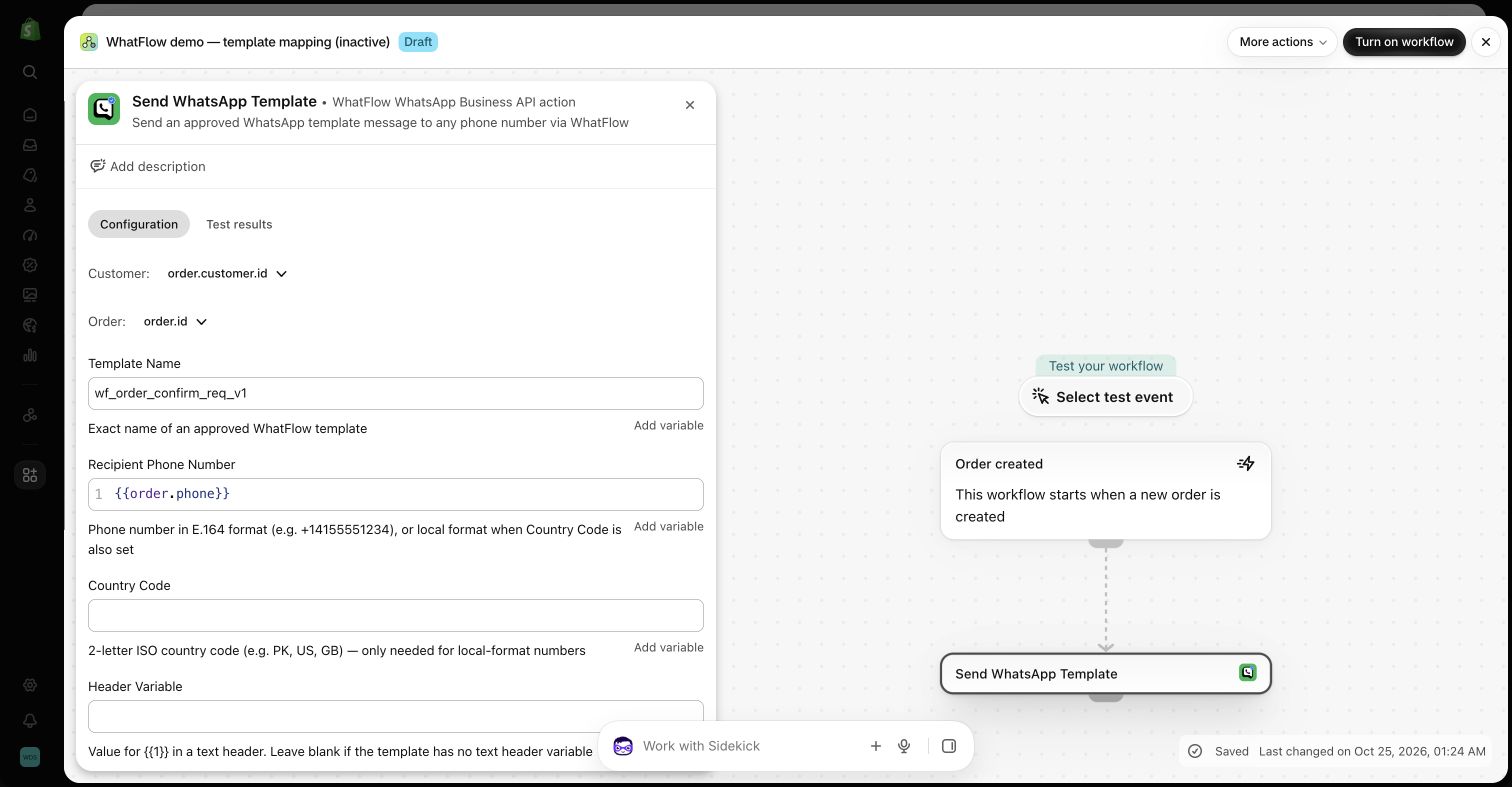
2. Broadcasts to a chosen audience. For one-off campaigns, choose your opted-in recipients and send an approved template from WhatFlow's broadcasts.
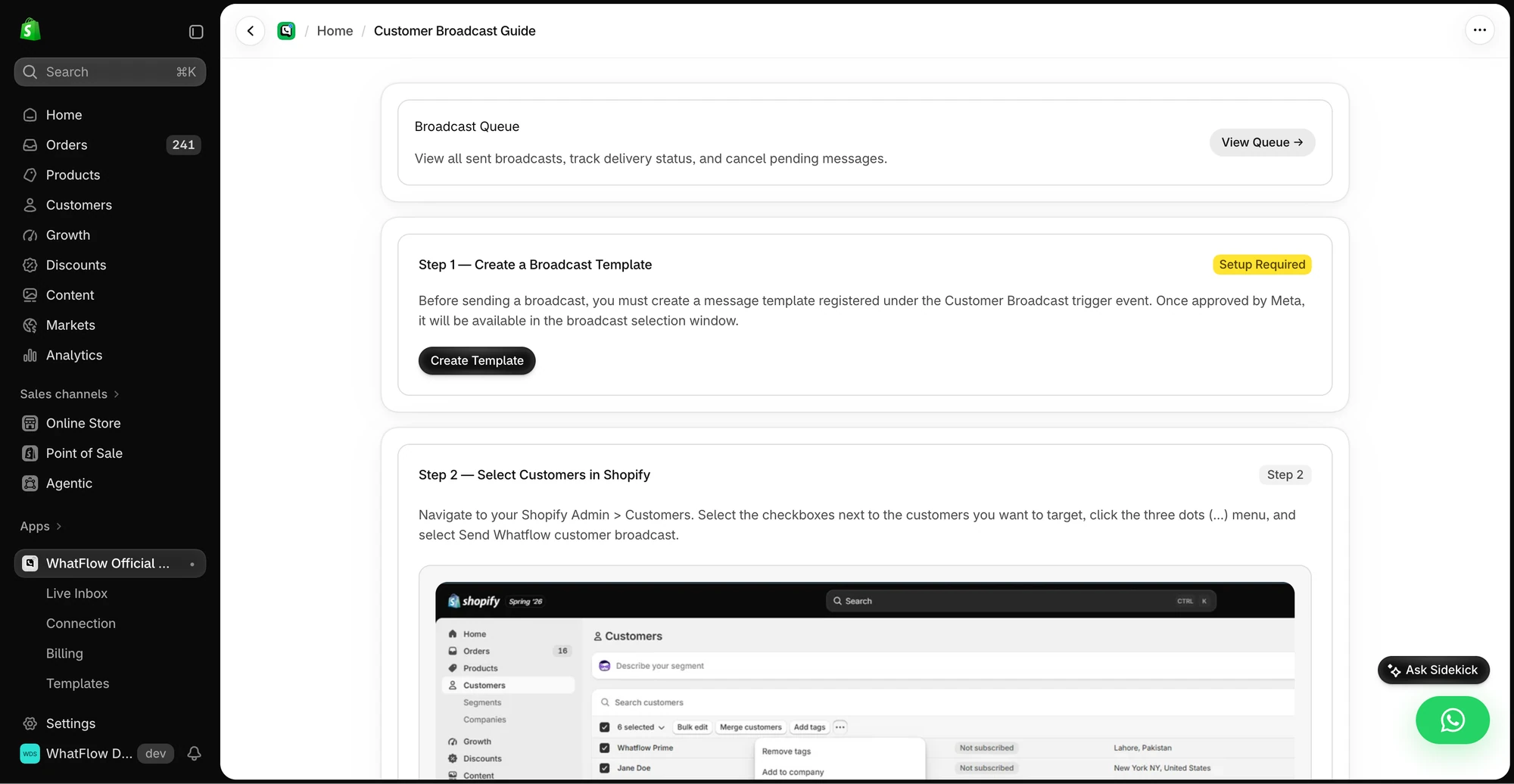
You can launch a WhatFlow broadcast from selected Shopify customers or a Shopify segment using the Admin action. In Team Inbox, the audience builder instead uses a spreadsheet or existing conversation contacts. Launching from a Shopify segment does not keep that segment continuously synced into Inbox. See the two campaign routes.
Be ready for the replies
Targeted messages get more replies, which is the point. Prepare a saved reply for the obvious question ("does it work on enamel pans?") and make sure whoever knows the product can answer. With no seat fees, you can add your product expert to the inbox without a licence.
For more campaign ideas built around customer needs, see segment WhatsApp campaigns around customer needs and the campaign preflight checklist.
What does it cost?
As of November 2026 (Shopify App Store listing), WhatFlow's paid plans start at $4.99/month and every plan has every feature. A store sending 5,000 messages a month pays $9.99 on Plus, with no seat fees. Meta's fees are separate. Sending to the right 1,500 people instead of all 10,000 cuts both your app usage and your Meta bill. Current amounts are on our pricing page.
WhatFlow's WhatsApp Business API app runs on the official Meta WhatsApp Cloud API and is rated 5.0 out of 5 from 55 ratings on the Shopify App Store (checked November 5, 2026).
When a bulk send might still make sense
Use a broad send only for something that genuinely affects every opted-in customer, like a holiday shipping cut-off or a store-wide policy change. Even then, keep it short and useful. Our broadcast best practices cover the details.
The bottom line
Relevance is what keeps WhatsApp working as a channel for your store. WhatFlow lets you target with Shopify data through Flow today, send opted-in broadcasts, and handle the replies with your whole team. Start with one product-based message, read every reply, then build from there. For how this compares with email, see segmented WhatsApp broadcasts vs email blasts.
Questions worth asking
Can I send WhatsApp messages to a Shopify customer segment?
Yes. With WhatFlow you can target today using Shopify Flow conditions (for example, customers who bought a specific product) and broadcasts to opted-in customers you choose.
How do I test a targeted WhatsApp campaign?
Write one inclusion rule and one exclusion, check five sample customers by hand, and prepare a saved reply for the most likely question. Send to a small batch first and read every reply.
Does the free WhatFlow plan restrict features?
No. Every WhatFlow feature, including broadcasts and Shopify Flow, is on every plan, including Free. Plans differ only by message allowance and rate.
Are Meta's WhatsApp charges included in WhatFlow's price?
No. Meta charges separately for each delivered template message, with marketing templates priced by recipient country. That's another reason to send only to the customers an offer is for.
Sources and methodology
We checked these primary sources on November 5, 2026. Vendor pages describe advertised capabilities, rather than independent performance tests. Confirm current pricing, plan limits and availability with each provider.
- WhatFlow plans and Shopify integrations
WhatFlow WhatsApp Business API listing: plan prices, included sends and a 5.0 rating from 55 reviews, checked November 5, 2026.
- WhatsApp Business Platform pricing
Meta's per-message pricing, which varies by template category and recipient country and is charged separately from app fees.
- WhatsApp Business Messaging Policy
Opt-in is required before business-initiated messages, and opt-out requests must be honoured.