
Publisher disclosure: this comparison is written by WhatFlow. Competitor capabilities are based on the linked public documentation; the WhatFlow screenshots come from our demo store. Examples are illustrative, and results depend on your store and configuration.
WhatFlow and Generic email blasts at a glance
| Consideration | WhatFlow | Generic email blasts |
|---|---|---|
| What the customer gets | A short, well-targeted WhatsApp message they can reply to, e.g. a refill reminder for the serum they bought. | A designed email to the whole list, read (or not) when they get to it. |
| Cost | WhatFlow from $0 (Free) or $4.99/month for 2,000 messages, plus Meta's per-template charge. Smaller, targeted sends keep both down. | Low per email; platforms often price by list size. |
| Choosing the audience | WhatFlow broadcasts plus Shopify Flow to target customers by order history or tags. Native Shopify segment sync is coming soon. | Email platforms segment well too; blasts happen when nobody does. |
| Replies | Questions land in WhatFlow's team inbox; staff answer and share products from the live catalog. | Replies usually go to a no-reply address or a marketing mailbox. |
| Best use | Time-sensitive or personal offers: restocks, refills, early access, VIP drops. | Newsletters, stories, long product content. |
Swap generic email blasts for segmented WhatsApp broadcasts on the offers that matter. A WhatsApp message to the 500 customers who actually want this offer gets read and answered; an email to all 20,000 mostly gets skipped. WhatFlow sends broadcasts and Shopify Flow-driven templates to opted-in customers chosen by what they bought, and replies land in a team inbox with no seat fees.
At a glance
- Segmented WhatsApp broadcast (WhatFlow): fewer recipients, chosen by purchase behaviour, read on the phone, answerable.
- Generic email blast: everyone on the list, same message, low cost per send, low attention per send.
- Cost logic: WhatsApp charges per delivered message, so targeting saves money as well as goodwill.
- Audience today: WhatFlow broadcasts plus Shopify Flow conditions. Native Shopify customer-segment sync is coming soon.
Why does a smaller list win?
Because relevance is what makes a message worth opening. Compare two sends from the same skincare store:
Email blast to 20,000: "Our autumn sale is here! 20% off everything."
WhatsApp to 420 customers who bought the Vitamin C serum 25 to 35 days ago:
Hi Nadia, your Vitamin C serum is probably running low about now. Want a refill? Here's the link: {product_link}. Questions about layering it with retinol? Reply here.
The second one is useful. It's timed to the customer's life, it's about a product they already like, and it invites a question. Someone replies "can I use it in the morning with SPF?" and your team answers from the inbox. More ideas like this are in replenishment reminders for consumables and segmenting WhatsApp campaigns around customer needs.
How do I build a segmented WhatsApp send in Shopify?
Two ways in WhatFlow, both on every plan:
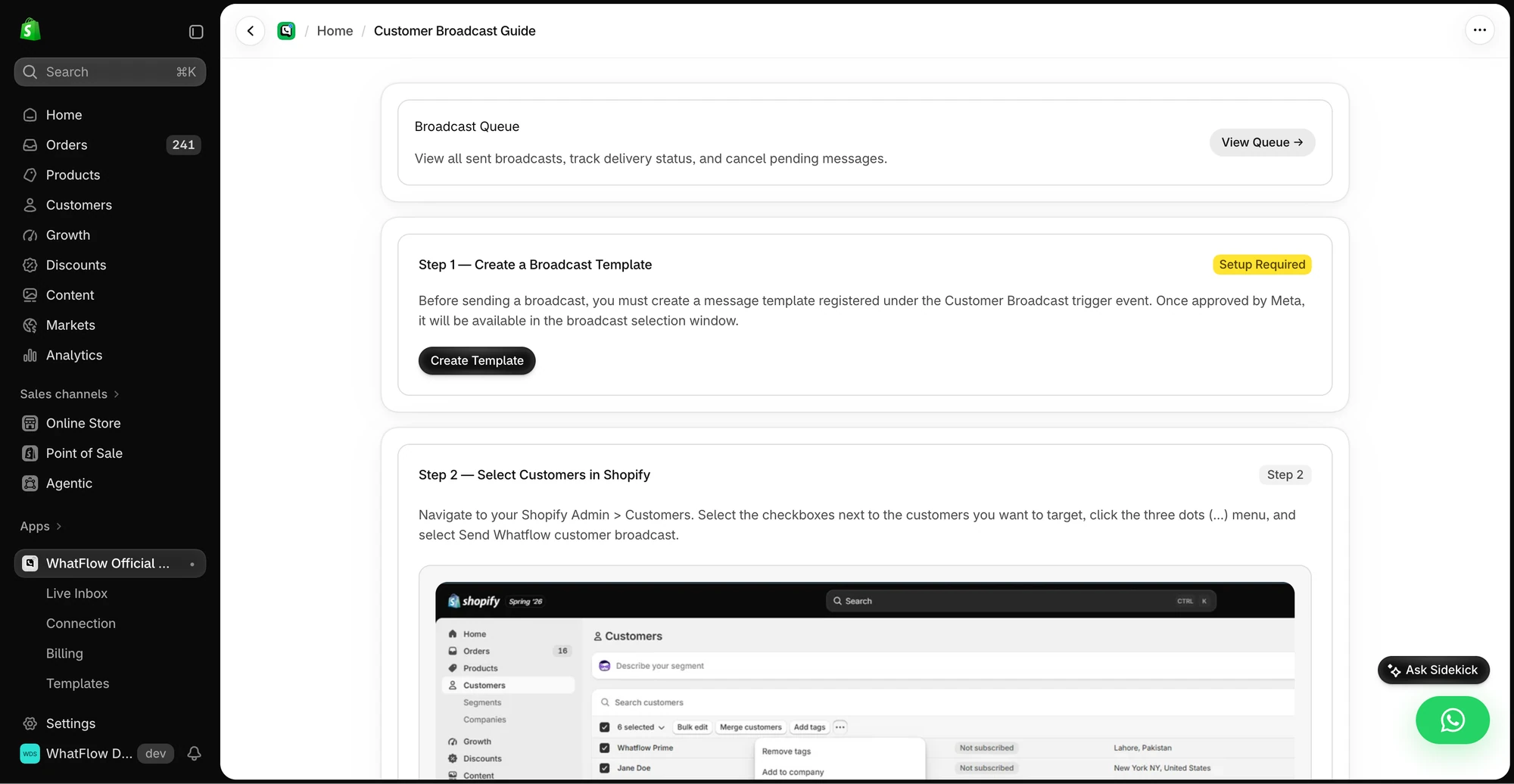
- Broadcasts. Send a campaign template to an opted-in audience you choose in WhatFlow.
- Shopify Flow. For behaviour-based sends, let Flow pick the customers. For example: a scheduled workflow finds customers tagged
vitc-buyerwhose last order was 25 to 35 days ago, then runs WhatFlow's Send WhatsApp Template action for each.
You can launch a WhatFlow broadcast from selected Shopify customers or a Shopify segment using the Admin action. In Team Inbox, the audience builder instead uses a spreadsheet or existing conversation contacts. Launching from a Shopify segment does not keep that segment continuously synced into Inbox. See the two campaign routes.
WhatFlow's Flow triggers also include opt-outs, so you can tag and exclude anyone who says stop. Building a clear opt-out process covers that.
What does a segmented broadcast cost?
A worked example with hypothetical numbers. Say you run four targeted broadcasts a month to about 600 customers each: 2,400 messages. Add 2,000 order updates and you're at 4,400, inside WhatFlow's Plus plan at $9.99/month for 5,000 messages (as of November 2026). Every feature, broadcasts included, is on every plan.
Meta charges per delivered marketing template, by recipient country. That's exactly why segmentation pays: blasting 20,000 contacts on WhatsApp costs 20,000 Meta charges, while 600 well-chosen ones cost 600. See WhatsApp Business API pricing explained and our pricing page.
What are the rules for WhatsApp broadcasts?
Customers must have opted in to WhatsApp messages from you, and opt-outs must be honoured, under Meta's WhatsApp Business Messaging Policy. Meta also tracks your phone number's quality rating and applies messaging limits, so off-target blasts that get blocked can hurt your ability to send. Targeted sends protect both. WhatsApp broadcasts that customers don't block has the full checklist.
Is WhatFlow ready for large campaigns?
Yes. WhatFlow WhatsApp Business API runs on the official Meta WhatsApp Cloud API and is enterprise-ready: inbox assignment and filters to handle campaign replies across a big team, no seat fees at any team size, Shopify Flow automation at scale, COD confirmation, live catalog sharing and Shopify admin extensions. Small stores get the same features on the Free plan.
When does an email blast still make sense?
Use email for long-form content (newsletters, lookbooks, brand stories), for customers without WhatsApp consent, and for broad announcements where a reply isn't the point. Good email can be segmented too; the point is to save WhatsApp for messages worth a notification. For the wider split, see WhatsApp vs email for Shopify.
The bottom line
Send fewer, better messages, and send them where customers reply. WhatFlow gives you broadcasts, Shopify Flow targeting and a no-seat-fee inbox for the replies, with every feature on the Free plan. WhatFlow WhatsApp Business API is rated 5.0/5 from 55 ratings on the Shopify App Store (as of November 5, 2026).
Questions worth asking
Are WhatsApp broadcasts better than email blasts?
For targeted, time-sensitive offers, yes. A segmented WhatsApp broadcast reaches opted-in customers on their phones and invites a reply, and WhatFlow routes those replies to a no-seat-fee team inbox. Email stays better for long newsletters.
How should I segment a WhatsApp broadcast on Shopify?
Start from purchase behaviour: what they bought, when, and how often. A refill reminder to customers who bought a 30-day product 25 days ago is a good first segment.
Are broadcasts included in WhatFlow's free plan?
Yes. Broadcasts and campaigns, like every WhatFlow feature, are on every plan including Free. Plans differ only by message allowance.
How much does a WhatsApp broadcast cost?
WhatFlow's plan (Free or from $4.99/month) plus Meta's per-delivered-message charge for marketing templates, which varies by recipient country. That's why a smaller, targeted list is usually the smarter send.
Sources and methodology
We checked these primary sources on November 5, 2026. Vendor pages describe advertised capabilities, rather than independent performance tests. Confirm current pricing, plan limits and availability with each provider.
- WhatFlow plans and Shopify integrations
WhatFlow listing: bulk broadcasts and plan pricing, checked November 5, 2026.
- WhatsApp Business Platform pricing
Meta's overview of WhatsApp Business Platform pricing by category and country.
- Google: New Gmail protections for a safer, less spammy inbox (October 3, 2023)
Google's October 2023 announcement of Gmail bulk-sender requirements; background on email deliverability.
- WhatsApp Business Platform pricing (Meta developer docs)
Meta charges per delivered template message by category and recipient country. Since October 1, 2026, service replies are free only for the first 1,000 per business number each month, and utility templates inside the customer service window are charged.
- WhatsApp Business Messaging Policy
Opt-in, opt-out and template rules for business-initiated WhatsApp messages.
- WhatsApp messaging limits (Meta developer docs)
How quality rating and messaging-limit tiers cap business-initiated messages.