
Publisher disclosure: this comparison is written by WhatFlow. Competitor capabilities are based on the linked public documentation; the WhatFlow screenshots come from our demo store. Examples are illustrative, and results depend on your store and configuration.
WhatFlow and Enterprise engagement suite at a glance
| Consideration | WhatFlow | Enterprise engagement suite |
|---|---|---|
| Best-fit experience | Installs from the Shopify App Store and connects WhatsApp from Shopify admin. Your first order message can go live the same day. | Built for coordinating data, channels and governance across departments. Useful at scale, but someone has to own and maintain it. |
| Costs to include | Free plan, then message plans from $4.99/month. No seat fees, no feature tiers. Meta's fees are separate. | Often an annual contract, platform fee, per-user or per-contact pricing, and onboarding or implementation services. |
| Shopify workflow | Order templates, abandoned checkout, COD confirmation, native Shopify Flow triggers and actions, admin extensions. | Shopify is one integration among many, usually configured during implementation. |
| Starting point | Free plan with every feature, plus theme-matched WhatsApp buttons that are free forever. | Usually a sales demo and a quote before you can try your own workflow. |
A small Shopify store should start WhatsApp with a focused Shopify app, not an enterprise engagement suite. WhatFlow installs from the Shopify App Store, connects to the official WhatsApp Business API from your admin, and gives you order templates, COD confirmation, Shopify Flow and a team inbox on the Free plan. No seat fees, no implementation project, and paid plans from $4.99/month.
Enterprise suites are built for a different problem: coordinating data and channels across departments. If you're two to ten people, that's not your problem yet.
At a glance
WhatFlow | Enterprise engagement suite | |
|---|---|---|
Setup | Install, connect via Meta Embedded Signup | Sales demo, contract, implementation |
Entry price | Free plan; paid from $4.99/month | Usually an annual commitment |
Features by plan | All features on every plan | Often tiered |
Team access | No seat fees | Often per user |
Shopify depth | Built for Shopify (Flow, admin extensions, COD) | One integration among many |
What a small store actually needs from WhatsApp
Say you run a two-person skincare store. Week one, you need two things: customers get a WhatsApp message when their order ships, and someone answers when they reply with "is this safe for sensitive skin?"
That's it. You don't need a customer data platform, a journey builder with 40 node types, or a governance console. You need:
- One reliable order message, sent from a Shopify event.
- One inbox where whoever is working can reply.
- A price that doesn't punish you for adding a helper.
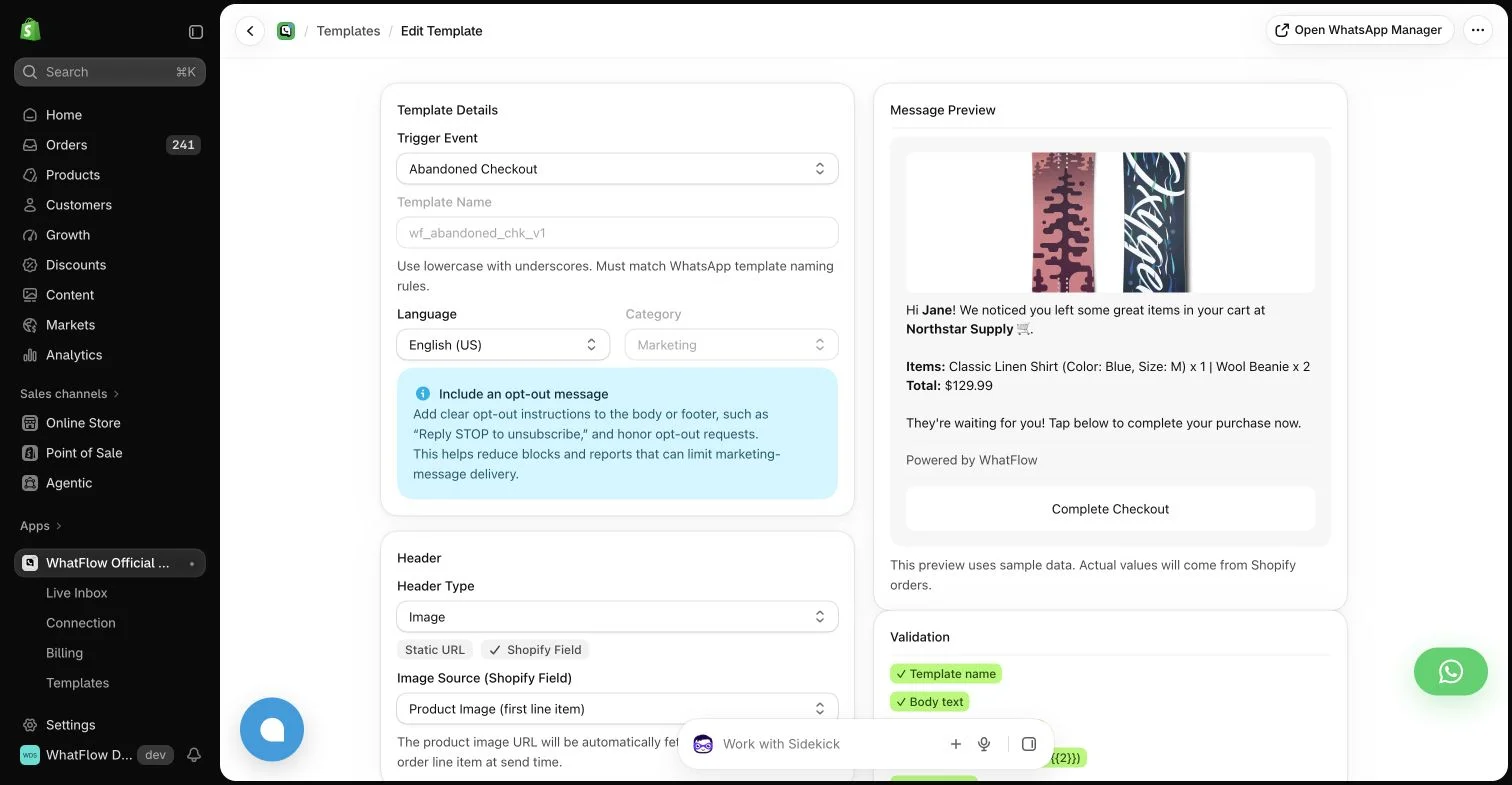
WhatFlow covers all three on the Free plan. Here's the shipping template you'd set up first:
Hi {{first_name}}, good news: order {{order_number}} is on its way. Track it here: {{tracking_url}}. Questions about using your products? Just reply to this message.
How much does each option cost?
Here's WhatFlow's published pricing as of November 2026 (from the Shopify App Store listing):
Plan | Monthly | Sends included | After that |
|---|---|---|---|
Free | $0 | 100 | $0.01 each |
Starter | $4.99 | 2,000 | $0.005 each |
Plus | $9.99 | 5,000 | $0.004 each |
Growth | $29 | 20,000 | $0.0025 each |
Scale | $49.99 | 40,000 | $0.002 each |
Every plan has every feature. Seat fees are zero on all of them. A store sending 40,000 messages a month pays $49.99 on Scale. Meta's WhatsApp fees are separate (Meta pricing); check our pricing page for the current numbers.
Enterprise suites rarely publish an entry price. Expect a quote that bundles a platform fee, users or contacts, and onboarding. Even when the per-message rate looks competitive, the commitment and setup time are what hurt a small store. For a broader look at hidden costs, see how to audit Shopify app costs beyond the headline price.
Shopify depth beats breadth
An enterprise suite treats Shopify as one data source. WhatFlow is built around it:
One practical check: Can you run a launch and handle replies without swapping tools? Use the campaign, team inbox and catalog checkout walkthroughs to evaluate the broader WhatFlow Business API workflow alongside recovery and notifications.
- Native Shopify Flow triggers (incoming message, order reply) and actions (send template, text, media).
- Shopify Sidekick can draft those Flow workflows for you.
- COD confirmation with reply buttons that tag or cancel the order.
- Free-forever, theme-matched WhatsApp buttons on your storefront.
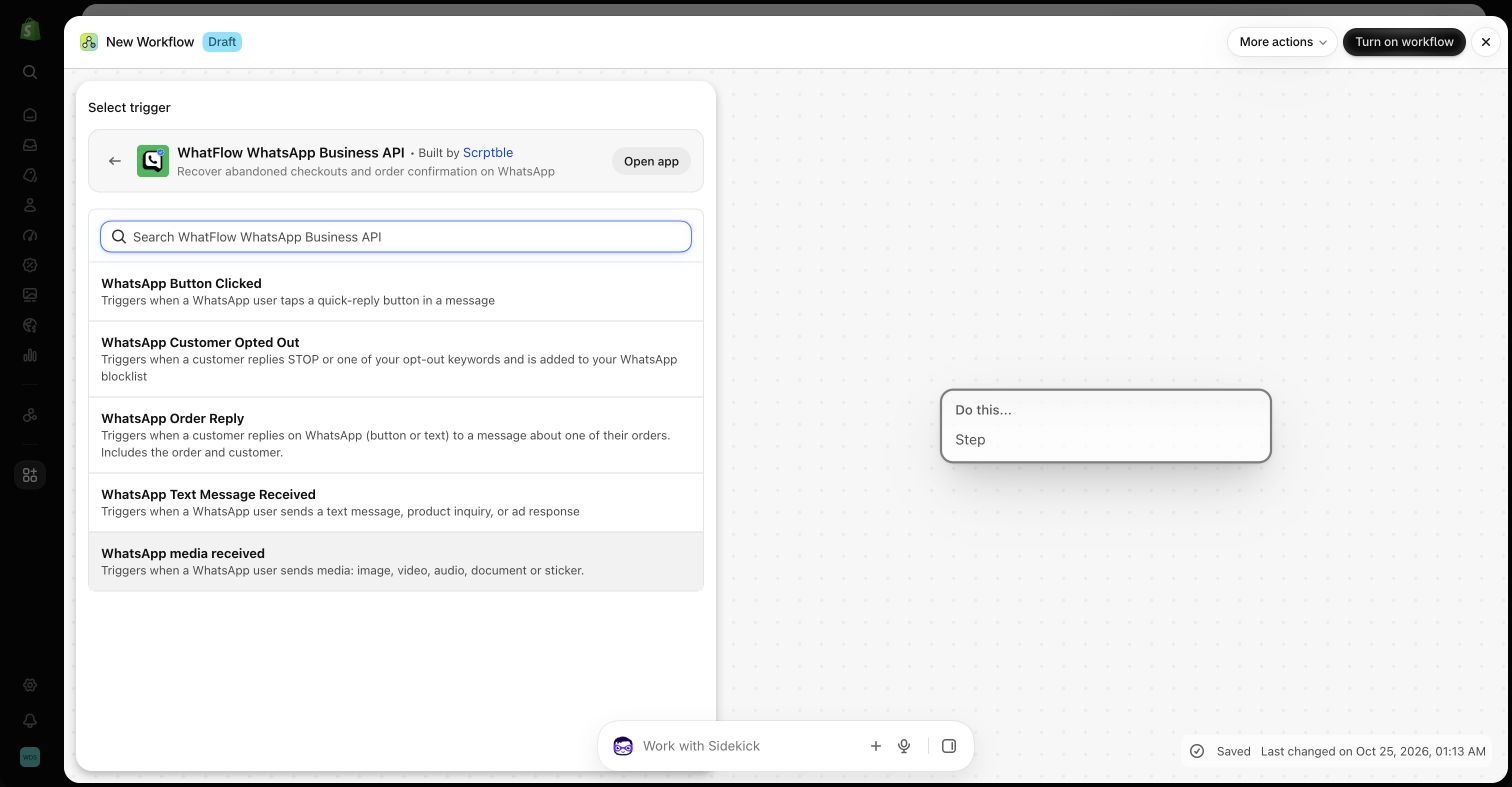
If Flow is new to you, start with the WhatFlow and Shopify Flow automation guide. If you're still picking your first automation, choose one your team can maintain.
WhatFlow's WhatsApp Business API app runs on the official Meta WhatsApp Cloud API and is rated 5.0 out of 5 from 55 ratings on the Shopify App Store (checked November 5, 2026).
Is a Shopify app "too small" to grow into?
No, and this is the misconception I hear most. People assume a free-to-start Shopify app must run on some unofficial workaround. WhatFlow's WhatsApp Business API app runs on the official Meta WhatsApp Cloud API, the same platform enterprise suites resell, and you connect it through Meta's own Embedded Signup. It's built to scale with you: a team inbox with assignment and filters and no seat fees at any team size, Shopify Flow automation that handles thousands of order events, COD confirmation, live catalog sharing and Shopify admin extensions. You don't have to switch platforms when you hit 20 staff or 50,000 messages a month; you move to a bigger message plan, up to Ultimate ($99/month, 75,000 sends included, as of November 2026).
(We also make a separate, older app, WhatFlow Chat Automation, which uses a linked-device connection for very small stores. That's not the product this page is about.)
When an enterprise suite might make sense
Pick an enterprise suite only if you have a concrete cross-department requirement (several brands sharing one customer database, say, or compliance rules that need a central console) and a named person who'll own the implementation. Without both, you'll pay for features nobody configures.
The bottom line
Small stores win on speed and attention, not software scope. WhatFlow lets you launch one useful WhatsApp journey this week, add your team without seat fees, and keep every feature as you grow. If you're also weighing commitment length, read seasonal costs vs a fixed contract next.
Questions worth asking
What is the best WhatsApp app for a small Shopify store?
Pick a Shopify-native app with a free plan and no seat fees. WhatFlow includes every feature on Free, including the team inbox, order templates, COD confirmation and Shopify Flow, and paid plans start at $4.99/month as of November 2026.
How should a small store roll out WhatsApp?
Start with one order message and one person answering replies. Once that runs smoothly for two weeks, add abandoned checkout or COD confirmation.
Does the free WhatFlow plan restrict features?
No. Every WhatFlow feature is on every plan, including Free. Plans differ only by message allowance and rate, and theme-matched WhatsApp buttons are free forever.
Are Meta's WhatsApp charges included in WhatFlow's price?
No. Meta charges separately for delivered template messages by category and country. Since October 1, 2026, Meta's free customer service replies are capped at the first 1,000 per number per month.
Sources and methodology
We checked these primary sources on November 5, 2026. Vendor pages describe advertised capabilities, rather than independent performance tests. Confirm current pricing, plan limits and availability with each provider.
- WhatFlow plans and Shopify integrations
WhatFlow WhatsApp Business API listing: plan prices, included sends and a 5.0 rating from 55 reviews, checked November 5, 2026.
- WhatsApp Business Platform pricing
Meta's per-message pricing, which varies by template category and recipient country and is charged separately from app fees.