Messaging customers in the UK on the official WhatsApp Business Platform costs $0.0635 per delivered marketing template and $0.022 per delivered utility or authentication template, at Meta's USD list rates as of November 2026. Three things matter most locally: UK utility messages are expensive compared with many markets, PECR's soft opt-in governs who you can market to, and you can pay Meta in pounds.
I'll show what that means for a real month of messages, how the UK GDPR and PECR rules apply to a WhatsApp campaign, and the setup I'd use for a UK Shopify store on WhatFlow.
How much does WhatsApp cost for a Shopify store in the UK?
Meta charges per delivered template message, priced by category and by the recipient's country code. These are Meta's USD list rates for UK numbers, from Meta's WhatsApp pricing page:
Message type
Typical Shopify use
USD per delivered message
Marketing template
Sales, launches, restock offers
$0.0635
Utility template
Order confirmations, dispatch and delivery updates
First 1,000 per number per month free, then $0.022
A utility template is a message about something the customer already started, such as an order. A marketing template is anything promotional. Meta can recategorise a template it decides is promotional.
Here's the UK-specific catch. In Brazil a utility template costs $0.0068; in the UK it's $0.022, more than three times as much. Since October 1, 2026, utility templates are charged even inside an open customer service window, and service replies are charged after the first 1,000 a month per number. So a busy UK support team pays for volume in a way it didn't a year ago. Meta does discount utility and authentication at higher monthly volumes, and the volume tier reconciliation guide explains how to check your bill.
Worked example: 1,000 order confirmations
Say you have 1,000 orders a month and confirm each on WhatsApp.
1,000 utility templates × $0.022 = $22 a month at the USD list rate.
My opinion: at UK prices, pick the order messages customers actually value. A dispatch message with tracking and a delivery-day update earn their cost. A confirmation that repeats your email receipt word for word may not. Shopify already emails a receipt, so let email carry the paperwork and use WhatsApp for the moments where a customer might want to reply: dispatch, a delay, a delivery problem. The comparison of WhatsApp and email for order updates goes through which message suits which channel. See our order confirmation message examples for copy that earns its cost.
Worked example: a 5,000-recipient campaign
Say you send a new-collection template to 5,000 opted-in UK customers.
If all 5,000 are delivered: 5,000 × $0.0635 = $317.50.
Undelivered messages aren't charged, so 4,800 deliveries would cost 4,800 × $0.0635 = $304.80.
Add your WhatFlow plan on top: those 6,000 messages fit the Essential plan ($19 a month for 10,000). Every feature is on every plan, including Free; see the WhatFlow pricing page. If you run click-to-WhatsApp ads, replying within 24 hours opens Meta's free entry point window, which can stay open up to 7 days with no Meta charges for messages to that customer. The free entry window guide explains when it applies.
Selling into Europe from the UK
Meta prices by the recipient's country, not yours. If your UK store ships to the EU, those customers cost more or less than UK ones:
Recipient market
Marketing (USD)
Utility (USD)
United Kingdom
$0.0635
$0.022
Germany
$0.1365
$0.055
Netherlands
$0.1597
$0.05
France
$0.0859
$0.03
Spain
$0.0707
$0.02
A campaign to 1,000 Dutch customers costs about two and a half times the same campaign to 1,000 UK customers. Segment by country before you send.
Paying Meta in pounds
GBP is one of the 16 billing currencies Meta lists for the WhatsApp Business Platform. Meta publishes separate GBP rate cards, so don't convert the USD figures above and expect an exact match. The currency is chosen when your Messaging account is created. For the full pricing model, read WhatsApp Business API pricing explained. The rand isn't on that list, which we cover in WhatsApp for Shopify in South Africa.
Local habits that change your WhatsApp setup
Language and tone
Use the English (UK) template code, en_GB, from Meta's supported template languages. It sounds trivial until a customer gets "color" and "your order is in transit, have a nice day!" from a brand in Bristol. If you sell into Europe, keep German, French or Spanish versions of the same template so the variables stay consistent.
Hi Olivia, your order #3187 has been dispatched with tracking number AB123456789GB. It should arrive on Thursday. Need to change anything? Reply here.
Payments and delivery
Payment happens in Shopify checkout, so WhatsApp rarely needs to deal with it. You probably won't need COD confirmation unless you offer cash on delivery. Where WhatsApp earns its keep is delivery: dispatch, a delivery-day heads-up, and a quick way to ask "can you leave it with a neighbour?" without opening a support ticket. Pick the shipping stages your carrier reports reliably and start with one. If you do, our COD confirmation message templates have wording you can adapt.
Returns are the other big one. A customer who can message a photo of the wrong size and get the return steps in the same chat doesn't need to hunt for your returns page. The returns and exchanges on WhatsApp guide has message examples.
What do UK GDPR and PECR mean for WhatsApp marketing?
Two sets of rules apply, and the Information Commissioner's Office (ICO) enforces both. This isn't legal advice, but here's how they fit a WhatsApp program.
PECR: consent or the soft opt-in
The Privacy and Electronic Communications Regulations 2003 (PECR) cover electronic marketing. Regulation 2 defines "electronic mail" as any text, voice, sound or image message sent over a public network that can be stored until the recipient collects it, and it includes SMS. I'd treat a WhatsApp marketing template as falling inside that definition and plan accordingly.
Regulation 22 says you can't send unsolicited marketing by electronic mail to individuals unless they've consented, with one exception: the soft opt-in. It applies only when all three hold:
you got the person's contact details during a sale or negotiations for a sale;
you're marketing your own similar products and services;
you gave them a simple, free way to refuse when you collected the details, and in every message since.
Regulation 22 was amended by the Data (Use and Access) Act 2025, effective 5 February 2026, which added a separate soft opt-in for charities. The three conditions above weren't changed, so for a Shopify store the rule is the same as before.
UK GDPR: the right to object
Under Article 21 of the UK GDPR, a person can object to their data being used for direct marketing at any time, and once they do, you have to stop. There's no balancing test. A "STOP" reply on WhatsApp is an objection; treat it like one across every channel, including email and SMS. The guide to GDPR and WhatsApp marketing consent goes deeper on records and wording.
WhatsApp's own opt-in rule
Meta's WhatsApp Business Messaging Policy is stricter than the soft opt-in. You can only contact people who gave you their number and opted in to receive messages from you, and you must respect opt-out requests made on or off WhatsApp. Outside the 24-hour window, only approved templates can start a conversation.
So the practical rule for a UK store: get an explicit WhatsApp opt-in, even for customers PECR would let you email under the soft opt-in, and put a way out in every promotional template.
New autumn knitwear is in, and early access ends Sunday: [link]. From Harbour & Hide. Reply STOP to stop offers on WhatsApp.
Setup checklist: WhatsApp for a UK Shopify store with WhatFlow
WhatFlow WhatsApp Business API runs on the official Meta WhatsApp Cloud API and is built for growing and large teams as well as small shops: a shared team inbox with no seat fees, native Shopify Flow triggers and actions, Shopify admin extensions and a 5.0/5 rating from 85 ratings on the Shopify App Store (checked November 24, 2026).
Connect with Embedded Signup. In WhatFlow, open Connections and start the WhatsApp setup; Meta's Embedded Signup runs inside Shopify admin. Pick the business portfolio and WhatsApp account you intend to use. The connection and billing doc walks through it.
Check the number and display name. Confirm what customers will see in Connections. If the name is pending, message the number from another phone.
Choose GBP billing if you want Meta invoices in pounds, and add the payment method where Meta directs you. WhatFlow passes Meta's charges through with no markup.
Createen_GBtemplates, plus EU language versions if you sell abroad. Use Template Library and Message Editor, then check approval in Templates. The template guide covers approval.
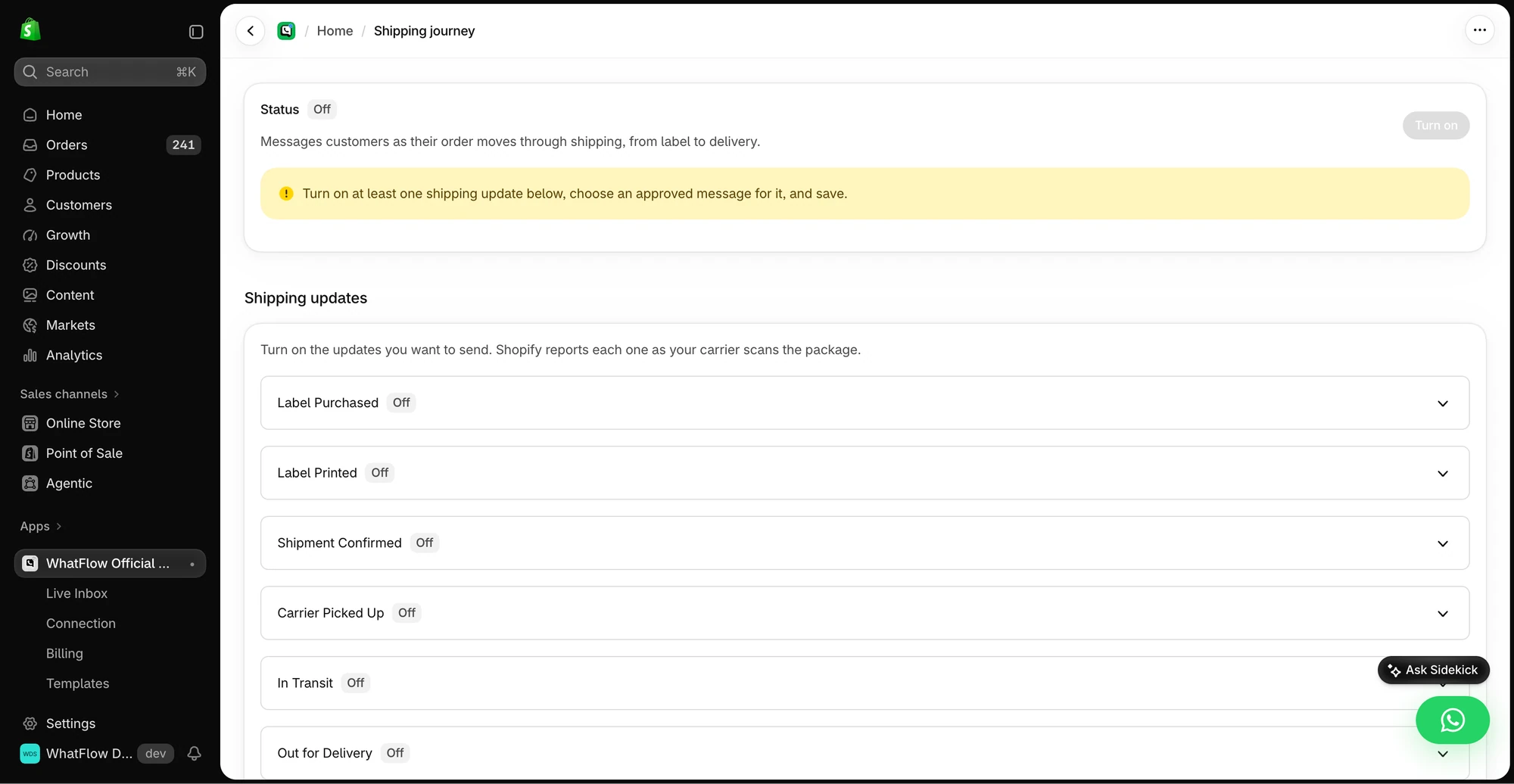
Pick your order updates. Start with dispatch and one delivery stage in Shipping Journey, given UK utility pricing. Our shipping confirmation message examples cover each stage.
Set up abandoned checkout reminders in Abandoned Checkout, with a template, a delay and a test on your own phone.
Share your catalog from the Inbox after syncing a small test collection.
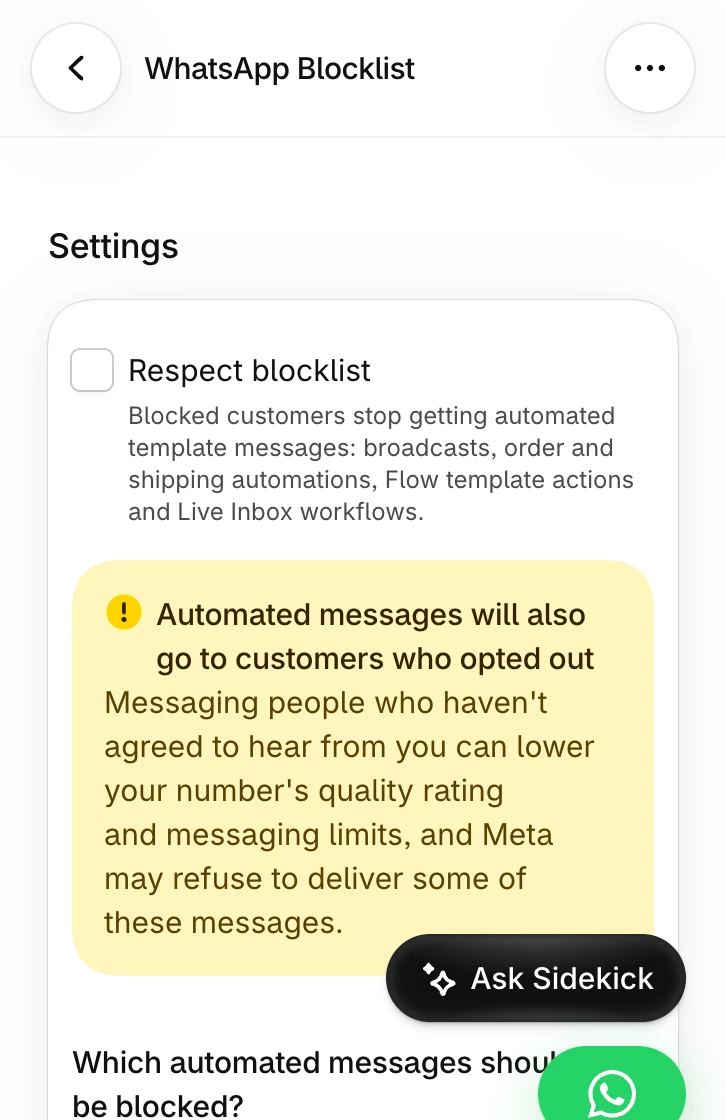
Check opt-out handling and the blocklist before your first campaign.
Shipping Journey stages in a WhatFlow demo store. Start with the one stage your carrier reports reliably.
Blocklist settings in a WhatFlow demo store, with the warning shown when suppression is off.
When volume grows, the WhatFlow team inbox handles assignment and filters, and you can route incoming messages with Shopify Flow. Adding agents for peak season doesn't add seat fees.
Run WhatsApp for your Shopify store with WhatFlow
Free plan available. Templates, COD confirmation, Shopify Flow automations and a shared team inbox with no seat fees. Every feature is included on every plan, including Free.
Get the opt-in wording live at checkout this week, because every other decision depends on it. Then connect your number, approve one en_GB dispatch template and send it to yourself. Leave marketing templates until you've got a list of people who clearly asked for them.
Frequently asked questions
How much does a WhatsApp marketing message cost in the UK?
As of November 2026, Meta's USD list rate is $0.0635 per delivered marketing template to a UK number and $0.022 per delivered utility or authentication template. Stores billed in GBP pay the rates in Meta's GBP rate card instead.
Can a UK store send WhatsApp marketing to past customers without consent?
PECR's soft opt-in lets you email-market existing customers about your own similar products if you got their details during a sale and offered an opt-out then and in every message. WhatsApp's own policy still requires an opt-in before business-initiated messages, so ask for permission regardless.
Does PECR apply to WhatsApp messages?
PECR defines electronic mail broadly, as any text, voice, sound or image message stored in the network or on the recipient's device until collected, including SMS. I'd treat WhatsApp marketing templates as covered and follow the same rules.
Can I pay Meta for WhatsApp in pounds?
Yes. GBP is one of the 16 billing currencies Meta lists for the WhatsApp Business Platform as of November 2026. The currency is chosen when the Messaging account is created.
Are WhatsApp customer service replies free in the UK?
Only the first 1,000 delivered service messages per business phone number each month. After that, Meta charges the UK utility rate, $0.022 per message as of November 2026.
Per-message pricing, the October 1, 2026 changes to service and utility messages, the free entry point window and the 16 billing currencies including GBP.