
Publisher disclosure: this comparison is written by WhatFlow. Competitor capabilities are based on the linked public documentation; the WhatFlow screenshots come from our demo store. Examples are illustrative, and results depend on your store and configuration.
WhatFlow and Twilio at a glance
| Consideration | WhatFlow | Twilio |
|---|---|---|
| What the product is built around | A ready-made Shopify app: order events, mapped templates, COD confirmation, Shopify Flow, admin extensions and a team inbox. | A programmable messaging API for developers. Powerful for custom products; the Shopify integration and staff interface are yours to build. |
| Pricing and billing units | Free plan; Plus is $9.99/month with 5,000 sends included (as of November 2026). Meta fees separate. | $0.005 per inbound or outbound WhatsApp message plus Meta's fees, and $0.001 per failed message. 5,000 outbound messages = $25 in Twilio fees before any inbound replies or build costs. |
| Feature access | All features on every plan, including Free: templates, broadcasts, abandoned checkout, COD, catalog sharing, Flow. | Messaging APIs plus optional add-ons such as the Messaging Engagement Suite ($0.015 per message after the first 1,000 each month). |
| Team access | Shared team inbox with assignment and filters. No seat fees at any team size. | The WhatsApp API doesn't include a team inbox. You build one or buy a separate product. |
| Storefront entry point | Free-forever WhatsApp buttons that match your Shopify theme. | Not a Shopify feature. You'd add a link or widget yourself. |
For a Shopify store, WhatFlow is the better WhatsApp choice than Twilio. Twilio is a developer API: as of November 2026 it charges $0.005 per inbound or outbound WhatsApp message plus Meta's fees, and you build the Shopify integration, templates logic and team inbox yourself. WhatFlow is that app already built, on the official Meta Cloud API, with order templates, COD, native Shopify Flow and a team inbox with no seat fees. It's free to start.
Twilio is excellent for engineers building custom products. Shopify merchants usually want the product.
At a glance
WhatFlow | Twilio | |
|---|---|---|
What it is | Ready-made Shopify WhatsApp app | Programmable messaging API |
Who sets it up | You, from Shopify admin | Developers |
WhatsApp connection | Official Meta Cloud API | Official WhatsApp Business Platform |
Price | Free; Plus $9.99/month for 5,000 sends | $0.005 per message in or out, plus Meta fees |
Team inbox | Included, no seat fees | Not included |
Shopify Flow, COD | Built in | Build it |
Twilio figures are from its WhatsApp pricing page, checked November 5, 2026.
How much does each cost?
Take a store sending 5,000 WhatsApp messages a month.
Twilio: 5,000 outbound × $0.005 = $25 in Twilio fees. Every inbound customer reply is another $0.005, so 2,000 replies adds $10. Failed messages are $0.001 each. Link tracking and scheduling through the Messaging Engagement Suite add $0.015 per message after the first 1,000 free each month.
WhatFlow: Plus is $9.99/month with 5,000 sends included (Shopify App Store listing). Templates, abandoned checkout, COD, Shopify Flow, the team inbox and catalog sharing are all included. No seat fees.
5,000 outbound sends/month | App or API fee | What you still need |
|---|---|---|
Twilio | $25 + $0.005 per reply | Shopify integration, template logic, retries, staff inbox, hosting |
WhatFlow Plus | $9.99 | Nothing; it's installed |
Meta's per-message fees are separate on both (Meta pricing); our WhatsApp Business API pricing guide explains them. The bigger cost with Twilio isn't the per-message fee. It's the engineering time to build and maintain everything around it. Current WhatFlow amounts are on our pricing page.
What you'd have to build on Twilio
Sending one message through an API is easy. A working Shopify WhatsApp system is not. On Twilio, your developer needs to handle:
- Listening to Shopify order, fulfillment and checkout events.
- Matching each event to the right approved template and filling its variables.
- Timing (when to send the abandoned checkout reminder, when to stop).
- Delivery status, failures and safe retries, so nobody gets the same message twice.
- Inbound replies, routed to a person who can see the order.
- Opt-out handling.
- Keeping all of it running when Shopify, Meta or Twilio change something.
WhatFlow ships all of that. Here's the COD flow, configured in minutes:
Hi {{first_name}}, please confirm your cash-on-delivery order {{order_number}} so we can dispatch it today. [Confirm] [Cancel]
The customer taps a button, WhatFlow's order reply trigger fires in Shopify Flow, and the order is tagged or cancelled.
We go deeper on this trade-off in Shopify WhatsApp app vs a custom Cloud API build and Shopify Flow WhatsApp automation vs a Zapier chain.
Shopify Flow instead of custom code
What you'd write as code on Twilio, you build visually in Shopify Flow with WhatFlow. WhatFlow adds native triggers (incoming message, order reply, button reply, opt-out) and actions (send template, text, image, video), and Shopify Sidekick can draft the workflow from a plain-English description.
When testing WhatFlow and Twilio, ask: Can a WhatsApp reply start the Shopify workflow you need? WhatFlow has separate Shopify Flow blocks, API-triggered Inbox Workflows and in-chat WhatsApp forms. Try the catalog cart workflow if you need to connect a buyer reply with a Shopify action.
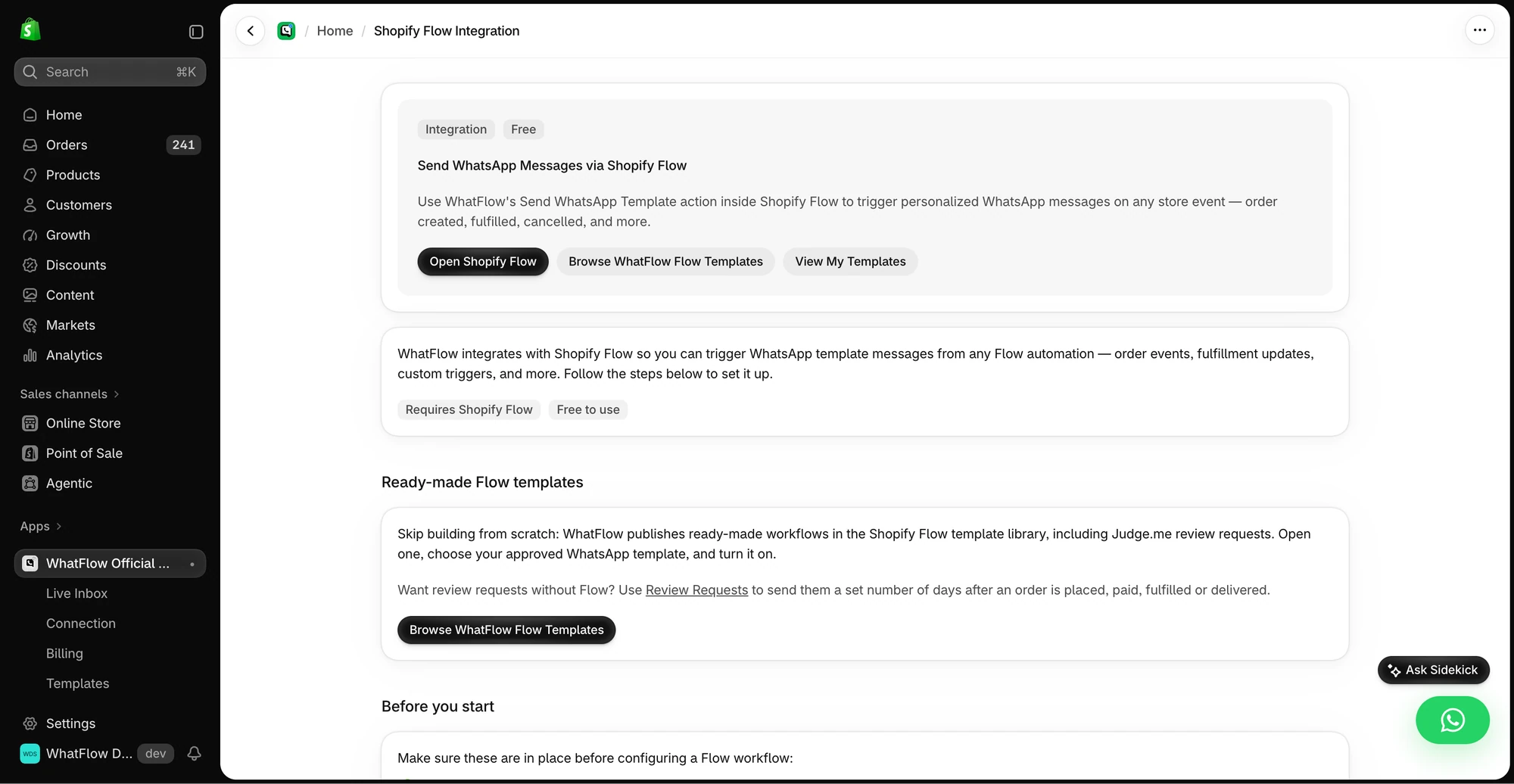
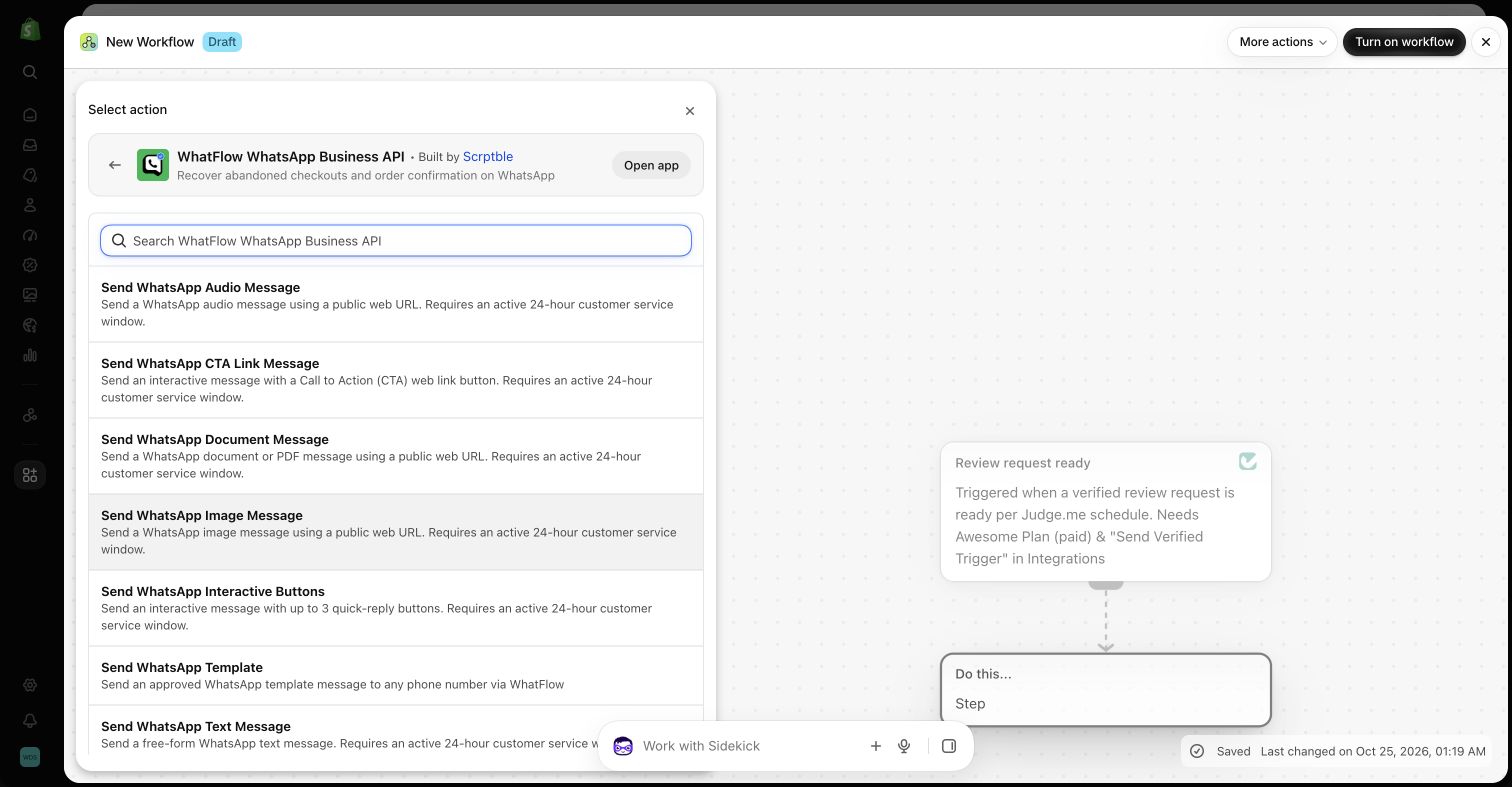
See build WhatsApp automations without API knowledge and use Sidekick to draft WhatsApp workflows.
Enterprise-ready, on the same official API
Choosing an app over an API doesn't mean choosing something smaller. WhatFlow's WhatsApp Business API app runs on the official Meta WhatsApp Cloud API, connected through Meta's Embedded Signup, and it's built for teams at scale: shared inbox with assignment and filters, no seat fees at any team size, Shopify Flow automation, COD, live catalog sharing and Shopify admin extensions. It's rated 5.0 out of 5 from 55 ratings on the Shopify App Store (checked November 5, 2026).
When Twilio might still make sense
Pick Twilio only if you're building a custom communications product that spans many systems beyond Shopify, you need SMS, voice and WhatsApp in one programmable stack, and you have engineers who'll own it long term. For a Shopify store's order messages and customer chats, it's a build you don't need.
The bottom line
Twilio gives developers an excellent API. WhatFlow gives Shopify merchants the finished WhatsApp app: official Meta Cloud API, order automation, COD, Shopify Flow and a no-seat-fee team inbox, free to start and cheaper per month at typical volumes. Install it and have your first order message live today. Also comparing providers? See WhatFlow vs 360dialog and WhatFlow vs Infobip.
Questions worth asking
Is WhatFlow a good Twilio alternative for Shopify WhatsApp?
Yes, for Shopify stores. WhatFlow gives you the finished app on the official Meta Cloud API, with order templates, COD confirmation, Shopify Flow and a team inbox with no seat fees, so you don't need developers. Twilio suits teams building a custom communications product with engineers to maintain it.
How does Twilio WhatsApp pricing compare with WhatFlow?
As of November 2026, Twilio charges $0.005 per inbound or outbound WhatsApp message plus Meta's fees, so 5,000 outbound messages cost $25 in Twilio fees alone. WhatFlow Plus is $9.99/month with 5,000 sends included. Meta's fees are separate on both, and Twilio's total also needs your development and hosting costs.
Does WhatFlow charge per inbox seat?
No. WhatFlow's team inbox has no seat fees at any team size. You pay only for your message plan and Meta's fees.
Are WhatFlow features restricted on the free plan?
No. All plans have the same features. Message allowances and rates differ, Meta's delivery charges are separate, and theme-matched WhatsApp buttons are free forever.
Sources and methodology
We checked these primary sources on November 5, 2026. Vendor pages describe advertised capabilities, rather than independent performance tests. Confirm current pricing, plan limits and availability with each provider.
- Twilio: official product and commercial information
Twilio's WhatsApp pricing: $0.005 per inbound or outbound message, Meta fees passed through, $0.001 failed-message fee and Engagement Suite add-on, checked November 5, 2026.
- Twilio WhatsApp product overview
Twilio's overview of WhatsApp as a programmable messaging channel.
- WhatFlow plans and Shopify integrations
WhatFlow WhatsApp Business API listing: plan prices, included sends, features and a 5.0 rating from 55 reviews, checked November 5, 2026.
- WhatsApp Business Platform pricing
Meta's per-message pricing, which varies by template category and recipient country and is charged separately from app fees.