
Publisher disclosure: this comparison is written by WhatFlow. Competitor capabilities are based on the linked public documentation; the WhatFlow screenshots come from our demo store. Examples are illustrative, and results depend on your store and configuration.
WhatFlow and 360dialog at a glance
| Consideration | WhatFlow | 360dialog |
|---|---|---|
| What the product is built around | A complete Shopify app: order events, mapped templates, COD confirmation, Shopify Flow, admin extensions and a team inbox. | WhatsApp Business Platform API access, webhooks and partner integrations. You build or buy the application on top. |
| Pricing and billing units | Free plan; paid plans from $4.99/month (as of November 2026). Meta fees separate. | Per number per month: Regular €49, Premium €99, Scale €500, with no markup on Meta fees (as of November 2026). App and build costs extra. |
| Feature access | All features on every plan, including Free. Plans differ only by message allowance. | Regular lists support and Zapier, Make and n8n integrations. Premium adds an inbox, sendout and automation add-ons and a Messaging MCP. |
| Team access | Shared team inbox with assignment and filters. No seat fees at any team size. | Inbox listed from Premium (€99/number/month). Check user terms for your plan. |
| Storefront entry point | Free-forever WhatsApp buttons that match your Shopify theme. | Not a Shopify feature. You'd add a link or widget yourself. |
For a Shopify store, WhatFlow is the better WhatsApp choice than 360dialog. 360dialog sells access to the WhatsApp Business API, starting at €49 per number per month as of November 2026. You still need an app or a developer to turn that into Shopify order messages and a team inbox. WhatFlow is that finished app, on the official Meta Cloud API, with order templates, COD, native Shopify Flow and a no-seat-fee team inbox, free to start.
360dialog is the pipe. WhatFlow is the pipe plus everything a Shopify store needs on top.
At a glance
WhatFlow | 360dialog | |
|---|---|---|
What it is | Complete Shopify WhatsApp app | WhatsApp API access |
WhatsApp connection | Official Meta Cloud API | Official WhatsApp Business Platform |
Entry price | Free; paid from $4.99/month | €49 per number per month |
Inbox | Included on every plan, no seat fees | Listed from Premium (€99/number/month) |
Shopify | Built in: events, Flow, admin extensions | Via a partner app or your own build |
Meta fees | Separate | Separate, no markup |
360dialog figures are from its pricing page, checked November 5, 2026.
API access vs a ready-made Shopify app
360dialog is a well-known WhatsApp Business Solution Provider. Its plans give you API access, webhooks and support, and its higher tiers add an inbox and automation tools. It's built for developers and software partners who want to plug WhatsApp into their own product.
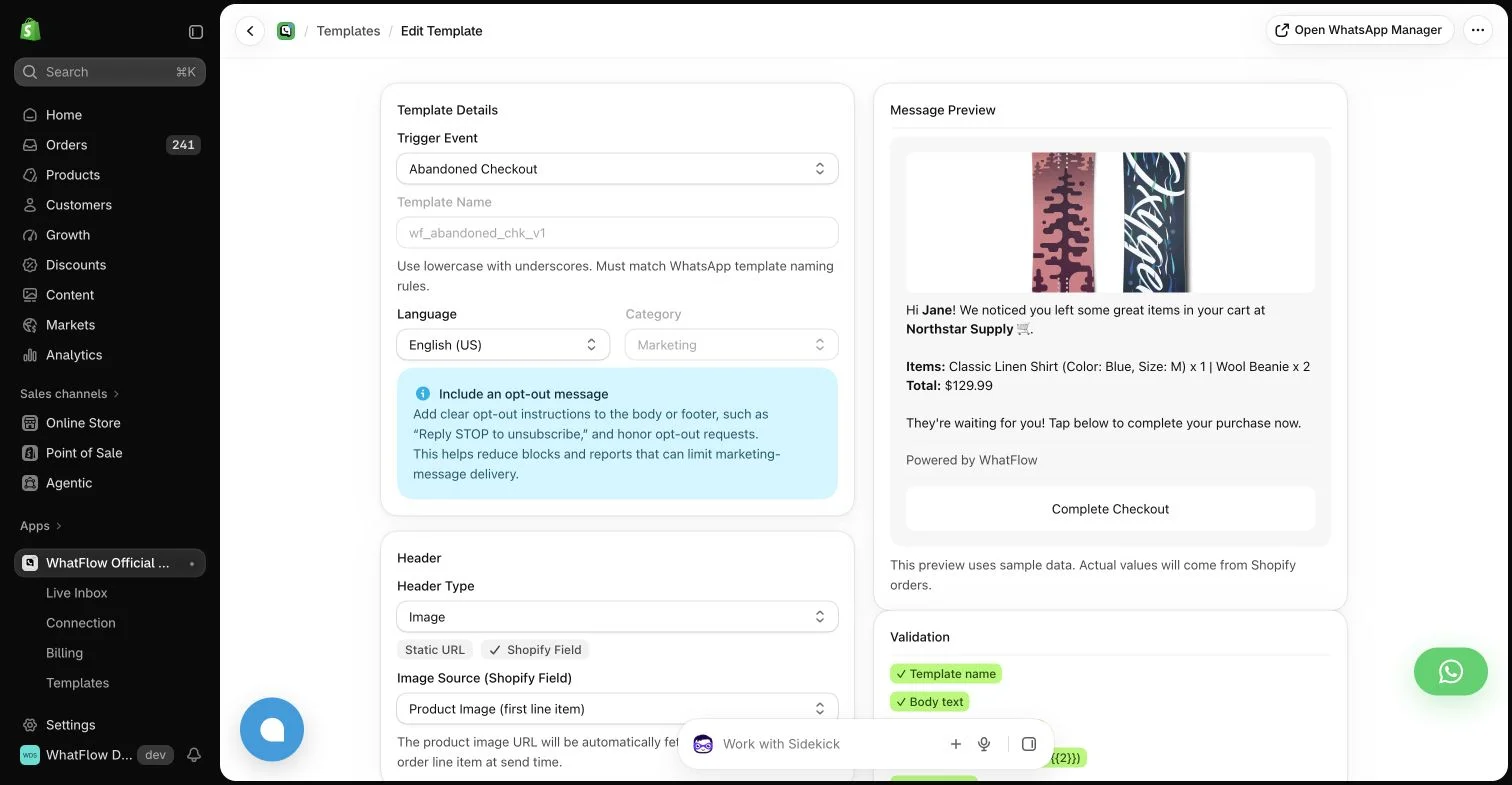
Now picture getting an abandoned checkout reminder out of it. You'd need to catch Shopify's checkout event, decide when to send, fill an approved template with the customer's name and checkout link, call the API, record the result and route the reply to a person. Regular lists Zapier, Make and n8n integrations, so you could wire some of that together, but you're the one maintaining it.
With WhatFlow, it's a setting:
Hi {{first_name}}, you left {{product_name}} in your cart. It's still here for you: {{checkout_url}}. Questions about sizing? Just reply.
For the wider build-or-buy question, see Shopify WhatsApp app vs a custom Cloud API build.
How much does each cost?
Take a store on one WhatsApp number sending 5,000 messages a month.
Monthly app/API cost (before Meta fees) | Shopify workflows | Team inbox | |
|---|---|---|---|
360dialog Regular | €49 | Your build or a partner app | Not listed on Regular |
360dialog Premium | €99 | Your build or a partner app | Included |
WhatFlow Plus | $9.99 | Included | Included, no seat fees |
WhatFlow Plus is $9.99/month with 5,000 sends included, as of November 2026 (Shopify App Store listing). On both, Meta charges per delivered template message by category and country (Meta pricing); 360dialog says it adds no markup on them. The difference is that the 360dialog line doesn't yet include the Shopify app your team will work in. Our WhatsApp Business API pricing guide explains the Meta side, and current WhatFlow amounts are on the pricing page.
What WhatFlow includes that you'd otherwise build
On every WhatFlow plan, including Free:
- Order confirmation, shipping and abandoned checkout messages from Shopify events.
- COD confirmation with buttons that tag or cancel the order through Shopify Flow.
- Native Shopify Flow triggers (incoming message, order reply) and actions (template, text, media), with Shopify Sidekick to draft workflows.
- A shared team inbox with assignment, filters and saved replies, and no seat fees.
- Live catalog sharing, Shopify admin extensions and free-forever theme-matched buttons.
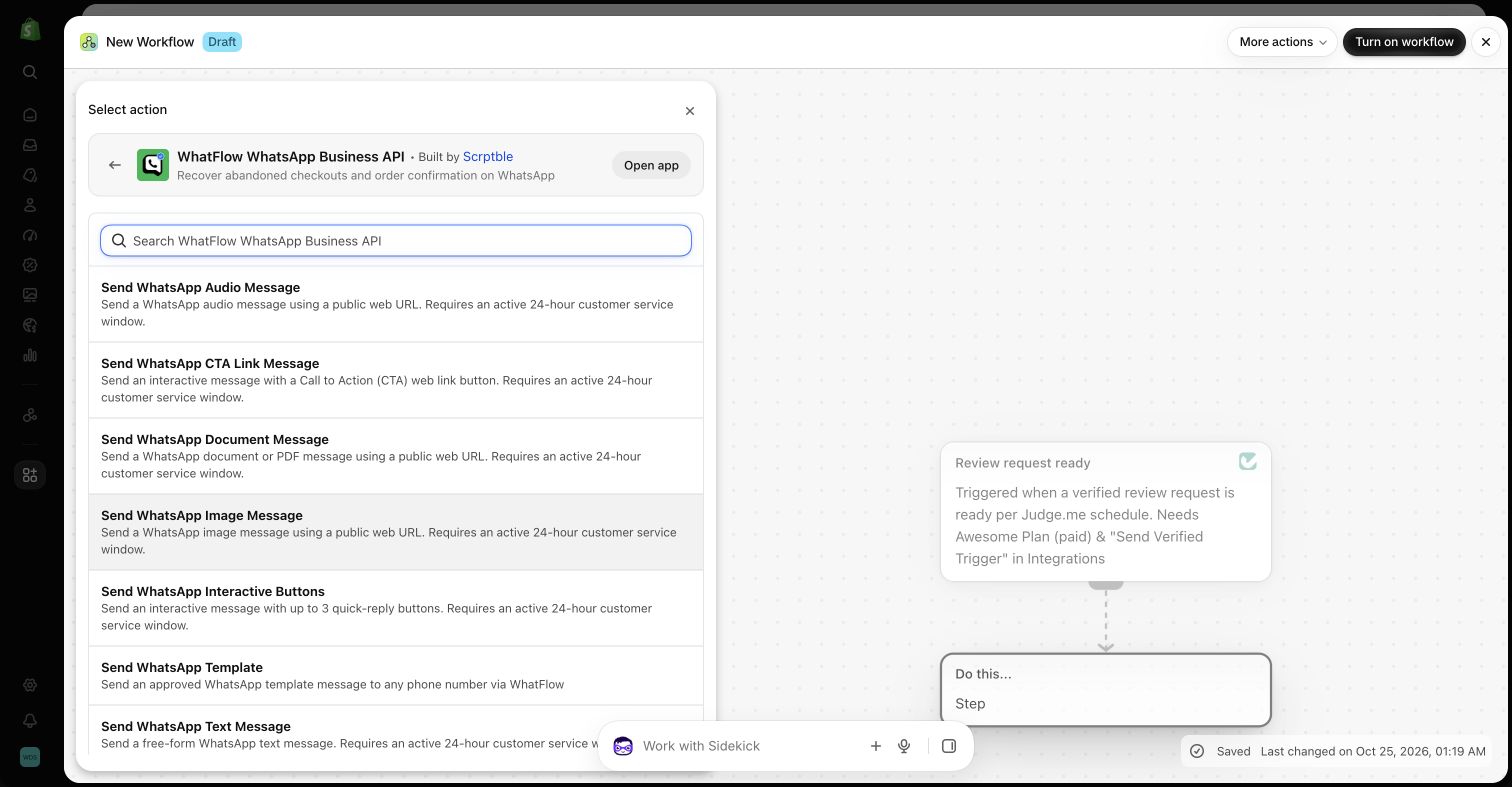
See send WhatsApp templates from Shopify Flow for how the Flow actions work.
Same official API, enterprise-ready
360dialog and WhatFlow sit on the same foundation: the official WhatsApp Business Platform. WhatFlow's WhatsApp Business API app connects to the official Meta Cloud API through Meta's Embedded Signup from your Shopify admin, and it's built to run real teams: inbox assignment and filters, no seat fees at any size, Shopify Flow automation at volume, COD and catalog. It's rated 5.0 out of 5 from 55 ratings on the Shopify App Store (checked November 5, 2026).
If you're moving a number from another provider, check who controls the WhatsApp Business account and what Meta's migration process requires before you switch.
When 360dialog might still make sense
Pick 360dialog only if you're a developer or software partner building your own WhatsApp product, you want raw API access at scale across many numbers, or you already have an app that needs a BSP behind it. For a Shopify store, it's a component, not a solution.
The bottom line
360dialog gives you WhatsApp API access. WhatFlow gives a Shopify store the whole thing: official Meta Cloud API, order automation, COD, Shopify Flow and a team inbox with no seat fees, starting free. Install it and skip the build. Comparing other API providers? See WhatFlow vs Twilio and WhatFlow vs Bird.
Questions worth asking
Is WhatFlow a good 360dialog alternative for Shopify?
Yes. 360dialog provides WhatsApp API access; WhatFlow is a complete Shopify app on the official Meta Cloud API, with order templates, COD confirmation, Shopify Flow and a team inbox with no seat fees. 360dialog suits developers and partners assembling their own stack.
How does 360dialog pricing compare with WhatFlow?
As of November 2026, 360dialog charges €49 per number per month on Regular and €99 on Premium, which includes an inbox, plus Meta's fees with no markup. WhatFlow starts free, paid plans start at $4.99/month, and Meta's fees are separate there too. With 360dialog, budget for the Shopify app or build as well.
Does WhatFlow charge per inbox seat?
No. WhatFlow's team inbox has no seat fees at any team size. You pay only for your message plan and Meta's fees.
Are WhatFlow features restricted on the free plan?
No. All plans have the same features. Message allowances and rates differ, Meta's delivery charges are separate, and theme-matched WhatsApp buttons are free forever.
Sources and methodology
We checked these primary sources on November 5, 2026. Vendor pages describe advertised capabilities, rather than independent performance tests. Confirm current pricing, plan limits and availability with each provider.
- 360dialog: official product and commercial information
360dialog's overview of WhatsApp API access, webhooks and partner-oriented offerings.
- WhatFlow plans and Shopify integrations
WhatFlow WhatsApp Business API listing: plan prices, included sends, features and a 5.0 rating from 55 reviews, checked November 5, 2026.
- WhatsApp Business Platform pricing
Meta's per-message pricing, which varies by template category and recipient country and is charged separately from app fees.
- 360dialog pricing
Per-number monthly prices for Regular, Premium and Scale, what each includes, and the no-markup statement on Meta fees, checked November 5, 2026.