Messaging customers in Mexico on the official WhatsApp Business Platform costs $0.0085 per delivered utility template (order confirmations, shipping updates) and $0.0397 per marketing template, as of November 2026, and you can be billed in pesos. For a Mexican Shopify store, three things matter most: following up on OXXO and cash-on-delivery orders, writing templates in Mexican Spanish, and meeting the 2025 data protection law that replaced INAI.
I'm Safwan, and I run WhatFlow. Merchants selling in Mexico rarely ask us whether to use WhatsApp. They ask what Meta will charge, how to turn chats into paid orders, and what changed with the privacy rules. Here are the answers, with Meta's figures and a setup you can copy.
How much does WhatsApp for Shopify cost in Mexico?
Meta charges per delivered template message, based on the category and the recipient's country. A template is a message Meta has approved in advance. You need one for anything you send outside the 24-hour customer service window, the 24 hours after a customer last messaged you. Inside that window you can reply in your own words.
Here's Meta's USD rate card for Mexican (+52) numbers, effective October 1, 2026 and current as of November 2026:
Service (free-form reply), after 1,000 free per number per month
$0.0085
Mexico isn't on Meta's authentication-international list, so OTP templates to +52 numbers cost the normal authentication rate wherever your business is based.
Two changes from October 1, 2026 matter for every store. Service replies are free only for the first 1,000 delivered per business phone number each month, then each one costs the utility rate. And utility templates sent inside an open customer service window are now charged. Both are in Meta's pricing documentation.
Worked example: 1,000 order confirmations
Say you take 1,000 orders in a month (a mix of card, OXXO and cash on delivery) and send each buyer one confirmation template.
1,000 utility templates × $0.0085 = $8.50 in Meta fees.
When buyers reply ("¿llega antes del viernes?"), your answers are service messages. The first 1,000 each month on that number are free.
For the cash-on-delivery share, that confirmation is the cheapest insurance you'll buy. A parcel refused at the door costs you shipping both ways. Our guide to the RTO rate for Shopify COD stores shows how to measure it with your own numbers.
Worked example: a 5,000-recipient campaign
Now say you send a seasonal sale announcement to 5,000 opted-in customers.
5,000 marketing templates × $0.0397 = $198.50 in Meta fees, if every message is delivered.
Marketing costs nearly five times as much as utility in Mexico. That's a smaller gap than in many markets, but $198.50 for one send still deserves a tight list: recent buyers, people who clicked last time, people who asked about the product on sale. Our Black Friday WhatsApp playbook covers sequencing for big sale weekends. Click-to-WhatsApp ads help too: once you reply, Meta opens a free entry point window that may stay open for up to 7 days, and it doesn't charge for your messages to that customer during it.
Billing in pesos
MXN has been one of Meta's WhatsApp billing currencies since January 1, 2026, so a Mexican business can pay Meta in pesos rather than dollars. Meta's rate card is still published in USD, which is why I quote USD here. WhatFlow passes Meta's charges through with zero markup, and your WhatFlow plan is a separate subscription. The WhatFlow pricing page has the country table and a calculator, and our WhatsApp Business API pricing explainer goes deeper on categories.
How Mexican buyers pay, and what it changes on WhatsApp
OXXO orders need a nudge, not a chase
Shopify Payments is available in Mexico (Shopify's supported countries), and Shopify lists OXXO and meses sin intereses as local payment methods there. OXXO is a pay-later voucher: the buyer orders online and pays in cash at the store with a reference number.
That creates a gap between "ordered" and "paid" where buyers forget. A short utility template fixes most of it:
Hola Daniela, tu pedido #3150 de Casa Barro (2 tazas de talavera, $890 MXN) está apartado. Recuerda pagar en OXXO con tu referencia antes de que venza. ¿Dudas? Responde a este mensaje.
Keep the amount and the reference reminder in the message, and don't send more than one or two. A buyer who decided not to pay won't be won over by a third reminder.
Cash on delivery (pago contra entrega)
Some Mexican stores offer pago contra entrega, especially for first-time buyers who don't trust a new shop yet. In Shopify it's a manual payment method, and those orders stay payment pending until you mark them paid. Confirm before dispatch:
Hola Jorge, gracias por tu pedido #3162: tenis de piel, $1,450 MXN, pago contra entrega en Coyoacán, CDMX. Toca Confirmar y lo enviamos hoy, o Cancelar si ya no lo necesitas.
The buyer's tap lands on the Shopify order, so your warehouse ships confirmed orders only. Our COD confirmation message templates have more variations.
Mexican Spanish, not generic Spanish
Meta's template language list includes Spanish (MEX), code es_MX, alongside generic es and Spain's es_ES. Use es_MX for templates written for Mexican customers. Write the way your customers talk: "tu pedido", "te avisamos", prices in pesos with the MXN label so cross-border buyers aren't confused. If you sell to US customers too, keep an English version of each template; WhatFlow lets you keep several language versions of the same template, and our guide to WhatsApp template languages for order updates shows how to route each buyer to the right one.
What are Mexico's data protection and marketing rules?
This isn't legal advice, but here's the picture as of November 2026.
INAI is gone; the Secretaría Anticorrupción y Buen Gobierno is the authority. The 2025 law defines "la Secretaría" as the Secretaría Anticorrupción y Buen Gobierno, and Hogan Lovells' summary confirms that INAI was dissolved and its data protection role and pending cases moved to the Secretaría.
What the law asks of a Shopify store:
An aviso de privacidad (privacy notice). Articles 14 to 16 require you to tell customers who you are, where you're based and what you use their data for. The full notice has to separate purposes that need consent from those that don't, and a short simplified version can link to it.
Consent, tacit by default. Under Article 7, consent is tacit when you've made the privacy notice available and the customer doesn't object, unless the law requires express consent. Financial or patrimonial data needs express consent, and sensitive data needs express, written consent (Article 8).
The right to object. Article 26 lets customers object to the processing of their data on legitimate grounds at any time.
REPEP and PROFECO. PROFECO runs the REPEP, the Registro Público para Evitar Publicidad, where people register their phone numbers to avoid promotional contact. ECIJA's April 2026 note describes it as aimed at promotional calls and as a way to exercise the right to object. I couldn't find official wording that applies REPEP to WhatsApp specifically, and PROFECO's site didn't load for me, so check with your lawyer if you plan to contact anyone who hasn't opted in. My answer is simpler: don't.
WhatsApp's own rules are the strict part. The WhatsApp Business Messaging Policy says you may only message people who gave you their number and agreed to hear from you, you must honour opt-outs made on or off WhatsApp, and outside the 24-hour window you can only send approved templates. Mexican law may let you rely on tacit consent for some uses. WhatsApp won't let you rely on it for marketing.
In practice:
Link your aviso de privacidad from checkout and from your WhatsApp opt-in, and list WhatsApp order updates and WhatsApp marketing as separate purposes.
Add "Responde BAJA para dejar de recibir promociones" to marketing templates and suppress those numbers. WhatFlow has opt-outs and a blocklist for this.
Setup checklist: WhatsApp for your Mexican Shopify store with WhatFlow
WhatFlow WhatsApp Business API is built on the official Meta WhatsApp Cloud API and is rated 5.0/5 from 85 ratings on the Shopify App Store (checked November 24, 2026). The shared inbox has no seat fees and every feature is on every plan, including Free, so it suits a two-person brand in Guadalajara and a 40-agent team in Monterrey equally. New to this? Start with how to add WhatsApp to Shopify.
Connect through Meta Embedded Signup. Install the app and connect your WhatsApp Business account from Shopify admin; you'll create or choose a Meta business portfolio in the flow.
Use a Mexican number and a recognisable display name. A +52 number with your store name builds trust. Meta reviews the display name.
Set up order confirmations and OXXO reminders as utility templates in es_MX.
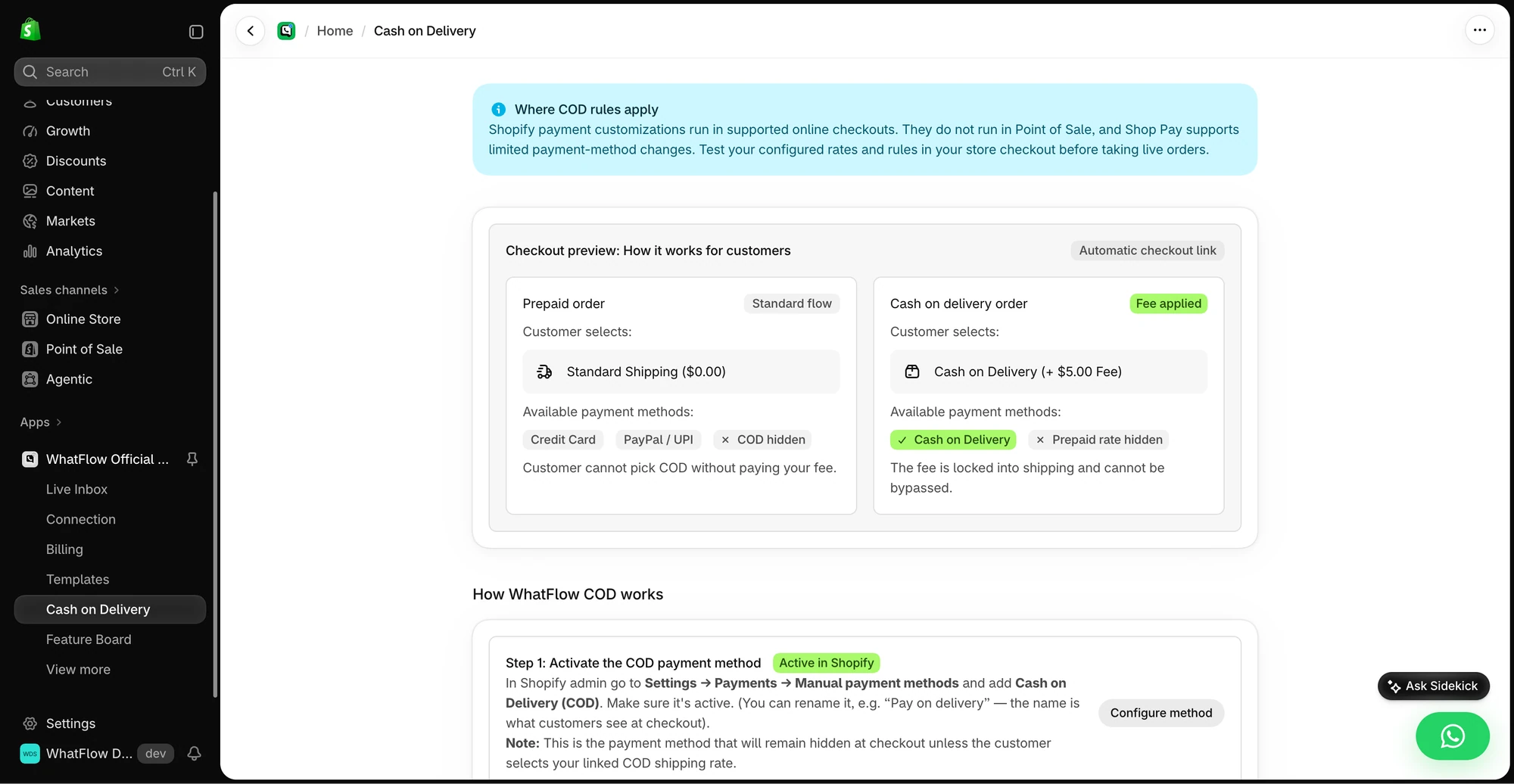
If you offer pago contra entrega, set COD rules. Choose the manual payment method WhatFlow manages, select any COD shipping rate, and preview eligible checkouts.
Turn on COD confirmation with reply buttons. Replies can tag or cancel orders through Shopify Flow.
Add OTP verification where fake orders are a problem. WhatFlow verifies the number with a one-time code and tags the order. A verified number only proves access to the phone, so keep a dispatch rule.
Add shipping updates. WhatFlow's shipping-journey messages cover label, carrier pickup, in transit and delivered.
Use FlowSense for a second look at COD orders that may need checking. Read its consent screen first.
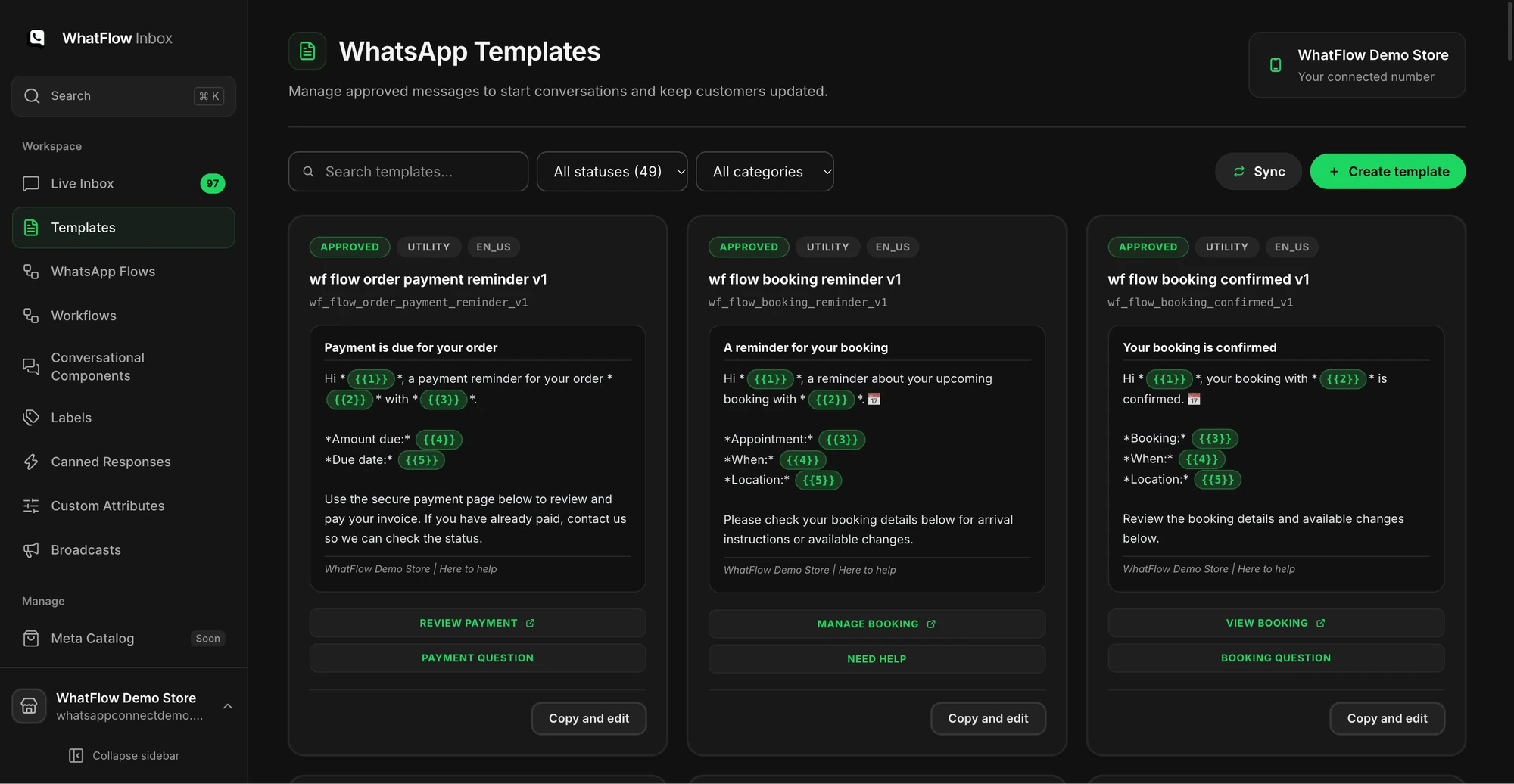
WhatFlow demo store: templates filtered by language and approval status. Sample data, nothing sent.
The COD and OTP setup guide has the click-by-click and the tests to run before going live: confirm, cancel, no reply, and a buyer with two open orders.
WhatFlow demo store: COD rules with a sample checkout preview. Sample data, nothing sent.
For flagged orders, the FlowSense COD order review guide explains how to choose a fair next step. A flag means "check this", not "this is fraud".
Run WhatsApp for your Shopify store with WhatFlow
Free plan available. Templates, COD confirmation, Shopify Flow automations and a shared team inbox with no seat fees. Every feature is included on every plan, including Free.
Start with order confirmations and OXXO reminders in es_MX. At $8.50 per 1,000 messages in Meta fees, they're cheap and they recover orders you'd otherwise lose. Then publish your aviso de privacidad and opt-in, and only then plan campaigns. If you also sell in Brazil, the Brazil guide covers Meta's rates and LGPD there, and our roundup of COD confirmation apps for Shopify compares tools if you're still choosing.
Frequently asked questions
How much does a WhatsApp utility message cost in Mexico?
As of November 2026, Meta charges $0.0085 per delivered utility or authentication template sent to a Mexican (+52) number. That makes 1,000 order confirmations about $8.50 in Meta fees.
Can I pay Meta for WhatsApp in Mexican pesos?
Yes. MXN is one of the billing currencies Meta lists for the WhatsApp Business Platform, available since January 1, 2026.
Who enforces data protection for private companies in Mexico now that INAI is gone?
The Secretaría Anticorrupción y Buen Gobierno. The new Ley Federal de Protección de Datos Personales en Posesión de los Particulares, published on March 20, 2025, names it as the authority in place of INAI.
Do I need a privacy notice to message customers on WhatsApp in Mexico?
Yes. Mexico's 2025 private-sector data protection law requires an aviso de privacidad that tells customers who you are and what you use their data for, and it must flag which purposes need their consent.
Which Spanish should I pick for WhatsApp templates in Mexico?
Meta offers a Spanish (MEX) template language, code es_MX, alongside generic Spanish (es). Use es_MX for templates written for Mexican customers so the language tag matches the copy.
Per-message pricing, the October 1, 2026 changes, the up-to-7-day free entry point window and the billing currency list, which includes MXN from January 1, 2026.
Government-hosted text of the 2025 law (DOF March 20, 2025): Secretaría definition, tacit and express consent (Art. 7), privacy notice (Arts. 14 to 16) and the right to object (Art. 26). The Chamber of Deputies copy refused our connection.
Entry into force on March 21, 2025, INAI's dissolution and the transfer of its role to the Secretaría Anticorrupción y Buen Gobierno, and privacy notice changes.
Law-firm article (April 2026) describing PROFECO's REPEP registry for promotional calls and its link to the right to object; PROFECO's own REPEP site refused our connection.