The best DelightChat alternative for a Shopify store whose main channel is WhatsApp is WhatFlow WhatsApp Business API. It runs on Meta's official WhatsApp Cloud API, includes every feature on every plan (the Free plan too), and its shared team inbox has no seat fees. Your bill follows message volume, not tickets closed, contacts reached or agents logged in.
That's my pick, and I'm obviously biased because I build WhatFlow. So below you'll find six other DelightChat alternatives with their real prices, ratings and billing units, all checked on their Shopify App Store listings and pricing pages on November 18, 2026. Some of them beat us for specific jobs, and I'll say which.
Why do Shopify stores look for DelightChat alternatives?
DelightChat is a solid product. It's rated 4.9 from 223 reviews on the Shopify App Store, it uses the official WhatsApp Business API, and it covers support, marketing, cart recovery and COD verification in one app. Nobody should switch away from it on a whim.
The reasons stores compare it come down to how it bills. As of November 2026, DelightChat's pricing page lists:
Two billing units at once. Support is billed per billable ticket (a ticket counts once a human replies) and marketing per unique contact. Startup is $29/month for 500 tickets and 2,500 contacts, Scale is $99/month for 2,000 and 10,000, Growth is $299/month for 6,000 and 30,000.
Overage by the hundred. Extra tickets cost $10 per 100 on Startup, $8 on Scale and $5 on Growth. Extra contacts cost $10, $5 and $3 per 1,000.
Team caps per plan. Startup includes 5 team members, Scale 20 and Growth 50.
Add-ons. Each extra WhatsApp API number is $25/month. Back in Stock Alerts cost $10 to $30/month depending on plan. The GPT assistant is a paid add-on after the free token allowance.
None of that is unusual. But say you have six people answering WhatsApp. Startup's 5-member cap moves you to Scale at $99/month before you've sent a single campaign. If your team is growing faster than your ticket count, you may prefer a model where headcount doesn't touch the price. That's the gap the apps below try to fill, each in its own way.
DelightChat alternatives compared
Ratings and prices are from each app's Shopify App Store listing, checked November 18, 2026. Meta's WhatsApp message charges are extra on every app.
API setup listed; "official" not stated on listing
Wati
Cart recovery with AI and drip campaigns
$69/month
3.7 (121)
Yes, per its pricing page
WhatsApp by Meta
Free order updates and cart campaigns
Free to install
4.4 (974)
Meta's own app
DelightChat (for reference)
Support plus marketing billed by tickets and contacts
$29/month
4.9 (223)
Yes, per its listing
1. WhatFlow WhatsApp Business API
Who it's for: Shopify stores where WhatsApp is the main customer channel, from a two-person shop to a support team of 30 or more.
WhatFlow is built on the official Meta WhatsApp Cloud API, and you connect it through Meta Embedded Signup inside Shopify admin. That gives you Meta-approved templates and a business profile that's eligible for the green tick through Meta. Many merchants still remember us as the small-shop app from our older Chat Automation product. That's a different app (see Chat Automation vs Business API). The Business API app is what growing teams run on.
Standout features:
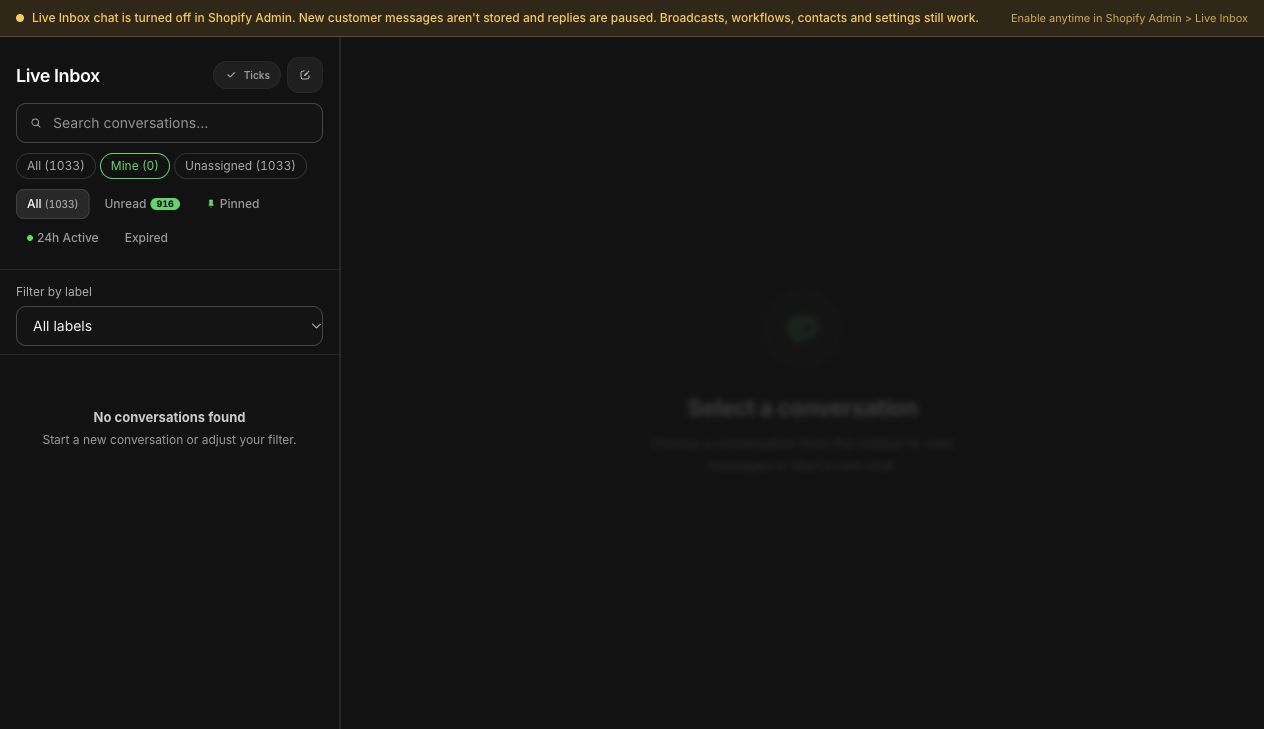
A shared team inbox with assignment, filters, labels and canned replies, and no seat fees. A 50-person team costs the same in seats as a 2-person team.
Every feature on every plan, including Free. Plans differ only by messaging allowance.
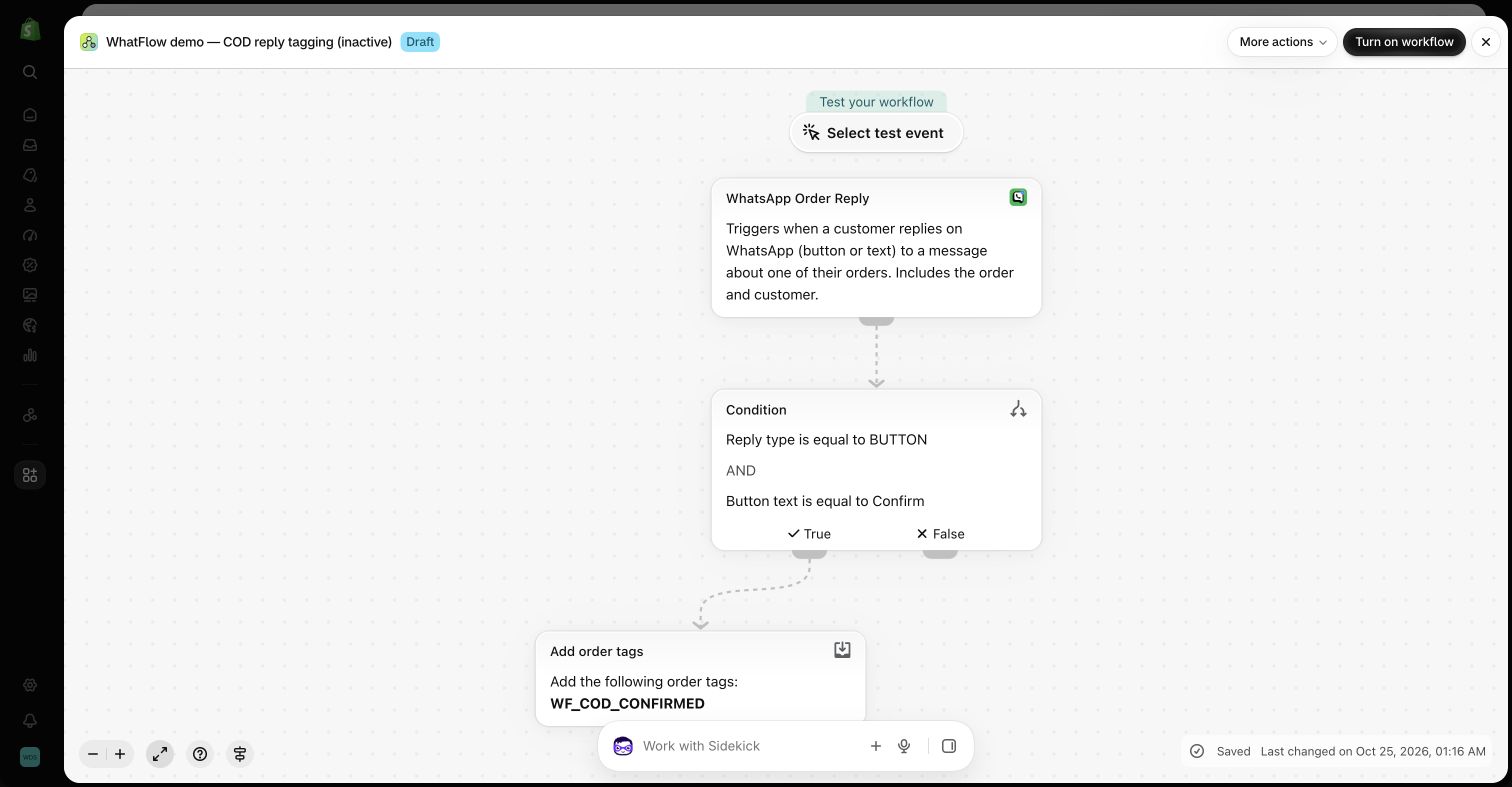
COD order confirmation with reply buttons that can tag or cancel orders through Flow, plus abandoned checkout recovery, shipping updates, broadcasts and live catalog sharing.
No built-in AI bot, but it plugs into Shopify Sidekick and, over our MCP connector, into Claude, ChatGPT or Cursor with a draft mode so a person approves replies.
Assignment filters in the WhatFlow team inbox on our demo store, with sample data.
Pricing and rating (November 2026): a Free plan and paid plans from $4.99/month, with a 7-day trial on paid plans. See WhatFlow pricing for allowances and Meta's country rates, which we pass through with zero markup. Rated 5.0/5 from 85 ratings (checked November 24, 2026).
Honest limitation: there's no native AI chatbot inside WhatFlow. If you want an AI agent answering customers on its own around the clock, Spur or Zoko's add-on bots are closer to that today. Our full side-by-side is in WhatFlow vs DelightChat.
2. Zoko
Who it's for: stores that want customers to browse and buy inside WhatsApp.
Zoko syncs your Shopify catalog to WhatsApp, runs broadcasts to Shopify segments, and has a multi-agent inbox that handles chats, calls and voice notes with real-time translation. Its pricing page says every feature is on every plan, so the plan choice is about volume, which I like.
Pricing and rating (November 2026): Starter is $49.99/month with unlimited agents and a $0.015 markup per conversation. Plus is $79.99/month (5 agents included, then $15 each), Elite $139.99 and Max $499.99. Instagram is a $9.99/month add-on, premium flows are $5.99 per flow, and AI bots start at $24.99/month per bot. 7-day trial. Rated 4.9 from 479 reviews.
Honest limitation: the low-entry Starter plan adds a per-conversation markup, and the higher plans move to per-agent fees past the included seats, so model both before you pick. More in WhatFlow vs Zoko.
3. Spur
Who it's for: brands that sell on Instagram as much as WhatsApp and want an AI agent up front.
Spur's AI agent recommends products, shares order tracking and hands chats to your team. You also get cart recovery that stops once the shopper buys, COD confirmation with an offer to pay online, segment campaigns and Instagram comment-to-DM automation. It even has an MCP server for Claude and ChatGPT.
Pricing and rating (November 2026): on the Shopify listing, AI Start is $39/month with 2,000 AI credits and 2 user seats, AI Accelerate is $159/month with 5 seats, and AI Max is $499/month with 10 seats. Spur's pricing page lists extra seats at $15 each. 14-day trial. Rated 5.0 from 118 reviews.
Honest limitation: seats and AI credits are both metered, so a big team or a chatty AI agent raises the bill. See WhatFlow vs Spur.
4. Kanal
Who it's for: marketing-led brands, especially in Europe, that want WhatsApp, SMS, iMessage and RCS campaigns in one place.
Kanal focuses on revenue flows: abandoned carts, welcome messages, post-purchase upsells, back-in-stock alerts and segment campaigns, with A/B tests and carousels on Scale. It has a shared inbox with Shopify order context and an AI agent that works in 96+ languages.
Pricing and rating (November 2026): a Free plan, Pro at $89/month for 1 user, and Scale at $149/month with unlimited users. Each extra market on Scale is $50/month. Rated 5.0 from 144 reviews.
Honest limitation: Pro is a single-user plan, so a support team effectively starts at $149/month. Compare in WhatFlow vs Kanal.
5. Interakt
Who it's for: budget-conscious stores, often in India, that mostly need notifications and campaigns.
Interakt covers cart reminders, bulk campaigns, order confirmations, COD confirmation, a shared team inbox and a mobile app. Higher plans add chatbots, auto-routing and AI agents.
Pricing and rating (November 2026): on the Shopify listing, Starter is $21/month, Growth $41, Advanced $51 and Premier $99, each with a 14-day trial and WhatsApp conversation charges on top. Interakt's own pricing page shows unlimited agent seats. Rated 4.3 from 235 reviews.
Honest limitation: some of the more useful bits sit on higher tiers. Cart reminders and Shopify actions in the workflow builder are listed on Premier. Details in WhatFlow vs Interakt.
6. Wati
Who it's for: larger teams that want AI agents, drip campaigns and Click-to-WhatsApp ad attribution.
Wati's Shopify app adds cart recovery, carousel and drip campaigns, Shopify segment sync, ad-lead tagging and a Shopify dashboard on top of its team inbox.
Pricing and rating (November 2026): the listing shows Growth at $69/month, Pro at $149 and Business at $349, with extra users at $89/user/month on Pro and Business and automation or AI credits sold per 1,000. Wati's pricing page shows lower annual-billing prices and 3 to 5 included users. 7-day trial. Rated 3.7 from 121 reviews.
Honest limitation: user seats are a real cost line here, which matters if you're leaving DelightChat because of team size. See WhatFlow vs Wati.
7. WhatsApp by Meta
Who it's for: stores that only want order notifications and cart campaigns, at no app cost.
Meta's own Shopify app sends order updates and abandoned cart campaigns with templates, triggers and multi-language support. It's free to install, and Meta bills message charges separately from your Shopify invoice.
Pricing and rating (November 2026): free to install. Rated 4.4 from 974 reviews.
Honest limitation: the listing doesn't mention a chat button or a team inbox, so it won't replace DelightChat's support side. Our breakdown is in WhatFlow vs Meta's WhatsApp app.
How to switch from DelightChat
Switching WhatsApp apps is mostly about the number and the templates. Here's the checklist I give merchants:
Export what you need. Contacts with opt-in status, open conversations you'll still need, and your saved replies.
Decide on the number. Keeping it means releasing it from DelightChat's WhatsApp Business account first. Ask their support how they handle that, and pick a quiet hour for the cutover.
List your templates. Order confirmation, shipping, cart recovery, COD confirmation, marketing. If the new app uses a different WhatsApp Business account, you'll resubmit them to Meta.
Rebuild automations one at a time. Start with COD confirmation and order updates, then cart recovery, then campaigns.
Set up the inbox. Add agents, labels and assignment rules, and paste in your saved replies.
Test on a staff phone. Place a test order, reply to the confirmation, check the order tag lands in Shopify.
Uninstall DelightChat last, after a full day of clean sends on the new app.
A COD confirmation template you can recreate on day one looks like this:
Hi {{1}}, thanks for your order {{2}} for {{3}}. It's cash on delivery. Tap Confirm to ship it, or Cancel if you've changed your mind.
In WhatFlow, the customer's button tap can drive a Shopify Flow workflow that tags the order, so your warehouse only picks confirmed COD orders.
An inactive demo workflow that branches on a WhatsApp order reply and tags the order. Nothing was sent.
Remember that outside the 24-hour customer service window, WhatsApp only lets a business send a Meta-approved template, and Meta charges per delivered template message. Rates are on Meta's pricing page.
Run WhatsApp for your Shopify store with WhatFlow
Free plan available. Templates, COD confirmation, Shopify Flow automations and a shared team inbox with no seat fees. Every feature is included on every plan, including Free.
WhatsApp is your main channel and your team is growing: WhatFlow. No seat fees, every feature on Free, and Shopify Flow for anything custom. Read why no-seat-fee inboxes beat per-seat pricing as you hire.
You want customers to shop inside WhatsApp: Zoko.
Instagram matters as much as WhatsApp and you want an AI agent: Spur.
You're marketing-led and want SMS, RCS and iMessage too: Kanal.
You only need order updates and cart campaigns for free: WhatsApp by Meta.
If you're happy with DelightChat's ticket model and your team fits the plan, stay. If headcount is what's pushing your bill up, try WhatFlow's Free plan for a week alongside it and see how the inbox feels.
What is the best DelightChat alternative for Shopify?
For a Shopify store where WhatsApp is the main channel, WhatFlow WhatsApp Business API is the closest fit: it runs on Meta's official WhatsApp Cloud API, has a team inbox with no seat fees and includes every feature on its Free plan. Paid plans start at $4.99/month as of November 2026.
How does DelightChat charge?
As of November 2026, DelightChat's pricing page bills support by billable ticket, counted once a human replies, and marketing by unique contact. Plans run from $29/month (Startup, 500 tickets, 2,500 contacts, 5 team members) to $299/month (Growth).
Can I keep my WhatsApp number if I leave DelightChat?
Usually yes, but the number has to be disconnected from the old provider's WhatsApp Business account before you connect it to a new app. Check with your current provider how they release the number, and plan a short cutover window.
Do I need to recreate my WhatsApp templates when I switch apps?
Plan for it. Templates belong to the WhatsApp Business account they were approved in, so if the new app connects a different account you'll submit them to Meta again, and approval isn't instant.
Are Meta's WhatsApp charges included in these app prices?
No. Every app here bills its subscription separately from Meta's per-message WhatsApp charges, which vary by message category and the customer's country. WhatFlow passes Meta's charges through with zero markup.
DelightChat's 4.9 rating from 223 reviews, Startup/Scale/Growth plans at $29/$99/$299, 14-day trial and its official WhatsApp Business API statement, checked November 18, 2026.
Billable-ticket and contact billing units, team member and channel limits per plan, overage rates, extra WhatsApp numbers at $25/month and the Back in Stock add-on.