The best way to use AI in a small Shopify business is as a fast first-draft writer and data assistant, never as the final word. Use it to draft product copy, edit images, query your sales data and sketch Shopify Flow workflows. Don't let it invent product facts, reply to customers unsupervised, write your policies alone, or fill your blog. A person checks everything that reaches a customer.
That's my position after a couple of years of watching merchants use these tools. AI saves real hours on the boring parts of running a store. It also creates a new, quiet kind of mistake: the confident wrong answer that nobody checked.
What AI tools does Shopify already include?
Before you pay for anything, look at what's in your admin. According to Shopify's AI-powered tools page, Shopify includes:
Sidekick, an AI assistant in the admin that can give guidance, generate content, complete tasks and build custom apps.
Text generation in the editors for product descriptions, pages, blog posts, Shopify Messaging emails and theme content.
Image editing in the file editor, such as changing an image from a text prompt or replacing a background with a colour.
Smaller assists like product category suggestions, suggested replies in Shopify Inbox, customer segment descriptions and analytics projections.
Tinker, a free mobile app with AI tools for images, video and brand assets.
Shopify says many of these come at no extra cost, but availability varies by plan, device and language.
Sidekick has grown into the most useful of these. It can handle multi-step tasks, build Shopify Flow workflows, write and run code to forecast or summarise your store data, and follow instructions you save as skills. Importantly, Shopify says it presents changes for your review before applying them. Keep it that way.
How to use AI for Shopify: where it genuinely helps
Here's where I've seen AI pay for itself, roughly in order of value.
1. Asking questions about your own data
This is underrated. Instead of building reports, ask Sidekick things like:
"Which products had the most refunds last quarter, and what reasons were given?"
"What share of last month's orders were cash on delivery, by city?"
"Compare repeat purchase rate for customers who bought the serum vs the cleanser first."
You still need to sanity-check the numbers against a report you trust, but it gets you to the right question in minutes instead of an afternoon with spreadsheets.
2. First drafts of product descriptions
Say you sell skincare and you're adding a new vitamin C serum. Give the AI the facts: ingredients list, concentration, size, skin types, how to use, what customers asked about your last serum. Ask for a draft in your brand voice.
Then edit. Add the detail only you know ("the dropper gives about 4 drops per pump, which is all you need"). Remove anything it made up. Unedited AI descriptions sound like every other store's, and they occasionally include specifications that don't exist.
3. Image clean-up
Background removal, colour backgrounds, cropping variations for different placements. For a small store without a photographer, this is a real time saver. Don't use AI to change what the product looks like. If the photo doesn't match what arrives, you'll pay for it in returns.
4. Drafting automations
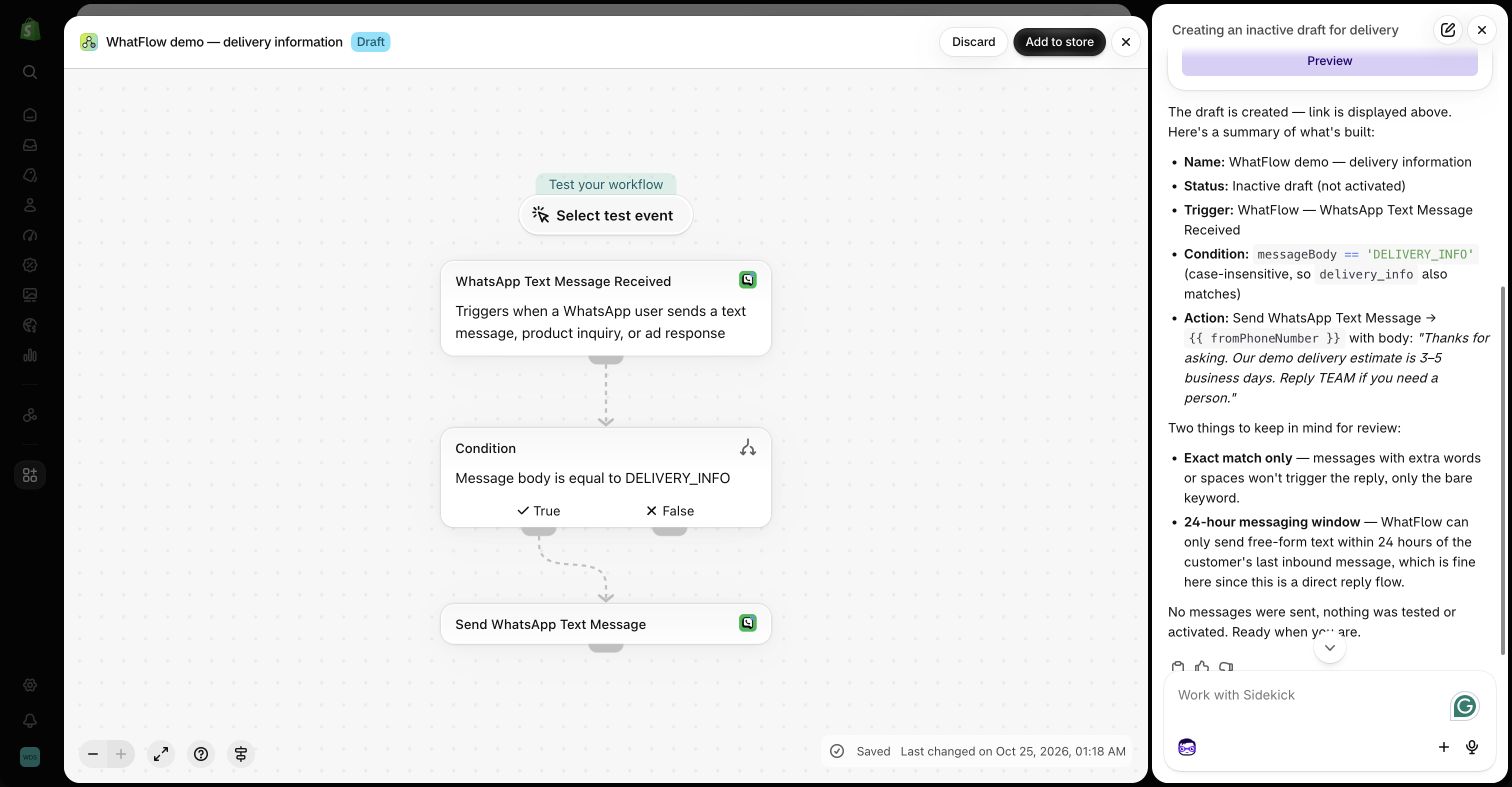
Sidekick can draft Shopify Flow workflows from a plain-language description: "When an order with COD as the payment method is created, wait 10 minutes and send a WhatsApp confirmation template." It's a faster starting point than building from scratch.
This is where WhatFlow fits in. WhatFlow has native Flow triggers and actions for WhatsApp, so Sidekick can help you sketch a workflow that sends a WhatFlow template or reacts to a customer's WhatsApp reply. You still review the workflow, test it on your own order, and turn it on yourself. I've written a step-by-step guide to using Sidekick to draft WhatsApp workflows.
Save the repeatable part of a reply in WhatFlow, then check the facts before you send it. Agents can personalize a canned response, keep a draft in the thread, and put the internal context in a private note. Search inside the conversation if you need to verify what another agent promised. The Inbox walkthrough shows when to use each tool.
Shopify Sidekick drafting a Flow workflow that uses WhatFlow actions, in a demo store.
5. Support reply drafts
AI is good at turning your messy notes into a clear, polite reply. It's bad at knowing whether the order actually shipped. Use it to draft, from your real policy text, with a person checking the facts before sending. I go deep on how to do that safely in using AI for support drafts while keeping answers accurate.
A practical approach: use AI once to improve your saved replies, then use the saved replies every day. That way the human-checked version is what customers see. Here's an example of a saved reply you might polish with AI and then lock in:
Hi Sara, thanks for checking. Your order #NS-1042 left our warehouse yesterday with Aramex and should reach Dubai Marina by Thursday. You'll get a tracking update here on WhatsApp when it's out for delivery. Anything else I can help with?
If you sell across languages (Arabic and English in the Gulf, Portuguese and Spanish in Latin America), AI translation is a good first pass for product pages and saved replies. Have a native speaker check anything customer-facing, especially sizing, ingredients and returns terms. I covered the practical side in planning multilingual customer messages.
7. Summarising feedback
Paste in a month of review text (no customer names) and ask for the top recurring complaints and compliments. It's a quick way to spot "runs small" or "lid leaks" across fifty reviews.
Where not to use AI
This is the part most AI guides skip.
Don't let it state facts it can't know
Delivery times, stock levels, ingredient safety, whether a product is suitable during pregnancy, warranty terms. AI will answer these confidently and sometimes wrongly. Say a customer messages at 11pm asking if your serum is safe during pregnancy. An AI-generated "yes, it's gentle and safe!" is a liability. The right answer comes from your product documentation or a "please check with your doctor" reply your team wrote and approved.
Don't let it reply to customers unsupervised
For a small store, every customer conversation is precious. An AI agent that answers "where's my order?" with a made-up date, or approves a refund your policy doesn't allow, damages trust faster than a slow reply. If you use any automated responder, keep it to things that can't be wrong: hours, links, "a person will reply shortly".
For the record: WhatFlow has no built-in AI bot that answers customers on its own. We've focused on making it fast for a person to give a good answer: a shared inbox, saved replies, catalog sharing, and Flow automations for the predictable messages like order and shipping updates. If you want AI help, bring the AI you already pay for. WhatFlow's MCP connector lets Claude, ChatGPT or Cursor read your Live Inbox chats, look up the Shopify order and draft a reply, and with draft mode on, nothing is sent until a person on your team presses Send. There are no per-resolution AI fees on top.
Don't let it write your policies alone
Returns, privacy and terms have legal weight. Shopify can generate policy templates from your settings and Sidekick can help insert them, which is a fine starting point. But read every line, and get proper advice for anything you're unsure about.
Don't fill your blog with generic AI posts
Google's helpful content guidance emphasises first-hand experience and suggests telling readers when automation played a substantial role. A hundred AI posts that say what every other site says won't rank, and won't get you cited in AI answers either. Write fewer posts, from your real customer questions. Here's how to mine your WhatsApp chats for content ideas.
Don't fake social proof
No AI-written reviews, no AI-generated "customer" photos, no invented testimonials. It's dishonest, and in many places it breaks consumer protection rules.
Don't paste customer data into tools you haven't checked
Customer names, phone numbers, addresses and order histories shouldn't go into a public AI chatbot. Use tools inside Shopify where possible, and strip personal details from anything else.
A quick guide: AI or human?
Task
AI drafts?
Human must…
Product descriptions
Yes
Add real details, check every spec
Image backgrounds and crops
Yes
Make sure the product looks like the real thing
Data questions
Yes
Spot-check numbers against a report
Flow workflows
Yes
Review, test on your own order, then turn on
Saved replies
Yes, once
Approve the final version
Live customer replies
Not unsupervised
Check facts and send
Translations
Yes
Native speaker checks customer-facing text
Policies
Template only
Read every line, get advice if unsure
Blog posts
Outline and editing help
Write from first-hand experience
Reviews and testimonials
Never
Collect real ones
Free plan available
Run WhatsApp for your Shopify store with WhatFlow
Templates, COD confirmation, Shopify Flow automations and a shared team inbox with no seat fees. Every feature is included on every plan, including Free.
Pick one boring job that eats your week, probably product descriptions or weekly reporting, and try Sidekick on it for a month. Keep a note of what it got wrong. If the time saved beats the time spent checking, expand to the next job. If you're deciding what to automate at all, my guide to choosing your first Shopify automation is a good companion to this one.
Frequently asked questions
What AI tools does Shopify include?
Shopify includes Sidekick, an AI assistant in the admin, plus AI text generation for product descriptions, pages, blog posts and emails, image editing in the file editor, and smaller features like product category suggestions. Shopify says many of these are available at no additional cost, though availability varies by plan, device and language.
Should I let AI reply to my customers automatically?
For a small store, I wouldn't let AI send replies unsupervised. Use it to draft answers from your own policies and product facts, and have a person check and send them, because a confidently wrong answer about delivery, ingredients or refunds costs more than the time it saves.
Can AI write my Shopify product descriptions?
It can write a solid first draft, but you need to add the details only you know (fit, texture, what customers ask about) and check every factual claim. Unedited AI descriptions tend to sound the same as everyone else's and can include made-up specifications.
Does WhatFlow have AI features?
WhatFlow has no built-in AI bot. Instead it connects to the AI you already use: Shopify Sidekick can draft Flow workflows that use WhatFlow's triggers and actions, and WhatFlow's MCP connector lets Claude, ChatGPT or Cursor read Live Inbox chats, look up Shopify orders and draft replies. With draft mode on, a person on your team approves every message before it reaches a customer, and there are no per-resolution AI fees.