A trustworthy Shopify product page answers four questions before the shopper has to ask: what exactly am I getting, do real buyers like it, when will it arrive (and what if it's wrong), and who do I talk to if I'm unsure. The 18 checks below cover those four areas plus a mobile test. Run them on your phone, on your best seller, before adding a single badge.
Trust isn't a design style. It's the feeling that you know what will happen after you pay. Most product pages I review have nice photos and a five-star badge, and still leave the shopper unsure whether the bag fits a laptop or when it'll arrive. That uncertainty costs more sales than any missing badge.
Part 1: Is the product clear?
Start here, because no review or badge can make up for a vague product.
What's in the box. List exactly what the customer receives. If photos show accessories that aren't included, say so under that photo.
Real dimensions. Measurements in the units your customers use, plus a scale reference (on a model, in a hand, next to a phone).
Compatibility limits. If it only fits certain models or sizes, say which ones. Say which ones it doesn't fit too.
Variant differences. If the 2024 and 2025 versions differ, explain how, next to the selector.
The top question, answered. Look at your inbox. Whatever shoppers ask most about this product should be answered on the page, ideally next to the decision it affects.
That last one is the highest-value check on the list. If people keep asking "is this waterproof?", a one-line answer beside the description will do more than any testimonial. For longer answers, write a proper product FAQ section.
Part 2: Are the reviews honest and useful?
Reviews are about this product. A review of a different colour is fine if labelled. A store-service testimonial ("fast delivery!") shouldn't be displayed as a product review. Our explainer on product reviews vs store reviews goes into the difference.
Variant context is kept. If a review is about the medium size, show that. "Runs small" means nothing without knowing which size. More in keeping review context across variants.
The star rating links to the reviews. A rating near the title should jump to the written reviews when tapped.
Critical reviews are visible. A page of only perfect scores looks curated. A 3-star review that says "great bag, strap is a bit short" is useful information and builds credibility.
No fakes, no insiders, no hiding. In the US, the FTC's Consumer Reviews and Testimonials rule, in force since October 21, 2024, bans fake reviews, undisclosed reviews from employees, and suppressing negative ones (FTC). Wherever you sell, it's the right standard anyway.
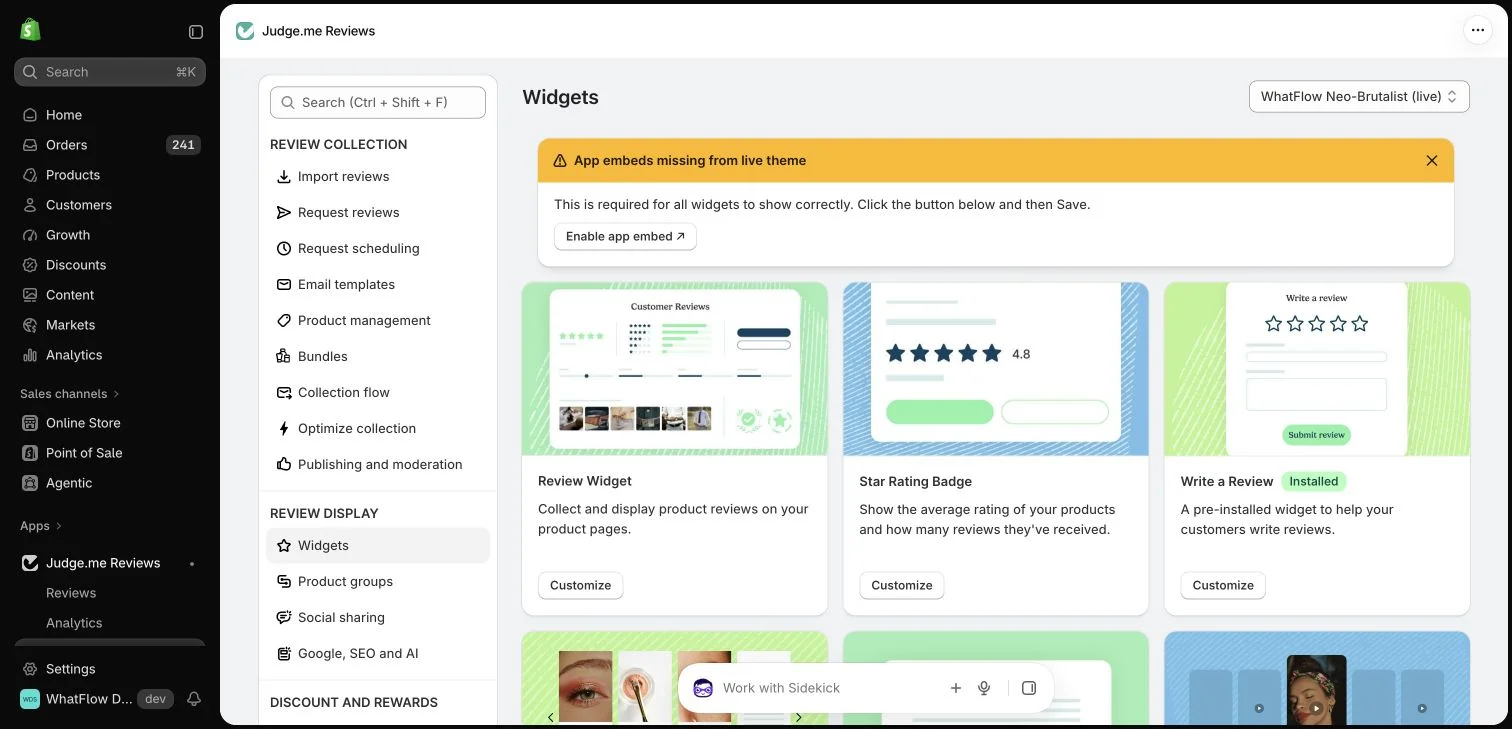
Most review apps, Judge.me included, offer several display widgets: a full review section, a star rating badge, carousels. Pick the ones that put real feedback near the buying decision, and skip the rest.
Judge.me widget settings in the WhatFlow demo store.
Part 3: Are delivery and returns clear before checkout?
Delivery time, not just shipping time. "Ships in 1 to 2 days" is your processing. Shoppers want "usually arrives in 3 to 5 working days in the UAE." Call it an estimate.
Shipping cost or threshold. Show the free-shipping threshold or the cost range on the product page, not only at checkout.
One-line returns summary. Near the buy button: "Return unworn items within 14 days." Link to the full policy.
No badge that overstates the policy. "Easy returns" is misleading if sale items are final. Say the real condition.
Payment options. If you offer cash on delivery, say so. In many markets that's the thing that tips a first-time buyer.
On badges generally: a badge is only as good as what's behind it. A "secure checkout" icon adds nothing Shopify's checkout doesn't already provide, and a certification logo you can't link to a real certificate is a liability. Our take on whether trust badges work goes deeper.
Part 4: Can shoppers ask a question?
A visible, honest way to ask. Some questions are too specific for any page. A WhatsApp button gives a hesitant shopper a quick route to a human. Prefill the message with the product name, and set expectations about hours:
Hi! We reply between 9am and 9pm, Monday to Saturday. Ask away and we'll get back to you within those hours.
Don't let an automated greeting pretend to be a person, and don't promise "instant replies" if you can't keep that promise at 2am. WhatFlow's WhatsApp chat buttons match your theme and are free forever, and conversations land in a shared team inbox with no seat fees, so whoever knows the product can answer.
Part 5: Does it all work on a phone?
Nothing covers the buy button. Open the page on your phone with the cookie banner, sticky add-to-cart bar, chat button and cart drawer all active. Price, variant selector and add-to-cart must stay visible and tappable throughout.
This one check catches more problems than any other. Every trust tool you add (review popup, chat button, discount prompt) wants the bottom corner of a phone screen. Our mobile layout checklist for review widgets and WhatsApp buttons walks through the full test.
How to run the checklist
Do it on one product first. Better yet, give your phone to someone who's never seen the store and ask them to find: the dimensions, what's included, a review from someone like them, when it would arrive and how to return it. Don't help. Write down the first thing they can't find.
Fix that first. Then measure: watch the questions that come in about that product, and the funnel in Shopify Analytics, for a couple of weeks. More chats aren't automatically good or bad, so read them to see if the same doubt keeps appearing. When you're ready to test review placement properly, see how to test social proof on a product page.
Free plan available
Run WhatsApp for your Shopify store with WhatFlow
Templates, COD confirmation, Shopify Flow automations and a shared team inbox with no seat fees. Every feature is included on every plan, including Free.
Facts first, honest reviews second, clear delivery and returns third, an easy way to ask fourth, and a phone test over all of it. A product page that does those well doesn't need a wall of badges.
Frequently asked questions
What makes a Shopify product page trustworthy?
Clear product facts (what's included, dimensions, materials, compatibility), genuine reviews tied to the right product, honest delivery and return information near the buy button, and a visible way to ask a question.
Do trust badges increase conversions?
Not on their own. A badge only helps if it's backed by something real, like an actual certification or a policy the customer can read. Clear information near the buy button usually does more than a row of icons.
Should every product page have a WhatsApp button?
If your team can answer within your stated hours, yes. Place it so it never covers the price, variant selector or add-to-cart button on mobile.
Is it legal to write or edit reviews for my own products?
No. In the US, the FTC's Consumer Reviews and Testimonials rule, effective October 21, 2024, prohibits fake reviews, undisclosed insider reviews and suppressing negative reviews.