Product reviews tell a shopper whether a specific item is right for them: fit, quality, how it actually works. Store reviews tell them whether the shop is safe to buy from: delivery, packaging, communication, how problems get handled. Show product reviews on product pages and store reviews where people decide whether to trust you. Inside the business, send each kind of feedback to the person who can fix it.
A product review helps someone choose an item. The most useful ones are specific: "runs small, size up", "the strap's shorter than it looks", "fits a 15-inch laptop with room to spare". They answer questions your product description didn't.
That's why they need to stay attached to the right product. A review of the large backpack doesn't tell someone much about the small one. If your products come in versions that really differ, our guide to variant review context covers how to keep that clear.
What store reviews are for
A store review helps someone decide whether to give you their money at all. For a shopper who's never heard of you, especially in markets where online scams are common or where they're paying upfront rather than COD, that matters a lot.
Store reviews are where people talk about the things around the product: "arrived in two days", "they replied on WhatsApp within an hour when I had a sizing question", "packaging was lovely, no plastic". Put them where trust is the open question. Many review apps have store-level widgets for this; Judge.me, for example, has a "Happy Customers" page and a floating reviews tab that show store and product reviews together.
Store reviews also help with a problem product reviews can't solve: the product you launched last week. A brand-new item has no reviews yet, but a shopper who sees 80 store reviews saying "arrived fast, easy to reach on WhatsApp, sorted my exchange in a day" has a reason to take a chance on it anyway.
If you're a new brand, store reviews can do a lot of work early. If you're well known, product reviews usually matter more. Our product page trust checklist covers what else to show alongside them.
When one review covers both
Customers don't split their feedback neatly. A typical one:
The jacket fits perfectly and the material is lovely. Delivery took nine days though, and nobody answered my email.
Don't edit it, don't split it, and don't hide it because the delivery part is negative. Leave it exactly as written.
What you do internally is different. Log two themes:
Product: fit and material are working. The size guide is probably accurate.
Store: slow delivery, and an unanswered email. That's for whoever owns fulfillment and support.
If you only look at the star rating, you lose both signals. The product team sees four stars and moves on. The support team never hears about the unanswered email.
How to ask for both without double-messaging
Don't send two review requests on the same day. Customers don't know or care what your review software calls each form.
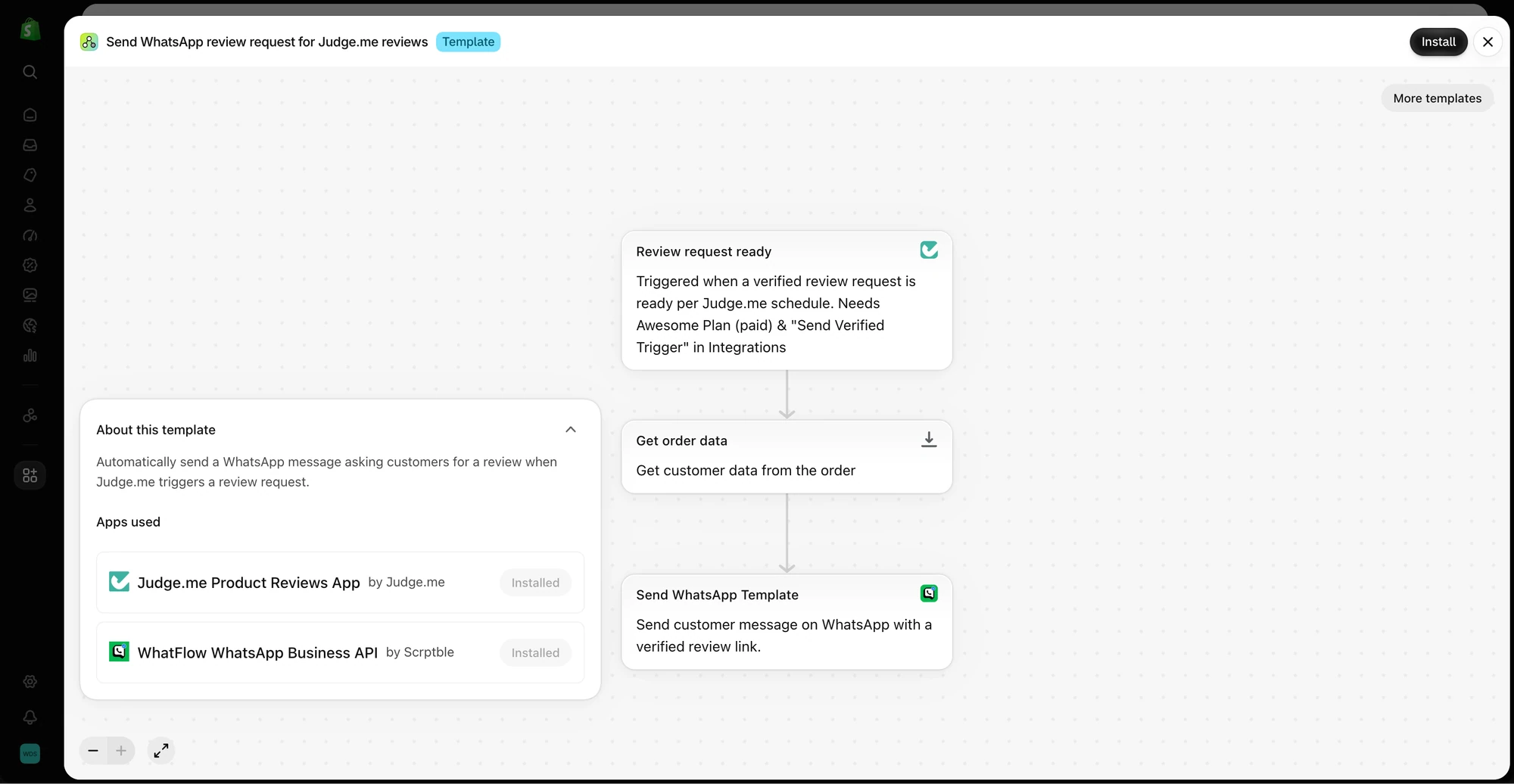
The template uses a Judge.me review request trigger, loads order data, and sends a WhatsApp template through WhatFlow. This is a preview, not an enabled workflow.
A sensible order:
First, the product review, once they've used the item. This is the one shoppers need most.
Optionally, store feedback, either as a prompt on the product review "thank you" page or in a separate short message later.
Example product review request (WhatsApp):
Hi {{1}}, how's the {{2}} working out? If you've got a minute, an honest review helps other shoppers: {{3}}
Example store feedback request, sent later or only to those who didn't leave a product review:
Hi {{1}}, one quick question: how was ordering from us? Delivery, packaging, anything we could do better. You can leave a short shop review here: {{2}}, or just reply to this message.
That "or just reply" matters. Some people won't fill in a form but will happily type two lines on WhatsApp. That's still useful feedback, even if it never becomes a public review. For more templates, see our review request message examples.
WhatFlow sends the request and handles the reply in your shared team inbox. Your review app owns the forms, the widgets and the verified badges.
Send feedback to the person who can fix it
Every review theme needs an owner. A rough mapping for a small store:
Theme
Owner
Broken zip, faded color, wrong size
Product or sourcing
"Description was misleading"
Whoever writes product pages
Slow delivery, damaged parcel
Fulfillment
Slow replies, unhelpful answers
Support
Confusing returns
Whoever owns the returns policy
Once a month, read through the new reviews and tally the themes. If "runs small" shows up on the same product four times, update the size guide. If "slow delivery" spikes after you switched couriers, that's a fulfillment conversation, not a product quality problem. Our guide to turning customer feedback into product improvements has a simple way to run this.
Compare like with like
Don't mix the two kinds of rating into one number and then draw conclusions from it. A store-wide average can hide a product with a real defect. And a run of delivery complaints after a courier change says nothing about product quality.
When you share numbers with the team, include the source, the date range and the count alongside the average. "4.6 from 12 reviews in October" means something very different from "4.6 from 400 reviews over three years".
Free plan available
Run WhatsApp for your Shopify store with WhatFlow
Templates, COD confirmation, Shopify Flow automations and a shared team inbox with no seat fees. Every feature is included on every plan, including Free.
Shoppers should be able to tell which is which. Don't show a store review ("great service!") on a product page as if it were a review of that specific item. And don't call a review "verified" unless your review app has actually verified it against an order. Clear labels make both kinds of review more believable, which is the whole point of showing them.
Frequently asked questions
What is the difference between a product review and a store review?
A product review describes a specific item: fit, quality, how it works. A store review describes the experience of buying from the shop: delivery, packaging, communication and support.
Do I need both product reviews and store reviews on Shopify?
Most stores should start with product reviews, because they help shoppers decide on an item. Store reviews become more useful once you need to prove the shop itself is trustworthy, for example as a new brand or for higher-priced orders.
Where should store reviews go on a Shopify site?
On the homepage, cart or a dedicated reviews page, where shoppers are deciding whether to trust the business. Product reviews belong on product pages.
What if one review mentions both the product and the delivery?
Leave the review as the customer wrote it. Internally, log the product point for whoever owns the product and the delivery point for whoever owns fulfillment.