A review app and a WhatsApp app do different jobs, so you need both. The review app hosts the review form, stores and moderates reviews, applies its verification rules and shows stars on your product pages. The WhatsApp app sends the review request at the right moment and handles the customer's reply. Pick each for its own job, then test the link between them.
I get asked "can WhatFlow replace my review app?" fairly often. No, and it shouldn't. A messaging app that tried to be a review platform would do both jobs badly. What matters is that the two hand off cleanly.
Who does what in a review workflow
Draw the journey as five boxes and put an owner in each:
Review is moderated, verified and shown on the product page
Review app
5. Follow-up
Customer replies "the zip broke", or asks a question
Messaging app inbox, then your team
Boxes 3 and 4 belong to the review app. Box 5 is where most stores fall down: the customer replies to the review request with a complaint, and nobody sees it, because the request came from a no-reply email address.
What to look for in a review app
Your review app owns the evidence. Check:
Collection methods. Email, on-site forms, links you can send through other channels (this is the one you need for WhatsApp).
Product and store reviews. Both, if you want them. Our guide to product reviews vs store reviews explains why they do different jobs.
Photo and video reviews, and how media is stored.
Moderation tools, applied the same way to good and bad reviews.
Verification rules. How the app decides a reviewer is a verified buyer. This is set by the review app. Judge.me, for example, documents its own verification criteria; a WhatsApp link doesn't change them.
Export. Can you get all your reviews out in a usable file if you switch later?
Mobile display. Load the widget on a phone and see how it sits next to your other buttons.
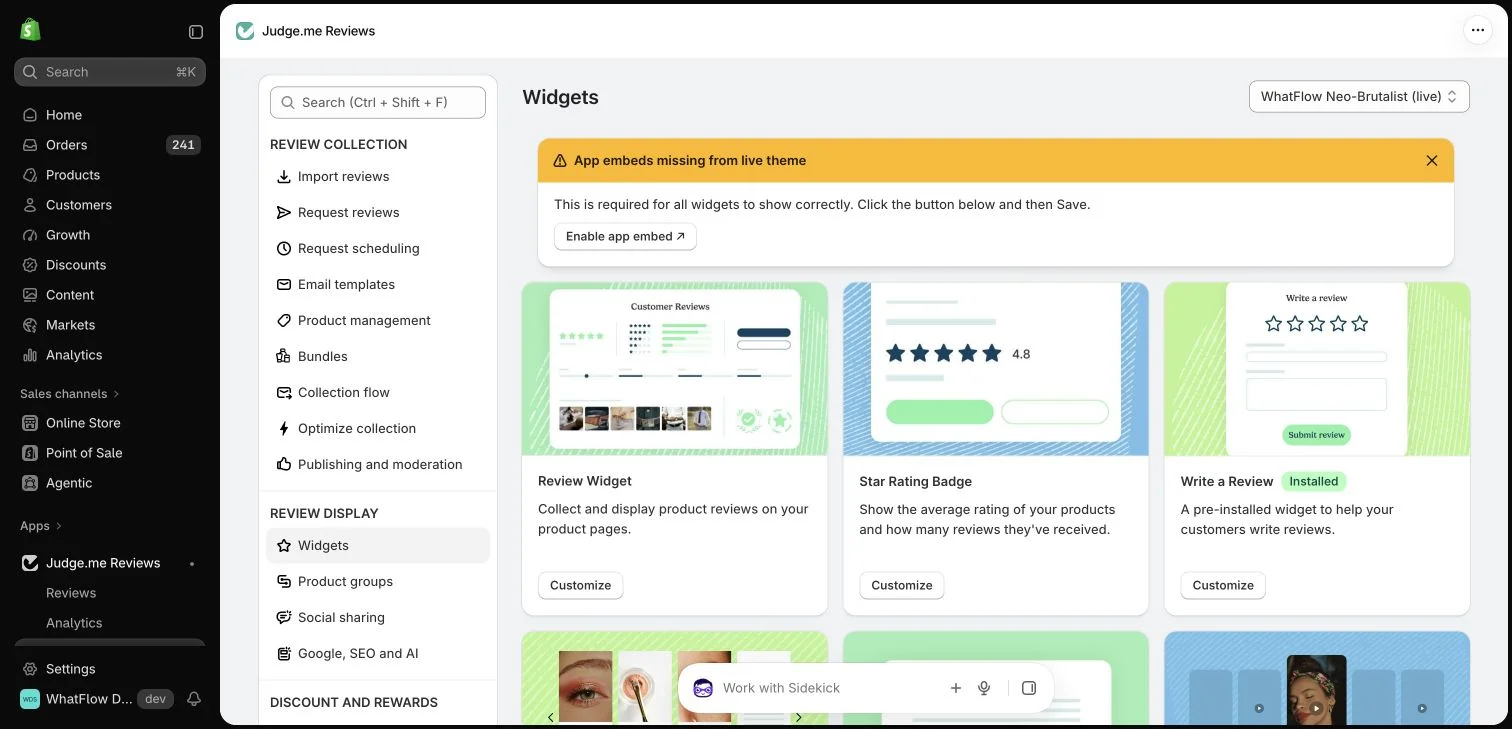
Judge.me's widget settings inside the WhatFlow demo Shopify store. Configuration view only; no reviews were collected.
What to look for in a WhatsApp app
Your messaging app owns the conversation. Check:
Official API. It should use Meta's WhatsApp Business Platform so you can send approved templates to opted-in customers outside the 24-hour window.
Templates with links and buttons, so the request can link straight to the review form.
Triggers from Shopify order data, so the request goes out after delivery rather than at checkout.
A shared inbox, so replies to the request reach a person.
Opt-out handling, because some customers will reply "stop".
WhatFlow's WhatsApp Business API app is built on Meta's official WhatsApp Cloud API and covers the first four (opt-outs are a process you own, whatever the app). It sends review-request templates that link to your review app's form, runs them from Shopify order events or Shopify Flow, and drops replies into a shared team inbox with no seat fees. Every feature is on every plan, including Free.
A review request that works on WhatsApp
Keep it short, personal and about the product they actually bought:
Hi Sara, it's been a week since your linen shirt arrived. How's it fitting? If you have a minute, a quick review helps other shoppers pick the right size:
[link to review form]
And if anything's wrong with it, just reply here and we'll sort it out.
One rule: don't offer a reward for positive reviews. The FTC's review rule prohibits fake reviews and review suppression, and incentives come with their own conditions. Our post on incentivised review rules covers what's safe.
Test the handoff before you trust it
"Integrates with" can mean anything from a deep connection to a single shared trigger. Test the actual route:
Place a test order on a real product and mark it delivered.
Let the review request go out to your own WhatsApp.
Tap the link. Does it open the right product's form, on a phone, in the right language?
Submit a review. Does it show up against the right product (and variant) in your review app?
Reply to the request with a complaint. Does someone on your team see it?
If you're connecting the two through Shopify Flow, check exactly which triggers and actions each app exposes. Our guide to connecting WhatsApp to your Shopify app workflows shows how that looks with WhatFlow.
Compare the combined cost
Price the pair together for your real volume: review app plan, messaging app plan, Meta's per-message charges for the review-request template, and anything you need to connect them. A review app's cheapest plan may not include the collection method you need, and a messaging app's cheapest plan may lock automation behind an upgrade. With WhatFlow it won't; plans differ only by messaging allowances and rates.
Free plan available
Run WhatsApp for your Shopify store with WhatFlow
Templates, COD confirmation, Shopify Flow automations and a shared team inbox with no seat fees. Every feature is included on every plan, including Free.
Whichever review app you pick, you might leave it one day. Check the export format now, keep your review-request link in one place (a single Flow action or template) so it's easy to update, and read our guide to migrating review apps without losing your reviews before you need it.
Frequently asked questions
Do I need a separate review app if I use WhatsApp for review requests?
Yes. The WhatsApp app sends the request and handles replies; the review app hosts the form, stores and moderates reviews, applies its verification rules and shows them on your product pages.
Can I send review requests on WhatsApp from Shopify?
Yes. With WhatFlow you can send an approved WhatsApp template after delivery that links to your review app's form, triggered by Shopify order events or a Shopify Flow workflow.
Will reviews collected through a WhatsApp link count as verified?
That depends on your review app's verification rules, not on the messaging app. Check your review provider's documentation for how it marks verified buyers.
Can I offer a discount in exchange for a review?
Be careful. Incentives tied to positive reviews are a problem under FTC rules and many platform policies, and any incentive needs disclosure. Read the rules before you add one.