
Publisher disclosure: this comparison is written by WhatFlow. Competitor capabilities are based on the linked public documentation; the WhatFlow screenshots come from our demo store. Examples are illustrative, and results depend on your store and configuration.
WhatFlow and Trengo at a glance
| Consideration | WhatFlow | Trengo |
|---|---|---|
| What the product is built around | Built for Shopify: admin extensions, native Shopify Flow triggers and actions, COD confirmation and a WhatsApp team inbox. | A multichannel customer conversation platform with team collaboration and automation, sold as bundled packages. |
| Pricing and billing units | Free plan; paid plans from $4.99/month based on sends. Meta fees separate. | Boost €349/month month to month (500 conversations/month) or €299/month billed annually (6,000 conversations/year), as of November 2026. |
| Feature access | Every feature on every plan, including Free. | Boost bundles an inbox and basic automation; Pro adds broader integrations, AI and governance. Trengo says AI Journeys beta packaging may change. |
| Team access | No seat fees. Add as many teammates as you need. | Boost includes 10 users; Pro includes 20 (€599/month monthly or €499/month annually). |
| Storefront entry point | Theme-matched WhatsApp buttons, free forever. | Check Trengo's current website widget options directly. |
| Lowest monthly cost to start | $0 on the Free plan with every feature. | €299/month on annual Boost, €349/month month to month. |
WhatFlow is the better WhatsApp choice for a Shopify store than Trengo. You can start on WhatFlow's Free plan with every feature switched on, invite your whole team without seat fees and run WhatsApp from Shopify Flow. Trengo's cheapest bundle, Boost, is €349 a month month to month as of November 2026. That's a fair price for a multichannel service desk, but most Shopify stores don't need one.
WhatFlow vs Trengo at a glance
- WhatFlow is a WhatsApp app built for Shopify. It uses the official Meta WhatsApp Cloud API, sits inside your Shopify admin and is rated 5.0/5 from 55 ratings on the Shopify App Store (checked November 5, 2026).
- Trengo is a multichannel customer conversation platform for service teams, sold as bundles of users and conversations.
- Starting price: WhatFlow $0, paid from $4.99 a month. Trengo €299 a month billed annually or €349 month to month.
- Team: WhatFlow has no seat fees. Trengo Boost includes 10 users and Pro includes 20.
- Shopify automation: WhatFlow ships native Shopify Flow triggers and actions on every plan.
- Enterprise-ready, not just for small shops: WhatFlow WhatsApp Business API runs on the official Meta Cloud API, with inbox assignment and filters, Shopify Flow automation at scale and no seat fees at any team size, so a 50-person team pays the same in seats as a two-person shop.
How much does Trengo cost compared with WhatFlow?
Let's put real numbers side by side, using Trengo's published prices and WhatFlow's Shopify App Store prices, both as of November 2026. Trengo prices in euros and WhatFlow in US dollars, so I haven't converted anything. Meta's WhatsApp delivery fees apply to both and sit outside these figures.
WhatFlow | Trengo | |
|---|---|---|
Entry plan | Free (100 sends, then $0.01 each) | Boost, €349/month month to month |
Annual option | Not needed: pay monthly from $4.99 | Boost, €299/month billed annually |
What the allowance counts | Messages sent | Conversations (500/month, or 6,000/year on annual) |
Users included | Unlimited, no seat fees | 10 on Boost, 20 on Pro |
Next tier up | Plans only add sends | Pro, €599/month monthly or €499/month annually |
Say you're a three-person store sending around 15,000 WhatsApp messages a month across order updates, abandoned checkout reminders and a weekly broadcast. On WhatFlow that's the Growth plan: $29 a month for 20,000 sends, or $348 for the year. A year of Trengo Boost on monthly billing is €4,188, and €3,588 on the annual plan. Those seven unused seats in the bundle don't help a three-person team.
Conversations and sends aren't the same unit, so I'm not claiming the bundles do identical work. The point is simpler: with WhatFlow you pay for the messages you send, and nothing for the people answering. The full plan list (Starter $4.99 for 2,000 sends, Plus $9.99 for 5,000, Scale $49.99 for 40,000, Ultimate $99 for 75,000) is on our pricing page. If you're auditing your whole app bill, our guide to feature gates and seat fees is worth ten minutes.
Which one fits your Shopify workflow better?
WhatFlow was built around the Shopify order. Its Shopify Flow triggers fire when a customer messages you or replies to an order message, and its actions send templates, text, media or video. That means WhatsApp slots into the workflows you already run.
Say you sell skincare in the Gulf and a parcel is stuck at customs. A Flow workflow can send this utility template when you tag the order "delayed":
Hi Fatima, your order #3307 (Vitamin C serum, 2 × 30ml) is held at customs in Dubai. We expect it to clear within 3 working days. Reply here if you'd rather cancel and we'll sort it today.
Fatima's reply lands in the shared team inbox. Whoever picks it up can share a product from your live catalog, use a saved reply and close the loop without opening another tool. Our post on handling shipping delays on WhatsApp has more templates like this.
COD stores get the most out of this. WhatFlow sends a confirmation with reply buttons, and Shopify Flow tags or cancels the order based on the answer. Trengo has its own automation, and its Pro bundle adds broader integrations, but it's a general service platform. Shopify isn't the centre of it the way it is in WhatFlow.
Team inbox: who answers, and what does it cost?
WhatFlow's shared inbox has assignment, filters and saved replies on every plan. You can add a seasonal helper for Black Friday and remove them in January without touching your bill. That's the whole idea behind no seat fees: the people answering customers shouldn't be a line item.
When testing WhatFlow and Trengo, ask: Can an agent open a matching Shopify order while they reply? In WhatFlow, use Needs reply and Closing soon, claim a conversation, then check Shopify order context and leave a private note. The team inbox walkthrough gives you a repeatable test for two agents, with no per-seat fee.
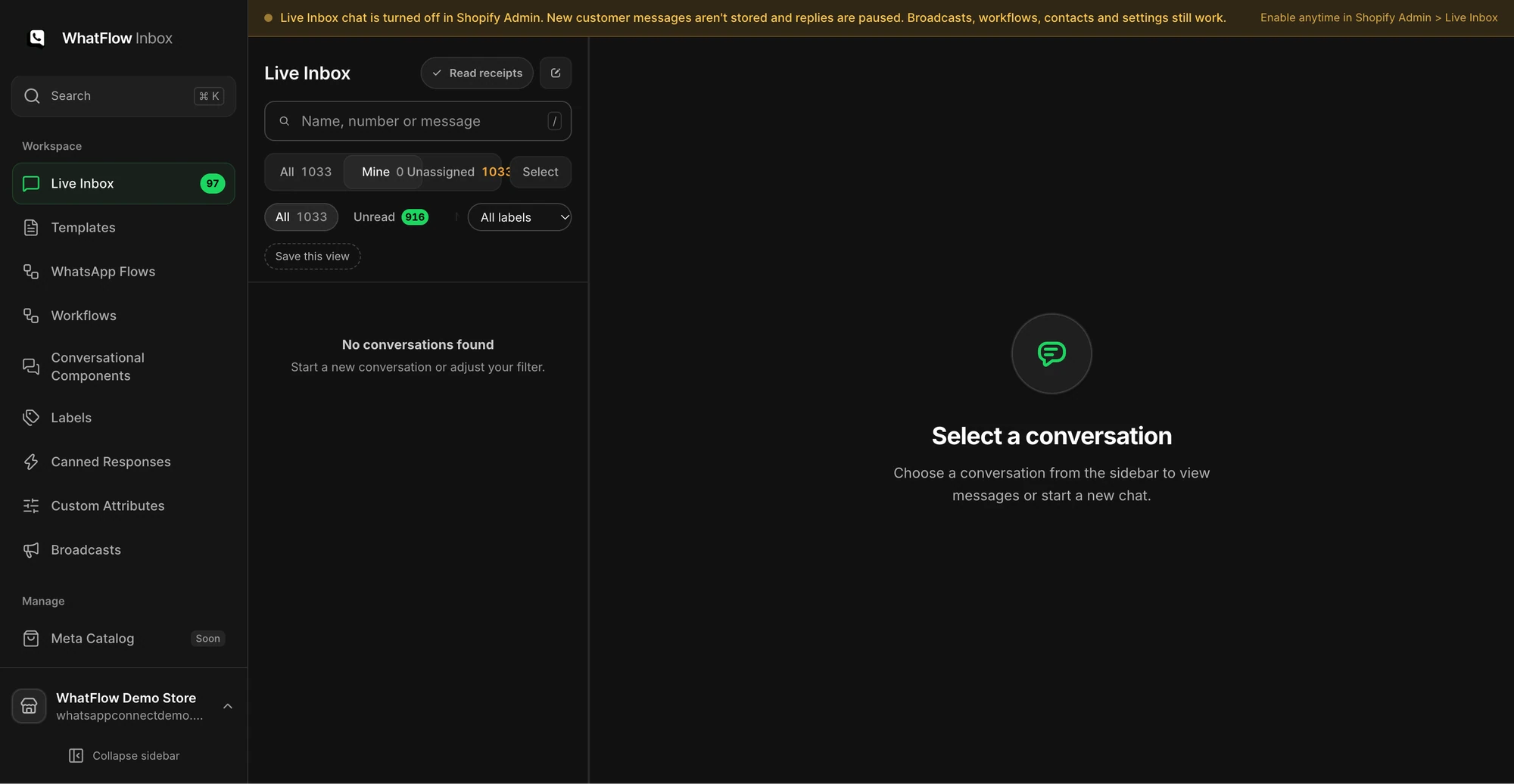
Trengo's model is different. Ten users come with Boost and twenty with Pro, which is plenty for a big team and more than many Shopify stores need. If your support work is mostly order questions on WhatsApp, read WhatsApp inbox vs helpdesk tickets before you commit to a full service platform, and our guide to running a shared team inbox for the ownership rules that keep it tidy.
One trade-off, stated once: WhatFlow has no built-in AI bot, while Trengo's Pro bundle lists AI. If AI-handled conversations are a must-have, weigh that. If AI drafting is enough, WhatFlow's MCP connector lets Claude, ChatGPT or Cursor read Live Inbox chats and draft replies a person approves, using the AI you already pay for. Shopify customer-segment sync is coming soon to WhatFlow.
When Trengo might still make sense
Pick Trengo only if you run a genuine multichannel service team (email, phone, social and WhatsApp handled by 10 or more agents in one place) and you'll use its broader integrations and AI features. In that setup, a bundled €349 plan can be good value.
The bottom line
For a Shopify store, Trengo's bundles mostly buy capacity you won't use. WhatFlow gives you every feature from day one, no seat fees, native Shopify Flow and COD confirmation, and you only pay more when you send more. Install WhatFlow, add a free theme-matched WhatsApp button to your store and you can have your first order update running the same afternoon.
Questions worth asking
Is WhatFlow a good Trengo alternative for Shopify?
Yes. WhatFlow is built for Shopify, with native Shopify Flow, COD confirmation and a WhatsApp team inbox with no seat fees, and every feature is on the Free plan. Trengo is a broader multichannel service platform sold in bundles that start at €299 to €349 a month.
How much does Trengo cost compared with WhatFlow?
As of November 2026, Trengo Boost costs €349 a month on monthly billing (10 users, 500 conversations a month) or €299 a month billed annually. WhatFlow has a Free plan and paid plans from $4.99 a month, with Meta's WhatsApp charges separate. Trengo counts conversations and WhatFlow counts sends, so they're different units.
Does WhatFlow charge per inbox seat?
No. WhatFlow's team inbox has no seat fees and no user cap tied to your plan. You pick a plan by message volume only.
Are WhatFlow features restricted on the free plan?
No. Every WhatFlow feature, from templates and broadcasts to Shopify Flow and the team inbox, is on the Free plan. Paid plans only add message allowance, and theme-matched WhatsApp buttons are free forever.
Sources and methodology
We checked these primary sources on November 5, 2026. Vendor pages describe advertised capabilities, rather than independent performance tests. Confirm current pricing, plan limits and availability with each provider.
- Trengo pricing
Boost and Pro prices in euros, monthly and annual billing, included users and conversation allowances. Checked November 5, 2026.
- WhatFlow WhatsApp Business API on the Shopify App Store
WhatFlow plan prices, included sends, 5.0/5 rating from 55 ratings and Shopify features. Checked November 5, 2026.
- WhatsApp Business Platform pricing
Meta's per-message charges, which apply separately from any app subscription.