
Publisher disclosure: this comparison is written by WhatFlow. Competitor capabilities are based on the linked public documentation; the WhatFlow screenshots come from our demo store. Examples are illustrative, and results depend on your store and configuration.
WhatsApp with WhatFlow and Shopify Messaging at a glance
| Consideration | WhatsApp with WhatFlow | Shopify Messaging |
|---|---|---|
| WhatsApp connection | Official Meta WhatsApp Cloud API through Meta Embedded Signup inside Shopify admin. | WhatsApp Business Account connected through Meta Embedded Signup. |
| What WhatsApp is used for | Campaigns, cart recovery, COD confirmation, order and shipping updates, review requests and two-way team support. | Marketing campaigns to opted-in subscribers, with interactive buttons and keyword replies. |
| Pricing and billing units | Free plan; paid plans from $4.99/month, priced by messages sent. Meta fees separate. | Per message by recipient region, added to your Shopify bill; for example $0.024 (India), $0.106 (UK) or $0.248 (Germany) per marketing message (as of November 2026). |
| Team inbox | Shared inbox with assignment, filters and saved replies, and no seat fees. | Not described in Shopify's WhatsApp help pages. |
| COD confirmation | Template with reply buttons that tag or cancel the Shopify order through Flow. | Not described in Shopify's WhatsApp help pages. |
| Shopify Flow | Native triggers (incoming message, order reply) and actions (template, text, media). | Not described for WhatsApp in Shopify's help pages. |
| Template formats | Template editor with text, media and video message actions in Flow. | Image headers, text and products; video headers and carousel cards aren't supported. |
| Catalog sharing | Live Meta product catalog sharing from the inbox. | Products and catalog media can be added to campaigns. |
| Shopify App Store rating | 5.0 out of 5 from 55 ratings (WhatsApp Business API, November 5, 2026). | 4.8 out of 5 from 4,799 reviews (Shopify Messaging, covering email, SMS and WhatsApp, November 5, 2026). |
| Best fit | Stores that want WhatsApp to run orders, COD, campaigns and support, from solo founders to large teams. | Stores that want to add WhatsApp campaigns next to Shopify email and SMS, without two-way support. |
Shopify Messaging now sends WhatsApp marketing campaigns, and if campaigns are all you want, it's a tidy option inside Shopify. But WhatsApp isn't just a campaign channel. Customers reply, confirm COD orders, ask about sizes and want a person. WhatFlow runs on the official Meta Cloud API and handles all of that: campaigns, a team inbox with no seat fees, COD confirmation, abandoned checkout recovery, order updates, catalog sharing and native Shopify Flow actions. For a store that sells and supports on WhatsApp, pick WhatFlow.
When testing WhatFlow and Shopify Messaging, ask: Which Shopify audience do you already use? In WhatFlow, test a Shopify customer or segment send, then try scheduling a separate Inbox broadcast from a spreadsheet or existing conversations. The campaign walkthrough shows the test send, reply handoff and recipient report.
A quick note on who we are now. Merchants who met WhatFlow years ago through our linked-device Chat Automation app sometimes still see us as an unofficial tool for small shops. WhatFlow WhatsApp Business API is the official-API product: enterprise-ready, rated 5.0 on the Shopify App Store, and connected through the same Meta Embedded Signup Shopify itself uses.
WhatFlow vs Shopify Messaging at a glance
WhatFlow | Shopify Messaging (WhatsApp) | |
|---|---|---|
Connection | Official Meta Cloud API, Embedded Signup | Meta Embedded Signup |
WhatsApp campaigns | Yes | Yes |
Cart recovery, order and shipping updates | Yes | Not described for WhatsApp |
COD confirmation with order tagging | Yes, via Flow | Not described |
Team inbox for replies | Yes, no seat fees | Not described |
Shopify Flow triggers and actions | Yes | Not described for WhatsApp |
Billing | App plan from $0; Meta fees separate | Per message on your Shopify bill |
Shopify rating (Nov 5, 2026) | 5.0 (55 ratings) | 4.8 (4,799 reviews, whole app) |
What does Shopify Messaging do on WhatsApp?
Shopify announced WhatsApp marketing in Shopify Messaging on July 29, 2026. You can build campaigns from pre-built templates or your own content, add media from your product catalog, and let customers trigger responses with buttons or keywords. You connect a WhatsApp Business Account through Meta Embedded Signup, and you can only message customers who explicitly opted in.
Shopify's requirements page also lists some limits: video headers and carousel cards aren't supported, and every message includes a STOP-to-unsubscribe line by default.
It's a sensible start for marketing. It's not a WhatsApp operation.
Where does WhatFlow go further?
Everything that happens around an order and after a customer replies. On every WhatFlow plan, including Free:
- COD confirmation: a template with Confirm and Cancel buttons. The customer's tap fires WhatFlow's order-reply trigger in Shopify Flow, which tags or cancels the order. Our COD with Flow guide shows the setup.
- Abandoned checkout recovery, order and shipping updates, and review requests.
- A shared team inbox with assignment, filters, saved replies and live catalog sharing, with no seat fees.
- Native Shopify Flow triggers and actions for template, text, media and video messages.
- Free-forever, theme-matched WhatsApp buttons for your storefront.
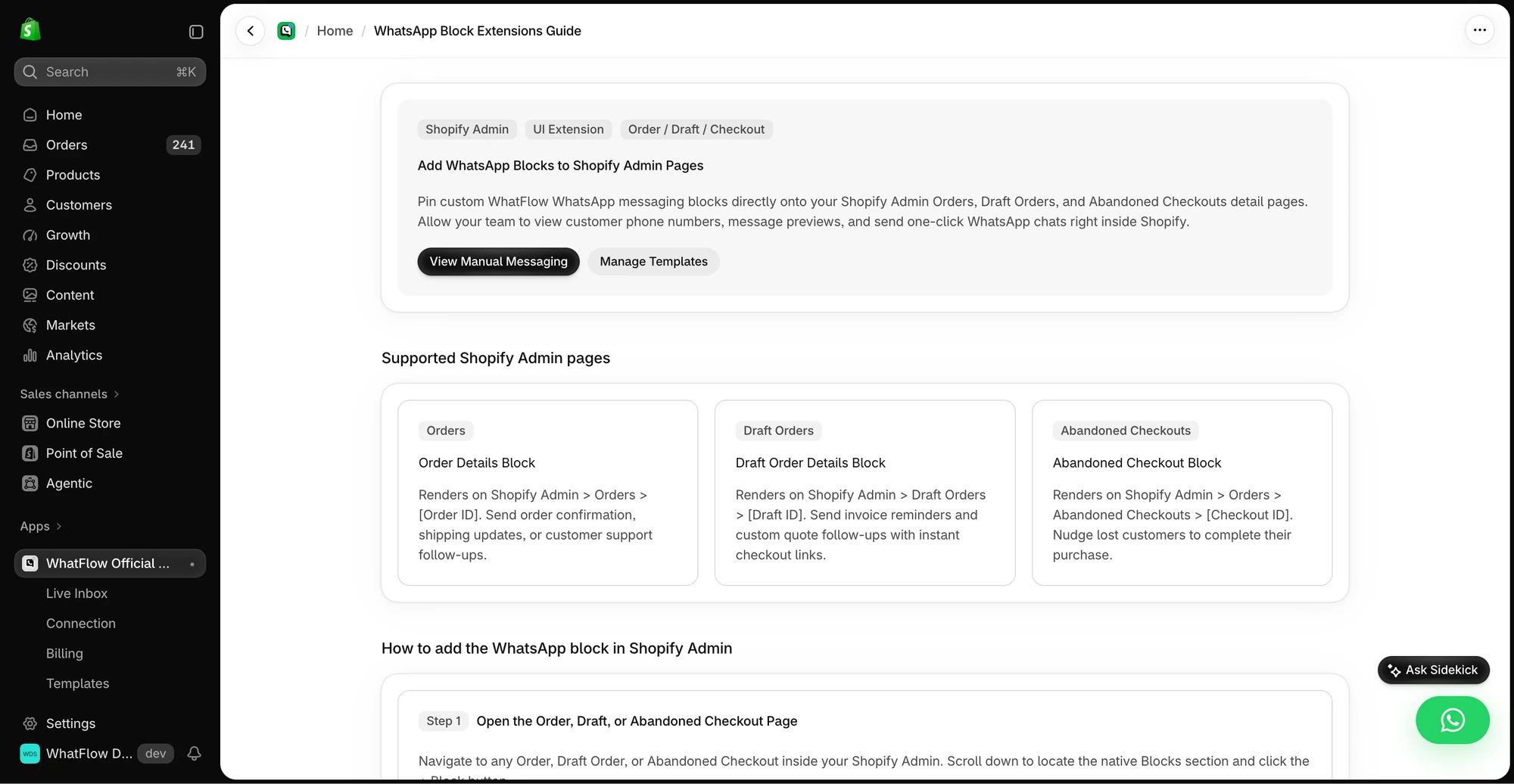
- Admin extensions that put WhatsApp next to the order.
Here's why the inbox matters. Say you send a Diwali campaign to 3,000 opted-in customers and 250 reply:
Is the gold kurta available in XL? Can I get it before Friday?
Every one of those is a sale waiting for an answer. In WhatFlow, those replies land in a shared inbox, get assigned to whoever's on shift, and an agent can share the exact catalog item in seconds. Our Ramadan, Eid and Diwali campaign guide has more examples.
How do the costs compare?
Shopify Messaging charges per WhatsApp message by recipient region and adds it to your Shopify bill. Shopify's pricing page lists marketing rates such as $0.024 for India, $0.095 for Pakistan, $0.100 for Saudi Arabia and the UAE, $0.106 for the UK, $0.125 for Brazil and $0.248 for Germany, as of November 2026. Campaign sends, subscriber confirmations and keyword auto-replies are all billed at the marketing rate. Service messages beyond 1,000 free per WhatsApp Business Account each month are charged from October 1, 2026.
WhatFlow charges a flat app plan, with every feature on every plan:
- Free: first 100 messages
- Starter, $4.99/month: 2,000 messages
- Plus, $9.99/month: 5,000 messages
- Growth, $29/month: 20,000 messages
Meta's own per-message fees are separate on WhatFlow and vary by template category and country; see Meta's pricing doc. The two models don't line up one-to-one, so price your real mix of campaigns, confirmations and updates. Our WhatsApp Business API pricing guide helps, and current WhatFlow amounts are on the pricing page. What doesn't change: on WhatFlow, the inbox, COD, Flow and catalog come included, and adding teammates costs nothing.
Is WhatFlow ready for a large team?
Yes. A big campaign creates a support queue, and WhatFlow is built to work it: one official number, assignment and filters so every reply has an owner, saved replies for consistency, and Shopify Flow to route and tag at volume. No seat fees, so 5 agents or 50 cost the same in seats.
When might Shopify Messaging be enough?
Pick Shopify Messaging for WhatsApp only if you want occasional marketing campaigns billed on your Shopify invoice, and you don't need to answer replies as a team, confirm COD orders or automate order messages. Plenty of stores keep Shopify Messaging for email and run WhatsApp in WhatFlow.
The bottom line
Shopify Messaging adds WhatsApp campaigns to Shopify. WhatFlow runs your whole WhatsApp operation on the official Meta Cloud API: campaigns, cart recovery, COD confirmation, order updates, a no-seat-fee team inbox and Shopify Flow automation, all on every plan. Install it free and see what happens when every reply has somewhere to go.
Questions worth asking
Does Shopify Messaging support WhatsApp?
Yes. Since July 29, 2026, Shopify Messaging can send WhatsApp marketing campaigns to opted-in subscribers, with interactive buttons and keyword replies. Charges are per message by recipient region and appear on your Shopify bill.
Is WhatFlow better than Shopify Messaging for WhatsApp?
For anything beyond campaigns, yes. WhatFlow adds a team inbox with no seat fees, COD confirmation, abandoned checkout recovery, order updates, catalog sharing and native Shopify Flow actions, all on the official Meta Cloud API.
How much does WhatsApp cost in Shopify Messaging?
Shopify's help center lists per-message marketing rates by region, for example $0.024 for India, $0.106 for the UK and $0.248 for Germany, as of November 2026. Service messages beyond 1,000 free per WhatsApp Business Account each month are also charged from October 1, 2026.
Can I use Shopify Messaging and WhatFlow together?
Yes. You could keep email in Shopify Messaging and run WhatsApp in WhatFlow. Keep one tool in charge of WhatsApp campaigns so subscribers aren't messaged twice.
Sources and methodology
We checked these primary sources on November 5, 2026. Vendor pages describe advertised capabilities, rather than independent performance tests. Confirm current pricing, plan limits and availability with each provider.
- Shopify Messaging on the Shopify App Store
Shopify Messaging's email, SMS and WhatsApp campaigns and its 4.8/5 rating from 4,799 reviews, checked November 5, 2026.
- Shopify Changelog: Shopify Messaging now supports WhatsApp marketing
July 29, 2026 launch of WhatsApp campaigns, interactive buttons and keyword replies.
- Shopify Help Center: WhatsApp pricing in Shopify Messaging
Per-message marketing and service rates by region, billed on the Shopify bill, checked November 5, 2026.
- Shopify Help Center: WhatsApp requirements in Shopify Messaging
Embedded Signup, opt-in, the default STOP line and unsupported video headers and carousels.
- WhatFlow WhatsApp Business API on the Shopify App Store
WhatFlow plans, included messages and the 5.0/5 rating from 55 ratings, checked November 5, 2026.
- WhatsApp Business Platform pricing documentation
Meta's per-message pricing, including the October 1, 2026 changes to free service messages.