
Publisher disclosure: this comparison is written by WhatFlow. Competitor capabilities are based on the linked public documentation; the WhatFlow screenshots come from our demo store. Examples are illustrative, and results depend on your store and configuration.
WhatFlow and QuickReply.ai at a glance
| Consideration | WhatFlow | QuickReply.ai |
|---|---|---|
| What the product is built around | WhatsApp for Shopify on the official Meta Cloud API: admin extensions, Shopify Flow triggers and actions, COD confirmation, catalog sharing and an enterprise-ready team inbox. | A WhatsApp marketing automation platform with a Shopify integration, two-way conversations and a journey builder. |
| Pricing and billing units | Free plan; paid plans from $4.99/month by messages sent. Meta fees separate. | Starter, Standard, Plus and Enterprise plans with unlimited monthly active contacts; messaging charges and tax extra (as of November 2026). |
| Feature access | Every feature on every plan, including Free. | Journeys with event filters, waits, conditions, dynamic values, versioning and exit nodes; check which plan your sequence needs. |
| Team access | No seat fees at any team size. | 1 agent on Starter, 2 on Standard, 5 on Plus, then ₹500 per extra agent per month. |
| Storefront entry point | Free-forever WhatsApp buttons that match your Shopify theme. | Check which storefront widget your QuickReply.ai plan includes. |
| Automation builder | Native WhatFlow triggers and actions inside Shopify Flow, on every plan. | QuickReply.ai's own journey builder. |
| Shopify App Store rating | 5.0 out of 5 from 55 ratings (November 5, 2026). | 4.9 out of 5 from 219 reviews (November 5, 2026). |
For a Shopify team, WhatFlow is the better WhatsApp app than QuickReply.ai. WhatFlow is an official Meta Cloud API app with every feature on every plan, native Shopify Flow automation and a team inbox with no seat fees at any size, and it starts free. QuickReply.ai is a well-rated marketing app with a capable journey builder, but its plans include one to five agents and charge ₹500 a month for each extra one.
When testing WhatFlow and QuickReply.ai, ask: Can your team run a test and handle the replies after the send? In WhatFlow, test a Shopify customer or segment send, then try scheduling a separate Inbox broadcast from a spreadsheet or existing conversations. The campaign walkthrough shows the test send, reply handoff and recipient report.
A common assumption is that WhatFlow is an unofficial-API tool for small shops. It isn't. WhatFlow WhatsApp Business API runs on the official Meta Cloud API and is enterprise-ready: inbox assignment and filters, no seat fees at any team size, Shopify Flow automation, COD confirmation, catalog sharing and Shopify admin extensions. It's also the easiest start for a small store. Our linked-device Chat Automation app is a separate, older entry-level product.
WhatFlow vs QuickReply.ai at a glance
WhatFlow | QuickReply.ai | |
|---|---|---|
Free plan | Yes, every feature | Check current plans |
Agents included | No seat fees at any size | 1 / 2 / 5 by plan |
Extra agents | $0 | ₹500 per agent per month |
Automation | Native Shopify Flow triggers and actions | Its own journey builder |
COD confirmation with order tagging | Every plan, through Flow | Check your plan |
Shopify App Store rating | 5.0/5 from 55 ratings | 4.9/5 from 219 reviews |
QuickReply.ai details are from its pricing page and both ratings from the Shopify App Store, checked November 5, 2026.
How much do extra agents cost?
As of November 2026, QuickReply.ai includes one agent on Starter, two on Standard and five on Plus, with each additional agent at ₹500 a month. Messaging charges and tax are extra. To be fair, it advertises unlimited monthly active contacts, so you're not penalised for a big customer list.
Take a store with eight people in WhatsApp: four support agents, a lead, two warehouse staff and a weekend cover. On Plus, that's three extra agents, or ₹1,500 a month on top of the plan. On Standard, it's six extra agents, ₹3,000 a month.
On WhatFlow, the same eight people cost nothing extra. Say they handle 4,500 messages a month: that's Plus at $9.99, with every feature included. Meta's per-message fees apply to both apps. Current amounts are on our pricing page, and the no-seat-fee comparison shows how this adds up over a year.
Journeys or Shopify Flow?
QuickReply.ai's journey builder is genuinely good: event filters, waits, conditions, dynamic values, versioning and exit nodes, all documented in its journey concepts.
WhatFlow takes a different route. Its triggers and actions live in Shopify Flow, the automation tool already built into Shopify. That has two advantages. First, your WhatsApp logic sits next to your other store automations (tagging, fulfilment holds, inventory alerts), so one person can see everything. Second, a customer's reply can act on the order directly.
Hi Kabir, you left the trail runners (UK 9) in your cart. Still want them? They're selling fast in that size. [Complete checkout]
Flow waits a few hours, checks the order hasn't been placed, then sends the template. If Kabir buys first, the sequence stops.
What about COD and order replies?
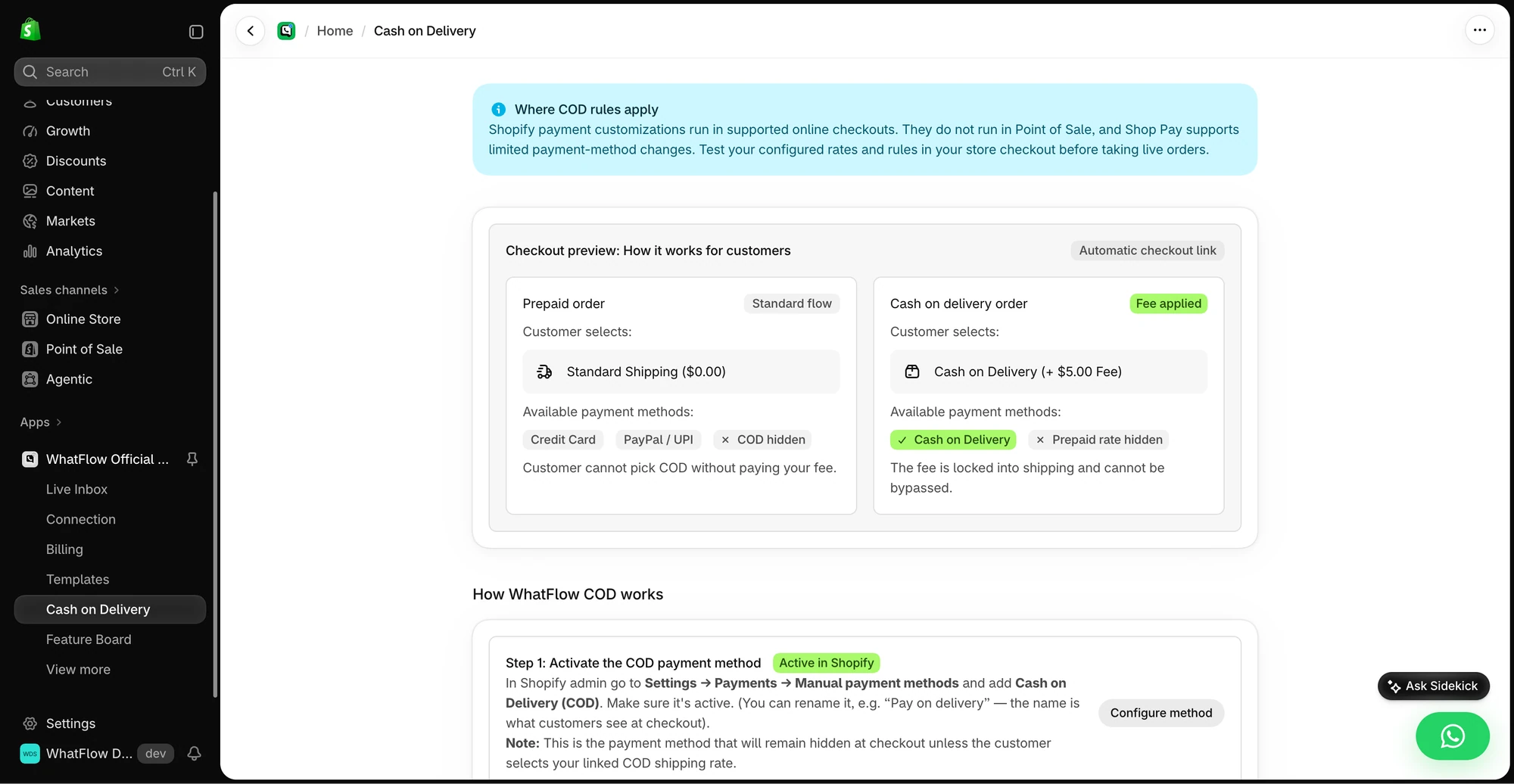
A COD confirmation in WhatFlow sends Confirm and Cancel buttons. Confirm tags the order cod-confirmed; Cancel can cancel it or flag it for a callback. Anything else lands in the team inbox with assignment, filters and saved replies. The COD reply guide has the setup.
When QuickReply.ai might still make sense
Choose QuickReply.ai if your marketing team wants a dedicated visual journey builder with versioning and you only need a few agents. It also advertises RCS alongside WhatsApp.
The bottom line
WhatFlow gives Shopify teams the official Meta Cloud API, Shopify Flow automation, COD confirmation and a team inbox with no seat fees at any size, all on the Free plan. QuickReply.ai is a good app, but every agent past the included count adds to the bill. Start with WhatFlow free and bring the whole team.
Questions worth asking
Is WhatFlow a good QuickReply.ai alternative for Shopify?
Yes, especially for teams. WhatFlow has no seat fees at any team size, includes every feature on every plan and runs automation natively in Shopify Flow. QuickReply.ai suits marketers who specifically want its journey builder and are happy to pay per agent above the included count.
How much does QuickReply.ai cost compared with WhatFlow?
As of November 2026, QuickReply.ai's plans include 1, 2 or 5 agents, with extra agents at ₹500 a month each and messaging charged separately. WhatFlow starts free, paid plans start at $4.99/month, and adding agents never costs extra. Meta's fees apply to both.
Does WhatFlow charge per inbox seat?
No. WhatFlow's team inbox has no seat fees at any team size, on every plan including Free.
Are WhatFlow features restricted on the free plan?
No. Every WhatFlow feature is on the Free plan, from broadcasts and cart recovery to COD confirmation and Shopify Flow actions. Paid plans add message allowance, and the theme-matched button is free forever.
Can WhatFlow build multi-step WhatsApp sequences?
Yes, through Shopify Flow. Flow's wait and condition steps combined with WhatFlow's send-template actions let you build sequences such as a cart reminder that stops once the order is placed.
Sources and methodology
We checked these primary sources on November 5, 2026. Vendor pages describe advertised capabilities, rather than independent performance tests. Confirm current pricing, plan limits and availability with each provider.
- QuickReply.ai documentation
QuickReply.ai's description of its WhatsApp marketing automation, Shopify integration and two-way conversations.
- WhatFlow WhatsApp Business API on the Shopify App Store
WhatFlow plans, included sends, Shopify workflows and the 5.0/5 rating from 55 ratings (checked November 5, 2026).
- WhatsApp Business Platform pricing
Meta's per-message charges, which apply on top of either app's subscription.
- QuickReply.ai journey concepts
QuickReply.ai's journey triggers, waits, filters, versioning and exit conditions.
- QuickReply.ai pricing
QuickReply.ai included agents per plan, the ₹500 extra-agent charge and contact terms, checked November 5, 2026.
- QuickReply.ai on the Shopify App Store
QuickReply.ai listing rating of 4.9/5 from 219 reviews, checked November 5, 2026.