
Publisher disclosure: this comparison is written by WhatFlow. Competitor capabilities are based on the linked public documentation; the WhatFlow screenshots come from our demo store. Examples are illustrative, and results depend on your store and configuration.
WhatFlow and Landbot at a glance
| Consideration | WhatFlow | Landbot |
|---|---|---|
| Built for | Shopify stores of any size, from first sale to large support teams. Admin extensions, native Shopify Flow triggers and actions, COD confirmation and a team inbox on the official Meta Cloud API. | A visual builder for conversational bots on web and WhatsApp. Great for designing flows; you build and maintain each one. |
| Pricing | Free plan, paid plans from $4.99/month (Plus is $9.99 for 5,000 sends). No seat fees. Meta's WhatsApp charges are billed separately. | Professional is €80/month billed annually or €100 monthly; WhatsApp on your own number adds €100/month. A Professional WA plan is also listed at €160/month billed annually (as of November 2026). |
| Feature access | Every feature on every plan, including Free. Plans only change message allowances and rates. | Own-number WhatsApp needs Professional plus the add-on, or Professional WA. The free plan's WhatsApp test number isn't a live store channel. |
| Team inbox | Shared WhatsApp inbox with assignment, filters and saved replies. No seat fees, so add the whole team. | Starter includes 2 seats, Professional 3 and Business 5+ (as of November 2026). |
| Storefront WhatsApp button | Theme-matched WhatsApp chat buttons, free forever. | Landbot's web widget is its own bot interface rather than a theme-matched Shopify WhatsApp button. |
| COD confirmation | Built in: Confirm and Cancel buttons that tag or cancel the order through Shopify Flow. | You'd design the bot flow and connect it to Shopify yourself. |
WhatFlow vs Landbot: Landbot is a visual bot builder. WhatFlow is a WhatsApp app built for Shopify. If your store needs abandoned checkout recovery, COD confirmation, order updates and a team to answer customers, WhatFlow does it out of the box, free to start, with every feature on every plan and no seat fees. Landbot makes you design the flows, and live WhatsApp costs extra.
WhatFlow vs Landbot at a glance
WhatFlow | Landbot | |
|---|---|---|
What it is | Shopify WhatsApp app | Visual bot builder |
Live WhatsApp on your number | Every plan, including Free | Professional plus €100/month add-on |
Seats | No seat fees | 2 on Starter, 3 on Professional, 5+ on Business |
Shopify workflows | Templates, COD, Flow triggers built in | Design and connect them yourself |
Starting price for WhatsApp | Free; paid from $4.99/month | €100 + €100/month on monthly billing |
Landbot figures are from its pricing page as of November 2026. WhatFlow's Business API app is rated 5.0 out of 5 from 55 ratings on the Shopify App Store, as of November 5, 2026.
When testing WhatFlow and Landbot, ask: Can a catalog cart event start a workflow separately from an order-paid event? WhatFlow has separate Shopify Flow blocks, API-triggered Inbox Workflows and in-chat WhatsApp forms. Try the catalog cart workflow if you need to connect a buyer reply with a Shopify action.
WhatFlow isn't only for small stores. The Business API app is built on the official Meta Cloud API and is enterprise-ready: a shared inbox with assignment and filters where a 50-person team pays the same in seat fees as a team of two (nothing), native Shopify Flow triggers and actions for automation at scale, COD confirmation, catalog sharing and Shopify admin extensions. Small stores still get the easiest start there is: a Free plan with every feature.
How much does WhatsApp cost on Landbot vs WhatFlow?
Landbot's free plan gives you a WhatsApp test number, which is useful for building but isn't your store's live channel. To run WhatsApp on your own number, you need Professional (€80/month billed annually, €100 monthly) plus the WhatsApp add-on at €100/month. Landbot also lists a Professional WA plan at €160/month billed annually. Either way, you're at roughly €160 to €200 a month, with three seats.
Say you have four people answering WhatsApp and send 5,000 messages a month. On WhatFlow that's Plus at $9.99, all four in the inbox. On Landbot, you're on Professional with WhatsApp and a fourth seat to sort out. Meta's per-message charges apply to both (Meta's pricing). WhatFlow's rates are on the pricing page.
A bot builder vs a ready-made Shopify workflow
Say you mostly need abandoned checkout recovery and an inbox. On Landbot, you'd design the conversation, connect it to Shopify, test every branch and fix it when something changes. On WhatFlow, the abandoned-checkout template already pulls the cart and checkout link from Shopify:
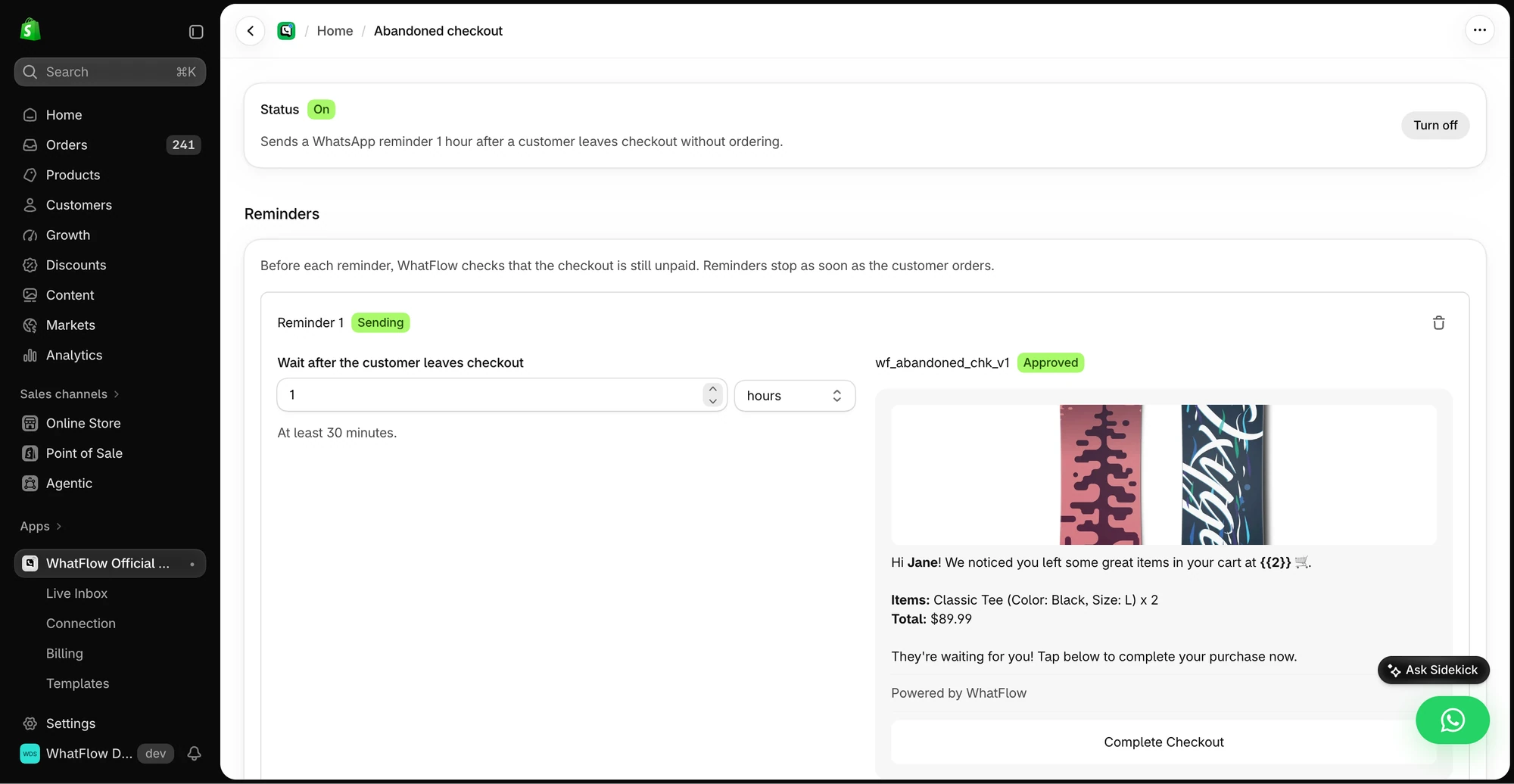
Hi Elena, your Weekend Tote in olive is still in your cart: [checkout link]. Questions about size or delivery? Reply here and we'll help.
When Elena replies, it lands in the team inbox, and a Shopify Flow trigger can tag her or alert a teammate. Here's how to make abandoned checkout messages feel like a conversation.
What WhatFlow includes on every plan
- COD confirmation with Confirm and Cancel buttons that tag or cancel the order through Flow.
- Order and shipping updates customers can reply to.
- Broadcasts to opted-in customers.
- Native Shopify Flow triggers and actions.
- Live catalog sharing, saved replies, assignment and filters.
- Free theme-matched WhatsApp buttons. Compare a free WhatsApp button vs a paid chat widget.
How do you set up WhatFlow on Shopify?
- Install WhatFlow WhatsApp Business API from the Shopify App Store.
- Connect your WhatsApp number through Meta's Embedded Signup, right inside Shopify admin.
- Turn on the free theme-matched WhatsApp button so shoppers can start a chat from your store.
- Pick one template to start with (COD confirmation, abandoned checkout or a shipping update), map the Shopify fields in the template editor and submit it to Meta for approval.
- Invite everyone who answers customers to the team inbox. There are no seat fees, so don't ration logins.
Meta reviews every template, so submit yours early. If one gets rejected, these fixes cover the usual reasons.
When Landbot might still make sense
Pick Landbot only if a custom conversational experience is the main thing you're buying, like a branching quiz or lead-qualification flow, and someone on your team will design and maintain it. It's good at that.
The bottom line
You don't need to design a bot to run WhatsApp on Shopify. WhatFlow gives you the order workflows, Shopify Flow and a no-seat-fee inbox on every plan, starting free, while Landbot's live WhatsApp starts around €160 to €200 a month. Install WhatFlow and switch on abandoned checkout first.
Questions worth asking
How much does Landbot cost for WhatsApp?
As of November 2026, Landbot lists Professional at €80/month billed annually (€100 monthly) and a WhatsApp add-on at €100/month, or a Professional WA plan at €160/month billed annually. WhatFlow starts free with every feature, with paid plans from $4.99/month.
Is WhatFlow a Landbot alternative for Shopify?
Yes. WhatFlow gives Shopify stores WhatsApp templates, COD confirmation, native Shopify Flow triggers and a no-seat-fee team inbox without designing a bot. Landbot fits when a custom conversational flow is the main requirement.
Does WhatFlow charge per inbox seat?
No. WhatFlow's team inbox has no seat fees, so your support, sales and fulfilment people can all answer WhatsApp without the bill changing. You pay for a message plan, and Meta bills its WhatsApp charges separately, as it would with Landbot.
Does WhatFlow include an AI chatbot?
WhatFlow has no built-in AI chatbot. You can connect the AI you already use through WhatFlow's MCP connector, so Claude, ChatGPT or Cursor can read chats and draft replies that a person approves before sending. Beyond that, it focuses on Shopify WhatsApp workflows (templates, COD confirmation, Flow triggers, catalog sharing) and a no-seat-fee inbox where your team answers, all on the Free plan.
Sources and methodology
We checked these primary sources on November 5, 2026. Vendor pages describe advertised capabilities, rather than independent performance tests. Confirm current pricing, plan limits and availability with each provider.
- Landbot: official product and commercial information
Landbot pricing page, checked November 2026: Professional €80/month annual or €100 monthly, WhatsApp add-on €100/month, Professional WA €160/month annual, seats per plan.
- WhatFlow WhatsApp Business API on the Shopify App Store
WhatFlow's plans (Free, and paid from $4.99/month), included sends, Shopify Flow and admin features, and its 5.0/5 rating from 55 ratings, checked November 5, 2026.
- WhatsApp Business Platform pricing
Meta's per-message WhatsApp pricing by country and template category, billed separately from any app or platform fee.