
Publisher disclosure: this comparison is written by WhatFlow. Competitor capabilities are based on the linked public documentation; the WhatFlow screenshots come from our demo store. Examples are illustrative, and results depend on your store and configuration.
WhatFlow and Kustomer at a glance
| Consideration | WhatFlow | Kustomer |
|---|---|---|
| WhatsApp connection | Official Meta WhatsApp Cloud API through Meta Embedded Signup inside Shopify admin. | WhatsApp is an omnichannel messaging channel, with up to 5 WhatsApp Business Accounts listed on the pricing page. |
| Built for Shopify | Shopify-only app with admin extensions and native Shopify Flow triggers and actions. | Enterprise CRM helpdesk with a Shopify App Store integration. |
| Pricing and billing units | Free plan; paid plans from $4.99/month, priced by messages sent. Meta fees separate. | Enterprise from $89 and Ultimate $139 per user per month on its Shopify listing; WhatsApp pricing is pay as you go (as of November 2026). |
| Team inbox seats | No seat fees at any team size, with assignment and filters. | Priced per user. |
| Feature access by plan | Every feature on every plan, including Free. | Two per-user tiers; exact pricing is set in a sales walkthrough. |
| Getting started | Install from the Shopify App Store and connect WhatsApp yourself in Shopify admin, on the Free plan. | Pricing page routes buyers to a live walkthrough; implementation is listed as an add-on. |
| COD confirmation | Template with reply buttons that tag or cancel the Shopify order through Flow. | Not described on Kustomer's pricing page or Shopify listing. |
| Abandoned checkout recovery and broadcasts | Included on every plan. | Not described on Kustomer's pricing page or Shopify listing. |
| Shopify App Store rating | 5.0 out of 5 from 55 ratings (WhatsApp Business API, November 5, 2026). | 5.0 out of 5 from 24 reviews (Kustomer, November 5, 2026). |
| Best fit | Shopify brands of any size that want WhatsApp sales, COD and support in one official-API app. | Large support organisations that want a CRM-style helpdesk across many channels and budget per user. |
If you want an enterprise-grade WhatsApp operation for a Shopify brand, WhatFlow is the better choice than Kustomer. WhatFlow runs on the official Meta Cloud API, gives your whole team a shared inbox with no seat fees, and includes COD confirmation, cart recovery, broadcasts and native Shopify Flow automation on every plan. Kustomer is a strong CRM helpdesk, but it's priced per user (from $89 a month on its Shopify listing) and bills WhatsApp pay as you go on top.
Here's the part the market hasn't caught up with. WhatFlow isn't only the unofficial, linked-device app small shops installed years ago; that's our older Chat Automation app. WhatFlow WhatsApp Business API is the official-API product, built for teams of 2 or 200, and rated 5.0 on the Shopify App Store.
WhatFlow vs Kustomer at a glance
- What it is: WhatFlow is a WhatsApp platform built only for Shopify. Kustomer is an enterprise CRM helpdesk with WhatsApp as one of many channels.
- Connection: WhatFlow uses the official Meta Cloud API through Embedded Signup inside Shopify admin.
- Pricing: WhatFlow is free to start, then from $4.99/month by messages sent. Kustomer's Shopify listing shows $89 (Enterprise) and $139 (Ultimate) per user per month, and its pricing page says WhatsApp is pay as you go, as of November 2026.
- Seats: WhatFlow charges none. Kustomer charges per user.
- Shopify automation: WhatFlow has native Shopify Flow triggers and actions, COD confirmation and cart recovery on every plan.
- Buying process: WhatFlow installs in minutes from the Shopify App Store. Kustomer's pricing page routes you to a live walkthrough, and lists implementation as an add-on.
- Rating (Shopify App Store, November 5, 2026): WhatFlow 5.0 from 55 ratings; Kustomer 5.0 from 24 reviews.
How much more does Kustomer cost for a large team?
Kustomer's Shopify listing shows Enterprise from $89 per user per month and Ultimate at $139 per user per month. Its pricing page says "WhatsApp pricing is pay as you go" and leaves exact pricing to a sales walkthrough.
Let's put real team sizes on it, seats only:
Team size | Kustomer Enterprise ($89/user) | Kustomer Ultimate ($139/user) | WhatFlow seats |
|---|---|---|---|
10 agents | $890/month | $1,390/month | $0 |
25 agents | $2,225/month | $3,475/month | $0 |
50 agents | $4,450/month | $6,950/month | $0 |
Kustomer then adds WhatsApp usage. WhatFlow adds a messaging plan instead: Growth at $29 for 20,000 messages, Scale at $49.99 for 40,000, or Ultimate at $99 for 75,000. Every feature is on every plan, so a 50-person team on Ultimate pays WhatFlow $99 a month for its first 75,000 messages and $0.0015 per message after that. Current amounts live on our pricing page.
When testing WhatFlow and Kustomer, ask: Can a second agent tell who owns the conversation without asking? In WhatFlow, use Needs reply and Closing soon, claim a conversation, then check Shopify order context and leave a private note. The team inbox walkthrough gives you a repeatable test for two agents, with no per-seat fee.
Meta's WhatsApp fees apply to both. Since October 1, 2026, only the first 1,000 service messages per business number each month are free, and utility templates sent inside the customer service window are charged (Meta's pricing doc). Our no-seat-fee vs per-seat comparison goes deeper on how seat pricing compounds as you hire.
Which handles Shopify WhatsApp workflows better?
WhatFlow, because it's built around Shopify events rather than tickets. Kustomer is designed to manage customer conversations across channels inside a CRM. WhatFlow is designed to run the WhatsApp side of a Shopify store, end to end.
On every WhatFlow plan, you get:
- COD confirmation with reply buttons. The customer's tap fires WhatFlow's order-reply trigger in Shopify Flow, which tags or cancels the order.
- Abandoned checkout recovery, order updates and shipping updates.
- Broadcasts to opted-in customers, using Meta-approved marketing templates.
- Native Shopify Flow triggers and actions for template, text and media messages. Our Flow template guide shows the setup.
- Admin extensions, so WhatsApp actions sit next to the order in Shopify admin.
- Live catalog sharing from the inbox.
Here's a shipping-delay template a 30-person ops team could trigger from Flow when an order gets a "delayed" tag:
Hi Daniel, quick update on order #18842: the courier has pushed delivery to Thursday. Nothing you need to do. Reply here if Thursday doesn't work and we'll sort it out.
Kustomer's pricing page and Shopify listing don't describe COD confirmation, cart recovery or broadcasts over WhatsApp.
Is WhatFlow really enterprise-ready?
Yes, for WhatsApp on Shopify. Here's what large teams get:
- Official Meta Cloud API via Embedded Signup, with Meta-approved templates and a green-tick-eligible business profile
- Shared team inbox on one number, with assignment and filters so every conversation has an owner
- Saved replies for consistent answers across shifts
- Shopify Flow automation for routing, tagging and order actions at volume
- No seat fees, so seasonal staff, warehouse leads and finance can all join without a budget request
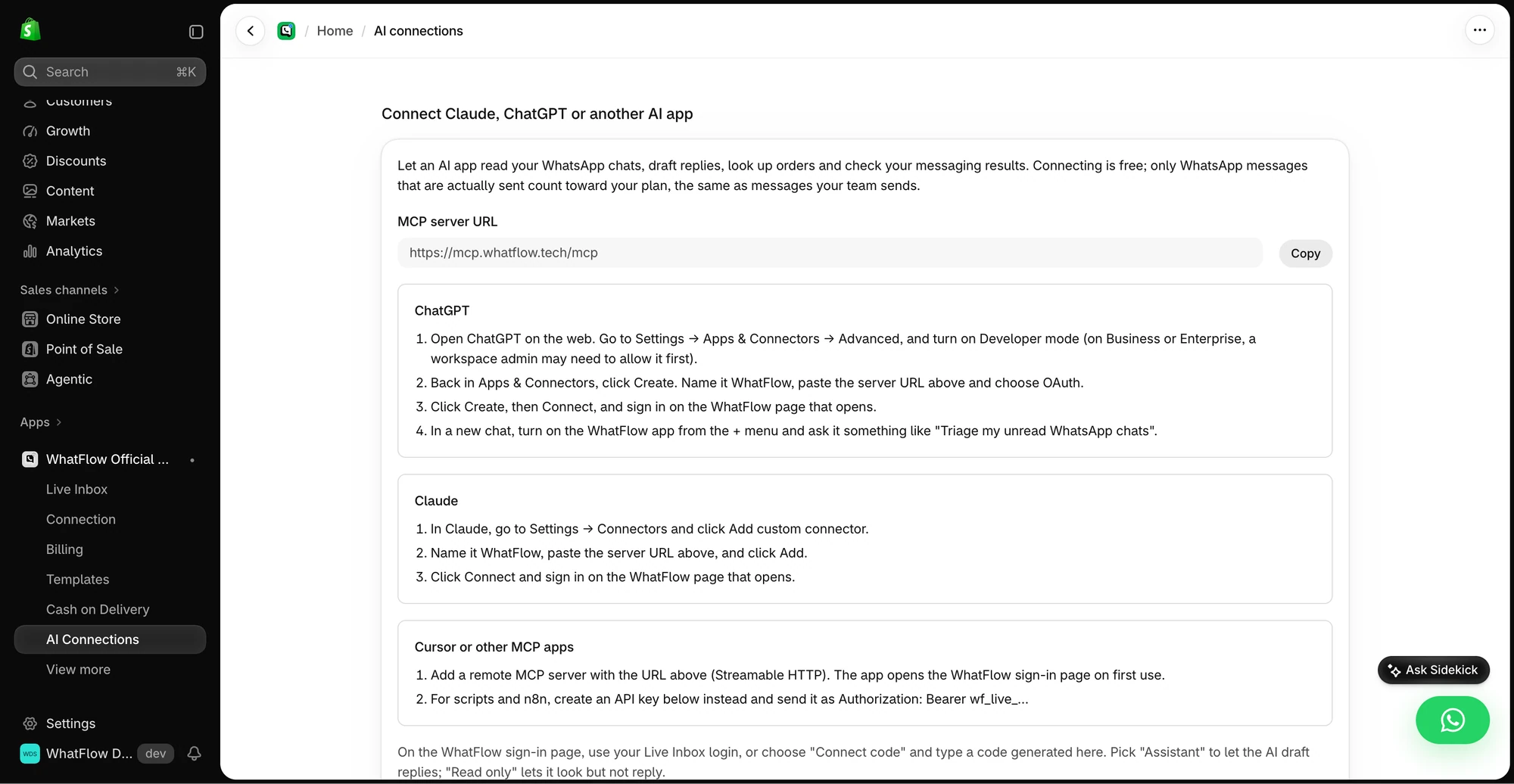
What WhatFlow doesn't do: a built-in AI bot that replies on its own, or a cross-channel CRM for email and voice. (For AI drafting, WhatFlow's MCP connector lets Claude, ChatGPT or Cursor draft replies from Live Inbox chats for a person to approve.) If those are what you're buying, that's the Kustomer case below.
When might Kustomer still make sense?
Pick Kustomer only if you specifically need a CRM-style helpdesk spanning email, voice, chat and social for a large support organisation, with AI agents and routing across all of it, and per-user pricing fits your budget. Many brands pair a helpdesk for email with WhatFlow owning WhatsApp.
The bottom line
Kustomer is an enterprise helpdesk that includes WhatsApp. WhatFlow is enterprise WhatsApp for Shopify: official Meta Cloud API, COD confirmation, cart recovery, broadcasts and Shopify Flow automation on every plan, and no seat fees whether you have 5 agents or 50. For a 25-person team, that's $2,225 or more a month in seats you simply don't pay. Install it free and test it with your own team.
Questions worth asking
Is WhatFlow enterprise-ready enough to replace Kustomer for WhatsApp?
For WhatsApp on Shopify, yes. WhatFlow runs on the official Meta Cloud API and gives large teams a shared inbox with assignment and filters, native Shopify Flow automation and admin extensions, with no seat fees at any team size.
How much does Kustomer cost per user?
Kustomer's Shopify App Store listing shows Enterprise from $89 per user per month and Ultimate at $139 per user per month, as of November 2026. Its pricing page says WhatsApp pricing is pay as you go.
Does Kustomer support WhatsApp?
Yes. Kustomer's pricing page lists WhatsApp Business Accounts (up to 5) under omnichannel messaging and bills WhatsApp pay as you go. It positions WhatsApp as a support channel within its CRM.
What would a 25-person team pay for seats on each?
On Kustomer Enterprise at $89 per user, 25 people cost $2,225 a month in seats before WhatsApp usage. WhatFlow charges no seat fees, so the same team pays only for its messaging plan, from $0.
Sources and methodology
We checked these primary sources on November 5, 2026. Vendor pages describe advertised capabilities, rather than independent performance tests. Confirm current pricing, plan limits and availability with each provider.
- Kustomer pricing
WhatsApp pricing is pay as you go, 5 WhatsApp Business Accounts, live walkthrough for exact pricing, checked November 5, 2026.
- Kustomer on the Shopify App Store
Enterprise from $89 and Ultimate $139 per user per month, and the 5.0/5 rating from 24 reviews, checked November 5, 2026.
- WhatFlow WhatsApp Business API on the Shopify App Store
WhatFlow plans, included messages and the 5.0/5 rating from 55 ratings, checked November 5, 2026.
- WhatsApp Business Platform pricing documentation
Meta's per-message pricing, including the October 1, 2026 changes to free service messages.