A good WhatsApp promotional message puts the offer in the first line, gives one real end date and one button, and only goes to people who opted in to marketing from you. Keep it short enough to read in the notification. Below are 24 WhatsApp promotional message examples for sale launches, festive sales, new arrivals, VIP early access, limited stock, bundles, flash sales, last-chance reminders and win-backs.
The rules before the copy
Opt-in first. WhatsApp's Business Messaging Policy says you need "opt-in permission from the recipient" before messaging them, and you must respect every request to stop. A phone number from a COD order is a delivery contact, not marketing consent. Here's how to collect WhatsApp opt-ins on Shopify properly.
It's a marketing template. A promotional message starts the conversation, so it has to be a Meta-approved template. Meta's categorization guidelines put sales events, coupons and offers under marketing, and any template that mixes an order update with a promo is marketing too. Don't try to slip a sale into an order update.
Not to US numbers. Meta's per-user limits documentation says WhatsApp currently doesn't deliver marketing templates to users with US phone numbers. If you sell in the US, use email or SMS for promotions there.
Every message needs a way out. End with "Reply STOP to opt out" or a quick-reply button that does the same, and honour it immediately.
What does a WhatsApp promotional message cost?
Meta charges per delivered marketing template, at a rate set by the recipient's country. That's separate from your app plan. Meta's list rates as of November 2026:
Say you send a Diwali sale to 2,000 opted-in customers in India: about $23.60 in Meta charges. The same send to 2,000 customers in the UAE is about $115.20. That's why segmenting beats blasting everyone. Every market, plus a calculator, is on our pricing page. WhatFlow passes Meta's charges through with no markup.
How often should you send promotions?
Start at two to four marketing messages a month per customer, then let opt-outs, blocks and replies tell you whether to go up or down. Our guide to WhatsApp message frequency has the full framework.
There's a hard reason too. WhatsApp caps how many marketing templates each person receives, and the cap adapts to how much that person reads. Messages over the limit fail with error 131049, and Meta says to wait at least 24 hours before retrying. Send too much and your next promo simply doesn't arrive.
Use the copy-code button
A copy code button is a template button that copies a discount code to the customer's clipboard with one tap. Meta's components documentation allows one per template, with a code of up to 20 characters. It's the single easiest win in a sale message: nobody mistypes FESTIVE15 when they don't have to type it. See using a copy-code button for Shopify discounts for setup.
Unless an example says otherwise: {{1}} = first name, {{2}} = offer or code, {{3}} = end date or link. Buttons are shown in square brackets.
Sale launch
1. Straight announcement
Hi {{1}}, our winter sale is live: 20% off all knitwear until {{3}}. No code needed, prices are already marked down.
[Shop the sale] [Reply STOP to opt out]
2. With a copy-code button
Hi {{1}}, the Saffron Thread sale starts now. Use {{2}} for 15% off everything, ends Sunday midnight.
[Copy code] [Shop now]
3. Best-seller led
Hi {{1}}, our best-selling linen co-ord is 25% off for the first time this year. Sale runs until {{3}}. Sizes S to XL in stock. Reply STOP to opt out.
Lead with a product people already want. "Sale on" is weaker than "the thing you looked at is cheaper".
Hi {{1}}, you're one of our regulars, so you get the sale 24 hours before everyone else. Code {{2}} works from now until it opens to the public on {{3}}.
[Copy code] [Shop early]
12. Private preview
Hi {{1}}, before we announce the new winter coats, we wanted our repeat customers to see them first. Reply with your size and we'll hold one for 48 hours.
That reply opens the 24-hour window, so you can answer free-form and hold the item by hand.
13. Thank-you offer
Hi {{1}}, five orders with us this year. Thank you. Here's 20% off your next one, just for regulars: {{2}}, valid until {{3}}.
[Copy code]
Limited stock
14. Honest scarcity
Hi {{1}}, we only made 60 of the indigo quilts this season and 12 are left. If you were waiting, now's the time: {{3}}
Only use real numbers. Customers check, and fake scarcity is how you lose them.
15. Last sizes
Hi {{1}}, the leather sandals are down to the last sizes 38 and 40. We won't be restocking this colour. {{3}}
Bundles
16. Bundle offer
Hi {{1}}, the cleanser, toner and moisturiser are now a bundle: all three for Rs 5,400 instead of Rs 6,300. Ends {{3}}.
[Shop the bundle]
17. Gift bundle
Hi {{1}}, our gift box is back: tea, honey and two mugs, wrapped and ready, for AED 149. Add a card message at checkout.
[Build a gift box]
Flash sales
18. Flash sale
Flash sale, {{1}}: 40% off all bedsheets for the next 6 hours only. Ends tonight at 10pm. Code below.
[Copy code] [Shop now]
19. Weekend flash
Hi {{1}}, 48-hour sale on dinnerware: 25% off with {{2}}, Saturday and Sunday only. Reply STOP to opt out.
Flash sales burn through goodwill fast. One a month is plenty.
Last-chance reminders
Send these only to people who got the first message and didn't buy, and send one, not three.
20. Last day
Hi {{1}}, last day of the winter sale. 20% off ends at midnight tonight. Your code {{2}} still works.
[Copy code]
21. Gentle close
Hi {{1}}, the sale ends in a few hours. If something caught your eye, it's still marked down until midnight. If not, no worries, we'll be quiet for a while. {{3}}
That last line works. It tells the customer you won't flood them.
Hi {{1}}, it's been a while since your last order with Dune Botanics. If you'd like to try us again, here's 15% off: {{2}}, valid until {{3}}. Reply STOP to opt out.
[Copy code]
23. Ask first
Hi {{1}}, we haven't seen you in a while. Was there something we got wrong? Reply and tell us, honestly. If you'd like to come back, {{2}} gets you 15% off.
24. Replenishment win-back
Hi {{1}}, your last coffee order was in August, so you're probably out. Your usual 500g Ethiopian roast is here, and {{2}} takes 10% off. {{3}}
How to send promotional messages with WhatFlow
WhatFlow WhatsApp Business API runs on Meta's official WhatsApp Cloud API. Templates, broadcasts and the team inbox are on every plan, including Free, and the plans differ only in message allowance.
Write and approve the template. Use WhatFlow's template editor, add your copy-code or link buttons, and submit as marketing.
Pick the audience. Start a broadcast from Shopify customers with the Customer Broadcast guide, or from the Broadcasts workspace in the Team Inbox. You can also map a CSV or Excel list to the template. Native Shopify customer-segment sync is coming soon.
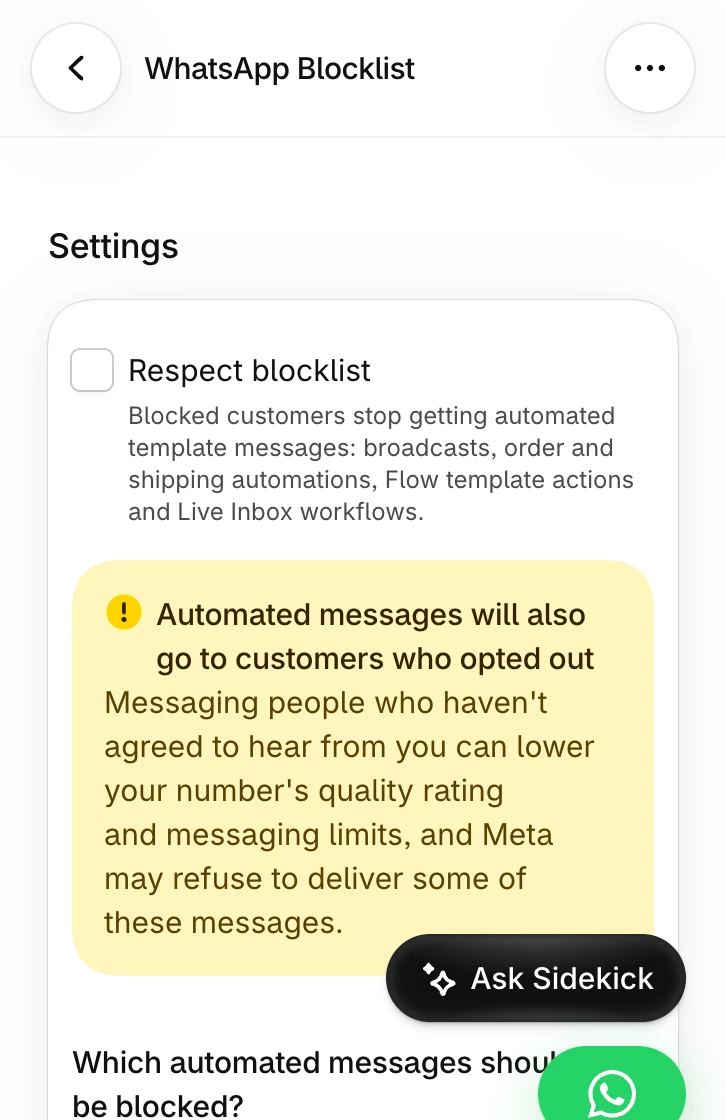
Check opt-outs. Turn on Respect blocklist so customers who sent STOP are left out of broadcasts and automations.
The WhatFlow demo store's blocklist settings, showing the warning when suppression is off. Turn on Respect blocklist before a campaign.
Test-send to yourself, tap every button, then send.
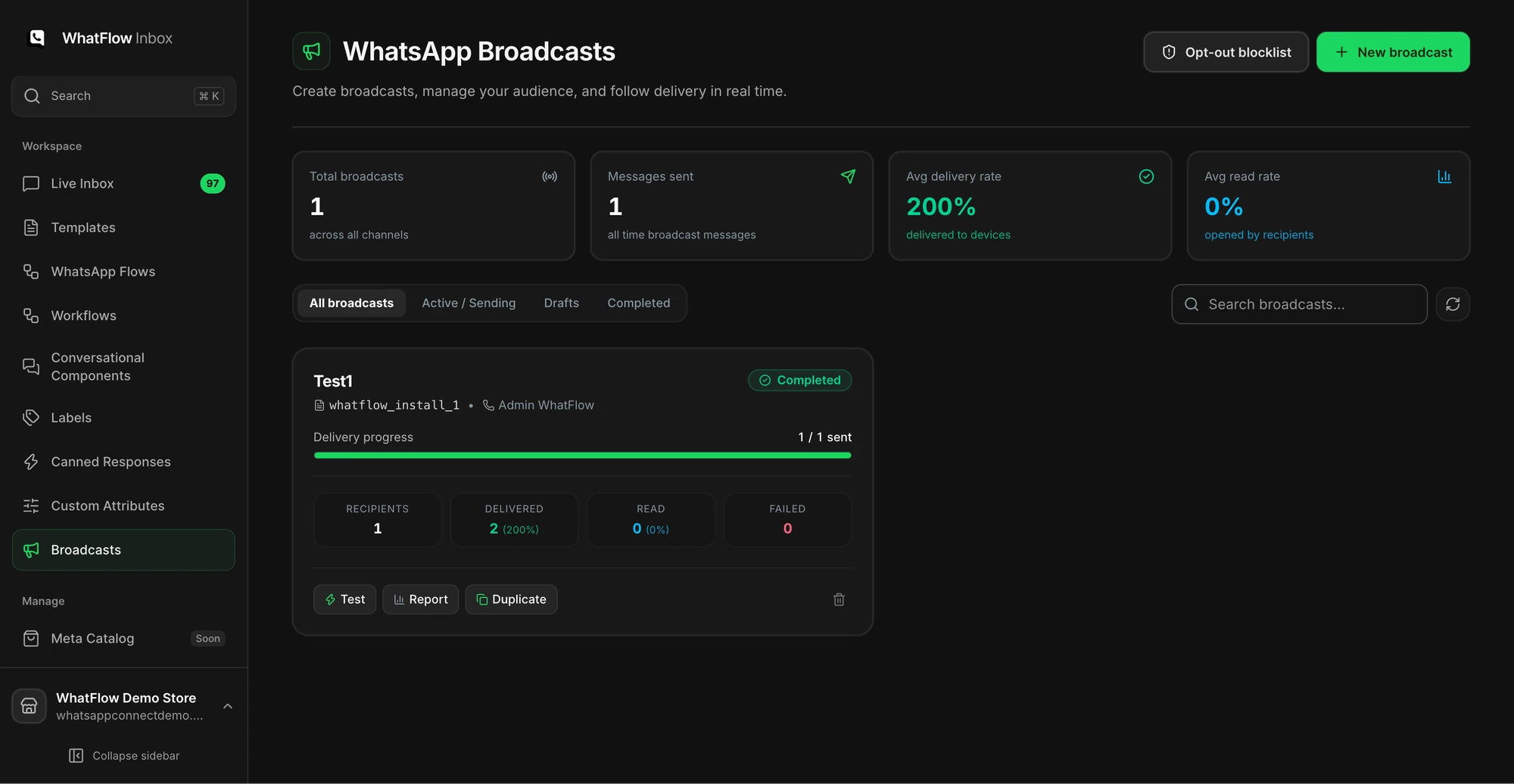
Read the results. The broadcast dashboard shows sent, delivered, failed and reply counts. Check failure codes before retrying, and keep people who already received it out of the retry.
The broadcast dashboard in the WhatFlow demo store with campaign status and a delivery overview.
Messaging people who never opted in. It breaks WhatsApp policy and gets you blocked.
Ignoring STOP. Every opt-out goes on the blocklist the same day.
Fake deadlines and fake stock. "Ends tonight" that runs for a week trains people to ignore you.
Three reminders for one sale. One launch, one last-chance, done.
Sending everything to everyone. Segment by what people bought and where they live.
Long paragraphs. If the offer isn't in the notification preview, it's buried.
Retrying failed sends blindly. Error 131049 means the person hit their marketing limit. Wait.
Run WhatsApp for your Shopify store with WhatFlow
Free plan available. Templates, COD confirmation, Shopify Flow automations and a shared team inbox with no seat fees. Every feature is included on every plan, including Free.
Pick your two to four promotions for the month first, then write the templates. That one habit keeps frequency sane, gives Meta time to approve everything, and stops the "let's just send something" campaigns that cost the most opt-outs.
Frequently asked questions
How do I write a WhatsApp promotional message?
Lead with the offer in the first line, give one clear end date, add a single button to shop or copy the code, and close with a way to opt out. Keep it under about 60 words, since most people read it in the notification.
Do I need permission to send WhatsApp promotional messages?
Yes. WhatsApp's Business Messaging Policy requires opt-in before a business messages someone, and you must honour opt-out requests. A phone number from a past order isn't permission for marketing.
How much does a WhatsApp promotional message cost?
Promotional messages are marketing templates, charged by Meta per delivered message by country. As of November 2026, Meta's list rate is $0.0118 in India, $0.0473 in Pakistan and $0.0576 in the UAE, on top of your app plan.
How often can I send WhatsApp promotions to customers?
Start at two to four marketing messages a month per customer and watch opt-outs and blocks. WhatsApp also limits how many marketing templates a person receives, and messages over that limit fail with error 131049.
Can I send WhatsApp marketing messages to US numbers?
Not currently. Meta's per-user limits documentation says WhatsApp doesn't deliver marketing template messages to users with US phone numbers.