A good welcome message for new customers confirms what they just did (placed a first order, or signed up for updates), tells them what happens next and gives them one easy way to reach you. Send it within minutes, keep it under five lines, and keep any discount separate unless the welcome is the offer. Below are 23 examples for WhatsApp, grouped by situation.
Welcome message vs greeting message: which one do you need?
These get mixed up, so here's the line I draw.
A greeting message is your reply when someone messages your store first, from a chat button, an ad or a saved number. The customer opened the conversation, so you're inside the 24-hour customer service window and can reply free-form. We have 21 greeting message examples for that, and auto-reply examples for the automatic version.
A welcome message is sent by your store after someone becomes a customer or subscriber. You message first, so on WhatsApp it needs a Meta-approved template and the customer's opt-in. That's this post.
Is a welcome message marketing or utility?
It depends on what's in it, and the cost difference is real. Meta's categorization guidelines list "Thanks for confirming opt-in!" as a utility example and an order confirmation as utility too. Introductions and anything promotional are marketing, and a template that mixes both counts as marketing.
As of November 2026, Meta's rates per delivered message are $0.0014 utility vs $0.0118 marketing in India, and $0.015 vs $0.0473 in Pakistan. Say you welcome 1,000 new customers a month in Pakistan: as utility that's about $15 in Meta fees, as marketing about $47. Every market is on our pricing page.
So my rule: keep the first message about the order or the sign-up, and send the offer as its own marketing template if you want one. Meta decides the final category, so check the status after you submit.
Unless noted: {{1}} = first name, {{2}} = store name.
First-order welcome
The first order is when a customer is most nervous. Did it go through? Is this shop real? Answer that.
1. Welcome with order confirmation (utility)
Hi {{1}}, welcome to {{2}}! Your first order {{3}} is confirmed. We'll message you here when it ships. Questions? Just reply.
{{3}} is the order number. Send within minutes of the order. Tied to the order with no promotion, so aim for utility.
Hi {{1}}, I'm Omar, I started {{2}}. I saw your first order come in and wanted to say thank you. If anything's not right when it arrives, reply here and it comes straight to our team.
Personal notes like this are introductions, so expect marketing. Send a day after the order, not on top of #1.
3. COD first order (utility)
Hi {{1}}, welcome to {{2}}. Your cash on delivery order {{3}} for {{4}} is confirmed. Please keep the exact amount ready. Reply here if you need to change anything before it ships.
For COD stores, this doubles as reassurance. If you also need the customer to confirm the order, see our COD confirmation templates.
4. What happens next (utility)
Hi {{1}}, thanks for your first order with {{2}}. Here's what happens now: we pack within 1 working day, then you'll get a tracking link here. Delivery usually takes {{3}}.
Only promise packing times you hit in your busiest week.
5. Free-form reply to a nervous first-timer
Yes, Fatima, your order came through fine, it's #4012. First orders can feel like a leap, so I'll message you myself when it ships tomorrow.
Opt-in confirmation
Send the moment someone ticks the WhatsApp box at checkout or in a popup. It proves the number works and tells them what they signed up for. Our guide to opt-in wording at Shopify checkout covers the consent line that comes first.
6. Plain confirmation (utility)
Hi {{1}}, you're set up for WhatsApp updates from {{2}}. We'll message you about your orders here. Reply STOP any time to opt out.
7. Order updates only (utility)
Thanks for opting in, {{1}}. You'll get order and delivery updates from {{2}} on WhatsApp. No promotions unless you ask for them.
If you say "no promotions", keep that promise.
8. Marketing opt-in confirmed (aim for utility; Meta may say marketing)
Hi {{1}}, thanks for joining the {{2}} WhatsApp list. We send new arrivals and offers about twice a month. Reply STOP to unsubscribe.
Keep it to the facts. Add "here's 10% off" and it becomes marketing.
9. Confirmation in a second language (utility)
مرحبًا {{1}}، تم تفعيل تحديثات واتساب من {{2}}. سنرسل لك تحديثات طلباتك هنا. أرسل STOP لإيقاف الرسائل.
WhatsApp templates work in any language WhatsApp supports, and you can keep several language versions of the same template.
Welcome offers
Welcome offers are marketing templates. Decide whether the code shows in your popup or arrives on WhatsApp, not both. Connecting a Shopify welcome popup to WhatsApp explains how to keep it to one send.
10. Classic first-order code (marketing)
Welcome to {{2}}, {{1}}! Here's 10% off your first order: {{3}}. Valid for 7 days.
Send right after sign-up. A copy-code button makes the code easier to use.
11. Free shipping instead of a discount (marketing)
Hi {{1}}, welcome to {{2}}. Your first order ships free with code {{3}}, no minimum. Good until {{4}}.
12. Gentle reminder (marketing)
{{1}}, your {{2}} welcome code {{3}} expires tomorrow. If you were waiting for the right moment, this is it.
Send once, a day before expiry, only to people who haven't ordered. That's it, no third nudge.
13. Offer after the first order (marketing)
Thanks again for your first order, {{1}}. When you're ready for the next one, {{3}} takes 15% off. No rush, it's valid for 60 days.
Send a week after delivery, not straight after checkout.
How-to-use-product messages
These are the welcome messages that actually prevent returns. Send them when the parcel arrives, not when it ships.
14. Getting started (utility)
Hi {{1}}, your {{3}} should have arrived. Quick start: {{4}}. Full guide here: {{5}}. Reply if anything's unclear.
Here {{3}} is the product, {{4}} one key instruction and {{5}} a link. Kept strictly to the item they bought, with no promotion, this can pass as utility. Meta decides.
15. Skincare first use (utility)
Hi {{1}}, before you start your new serum: patch test on your inner arm first, use it at night, and always wear SPF the next morning. Questions about your skin type? Reply here.
16. Care instructions (utility)
Hi {{1}}, a tip for your linen shirt: wash at 30°C and hang it to dry. It softens with every wash.
17. Setup help offer (free-form)
If the coffee grinder's settings are confusing, send me a photo of the dial, Lucas, and I'll tell you exactly where to set it for your machine.
18. Check-in after a few days (marketing)
Hi {{1}}, you've had your {{3}} for a week now. How's it going? If it's not what you expected, tell us and we'll help.
Asking how it's going is relationship-building, so expect marketing.
{{1}}, you've just become a {{2}} VIP. That means early access to new drops and free express delivery from now on. Thank you for being a regular.
20. Subscription started (utility)
Hi {{1}}, your {{3}} subscription with {{2}} is active. Your next delivery is on {{4}}. You can skip or change it any time by replying here.
About the customer's own subscription with no promotion, so aim for utility.
21. Subscriber first-box tips (utility)
Hi {{1}}, your first {{3}} box is on its way. Tip: store the beans airtight and away from light, and you'll get the best out of every bag.
22. Wholesale or B2B account welcome (utility)
Hi {{1}}, your trade account with {{2}} is approved. Your price list is here: {{3}}. Reply with any questions about minimums or delivery.
23. Community or club welcome (marketing)
Welcome to the {{2}} Run Club, {{1}}. We share routes and new gear here once a week. Reply STOP if it's ever too much.
Common welcome message mistakes
Sending three welcomes. Order confirmation, popup code and a founder note on the same day is noise. Space them.
Offer in the first message. It changes the category and buries the confirmation.
No opt-in. A support chat isn't permission for promotions. The WhatsApp Business Messaging Policy requires opt-in before you message first.
No way out. Tell subscribers how to stop.
Promising what you can't keep. "We reply within an hour" on a two-person team.
How to send welcome messages with WhatFlow
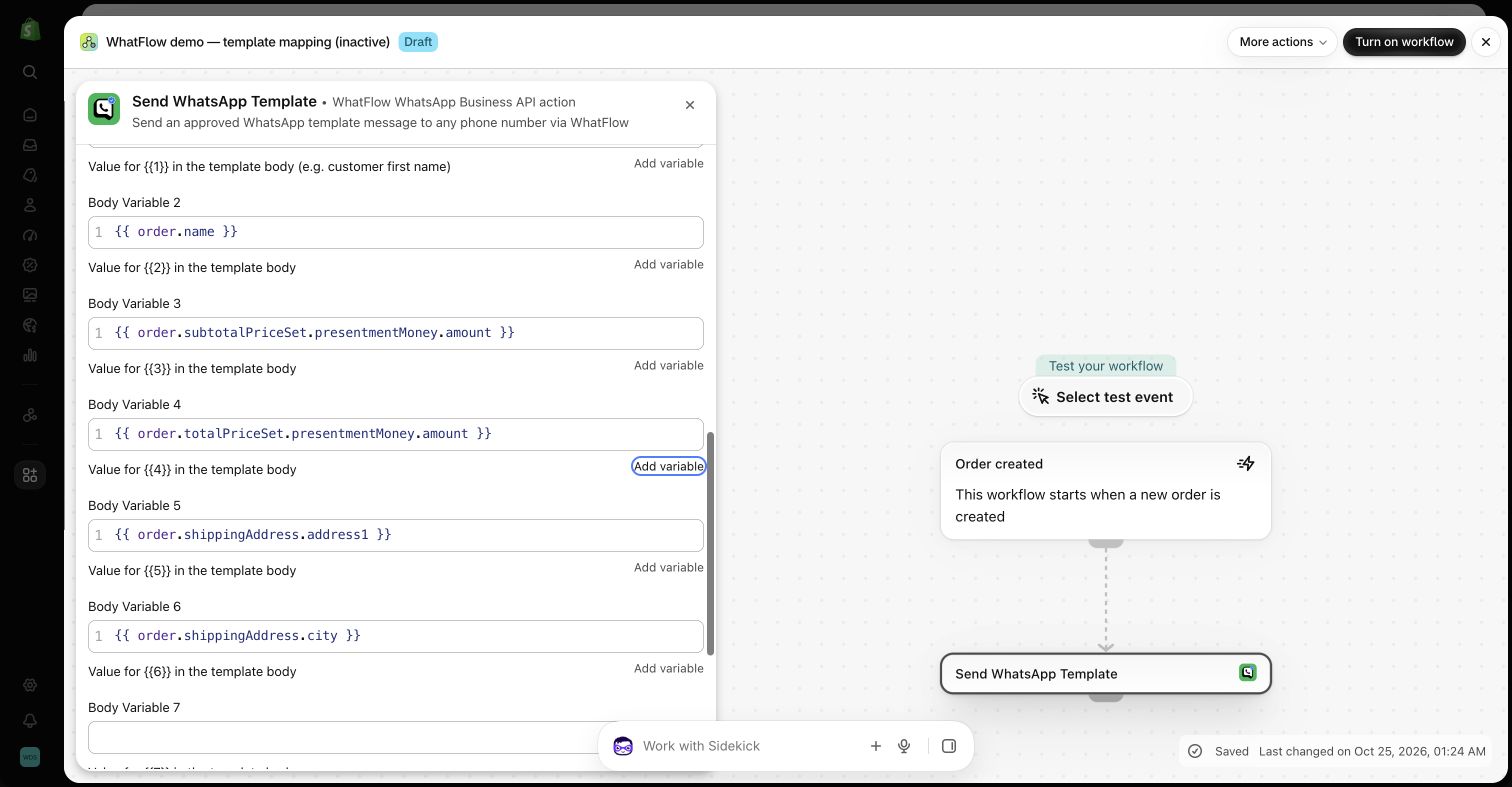
WhatFlow WhatsApp Business API runs on Meta's official WhatsApp Cloud API, with every feature on every plan, including Free. The simplest automated welcome uses Shopify Flow: the Customer created trigger fires when a new customer places an order or a profile is created by hand (Shopify Help Center). Add WhatFlow's Send WhatsApp Template action, pick your approved welcome template and map the first name and order fields. Our walkthrough on sending WhatsApp templates from Shopify Flow shows the mapping.
WhatFlow template variables mapped to Shopify order fields in a demo Flow workflow. Nothing was sent.
Replies to your welcome land in WhatFlow's shared team inbox, where you can assign them and answer with canned responses. There are no seat fees, so the whole team can pick up new-customer questions. WhatFlow's blocklist keeps anyone who replies STOP out of automated sends.
Run WhatsApp for your Shopify store with WhatFlow
Free plan available. Templates, COD confirmation, Shopify Flow automations and a shared team inbox with no seat fees. Every feature is included on every plan, including Free.
If you only set up one welcome message, make it #1: a first-order welcome tied to the order. It's cheap to send as utility, it answers the question every new customer has, and it opens the door for everything that follows.
Frequently asked questions
What is a good welcome message for new customers?
One that confirms what just happened (their first order, or their sign-up), tells them what to expect next, and gives them one easy way to ask for help. Keep any offer for a separate message unless the welcome is the offer.
What's the difference between a welcome message and a greeting message?
A greeting is your reply when someone messages you first, so it's free-form inside the 24-hour window. A welcome message is sent by your store after someone becomes a customer or subscriber, so on WhatsApp it needs an approved template and opt-in.
Is a WhatsApp welcome message marketing or utility?
It depends on the content. Meta lists a plain opt-in confirmation as a utility example, and a first-order welcome tied to the order can be utility. Add a discount, a product push or a general introduction and Meta treats it as marketing.
When should I send a welcome message to a new customer?
Within minutes of the order or sign-up, while they're still thinking about you. How-to-use tips go when the product arrives, and a welcome offer for subscribers goes right after they opt in.
Can I send a welcome message automatically on Shopify?
Yes. Shopify Flow's Customer created trigger fires when a new customer places an order or a profile is created by hand, and a WhatsApp app with Flow actions, such as WhatFlow, can send an approved template from that workflow.