
Publisher disclosure: this comparison is written by WhatFlow. Competitor capabilities are based on the linked public documentation; the WhatFlow screenshots come from our demo store. Examples are illustrative, and results depend on your store and configuration.
WhatFlow and Zixflow at a glance
| Consideration | WhatFlow | Zixflow |
|---|---|---|
| Connection | Official Meta WhatsApp Cloud API via Embedded Signup from Shopify admin. | Describes itself as an official Meta partner with a direct relationship with Meta. |
| Built for Shopify | Shopify App Store app with admin extensions and native Shopify Flow triggers and actions. | Native Shopify integration that syncs customers, purchases and products into Zixflow for its own workflows. Shopify Flow isn't mentioned. |
| Pricing and billing units | Free plan; paid plans from $4.99/month by message allowance, published on the Shopify App Store. Meta charges billed separately. | Free, Marketing Stack and Business Stack tiers, plus a prepaid wallet for WhatsApp, SMS, email and RCS (its pricing includes Meta rates). Confirm current plan amounts with Zixflow. |
| Feature access by plan | Every feature on every plan, including Free. | Features vary by tier; automation runs on credits sold in bundles. |
| Team inbox seats | Shared inbox with assignment, filters and saved replies. No seat fees. | Marketing Stack includes team management with role-based access; check user terms on your plan. |
| COD confirmation | Confirm and Cancel buttons that tag or cancel the Shopify order through Flow. | Not described on its Shopify integration page. |
| Abandoned checkout recovery | Built in, with templates mapped to Shopify checkout data. | Abandoned carts listed as a trigger in its Shopify integration. |
| Catalog sharing | Live Meta catalog sharing from the inbox. | Catalog browsing and in-thread payments listed on its WhatsApp page. |
| Cross-channel fallback | WhatsApp-focused. | Falls back to RCS, SMS or email when WhatsApp fails. |
| Best fit | Shopify brands of any size running orders, recovery and support on WhatsApp. | Teams that want one engagement tool across WhatsApp, RCS, SMS and email. |
WhatFlow vs Zixflow: for a Shopify brand, WhatFlow is the better WhatsApp choice. It runs on the official Meta WhatsApp Cloud API, works inside Shopify with native Flow triggers and actions and admin extensions, and includes COD confirmation, cart recovery and a team inbox with no seat fees on every plan. Zixflow is a multichannel engagement platform that syncs Shopify data into its own workflow builder.
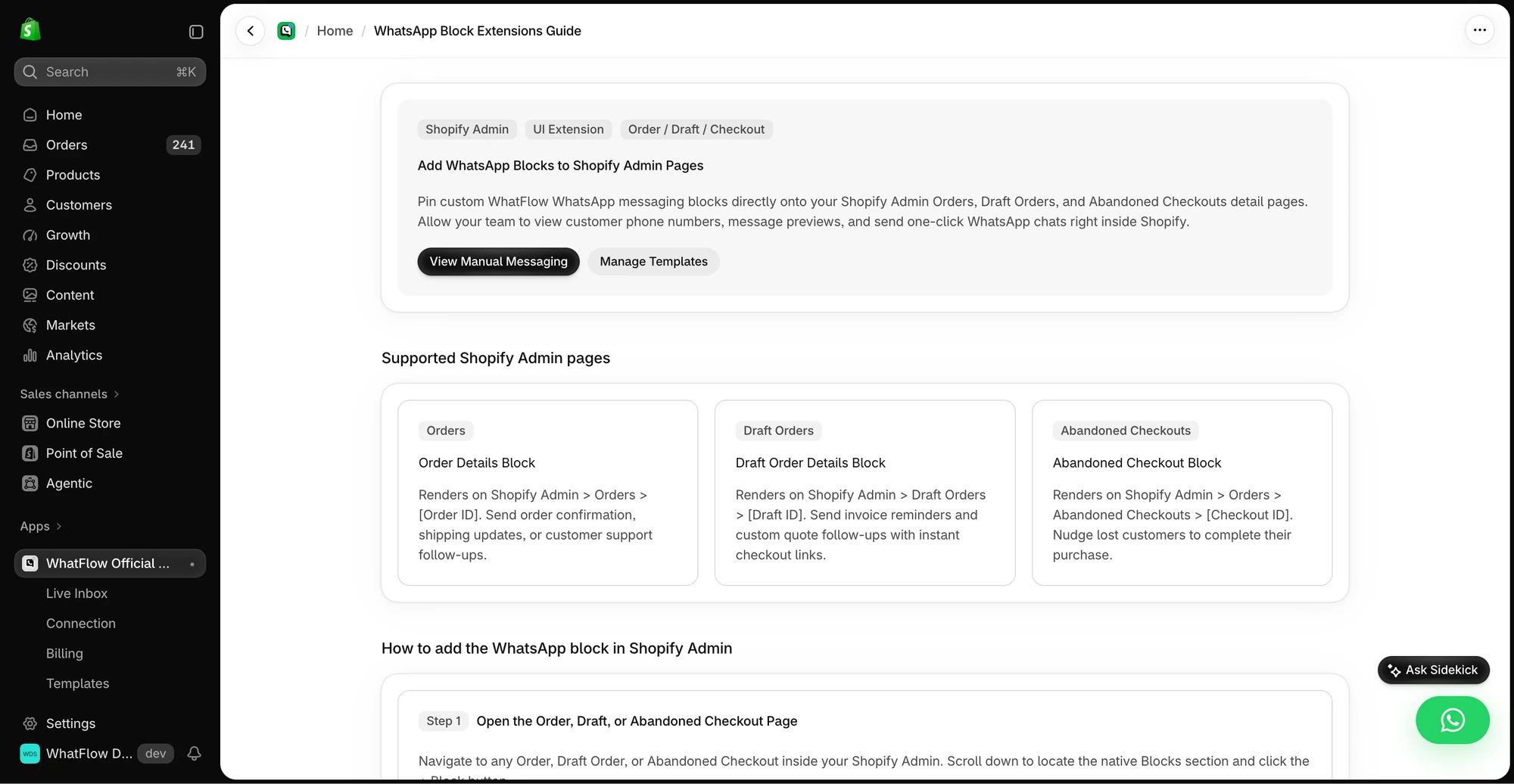
Quick note on WhatFlow itself, because the market's picture is a few years old. WhatFlow WhatsApp Business API is the official-API product, not the older linked-device app. It's rated 5.0 out of 5 from 55 ratings on the Shopify App Store as of November 5, 2026, and it's built for growing and large teams as well as first-time sellers.
WhatFlow vs Zixflow at a glance
WhatFlow | Zixflow | |
|---|---|---|
Core job | WhatsApp for Shopify orders and support | Engagement across WhatsApp, RCS, SMS, email |
Official Meta Cloud API | Official Meta partner (its claim) | |
Where automation runs | Shopify Flow, inside Shopify | Zixflow's journey builder |
Billing | Plan by message allowance | Tiers plus a prepaid messaging wallet |
Team seats | No seat fees | Check user terms per plan |
COD confirmation | Built in, tags or cancels orders | Not described on its Shopify page |
Zixflow details are from its WhatsApp page, Shopify integration page and billing help article, checked November 2026.
How do WhatFlow and Zixflow charge?
WhatFlow's plans are published on the Shopify App Store. Free includes 100 messages a month and every feature. Starter is $4.99 for 2,000, Plus $9.99 for 5,000, Growth $29 for 20,000, Scale $49.99 for 40,000 and Ultimate $99 for 75,000. Meta bills its WhatsApp charges separately. No seat fees, no feature gates. See WhatFlow pricing.
Zixflow has Free, Marketing Stack and Business Stack tiers. Messaging runs from a prepaid wallet: you add funds, and WhatsApp, SMS, email and RCS are deducted per delivered unit, with Meta's WhatsApp rates included. Automation runs on credits sold in bundles (its help centre lists 2,500 credits for $9). Plan amounts weren't readable on its pricing page when we checked in November 2026, so confirm current figures with Zixflow.
The practical difference: WhatFlow's app fee is a flat plan you can read today, Meta's charges sit on their own line, and the plan doesn't change when you add people. Say you have six people answering WhatsApp during a festive sale and send 22,000 messages that month: Growth at $29 plus 2,000 extra messages at $0.0025, so $34, with all six in the inbox.
Meta's rules apply on both platforms: per delivered template message, and since October 1, 2026, service replies are free only for the first 1,000 per business number each month, with utility templates inside the service window now charged. See Meta's pricing docs and our page on message-volume plans vs contact-based pricing.
Which is better for Shopify workflows?
WhatFlow, because it doesn't move your logic out of Shopify. Zixflow's integration syncs customers, purchase history and products into Zixflow, and you build automations there. WhatFlow adds WhatsApp to Shopify Flow: incoming messages and order replies are triggers, template, text and media sends are actions.
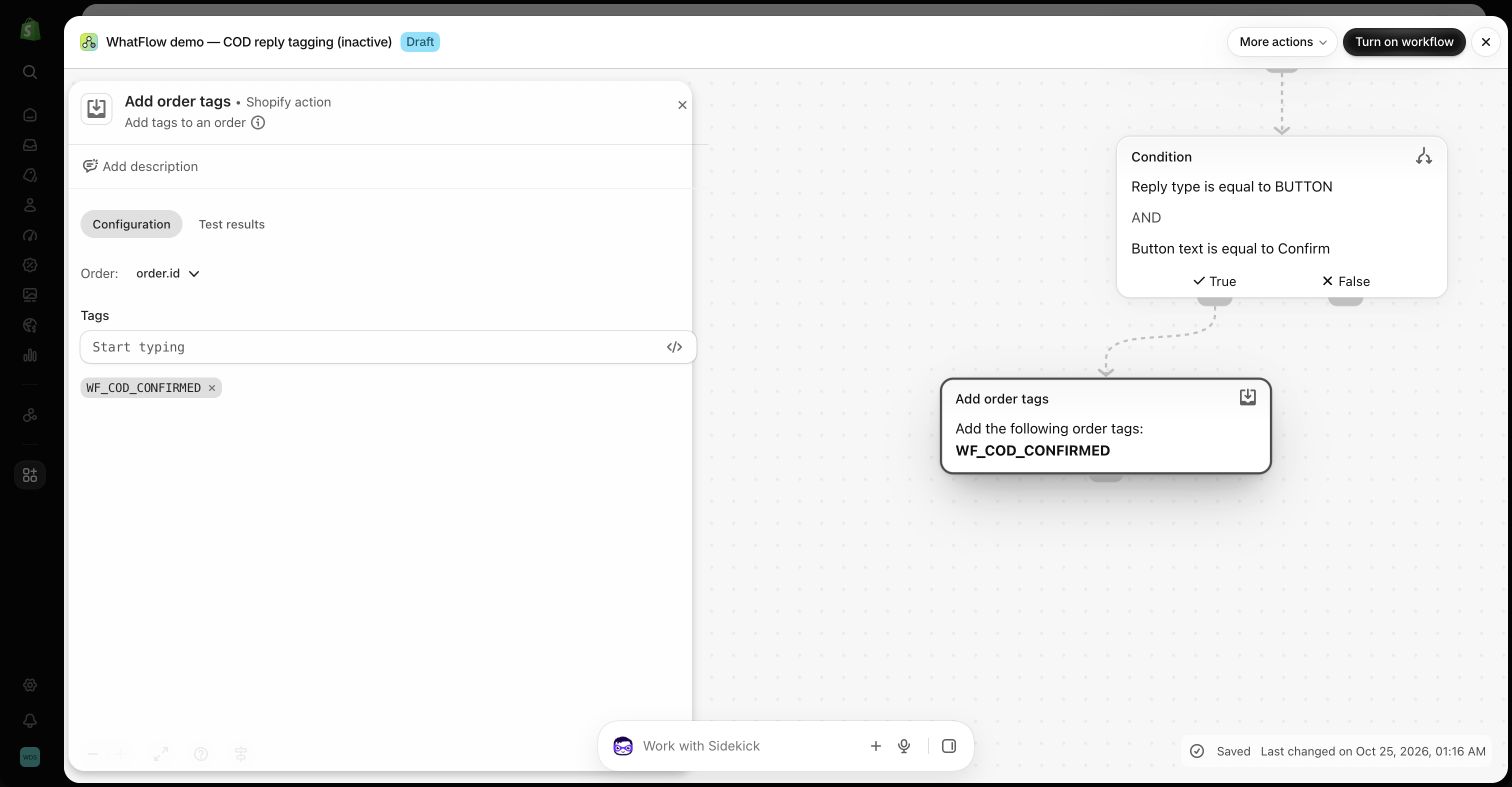
That matters when your WhatsApp step needs to touch the order, a tag, an inventory rule or another Shopify app. For example, a COD store:
Hi Rahul, your order #6603 (Rs 1,899, cash on delivery) is ready to ship. Please confirm. [Confirm order] [Cancel]
Confirm tags the order through Flow. Cancel cancels it. You can even ask Shopify Sidekick to draft the workflow; see using Sidekick with WhatFlow workflows.
To be fair to Zixflow, its WhatsApp page lists template management, session-window awareness, WhatsApp Flows forms, catalog browsing with in-thread payments and a visual journey builder. Those are real. They just live in a separate tool from your store.
Is WhatFlow enterprise-ready?
Yes. WhatFlow WhatsApp Business API gives large Shopify teams:
- The official Meta Cloud API, with Meta-approved templates and a template editor.
- A shared inbox with assignment, filters and saved replies.
- No seat fees, whatever your team size.
- Native Shopify Flow automation and Shopify admin extensions.
- Live catalog sharing, broadcasts, cart recovery and shipping updates.
For more, see the WhatFlow team inbox.
Moving WhatsApp work to WhatFlow
If you're already on Zixflow and want to try WhatFlow for Shopify workflows, keep it simple:
- Install WhatFlow and connect a WhatsApp number with Meta's Embedded Signup from Shopify admin.
- Rebuild your most-sent template (usually order confirmation) in the WhatFlow template editor.
- Add one Shopify Flow workflow on the order-reply trigger.
- Add your team to the inbox and load five saved replies for your most common questions.
- Run it for a week, then move the next workflow.
Our Shopify Flow WhatsApp automation guide has more workflow ideas.
When Zixflow might still make sense
Choose Zixflow if you specifically need one engagement tool across WhatsApp, RCS, SMS and email with automatic fallback when WhatsApp fails, or you want OTP delivery and multichannel journeys from a single wallet. Zixflow also lists AI agents. WhatFlow has no built-in AI bot, but WhatFlow's MCP connector lets you connect Claude, ChatGPT or Cursor to draft replies a person approves.
The bottom line
For WhatsApp on Shopify, WhatFlow is the more natural fit: official Meta Cloud API, native Shopify Flow, COD confirmation and a no-seat-fee team inbox, with every feature on the Free plan. Install it and run your first order workflow inside Shopify today.
Questions worth asking
Is WhatFlow a good Zixflow alternative for Shopify?
Yes. WhatFlow runs on the official Meta Cloud API and puts WhatsApp triggers and actions inside Shopify Flow, with COD confirmation, cart recovery and a team inbox with no seat fees on every plan, including Free.
Does Zixflow integrate with Shopify?
Yes. Zixflow describes a native Shopify integration that syncs customer, purchase and product data into Zixflow for its workflows. WhatFlow works inside Shopify itself, with native Shopify Flow triggers and actions and admin extensions.
How does Zixflow charge for WhatsApp?
Zixflow uses a prepaid wallet for WhatsApp, SMS, email and RCS, charging only for delivered WhatsApp messages and including Meta's rates, per its help centre. WhatFlow charges a plan fee by message allowance and Meta bills its charges separately.
Does WhatFlow charge per user?
No. WhatFlow's team inbox has no seat fees at any team size, and every feature is on every plan, including Free.
Sources and methodology
We checked these primary sources on November 5, 2026. Vendor pages describe advertised capabilities, rather than independent performance tests. Confirm current pricing, plan limits and availability with each provider.
- Zixflow WhatsApp
Zixflow's official Meta partner claim, template management, fallback, catalog and payments, journey builder and AI agents.
- Zixflow Shopify integration
Data synced from Shopify, triggers such as purchases and abandoned carts, and supported channels.
- Zixflow billing: how it works
Free, Marketing Stack and Business Stack tiers, prepaid wallet billing for delivered messages and automation credit bundles.
- WhatFlow WhatsApp Business API on the Shopify App Store
WhatFlow plans, Shopify Flow support and 5.0/5 rating from 55 ratings, checked November 5, 2026.
- WhatsApp Business Platform pricing (Meta)
Meta's per-message WhatsApp pricing by category and country.