
Publisher disclosure: this comparison is written by WhatFlow. Competitor capabilities are based on the linked public documentation; the WhatFlow screenshots come from our demo store. Examples are illustrative, and results depend on your store and configuration.
WhatFlow and Wassenger at a glance
| Consideration | WhatFlow | Wassenger |
|---|---|---|
| WhatsApp connection | Official Meta WhatsApp Cloud API through Meta Embedded Signup inside Shopify admin. | Two options: a QR-linked WhatsApp Web session (linked device) or the WhatsApp Business API. |
| Built for Shopify | Shopify App Store app with admin extensions and native Shopify Flow triggers and actions. | General WhatsApp platform; its Shopify guide has you create a custom Shopify app, copy API tokens and build n8n-based workflows. |
| Pricing and billing units | Free plan; paid plans from $4.99/month, priced by messages sent. Meta fees separate. | Professional $39.90, Business $69.90, Enterprise $99.90 per month, each with 1 number; Meta fees passed through at cost (as of November 2026). |
| Team inbox seats | No seat fees and no seat cap, with assignment and filters. | 3, 6 or 9 agents included by plan; extra agents ($14/month each) only on Enterprise. |
| Campaign limits | Broadcasts on every plan, limited by your message allowance and Meta's messaging limits. | Professional: 10 campaigns a month, 500 recipients each, 1 per day; higher plans raise the caps. |
| COD confirmation | Template with reply buttons that tag or cancel the Shopify order through Flow. | Possible to build yourself with workflows; not a ready-made feature on its pricing page. |
| Abandoned checkout recovery | Included on every plan. | Not listed as a ready-made Shopify feature on its pricing page. |
| Catalog sharing | Live Meta product catalog sharing from the inbox. | Its Shopify workflow guide reads products through a Shopify API node. |
| Shopify App Store rating | 5.0 out of 5 from 55 ratings (WhatsApp Business API, November 5, 2026). | No Shopify App Store listing found (November 5, 2026). |
| Best fit | Shopify stores of any size that want WhatsApp sales, COD and support without building integrations. | Businesses on many platforms that want a general WhatsApp API and are comfortable building their own workflows. |
For a Shopify store, WhatFlow is the better WhatsApp choice than Wassenger. WhatFlow installs from the Shopify App Store, connects on the official Meta Cloud API from inside Shopify admin, and includes COD confirmation, cart recovery, broadcasts, catalog sharing and native Shopify Flow actions on every plan. Its team inbox has no seat fees and no seat cap. Wassenger is a flexible general WhatsApp tool, but its plans cap agents, and connecting Shopify means creating a custom app and building workflows.
And yes, WhatFlow has grown up. If you know us as the linked-device app for small shops, that's our older Chat Automation app. WhatFlow WhatsApp Business API is the official-API product: enterprise-ready, rated 5.0 on the Shopify App Store, and still the easiest place for a new store to start.
WhatFlow vs Wassenger at a glance
WhatFlow | Wassenger | |
|---|---|---|
Shopify setup | Install from the Shopify App Store | Create a custom Shopify app, copy API tokens, build flows |
WhatsApp connection | Official Meta Cloud API only | QR-linked WhatsApp Web session or Business API |
Price | Free; paid from $4.99/month | $39.90–$99.90/month per number |
Agents | Unlimited, no seat fees | 3, 6 or 9 by plan; +$14 each on Enterprise only |
COD, cart recovery | Ready-made, every plan | Build it yourself |
Shopify Flow | Native triggers and actions | Not described |
Shopify rating (Nov 5, 2026) | 5.0 (55 ratings) | No listing found |
Official API vs a linked-device session
This matters more than it looks. Wassenger's pricing page lets you connect a number with a QR code or connect the WhatsApp Business API. The QR route is a linked-device session: Wassenger's help center explains that one of your WhatsApp Web or Desktop linked devices must stay connected to Wassenger, and if it's removed, sending and receiving stops until you re-link.
WhatFlow WhatsApp Business API doesn't have that mode. It only runs on the official Meta Cloud API, connected through Meta Embedded Signup in Shopify admin. You get Meta-approved templates, a green-tick-eligible business profile, and messaging limits that rise as your number builds quality. If you're weighing the move from a phone-based setup, our guide to moving from the WhatsApp Business app to the API explains what changes.
How does Wassenger's pricing compare with WhatFlow?
Wassenger's plans, as of November 2026, each include one WhatsApp number:
- Professional: $39.90/month, 3 agents, 10 campaigns a month with up to 500 recipients each
- Business: $69.90/month, 6 agents, 20 campaigns a month, 1,000 recipients each
- Enterprise: $99.90/month, 9 agents, extra agents $14/month, 100 campaigns, 2,000 recipients each
Wassenger passes Meta's fees through at cost, which is fair. Now the math for a 12-person team: Professional and Business can't add agents, so you're on Enterprise at $99.90 plus 3 × $14 = $141.90/month.
WhatFlow for the same 12 people:
- Seats: $0, and no cap
- Plan: Growth at $29/month for 20,000 messages, or Plus at $9.99 for 5,000
- Campaigns: broadcasts on every plan, limited only by your message allowance and Meta's messaging limits
Meta's per-message charges apply to both. Since October 1, 2026, only the first 1,000 service messages per business number each month are free (Meta's pricing doc). Current WhatFlow amounts are on our pricing page.
Which handles Shopify workflows better?
WhatFlow, by a long way. Wassenger's own Shopify guide has you open App Development in Shopify, create a custom app, grant Admin API access to orders, products and customers, save the access token (Shopify shows it once), then add Shopify nodes in Wassenger Flows. That's workable for a developer. It's a project for everyone else.
WhatFlow is a Shopify app, so the plumbing is already done:
- Install WhatFlow and connect WhatsApp with Embedded Signup.
- Pick a template from the template editor, or write your own.
- Turn on COD confirmation, abandoned checkout recovery or shipping updates, or build your own automation in Shopify Flow with WhatFlow's triggers and actions.
A COD confirmation looks like this:
Hi Karim, thanks for order #3317 (Smartwatch Strap Set, EGP 950, cash on delivery). Tap Confirm and we'll dispatch tomorrow, or Cancel to cancel the order.
The tap fires WhatFlow's order-reply trigger in Shopify Flow, which tags or cancels the order. No tokens, no nodes. Our Shopify Flow automation guide shows more examples.
Is WhatFlow ready for a large team?
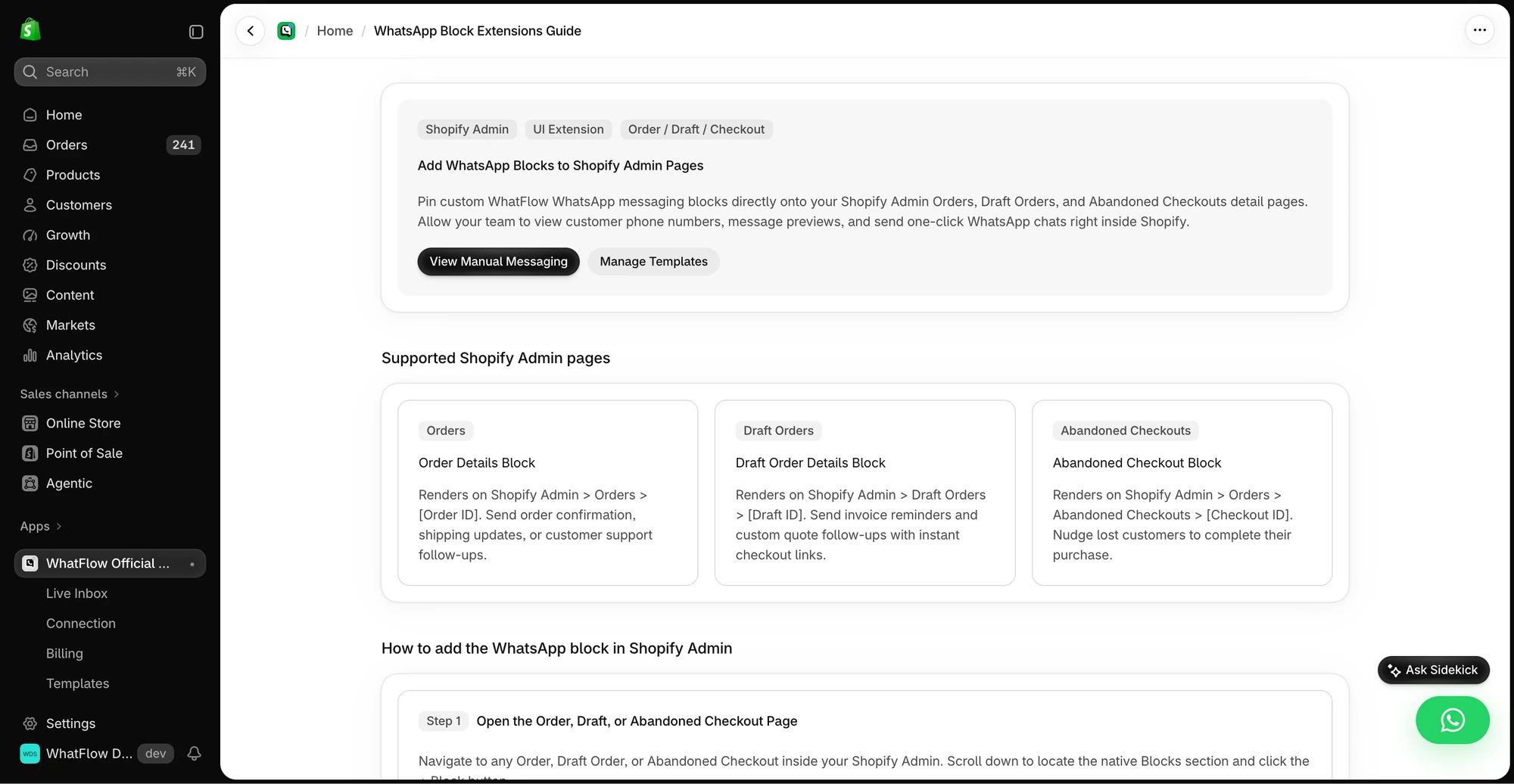
Yes. WhatFlow's team inbox has assignment, filters, saved replies and live catalog sharing, and there's no seat cap, so you can bring in 15 or 50 agents on one number. Admin extensions put WhatsApp next to the order in Shopify admin, and Flow handles routing and tagging at volume.
When might Wassenger still make sense?
Pick Wassenger only if you specifically need a general WhatsApp API across non-Shopify systems, want to build custom n8n-style workflows, or prefer connecting a regular WhatsApp number by QR code. For Shopify-first stores that's extra work you don't need.
The bottom line
Wassenger is a general WhatsApp toolkit. WhatFlow is the WhatsApp app built for Shopify: official Meta Cloud API, COD confirmation, cart recovery, broadcasts and Shopify Flow automation on every plan, with no seat fees or caps. Install it free and you'll have your first template live faster than you can create a custom app.
Questions worth asking
Is WhatFlow a good Wassenger alternative for Shopify?
Yes. WhatFlow installs from the Shopify App Store, runs on the official Meta Cloud API and includes COD confirmation, cart recovery, broadcasts, catalog sharing and Shopify Flow actions on every plan, with no seat fees or seat caps.
Does Wassenger use the official WhatsApp API?
It offers both. You can connect a number by QR code, which runs as a WhatsApp Web linked-device session, or connect the WhatsApp Business API. WhatFlow WhatsApp Business API always uses the official Meta Cloud API.
How many agents does Wassenger include?
Wassenger's pricing page lists 3 agents on Professional ($39.90/month), 6 on Business ($69.90) and 9 on Enterprise ($99.90), with extra agents at $14 a month only on Enterprise, as of November 2026. WhatFlow has no seat fees and no seat cap.
Does Wassenger have a Shopify app?
We didn't find a Wassenger listing on the Shopify App Store. Wassenger's own Shopify guide has you create a custom app in Shopify, save the Admin API access token and connect it inside Wassenger Flows.
Sources and methodology
We checked these primary sources on November 5, 2026. Vendor pages describe advertised capabilities, rather than independent performance tests. Confirm current pricing, plan limits and availability with each provider.
- Wassenger pricing
Plan prices, agents included, extra-agent pricing, campaign limits, QR and Business API connection options, and Meta fees at cost, checked November 5, 2026.
- Wassenger help center: number disconnected
Explains that a QR-connected number runs as a WhatsApp Web/Desktop linked-device session and stops messaging if that device is removed.
- Wassenger blog: Shopify owners, free your time with this WhatsApp AI hack
Wassenger's Shopify setup: create a custom Shopify app, save API tokens and add them in Wassenger Flows.
- WhatFlow WhatsApp Business API on the Shopify App Store
WhatFlow plans, included messages and the 5.0/5 rating from 55 ratings, checked November 5, 2026.
- WhatsApp Business Platform pricing documentation
Meta's per-message pricing, including the October 1, 2026 changes to free service messages.