
Publisher disclosure: this comparison is written by WhatFlow. Competitor capabilities are based on the linked public documentation; the WhatFlow screenshots come from our demo store. Examples are illustrative, and results depend on your store and configuration.
WhatFlow and Sprinklr at a glance
| Consideration | WhatFlow | Sprinklr |
|---|---|---|
| Connection | Official Meta WhatsApp Cloud API via Embedded Signup from Shopify admin. | Native WhatsApp integration as one of 30+ social, messaging, voice and digital channels. |
| Built for Shopify | Shopify App Store app with admin extensions and native Shopify Flow triggers and actions. | Lists Shopify among integrations for a unified customer view, alongside Salesforce, Zendesk and HubSpot. |
| Pricing | Free plan; paid plans from $4.99/month, published. Meta charges billed separately. | Pricing via sales (not published as of November 2026). Sprinklr says it operates entirely on custom enterprise quotes. |
| What drives the bill | Message allowance only. Every feature on every plan. | Named users by role, modules, channel and message volume, professional services and contract term. |
| Team inbox seats | Shared inbox with assignment, filters and saved replies. No seat fees at any size. | Unified inbox across channels; named users are a pricing factor. |
| Time to launch | Self-serve install and Embedded Signup from Shopify admin. | Smaller deployments in weeks; full enterprise rollouts typically 2 to 4 months, per Sprinklr. |
| Trial or free plan | Free plan with every feature, no time limit. | Free trial and self-serve sign-up deprecated, per Sprinklr. |
| COD confirmation | Confirm and Cancel buttons that tag or cancel orders through Flow. | Not described on its service pages; would be part of your implementation. |
| AI agents | No built-in AI agent. Connect Claude, ChatGPT or Cursor through WhatFlow's MCP connector to read chats and draft replies a person approves, with no per-resolution AI fees. | AI agent platform across service and marketing. |
| Best fit | Shopify brands, from first sale to large support teams, that want WhatsApp tied to orders. | Multi-brand, multi-region enterprises unifying social, voice and messaging service. |
WhatFlow vs Sprinklr: for a Shopify brand that wants enterprise-grade WhatsApp, WhatFlow gets you there faster and for far less. It runs on the official Meta WhatsApp Cloud API, installs from the Shopify App Store, automates through native Shopify Flow, and gives your whole team an inbox with no seat fees. Sprinklr is a unified CX platform sold only through custom enterprise quotes, with full rollouts it says typically take two to four months.
That "enterprise-grade" claim is deliberate. People still think of WhatFlow as a small-shop tool because the older Chat Automation app came first. WhatFlow WhatsApp Business API is the official-API product: Meta-approved templates, a shared inbox with assignment and filters, Flow automation at scale, Shopify admin extensions, and a 5.0 out of 5 rating from 55 ratings on the Shopify App Store as of November 5, 2026.
WhatFlow vs Sprinklr at a glance
WhatFlow | Sprinklr | |
|---|---|---|
Core job | WhatsApp for Shopify orders and support | Unified CX across 30+ channels |
Official Meta Cloud API | Native integration | |
Shopify | Native app, Flow triggers and actions | Listed integration for customer view |
Pricing | Published; Free, paid from $4.99/month | Custom enterprise quote only |
Seats | No seat fees | Named users are a pricing factor |
Launch | Self-serve install | Weeks to 2 to 4 months |
Free option | Free plan, every feature | Free trial deprecated |
Sprinklr facts are from its brand factsheet and omnichannel service page, checked November 2026.
How does Sprinklr pricing compare with WhatFlow?
WhatFlow's pricing is public. Free includes 100 messages a month and every feature. Starter is $4.99 for 2,000, Plus $9.99 for 5,000, Growth $29 for 20,000, Scale $49.99 for 40,000 and Ultimate $99 for 75,000. That's the whole model: no seat fees, no modules, no services line. See WhatFlow pricing.
Sprinklr says all of its pricing is quote-based for enterprise deployments and that it has deprecated its free trial and self-serve sign-up (pricing via sales, not published as of November 2026). It lists the factors: named users by role, modules, channel and message volume, professional services and onboarding, and contract term length.
Here's what that means for a 25-person Shopify support team. Say you send 60,000 WhatsApp messages a month. On WhatFlow that's Ultimate at $99, with all 25 people in the inbox and nothing extra as you add more. On Sprinklr, every one of those 25 named users is an input to the quote, as are the modules and onboarding services.
Meta's own charges apply on top with any provider: per delivered template message, by category and country. Since October 1, 2026, service replies are free only for the first 1,000 per business number per month and utility templates inside the service window are charged. See Meta's pricing docs and our WhatsApp Business API pricing guide.
Which is better for Shopify workflows?
WhatFlow, because WhatsApp runs inside Shopify. Incoming messages and order replies are Shopify Flow triggers. Template, text and media sends are Flow actions. Your ops team builds automations next to the tags, holds and fulfilment rules they already own, without a professional services engagement.
A returns workflow, for example:
Hi Tom, sorry the jacket didn't fit. Reply with your order number and the size you'd like instead, and we'll set up the exchange.
The reply lands in the shared inbox, assigned to the returns team. For a full playbook, see handling Shopify returns and exchanges on WhatsApp.
Sprinklr lists Shopify among the integrations that give agents one view of the customer, alongside Salesforce, Zendesk and HubSpot. That's a data connection into a large CX suite. COD confirmation, cart recovery templates and order tagging from WhatsApp replies aren't described on its service pages, so for a Shopify brand they'd be part of the implementation.
Is WhatFlow really enterprise-ready?
Yes. For a Shopify brand, the enterprise requirements for WhatsApp are clear, and WhatFlow covers them:
- Official Meta Cloud API with Meta-approved templates and a business profile eligible for Meta verification.
- Shared team inbox with assignment, filters and saved replies.
- No seat fees at any size, so a 100-person team costs the same in seats as a team of two.
- Native Shopify Flow for automation at volume, plus Shopify admin extensions.
- COD confirmation, cart recovery, shipping updates, broadcasts and live catalog sharing.
See the WhatFlow team inbox, and our take on a small-store WhatsApp setup vs an enterprise suite.
When Sprinklr might still make sense
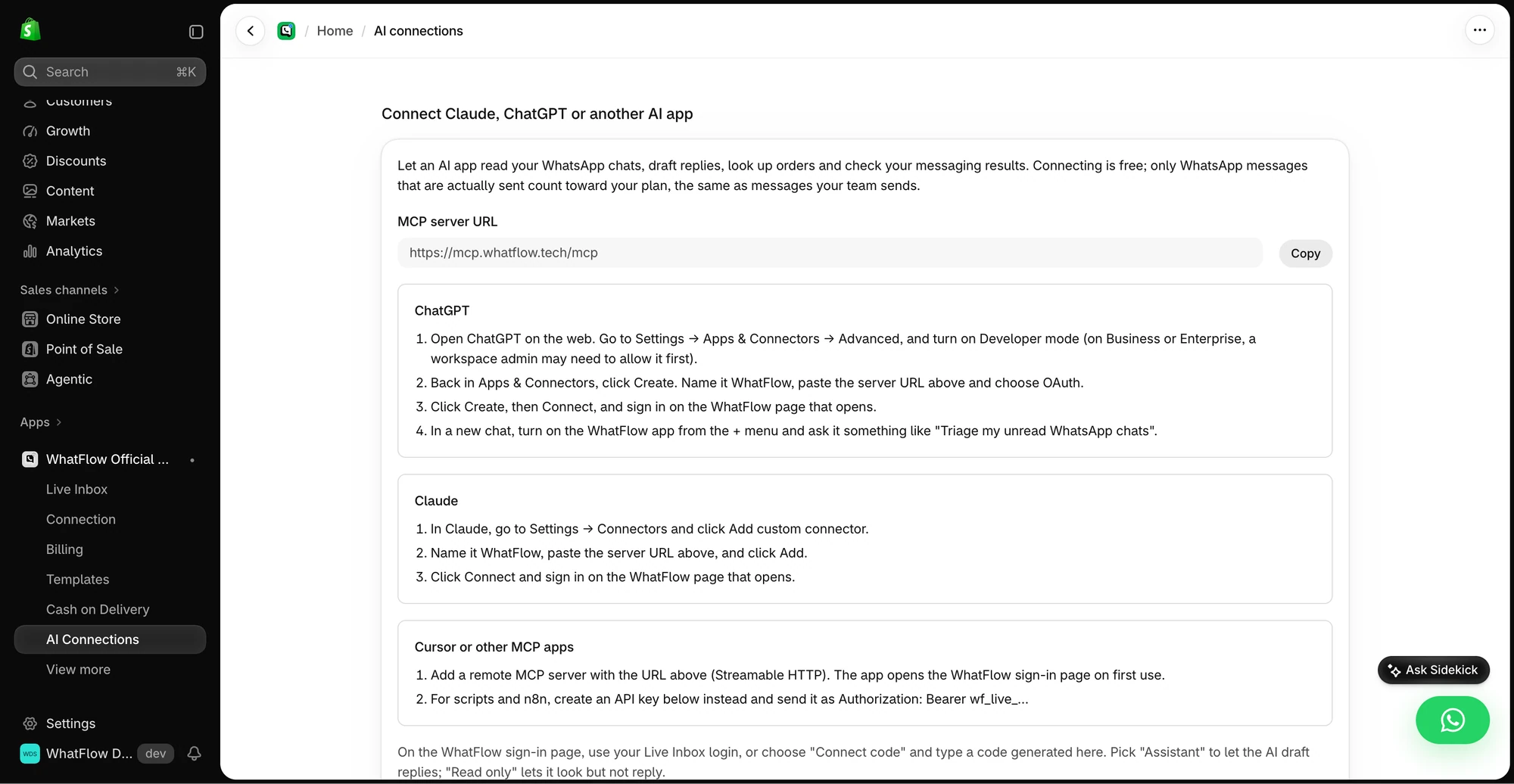
Choose Sprinklr if you're a multi-brand, multi-region enterprise unifying social, voice and messaging service in one platform, with AI agents across service and marketing, and you have the budget and time for a structured rollout. WhatFlow is WhatsApp-only, and it has no built-in AI bot; for AI drafting, WhatFlow's MCP connector connects Claude, ChatGPT or Cursor to your Live Inbox with a person approving each reply.
The bottom line
If WhatsApp's job at your Shopify brand is orders and support, you don't need a multi-month CX programme to do it at enterprise scale. WhatFlow gives you the official Meta Cloud API, native Shopify Flow, COD confirmation and a no-seat-fee inbox on published pricing. Install it and have your team answering on WhatsApp this week.
Questions worth asking
Is WhatFlow a Sprinklr alternative for Shopify WhatsApp?
Yes, for Shopify brands. WhatFlow runs on the official Meta Cloud API, installs from the Shopify App Store and adds WhatsApp to Shopify Flow, with COD confirmation, cart recovery and a team inbox with no seat fees.
How much does Sprinklr cost?
Sprinklr doesn't publish prices. As of November 2026 it says all pricing is quote-based, depending on named users, modules, channel and message volume, professional services and contract term.
How long does Sprinklr take to implement?
Sprinklr says smaller deployments can go live in weeks, while full enterprise rollouts with multi-region, multi-brand setups typically take 2 to 4 months. WhatFlow installs self-serve from the Shopify App Store.
Is WhatFlow suitable for enterprise Shopify brands?
Yes. WhatFlow WhatsApp Business API uses the official Meta Cloud API, supports large teams with assignment and filters at no seat cost, and automates at scale through native Shopify Flow triggers and actions.
Sources and methodology
We checked these primary sources on November 5, 2026. Vendor pages describe advertised capabilities, rather than independent performance tests. Confirm current pricing, plan limits and availability with each provider.
- Sprinklr brand factsheet
Quote-based pricing, deprecated free trial and self-serve sign-up, pricing factors, 30+ channels and rollout timelines, checked November 2026.
- Sprinklr omnichannel customer service
Unified inbox including WhatsApp, and Shopify named among integrations for a unified customer view.
- WhatFlow WhatsApp Business API on the Shopify App Store
WhatFlow plans, Shopify Flow support and 5.0/5 rating from 55 ratings, checked November 5, 2026.
- WhatsApp Business Platform pricing (Meta)
Meta's per-message WhatsApp pricing, billed separately from any app or platform fee.