
Publisher disclosure: this comparison is written by WhatFlow. Competitor capabilities are based on the linked public documentation; the WhatFlow screenshots come from our demo store. Examples are illustrative, and results depend on your store and configuration.
WhatFlow and Omnisend at a glance
| Consideration | WhatFlow | Omnisend |
|---|---|---|
| What the product is built around | WhatsApp for Shopify on the official Meta Cloud API: templates, broadcasts, COD confirmation, Shopify Flow and a two-way team inbox. | An ecommerce marketing platform for email, SMS and web push, with segmentation and automation. |
| Pricing and billing units | Free plan; paid plans from $4.99/month, priced by WhatsApp message allowance. Meta fees separate. | Priced by contacts: Free covers 250 contacts and 500 emails a month; Standard and Pro scale with contacts; SMS uses credits (as of November 2026). |
| Feature access | Every feature on every plan, including Free. Plans differ only by message allowance. | Email, SMS and web push with segmentation and automation. WhatsApp isn't on the pricing page; Omnisend's help centre documents WhatsApp through partner integrations. |
| Team access | Shared WhatsApp inbox with assignment and filters, no seat fees at any team size. | A marketing platform rather than a two-way support inbox; the pricing page doesn't list a per-seat charge. |
| Storefront entry point | Theme-matched WhatsApp chat buttons, free forever. | Signup forms and popups for collecting email and SMS subscribers. |
| COD confirmation and order replies | WhatsApp reply buttons that tag or cancel orders through Shopify Flow. | Not listed on the pricing page. |
For WhatsApp on Shopify, WhatFlow is the app to use, not Omnisend. Omnisend is a well-known email, SMS and push marketing platform, and its pricing page doesn't list WhatsApp. WhatFlow runs on the official Meta Cloud API and gives you WhatsApp templates, broadcasts, COD confirmation, abandoned checkout messages, native Shopify Flow actions and a two-way team inbox with no seat fees, all on the Free plan.
WhatFlow vs Omnisend at a glance
WhatFlow | Omnisend | |
|---|---|---|
Channels | WhatsApp (official Meta Cloud API) | Email, SMS, web push |
Built in, every plan | Not on the pricing page; partner integrations per its help centre | |
Pricing unit | WhatsApp messages sent | Contacts, plus SMS credits |
Two-way inbox | Shared team inbox, no seat fees | Marketing platform, not a support inbox |
COD confirmation | Reply buttons that tag or cancel orders via Shopify Flow | Not listed |
Free plan | Every feature, 100 sends | 250 contacts, 500 emails a month |
Rating (Nov 5, 2026) | 5.0/5 from 55 ratings (Business API) | See its own listing |
WhatFlow isn't just a small-shop tool either. WhatFlow WhatsApp Business API is enterprise-ready: inbox assignment and filters, Shopify Flow automation at scale and no seat fees at any team size, so a 50-person team pays the same in seats as a two-person shop.
Can Omnisend send WhatsApp messages?
As of November 2026, Omnisend's pricing page covers email, SMS and web push, and doesn't mention WhatsApp. Its help centre documents WhatsApp through third-party tools, such as the Chatarmin integration. So if you want WhatsApp with Omnisend, you're adding another app anyway.
That other app might as well be one built for Shopify. WhatFlow is a dedicated WhatsApp app that installs from the Shopify App Store and connects your number through Meta Embedded Signup from your Shopify admin.
How much does each cost?
Omnisend prices by contacts. As of November 2026, its Free plan covers 250 contacts and 500 emails a month, Standard and Pro scale with your list size, and SMS runs on credits. For a store with a growing email list, that bill grows with the list.
WhatFlow prices by WhatsApp messages sent, with no seat fees. As of November 2026:
WhatFlow plan | Price | Sends included |
|---|---|---|
Free | $0 | 100, then $0.01 each |
Starter | $4.99/month | 2,000 |
Plus | $9.99/month | 5,000 |
Growth | $29/month | 20,000 |
Scale | $49.99/month | 40,000 |
Say you send 4,000 WhatsApp messages a month: order confirmations, shipping updates and a couple of campaigns. That fits in Plus at $9.99 a month, before Meta's delivery fees. Meta charges per delivered template, by category and country, and since October 1, 2026, utility templates are charged even inside the customer service window. The full list is on our pricing page.
The two bills aren't either/or. Omnisend's units are contacts and emails, WhatFlow's are WhatsApp sends. Our guide to coordinating email, SMS and WhatsApp shows how to keep customers from getting the same message three times.
What WhatsApp adds that email and SMS don't
WhatsApp is a conversation. A customer can reply, ask a question and get an answer from a real person on your team, in the same thread. That's where WhatFlow does things a marketing platform isn't built for.
COD confirmation. Reply buttons that drive Shopify Flow:
Hi Deepa, thanks for your order #2740 (₹1,499, cash on delivery). Please confirm so we can ship it today. [Confirm] [Change address] [Cancel]
Abandoned checkout recovery as a conversation, not just a reminder:
Hi Deepa, you left the ceramic planter set in your cart. Any questions about sizes or delivery to Pune? Just reply here.
A two-way team inbox with assignment, filters and saved replies, so the person who knows the answer can reply, and live catalog sharing to send products right in the chat. Our WhatsApp vs email cart recovery comparison goes deeper on when each works best.
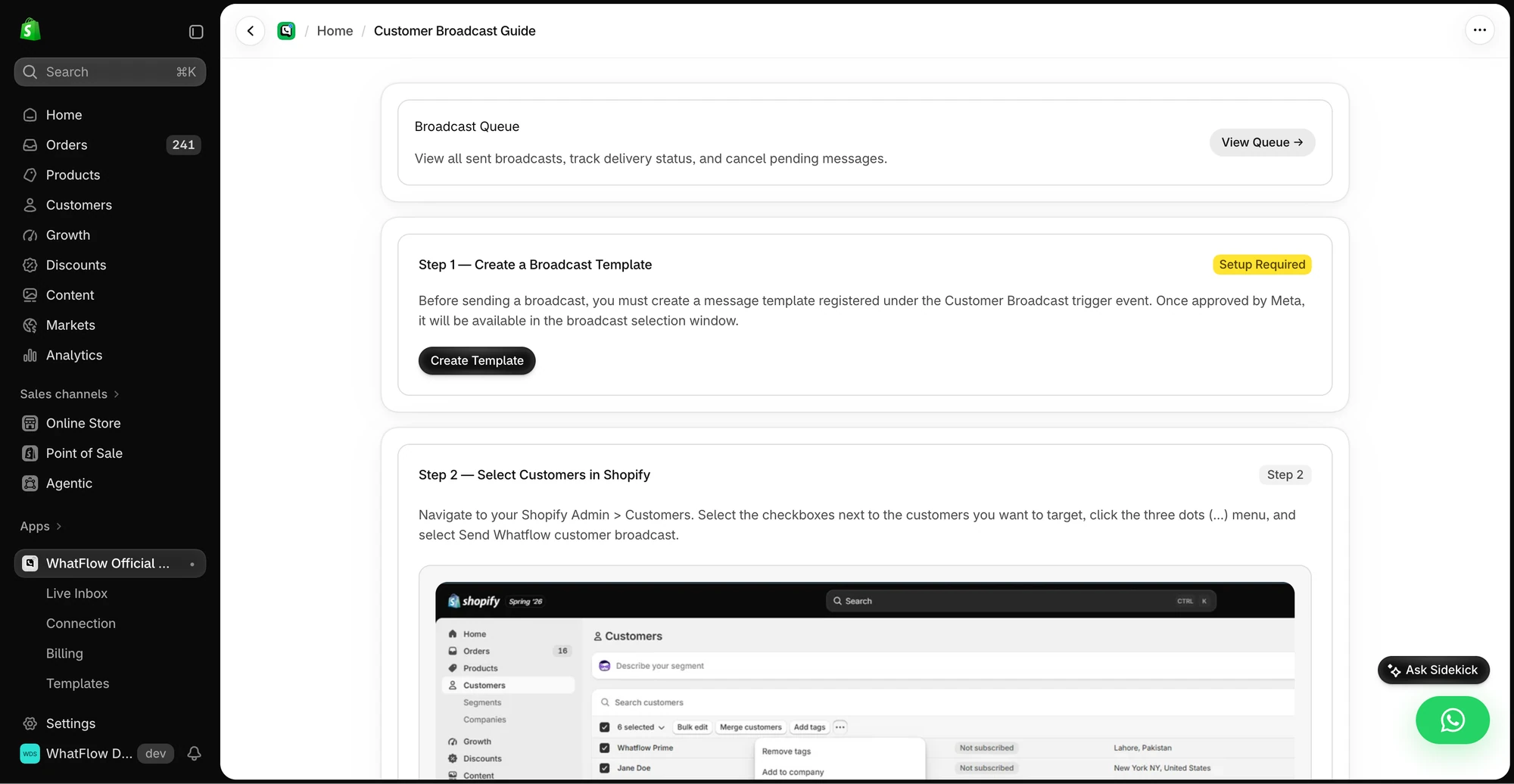
You can launch a WhatFlow broadcast from selected Shopify customers or a Shopify segment using the Admin action. In Team Inbox, the audience builder instead uses a spreadsheet or existing conversation contacts. Launching from a Shopify segment does not keep that segment continuously synced into Inbox. See the two campaign routes.
If you're planning your first WhatsApp campaigns, our WhatsApp marketing guide for Shopify covers opt-ins, templates and how often to message without getting blocked.
When might Omnisend still make sense?
Keep Omnisend if email and SMS are your main retention channels and you rely on its segmentation and campaign automation. That's not a reason to skip WhatsApp; it's a reason to run both.
The bottom line
Omnisend is an email, SMS and push platform. WhatFlow is how your Shopify store does WhatsApp: official Meta Cloud API, templates, broadcasts, COD confirmation, Shopify Flow and a no-seat-fee team inbox, with every feature on the Free plan. Keep your email tool if it works, and install WhatFlow for the channel your customers actually reply on.
Questions worth asking
Is WhatFlow a good Omnisend alternative for Shopify?
For WhatsApp, yes. WhatFlow runs on the official Meta Cloud API with templates, broadcasts, COD confirmation, Shopify Flow and a team inbox. Omnisend is built for email, SMS and push, so most stores run them side by side rather than replacing one with the other.
How does Omnisend pricing compare with WhatFlow?
Omnisend prices by contacts, with a Free plan for 250 contacts and paid plans that scale with your list (as of November 2026). WhatFlow prices by WhatsApp messages sent, with a Free plan and paid plans from $4.99 a month. Meta's WhatsApp delivery fees are separate.
Does WhatFlow charge per inbox seat?
No. WhatFlow's team inbox has no seat fees at any team size, so everyone who answers WhatsApp replies can be in it. You pay for your message plan and Meta's delivery fees.
Are WhatFlow features restricted on the free plan?
No. Every WhatFlow plan, including Free, has the full feature set. Plans differ only by message allowance and rate, and theme-matched WhatsApp buttons are free forever.
Does Omnisend support WhatsApp?
As of November 2026, Omnisend's pricing page lists email, SMS and web push but not WhatsApp, and its help centre describes WhatsApp through third-party integrations. WhatFlow is a dedicated WhatsApp app for Shopify on the official Meta Cloud API.
Sources and methodology
We checked these primary sources on November 5, 2026. Vendor pages describe advertised capabilities, rather than independent performance tests. Confirm current pricing, plan limits and availability with each provider.
- Omnisend pricing
Omnisend's contact-based plans, email allowances and SMS credits; WhatsApp isn't listed. Checked November 5, 2026.
- WhatFlow WhatsApp Business API on the Shopify App Store
WhatFlow plan prices, included sends, Shopify workflows and the 5.0/5 rating from 55 ratings, checked November 5, 2026.
- WhatsApp Business Platform pricing
Meta's per-message delivery pricing, which applies to WhatsApp messages sent through WhatFlow.
- Omnisend Help Center: integrate Chatarmin WhatsApp marketing tool with Omnisend
Shows Omnisend handling WhatsApp through a third-party integration. Checked November 5, 2026.