
Publisher disclosure: this comparison is written by WhatFlow. Competitor capabilities are based on the linked public documentation; the WhatFlow screenshots come from our demo store. Examples are illustrative, and results depend on your store and configuration.
WhatFlow and Mailchimp at a glance
| Consideration | WhatFlow | Mailchimp |
|---|---|---|
| Built for | Shopify stores of any size, from first sale to large support teams. Admin extensions, native Shopify Flow triggers and actions, COD confirmation and a team inbox on the official Meta Cloud API. | A broad email marketing platform for newsletters, audiences and automations. Strong at long-form campaigns, not at WhatsApp conversations. |
| Pricing | Free plan, paid plans from $4.99/month (Plus is $9.99 for 5,000 sends). No seat fees. Meta's WhatsApp charges are billed separately. | Priced by plan and contacts. Its marketing pricing page lists email plans and an SMS add-on in select countries; WhatsApp isn't listed there (as of November 2026). |
| Feature access | Every feature on every plan, including Free. Plans only change message allowances and rates. | Higher Mailchimp plans add more automation and audience tools. Email allowances don't translate into WhatsApp sends. |
| Team inbox | Shared WhatsApp inbox with assignment, filters and saved replies. No seat fees, so add the whole team. | Seats are tiered: Free 1 user, Essentials 3, Standard 5, Premium unlimited (as of November 2026). |
| Storefront WhatsApp button | Theme-matched WhatsApp chat buttons, free forever. | Mailchimp focuses on email sign-up forms rather than a WhatsApp chat button on your theme. |
WhatFlow vs Mailchimp isn't really either/or. Mailchimp is an email platform. WhatFlow is a WhatsApp app built for Shopify. If your customers message you on WhatsApp (and in India, Brazil, the Gulf or most of Europe, they do), add WhatFlow for orders, COD confirmation and replies, and keep Mailchimp for the newsletter. WhatFlow starts free with every feature and no seat fees.
When testing WhatFlow and Mailchimp, ask: Can you explain which recipients failed and retry only the ones worth retrying? In WhatFlow, test a Shopify customer or segment send, then try scheduling a separate Inbox broadcast from a spreadsheet or existing conversations. The campaign walkthrough shows the test send, reply handoff and recipient report.
WhatFlow vs Mailchimp at a glance
- Channel: WhatFlow runs WhatsApp on the official Meta Cloud API. Mailchimp's marketing pricing lists email and an SMS add-on, and doesn't list WhatsApp (as of November 2026).
- Shopify depth: WhatFlow adds native Shopify Flow triggers and actions, admin extensions and COD confirmation that tags orders.
- Team access: WhatFlow's inbox has no seat fees. Mailchimp's seats step up by plan: 1 on Free, 3 on Essentials, 5 on Standard, unlimited on Premium.
- Feature access: every WhatFlow feature is on every plan, including Free.
- Rating: WhatFlow's Business API app is rated 5.0 out of 5 from 55 ratings on the Shopify App Store, as of November 5, 2026.
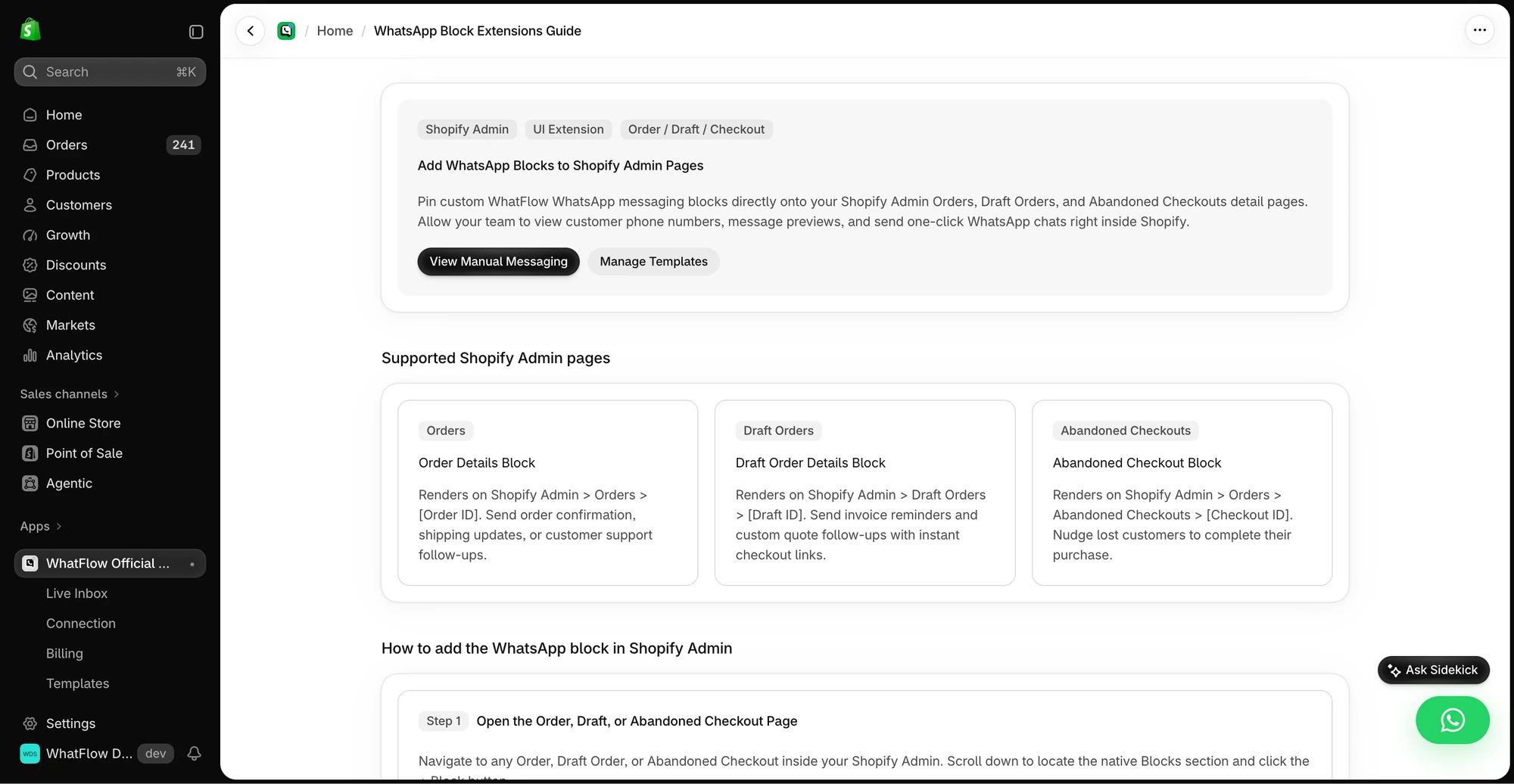
WhatFlow isn't only for small stores. The Business API app is built on the official Meta Cloud API and is enterprise-ready: a shared inbox with assignment and filters where a 50-person team pays the same in seat fees as a team of two (nothing), native Shopify Flow triggers and actions for automation at scale, COD confirmation, catalog sharing and Shopify admin extensions. Small stores still get the easiest start there is: a Free plan with every feature.
Why add WhatsApp when you already have Mailchimp?
Because an email can't take a question. Say you send a Mailchimp newsletter on Friday announcing a new linen collection. Saturday morning, twenty people want to know if the shirt runs small, whether the sand colour is back in stock, and if it'll arrive before a wedding next Thursday. Those questions don't belong in an inbox full of promotions. They belong in a chat your team can answer in two minutes.
That's what WhatFlow is for. A customer taps the theme-matched WhatsApp button (free forever) or replies to a WhatsApp message, and the conversation lands in a shared inbox where anyone on the team can pick it up. You can even send the product card from your live catalog:
Yes, the sand linen shirt is back in M and L. It runs true to size. Order before 2pm and it ships today, so you'll have it by Tuesday.
For more on splitting the work between channels, see WhatsApp vs email for Shopify.
How much does it cost to add WhatsApp next to Mailchimp?
Less than you'd think, because WhatFlow doesn't charge per seat and doesn't gate features. Your Mailchimp bill stays as it is. WhatFlow adds:
Monthly WhatsApp sends | WhatFlow plan | App cost |
|---|---|---|
Up to 100 | Free | $0 |
Up to 2,000 | Starter | $4.99 |
Up to 5,000 | Plus | $9.99 |
Up to 20,000 | Growth | $29 |
Say you send 10,000 WhatsApp messages a month. Growth covers that at $29, whether two people or ten answer replies. Meta charges per delivered template message on top, by country and category, so check Meta's WhatsApp pricing for your markets. Current WhatFlow rates are on the pricing page.
Compare that with seat-based tools: on Mailchimp, a fourth person who needs access moves you from Essentials to Standard. On WhatFlow, a fourth or fourteenth person is free.
The Shopify workflows Mailchimp doesn't cover
- Abandoned checkout on WhatsApp. A template pulls the cart and checkout link from Shopify. Here's how to make that message feel like a conversation.
- COD confirmation. Customers tap Confirm or Cancel, and Shopify Flow tags or cancels the order.
- Order and shipping updates that customers can reply to.
- Review requests that link to your review app's form.
- Shopify Flow, natively. Incoming-message and order-reply triggers, plus template, text and media actions.
Keep email and WhatsApp consent separate
One practical point. A Mailchimp subscriber hasn't opted in to WhatsApp marketing, and WhatsApp requires opt-in before you send business-initiated messages. Collect WhatsApp opt-in separately (at checkout, on the chat button, or in a post-purchase message) and keep the two lists apart. This guide covers collecting WhatsApp opt-ins on Shopify. Order updates a customer needs are a different job from marketing, and WhatFlow handles both.
What should you set up first in WhatFlow?
Don't switch everything on at once. A sensible order for a small Shopify team:
- The chat button. Free forever, theme-matched, and it starts bringing conversations in on day one.
- Saved replies. Write answers to your five most common questions (delivery time, returns, sizing, COD, order status).
- One order template. COD confirmation if you sell cash on delivery, otherwise a shipping update.
- One Shopify Flow workflow that reacts to a WhatsApp reply. The template-from-Flow guide shows the steps.
- Abandoned checkout, once you're comfortable with templates and opt-in.
Every step above is available on the Free plan.
When Mailchimp might still make sense
Keep Mailchimp for long-form email: editorial newsletters, lookbooks, content that people read at their desk. It's good at that. Just don't expect it to run your WhatsApp.
The bottom line
Mailchimp for email, WhatFlow for WhatsApp. Install WhatFlow free, connect your WhatsApp number through Meta's Embedded Signup inside Shopify admin, and start with one workflow: abandoned checkout or COD confirmation. You'll have the whole team in the inbox on day one without paying for seats.
Questions worth asking
Is WhatFlow a Mailchimp alternative for Shopify?
WhatFlow replaces Mailchimp for nothing you already like; it adds the WhatsApp channel Mailchimp doesn't cover. Most stores keep Mailchimp for newsletters and use WhatFlow for WhatsApp order updates, COD confirmation, abandoned checkouts and customer replies.
Does Mailchimp support WhatsApp for Shopify stores?
Mailchimp's marketing pricing page lists email plans and an SMS add-on in select countries, and doesn't list WhatsApp, as of November 2026. WhatFlow is a dedicated Shopify WhatsApp app on the official Meta Cloud API, with every feature on its Free plan.
Does WhatFlow charge per inbox seat?
No. WhatFlow's team inbox has no seat fees, so your support, sales and fulfilment people can all answer WhatsApp without the bill changing. You pay for a message plan, and Meta bills its WhatsApp charges separately, as it would with Mailchimp.
Is the WhatFlow Free plan limited?
No features are held back. The Free plan includes templates, Shopify Flow triggers and actions, COD confirmation, catalog sharing and the team inbox. Paid plans from $4.99/month only add message allowance at lower rates, and the theme-matched WhatsApp button is free forever.
Sources and methodology
We checked these primary sources on November 5, 2026. Vendor pages describe advertised capabilities, rather than independent performance tests. Confirm current pricing, plan limits and availability with each provider.
- Mailchimp: official product and commercial information
Mailchimp's marketing pricing page, checked November 2026: plan seats (Free 1, Essentials 3, Standard 5, Premium unlimited) and the SMS add-on.
- WhatFlow WhatsApp Business API on the Shopify App Store
WhatFlow's plans (Free, and paid from $4.99/month), included sends, Shopify Flow and admin features, and its 5.0/5 rating from 55 ratings, checked November 5, 2026.
- WhatsApp Business Platform pricing
Meta's per-message WhatsApp pricing by country and template category, billed separately from any app or platform fee.