
Publisher disclosure: this comparison is written by WhatFlow. Competitor capabilities are based on the linked public documentation; the WhatFlow screenshots come from our demo store. Examples are illustrative, and results depend on your store and configuration.
WhatFlow and LimeChat at a glance
| Consideration | WhatFlow | LimeChat |
|---|---|---|
| What the product is built around | Shopify operations on the official Meta Cloud API: admin extensions, Shopify Flow triggers and actions, COD confirmation, catalog sharing and an enterprise-ready team inbox. | Enterprise chat and voice AI agents for commerce and customer experience, alongside WhatsApp. |
| Pricing and billing units | Public: Free plan, paid plans from $4.99/month by messages sent. Meta fees separate. | By quote, covering channels, AI usage and implementation. |
| Feature access | Every feature on every plan, including Free. | Chat and voice AI agents across the customer lifecycle; scope depends on the rollout you buy. |
| Team access | No seat fees at any team size. | Set in the proposal; ask how human agent access is priced alongside AI usage. |
| Storefront entry point | Free-forever WhatsApp buttons that match your Shopify theme. | Check which storefront widget the rollout includes. |
| AI agents | No built-in AI agent; WhatFlow focuses on Shopify automation and a human team inbox. Connect Claude, ChatGPT or Cursor through WhatFlow's MCP connector to draft replies a person approves, with no per-resolution AI fees. | Core of the product, in chat and voice. |
| Shopify App Store rating | 5.0 out of 5 from 55 ratings (November 5, 2026). | 4.9 out of 5 from 46 reviews (November 5, 2026). |
For running WhatsApp on a Shopify store, WhatFlow is the better starting point than LimeChat. WhatFlow is an official Meta Cloud API app with every feature on every plan, native Shopify Flow automation, COD confirmation and a team inbox with no seat fees at any size, and it's free to install. LimeChat is built around enterprise chat and voice AI agents. That suits brands with a funded AI project and someone to maintain it.
A quick note on positioning: WhatFlow isn't an unofficial tool for tiny shops. WhatFlow WhatsApp Business API runs on the official Meta Cloud API and is enterprise-ready, with inbox assignment and filters, no seat fees at any team size, Shopify Flow automation at scale, COD confirmation, catalog sharing and Shopify admin extensions. Small stores can still start on Free. Our linked-device Chat Automation app is a separate, older entry-level product.
WhatFlow vs LimeChat at a glance
- Focus: WhatFlow covers Shopify operations on WhatsApp (orders, COD, shipping, cart recovery, support). LimeChat centres on AI agents in chat and voice.
- Pricing: WhatFlow is public, free to start, then from $4.99/month by messages sent. LimeChat is by quote.
- Setup: WhatFlow is self-serve from the Shopify App Store. LimeChat is an implementation project.
- Team: No seat fees on WhatFlow, at any size.
- AI: LimeChat's core. WhatFlow has no built-in AI agent. Instead, WhatFlow's MCP connector lets you connect Claude, ChatGPT or Cursor to read chats, look up orders and draft replies a person approves.
- Rating: WhatFlow Business API is 5.0/5 from 55 ratings; LimeChat is 4.9/5 from 46 reviews (both checked November 5, 2026).
What does each cost?
LimeChat quotes by channels, AI usage and implementation, so get those three lines separately. AI usage is the one to watch, because it grows with your customer volume.
WhatFlow's pricing is public on our pricing page: Free with every feature, Starter at $4.99/month for 2,000 messages, Plus at $9.99 for 5,000, Growth at $29 for 20,000 and Scale at $49.99 for 40,000. Say you send 35,000 order and shipping updates a month and have 15 people in the inbox. That's Scale at $49.99, with no seat charges. Meta's per-message fees apply to any WhatsApp API product.
Do you need an AI agent first?
Most stores I talk to don't, at least not yet. Their WhatsApp volume is mostly predictable: "is my COD order confirmed?", "where's my parcel?", "can I change my address?". Those are best handled by Shopify-triggered templates, a few Flow rules and a human who can actually change the order.
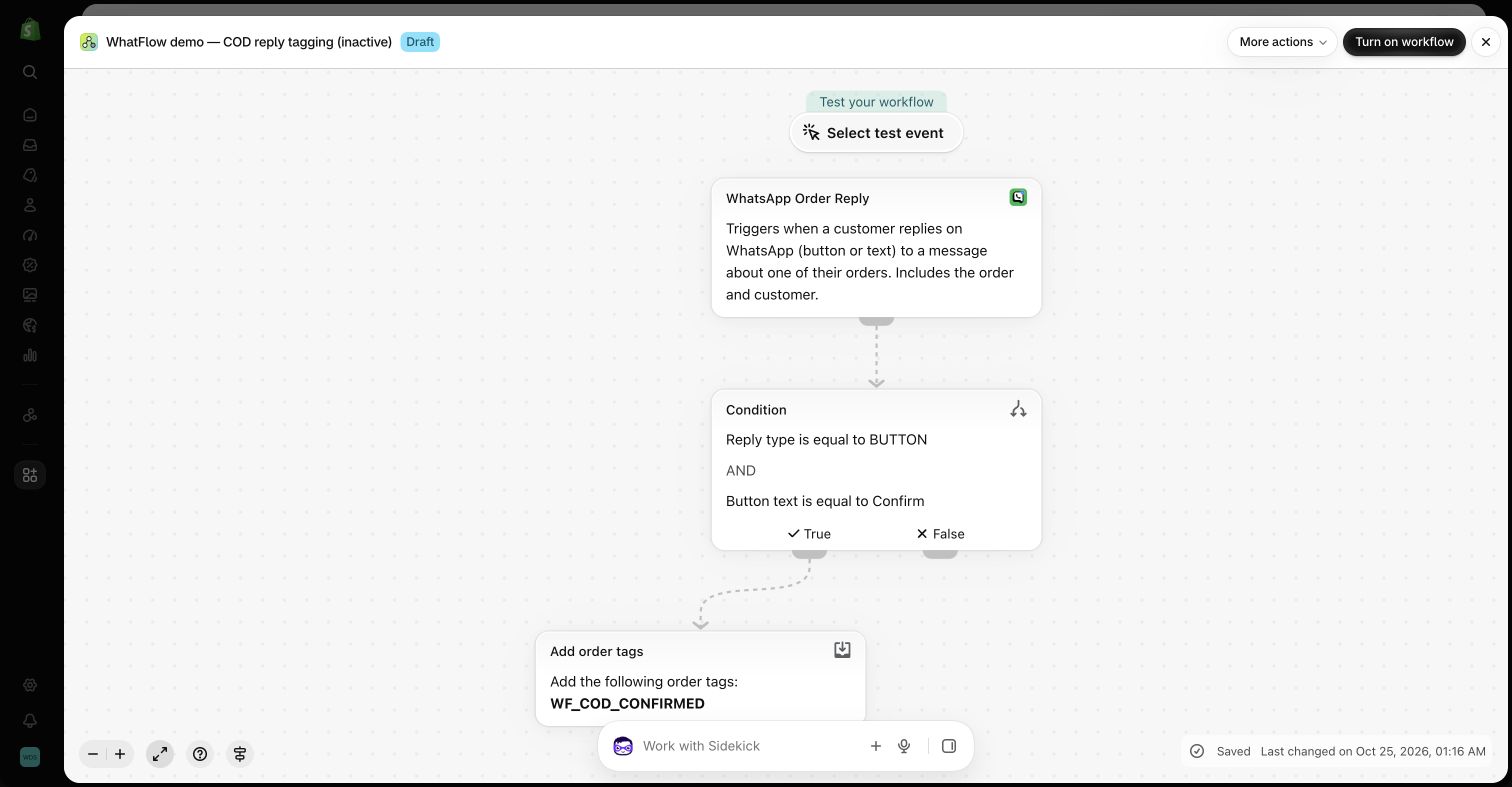
That's exactly what WhatFlow does. A COD confirmation goes out when the order is placed:
Hi Ankit, please confirm your COD order #8840 for ₹2,150. We'll ship today once you tap Confirm. [Confirm] [Cancel]
The tap tags the order through Shopify Flow. Anything unexpected lands in the team inbox, assigned to the right person, with saved replies for the common questions.
AI agents can help with high-volume product questions, but they need a maintained knowledge base and a clear human handoff. If that's a project for next year, get your order messaging running on WhatFlow now. Our guide to using AI for support drafts covers how to approach it carefully.
How do templates work in WhatFlow?
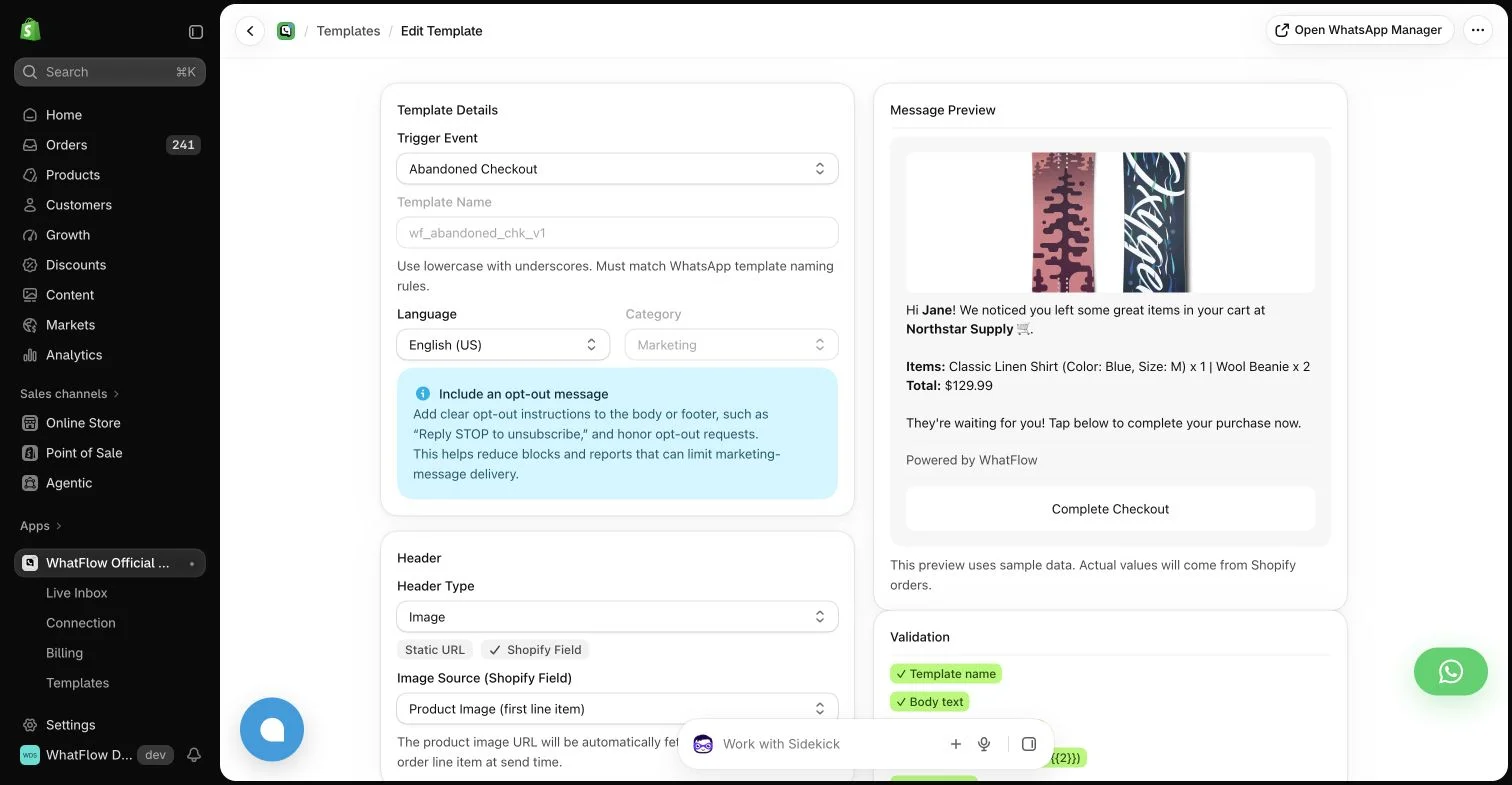
The template editor maps Shopify customer, order and checkout fields into the message, with a live preview. You can see exactly what the customer will get before Meta approves it.
When LimeChat might still make sense
Choose LimeChat if AI chat or voice agents are the main thing you're buying and you have budget and an owner for the knowledge base. WhatFlow has no built-in AI agent; its AI route is connecting the assistant you already use, with a person approving drafts.
The bottom line
For Shopify order messaging, COD confirmation and a team inbox that scales without seat fees, WhatFlow is the stronger, simpler choice, on the official Meta Cloud API with every feature on every plan. Start free, get the operational messages right, and add AI later if you need it.
Questions worth asking
Is WhatFlow a good LimeChat alternative for Shopify?
Yes, if you want Shopify WhatsApp automation and a human team inbox without an enterprise AI rollout. WhatFlow has every feature on every plan, no seat fees and public pricing from Free. LimeChat makes sense when AI chat or voice agents are the main thing you're buying.
How much does LimeChat cost compared with WhatFlow?
LimeChat prices by quote based on channels, AI usage and implementation. WhatFlow's pricing is public: Free with every feature, then paid plans from $4.99/month by messages sent. Meta's message fees are separate.
Does WhatFlow charge per inbox seat?
No. WhatFlow's team inbox has no seat fees at any team size, on every plan including Free.
Are WhatFlow features restricted on the free plan?
No. Every WhatFlow feature is on the Free plan, including COD confirmation, cart recovery, broadcasts and Shopify Flow actions. Paid plans add message allowance, and the theme-matched button is free forever.
Does WhatFlow have an AI chatbot like LimeChat?
Not a built-in one. WhatFlow has no AI chatbot of its own, but its MCP connector lets you bring Claude, ChatGPT or Cursor to read Live Inbox chats and draft replies that a person approves before sending. Beyond that, it focuses on Shopify-triggered templates, Shopify Flow automation, saved replies and a team inbox where people answer customers.
Sources and methodology
We checked these primary sources on November 5, 2026. Vendor pages describe advertised capabilities, rather than independent performance tests. Confirm current pricing, plan limits and availability with each provider.
- LimeChat homepage
LimeChat's description of its enterprise chat and voice AI agents.
- WhatFlow WhatsApp Business API on the Shopify App Store
WhatFlow plans, included sends, Shopify workflows and the 5.0/5 rating from 55 ratings (checked November 5, 2026).
- WhatsApp Business Platform pricing
Meta's per-message charges, which apply on top of either product's fees.
- LimeChat on the Shopify App Store
LimeChat listing rating of 4.9/5 from 46 reviews, checked November 5, 2026.