
Publisher disclosure: this comparison is written by WhatFlow. Competitor capabilities are based on the linked public documentation; the WhatFlow screenshots come from our demo store. Examples are illustrative, and results depend on your store and configuration.
WhatFlow and Kommunicate at a glance
| Consideration | WhatFlow | Kommunicate |
|---|---|---|
| Connection | Official Meta WhatsApp Cloud API via Embedded Signup from Shopify admin. | Connects WhatsApp through 360dialog, Twilio or Meta's Cloud API, using credentials you set up with the provider. |
| Built for Shopify | Admin extensions plus native Shopify Flow triggers and actions for WhatsApp. | Shopify app that adds its chat widget and AI agent to your store, with order and refund status updates. Shopify Flow isn't mentioned. |
| Pricing | Free plan; paid plans from $4.99/month by message allowance. Meta charges billed separately. | Starter $40/month ($34 billed annually), Professional $200/month ($167 annually), Enterprise via sales (as of November 2026). |
| Team inbox seats | No seat fees at any team size. | Starter includes 1 team member, Professional 3. Extra members cost $20/month (Starter) or $30/month (Professional). |
| Usage limits | Message allowance per plan, from 100 (Free) to 75,000 (Ultimate), with low overage rates. | 250 conversations/month on Starter, 2,000 on Professional; extra conversations $15 or $10 per 1,000. |
| Feature access by plan | Every feature on every plan, including Free. | Integrations such as Zendesk and Freshdesk, campaign messaging and API access start on Professional; Salesforce, HubSpot and SSO on Enterprise. |
| COD confirmation | Confirm and Cancel buttons that tag or cancel orders through Flow. | Not listed on its pricing page or Shopify listing. |
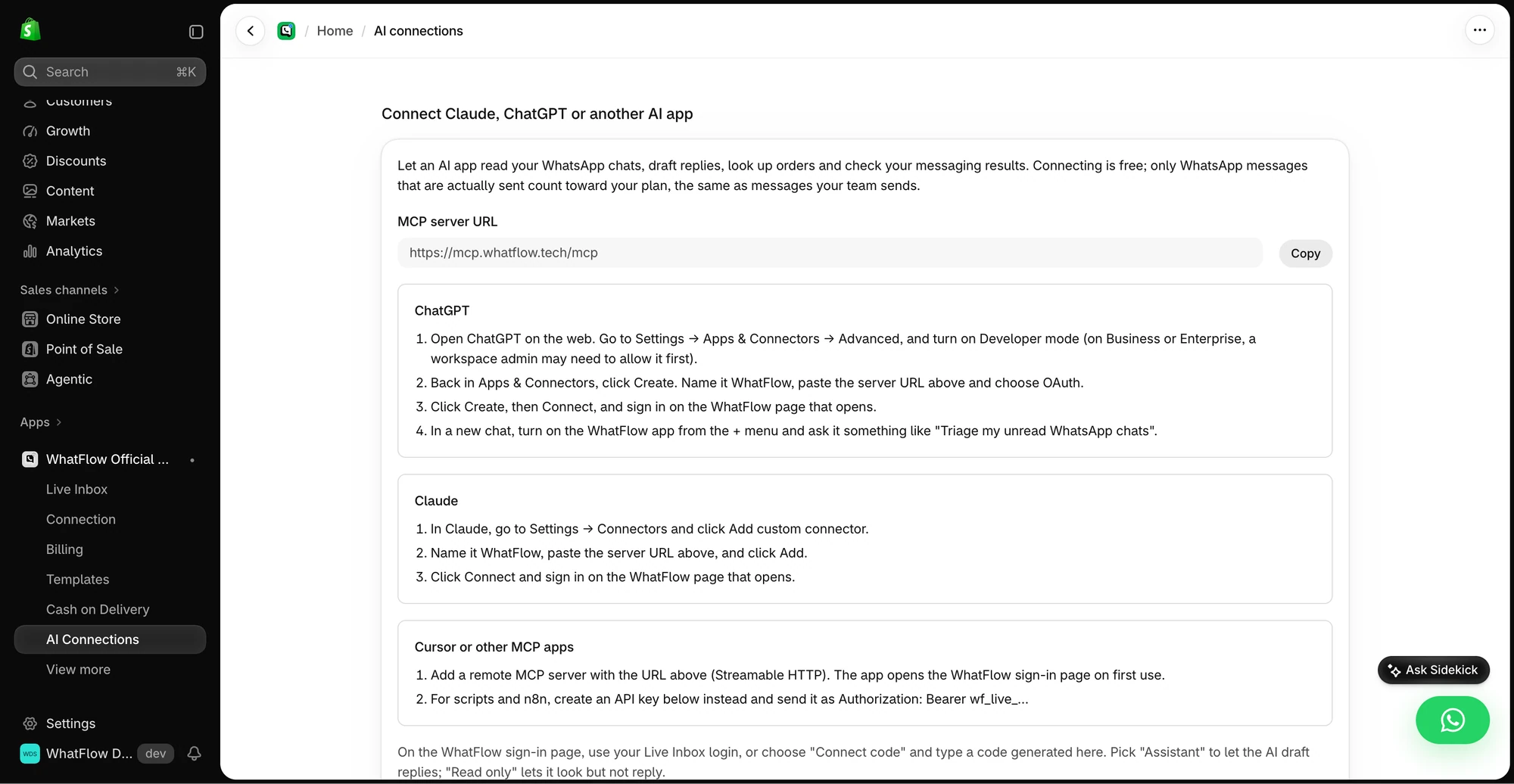
| AI agents | No built-in AI agent. Connect Claude, ChatGPT or Cursor through WhatFlow's MCP connector to read chats and draft replies a person approves, with no per-resolution AI fees. | Core product: AI agents on every plan, with extra agents $20 to $30/month. |
| Best fit | Shopify brands of any size running WhatsApp orders, recovery and team support. | Support teams that want an AI agent answering FAQs across web chat and messaging. |
WhatFlow vs Kommunicate: if your Shopify team handles orders and support on WhatsApp, WhatFlow is the better choice and usually far cheaper as the team grows. It runs on the official Meta WhatsApp Cloud API, plugs into Shopify Flow, and gives everyone a shared inbox with no seat fees. Kommunicate is an AI customer support platform whose plans include a fixed number of team members, with extra members billed monthly.
Also, if you know WhatFlow as the small-store app, that's the older Chat Automation product. WhatFlow WhatsApp Business API is the official-API app, rated 5.0 out of 5 from 55 ratings on the Shopify App Store as of November 5, 2026, and built for support teams of any size.
WhatFlow vs Kommunicate at a glance
WhatFlow | Kommunicate | |
|---|---|---|
Core job | WhatsApp for Shopify orders and support | AI agent plus live chat support |
Official Meta Cloud API, built in | Connected via 360dialog, Twilio or Cloud API | |
Shopify Flow | Native triggers and actions | Not mentioned |
Entry price | Free; paid from $4.99/month | Starter $40/month |
Team members | No seat fees | 1 on Starter, 3 on Professional, then $20 to $30 each |
AI agents | No built-in bot; connect Claude, ChatGPT or Cursor over MCP to draft replies a person approves | Core product |
Kommunicate details are from its pricing page and Shopify listing, checked November 2026.
How much does Kommunicate cost for a Shopify team?
Kommunicate publishes its prices, which makes the comparison easy. Starter is $40 a month ($34 billed annually) with 1 team member and 250 conversations. Professional is $200 a month ($167 annually) with 3 team members and 2,000 conversations. Extra team members cost $20 a month on Starter and $30 on Professional. Enterprise is via sales.
WhatFlow has no seat line at all. Free covers 100 messages a month with every feature. Starter is $4.99 for 2,000, Plus $9.99 for 5,000, Growth $29 for 20,000, Scale $49.99 for 40,000, Ultimate $99 for 75,000. See WhatFlow pricing.
Now the worked example. Say you run a Shopify brand with eight people answering WhatsApp and you need Professional-level features on Kommunicate:
Kommunicate Professional (monthly) | WhatFlow Growth | |
|---|---|---|
Base plan | $200 | $29 |
5 extra team members | 5 × $30 = $150 | $0 |
Monthly total, app side | $350 | $29 |
Kommunicate counts conversations (2,000 included) and WhatFlow counts messages (20,000 included on Growth), so check which unit matches your volume. Meta's per-message charges apply on top with both. Since October 1, 2026, service replies are free only for the first 1,000 per business number per month, and utility templates inside the service window are charged (Meta's pricing docs).
The gap widens every time you hire. That's the point of our no-seat-fee vs per-seat inbox comparison.
Which handles Shopify WhatsApp workflows better?
WhatFlow. Kommunicate's Shopify app adds its chat widget and AI agent to your storefront, answering repetitive questions and giving order and refund status, with escalation to live chat. That's a support layer on top of the store.
WhatFlow works inside the store. Incoming WhatsApp messages and order replies are Shopify Flow triggers. Template, text and media messages are Flow actions. So you can build:
- COD confirmation with Confirm and Cancel buttons that tag or cancel the order.
- Abandoned checkout recovery mapped to the customer's checkout.
- Shipping updates from fulfilment events.
- Routing rules that tag customers based on what they message.
A saved reply for a common question:
Hi Leila, thanks for checking. Your order #3318 left our warehouse yesterday and should arrive by Thursday. Here's the tracking: [link]
For routing ideas, see routing incoming WhatsApp messages with Shopify Flow.
Who answers when the bot can't?
Most Shopify WhatsApp questions aren't FAQs. "Can I change the address on #4471?" "The blue one arrived but I ordered green." Those need a person who can see the order and act on it. That's why WhatFlow puts the effort into the human side: assignment so the right person owns the chat, filters so nothing sits unanswered, and saved replies so answers stay consistent. Our guide to setting up a shared team inbox covers how to split ownership.
Is WhatFlow ready for larger support teams?
Yes. WhatFlow WhatsApp Business API gives a growing Shopify team:
- The official Meta Cloud API, connected from Shopify admin with Meta's Embedded Signup.
- A shared inbox with assignment, filters and saved replies.
- No seat fees, so seasonal staff and new hires cost nothing extra in seats.
- Live catalog sharing so agents can send products mid-chat.
- Shopify admin extensions and native Flow automation.
See the WhatFlow team inbox for the full picture.
When Kommunicate might still make sense
Pick Kommunicate if your main goal is an AI agent answering FAQs across web chat, WhatsApp, Instagram and Telegram, with handoff to a small team, or if you need its Zendesk, Freshdesk or Salesforce integrations. WhatFlow has no built-in AI bot; its AI route is WhatFlow's MCP connector, which lets Claude, ChatGPT or Cursor draft replies a person approves.
The bottom line
For WhatsApp on Shopify, WhatFlow gives you more of what matters for less: official Meta Cloud API, native Shopify Flow, COD confirmation and an inbox your whole team can use with no seat fees. Install it free and add everyone who answers customers.
Questions worth asking
Is WhatFlow a Kommunicate alternative for Shopify?
Yes. WhatFlow runs on the official Meta Cloud API and adds WhatsApp triggers and actions to Shopify Flow, with COD confirmation, cart recovery and a team inbox with no seat fees, all on the Free plan.
How much does Kommunicate cost?
As of November 2026, Kommunicate's Starter plan is $40 a month ($34 billed annually) with 1 team member, Professional is $200 a month ($167 annually) with 3 team members, and Enterprise is via sales. Extra team members cost $20 or $30 a month each.
Does WhatFlow charge for extra agents?
No. WhatFlow's team inbox has no seat fees at any team size. You choose a plan by message volume, and Meta bills its WhatsApp charges separately.
Does WhatFlow have an AI chatbot like Kommunicate?
Not a built-in one. WhatFlow has no AI chatbot of its own, but its MCP connector lets you bring Claude, ChatGPT or Cursor to read Live Inbox chats and draft replies that a person approves before sending. Beyond that, it focuses on Shopify WhatsApp automation through Flow and a shared inbox where your team answers with the order in view.
Sources and methodology
We checked these primary sources on November 5, 2026. Vendor pages describe advertised capabilities, rather than independent performance tests. Confirm current pricing, plan limits and availability with each provider.
- Kommunicate pricing
Starter, Professional and Enterprise plans, included team members and conversations, add-on prices and 30-day trial, checked November 2026.
- Kommunicate AI Agent on the Shopify App Store
Kommunicate's Shopify listing: AI agent, live chat escalation, order and refund status updates, WhatsApp integration.
- Kommunicate WhatsApp integration docs
How Kommunicate connects WhatsApp through providers such as 360dialog and Twilio.
- WhatFlow WhatsApp Business API on the Shopify App Store
WhatFlow plans, Shopify Flow support and 5.0/5 rating from 55 ratings, checked November 5, 2026.
- WhatsApp Business Platform pricing (Meta)
Meta's per-message WhatsApp pricing, billed separately from any app or platform fee.