When WhatsApp marketing delivery drops on a Shopify campaign, the cause is almost always in the failure reasons, not the copy. The usual suspects are Meta's per-user marketing limit (error 131049), a paused or low-quality template, your portfolio's messaging limit, or a list problem like bad numbers or US recipients. Read the reasons for one batch before you change anything or press retry.
A read rate can't explain a message that never reached the phone. So start with delivery, then worry about reads.
Start with one batch
Pick the campaign that dropped and write down:
the sending number and template name;
the template category (marketing or utility);
the audience source and size;
the send time;
delivered, failed and pending counts;
the top failure reasons, with counts.
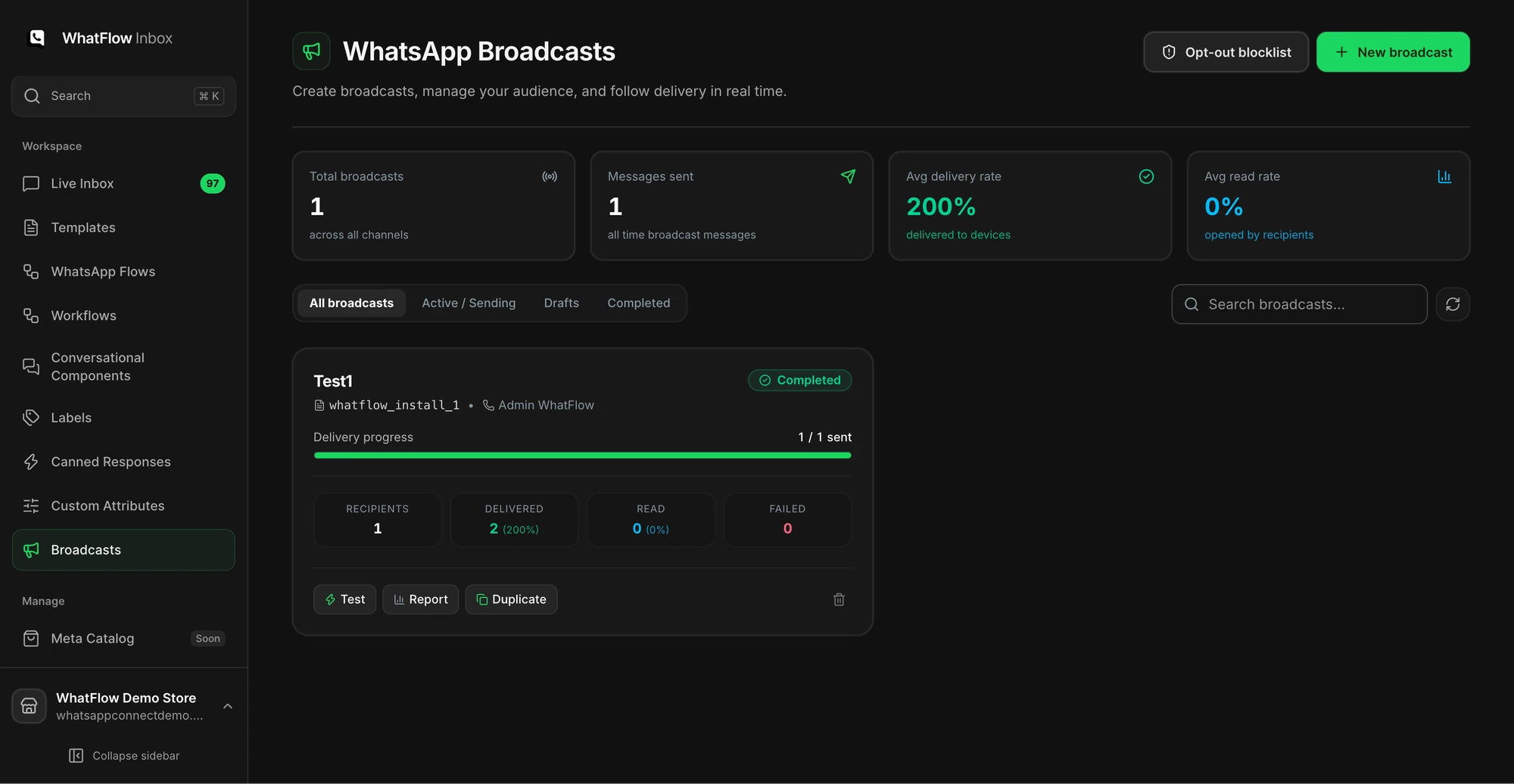
Demo store broadcast dashboard. Your own campaign's delivery overview and failure reasons are where the diagnosis starts.
In WhatFlow, the Broadcasts dashboard in Team Inbox shows campaign status and a delivery overview, with recipient-level failure detail. Pending and failed aren't the same thing; give pending messages time before you call them lost.
Wait at least 24 hours, then resend to those people only. Send less often
Every send of one template failing
Template paused, disabled or not approved
Check template status. Fix or replace it
Failures on US numbers only
Meta doesn't currently deliver marketing templates to US numbers
Remove them from marketing audiences
Failures start part-way through a big send
Portfolio messaging limit reached
Split the send across days, or wait for your limit to rise
Invalid or not-on-WhatsApp numbers
List quality
Clean the source data and remove duplicates
Delivered fine, few reads
Not a delivery problem
Look at timing, copy and audience instead
Per-user marketing limits (error 131049)
Meta caps how many marketing templates each WhatsApp user receives from businesses. When someone hits that cap, the message fails with error 131049. Meta's guidance is to wait at least 24 hours before resending a marketing template to that person, and it warns that repeated retries within 24 hours can block further attempts to that user for up to a day.
One useful exception: marketing messages sent inside a customer service window don't count toward the limit. If a customer replied to you in the last 24 hours, your follow-up isn't affected.
Say you run a fashion store and sent three promotions this week: new arrivals on Monday, a flash sale on Wednesday and a "last chance" on Friday. Friday's delivery is lower and the failures are mostly 131049. The fix isn't a retry button. It's sending fewer, better-targeted campaigns. The message frequency guide has a sensible cadence.
Paused or low-quality templates
Meta rates each template's quality from customer feedback and engagement, including read rates. A template that reaches low quality is paused for 3 hours the first time, 6 hours the second time, and disabled the third time. Sends of a paused template are rejected, though Meta says those attempts aren't billed or counted against your messaging limit.
If every failure in a campaign shares one template, check its status first. And if a template keeps getting paused, the audience is telling you something about the offer or the frequency.
Messaging limits
Meta limits how many unique people your business portfolio can message outside a customer service window in a rolling 24 hours. New portfolios start at 250, then step up to 2,000, 10,000, 100,000 and unlimited. The limit is shared by every number in the portfolio. A campaign that reaches the cap stops reaching new people until the window rolls on. The quality rating and messaging limits guide explains how to raise it.
Is it a delivery drop or a read drop?
Check this before you rewrite anything. If delivered is high and reads are low, WhatsApp did its job and the message didn't land with people. That's a copy, timing or audience question. If delivered itself fell, the cause is almost always in the failure reasons above.
Read receipts are also an imperfect signal. Some customers turn them off, so a message can be read without showing as read. I'd judge a campaign on delivered messages, replies and Shopify orders, in that order, rather than on read rate. The WhatsApp marketing metrics guide covers what to track.
A step-by-step recovery runbook
Pause the campaign if it's still sending and the cause could affect the rest of the audience.
Group failures by reason. A spreadsheet with reason, count, fix and retry decision is enough.
Fix the input for list problems: phone format, duplicates, missing variables.
Check the template status and category.
Remove anyone who opted out or blocked you, and keep them excluded.
Send a test to your own phone after any fix.
Retry only eligible failures, after the right wait. Keep delivered recipients out of the retry audience.
Note what you changed so the next campaign starts from it.
If people are blocking the number or reporting messages, check how they joined your list and what you promised them. Meta's policy requires opt-in before you message someone and says you must honour opt-out requests, on or off WhatsApp. It also warns that significant negative feedback can lead to enforcement.
Give people an easy way out in every marketing template:
Prefer not to get offers on WhatsApp? Reply STOP and we'll only message you about your orders.
Then actually stop. WhatFlow has opt-out handling and a blocklist to keep those customers out of future campaigns, and the customer opt-out process guide covers the team side.
Run WhatsApp for your Shopify store with WhatFlow
Free plan available. Templates, COD confirmation, Shopify Flow automations and a shared team inbox with no seat fees. Every feature is included on every plan, including Free.
Error 131049 means Meta held back a marketing template because the recipient reached WhatsApp's per-user marketing limit. Meta advises waiting at least 24 hours before trying that person again.
Why are my WhatsApp marketing messages not delivered but order updates are?
Meta's per-user marketing limits apply to marketing templates, not utility order updates. Meta also doesn't currently deliver marketing templates to US phone numbers, so a campaign to US customers will fail where shipping updates succeed.
Should I retry failed WhatsApp campaign messages straight away?
No. Read the failure reason first. For per-user limit failures Meta says to wait at least 24 hours, and repeated retries within 24 hours can block further attempts to that person for up to a day.
Can a WhatsApp template be paused?
Yes. When a template reaches low quality, Meta pauses it for 3 hours the first time, 6 hours the second time, and disables it the third time. Sends of a paused template are rejected.