WhatsApp blue ticks explained: read receipts for Shopify teams
What one grey tick, two grey ticks and two blue ticks mean on WhatsApp, why blue ticks go missing, and which signals Shopify teams should act on instead.
Read receipts describe a message. A badge describes an account.
On WhatsApp, one grey tick means the message was sent, two grey ticks mean it was delivered to the recipient's phone or a linked device, and two blue ticks mean it was read. A blue badge next to a business name is something else entirely: account verification. For a Shopify team, blue ticks are a soft hint, never proof that a customer agreed to anything.
What do WhatsApp's ticks mean?
Here's how WhatsApp's Help Center describes each one, alongside the status the WhatsApp Business API reports to apps like WhatFlow:
Those API statuses come from Meta's status webhook reference. One quirk worth knowing: if the customer has the chat open when your message arrives, Meta can skip the delivered status and go straight to read. So "read but never delivered" in a report isn't a bug.
In group chats, the second tick appears only when everyone has received the message, and the ticks turn blue only when everyone has read it. Stores rarely message groups, but your team chat might.
Why do blue ticks go missing?
WhatsApp lists these reasons a read receipt may not show:
The customer turned off read receipts in privacy settings (or you did, on a personal phone).
They haven't opened the chat yet.
They've blocked you.
Connection problems on either side.
Wrong date and time settings on either phone.
It's the first time they've received a message from you. WhatsApp says a read receipt may not be sent in that case.
That last one matters for stores. Your first order confirmation to a new customer is exactly the message most likely to stay grey. Plenty of people also read the preview in their notification and never open the chat. So "no blue ticks" tells you almost nothing. Don't build workflows around it.
The tick that does deserve attention is the one that never turns into two. If a message sits on sent or comes back failed, the number may be wrong, inactive or unable to receive WhatsApp. For a COD order, that's worth a phone call before you ship. When the customer later says "I never got your message," check the status before arguing about it:
Sorry about that, Bilal. Our system shows the confirmation for order #4471 didn't reach your phone. Could you check this is the right number for the delivery? We'll hold the parcel until you confirm.
Pick the signal that matches the Shopify job
The rule I give every team: a read is attention, a reply is intent, an order is the result. Use the strongest signal the job needs.
Shopify workflow
Signal to act on
Don't act on
COD order confirmation
A Confirm or Cancel button tap, matched to the order
Blue ticks
Abandoned checkout reminder
A completed Shopify order
Reads or link clicks alone
Shipping update
failed status (to fix the number), then customer replies
A read as "customer is happy"
Review request
A submitted review
A read as "will review later"
Support reply
The customer's next message
A read as "issue resolved"
A COD example that goes wrong
Say a customer in Karachi orders a Rs 6,500 kurta on cash on delivery. Your confirmation goes out at 12:40. She reads it at lunch, ticks go blue, and she plans to answer later. If your automation treats the read as approval, the order ships before she's decided, and you're paying the courier for a likely refusal.
Here's a confirmation template that gets an actual answer:
Hi Sana, thanks for your order #4471 from Noor Threads: 1 x Embroidered Kurta (M), Rs 6,500, cash on delivery to Gulshan-e-Iqbal. Please confirm so we can ship today.
[Confirm order] [Cancel order]
And a follow-up for anyone who hasn't tapped either button by the next morning:
Hi Sana, just checking on order #4471. Tap Confirm and it ships today, or Cancel if you've changed your mind. Reply here if you need to change the size or address.
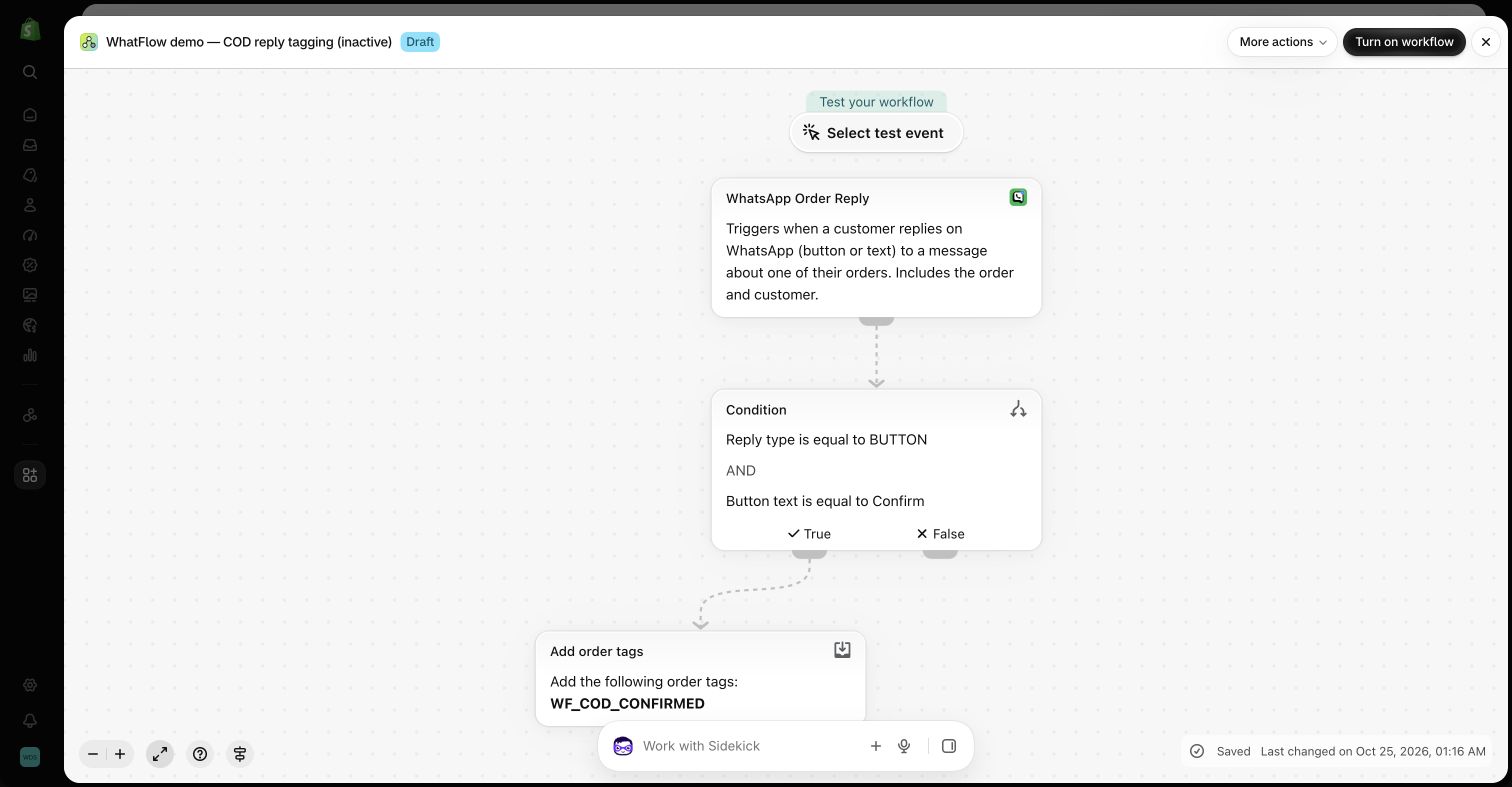
An inactive demo workflow that branches on the button reply, not the read receipt, before tagging the order.
Route anything that isn't a clean button tap ("can I pay half now?") to a person. Ambiguous replies are where orders get lost.
Keep delivery, replies and sales apart in reporting
Blue ticks tempt people into "read rate" as a headline metric. I'd keep it as a background number and report three things separately:
Delivered vs sent. A drop here means bad numbers, blocks or a quality problem. Look at failure codes before you retry.
Replies and button taps. This is engagement you can act on.
Completed Shopify orders. This is revenue, under an attribution rule you pick before sending.
There's a money angle too. Meta's pricing documentation says businesses are charged when a message is delivered. A template that's delivered and never read costs the same as one that's read. So a high delivered count with low replies isn't "free awareness"; it's spend without a result.
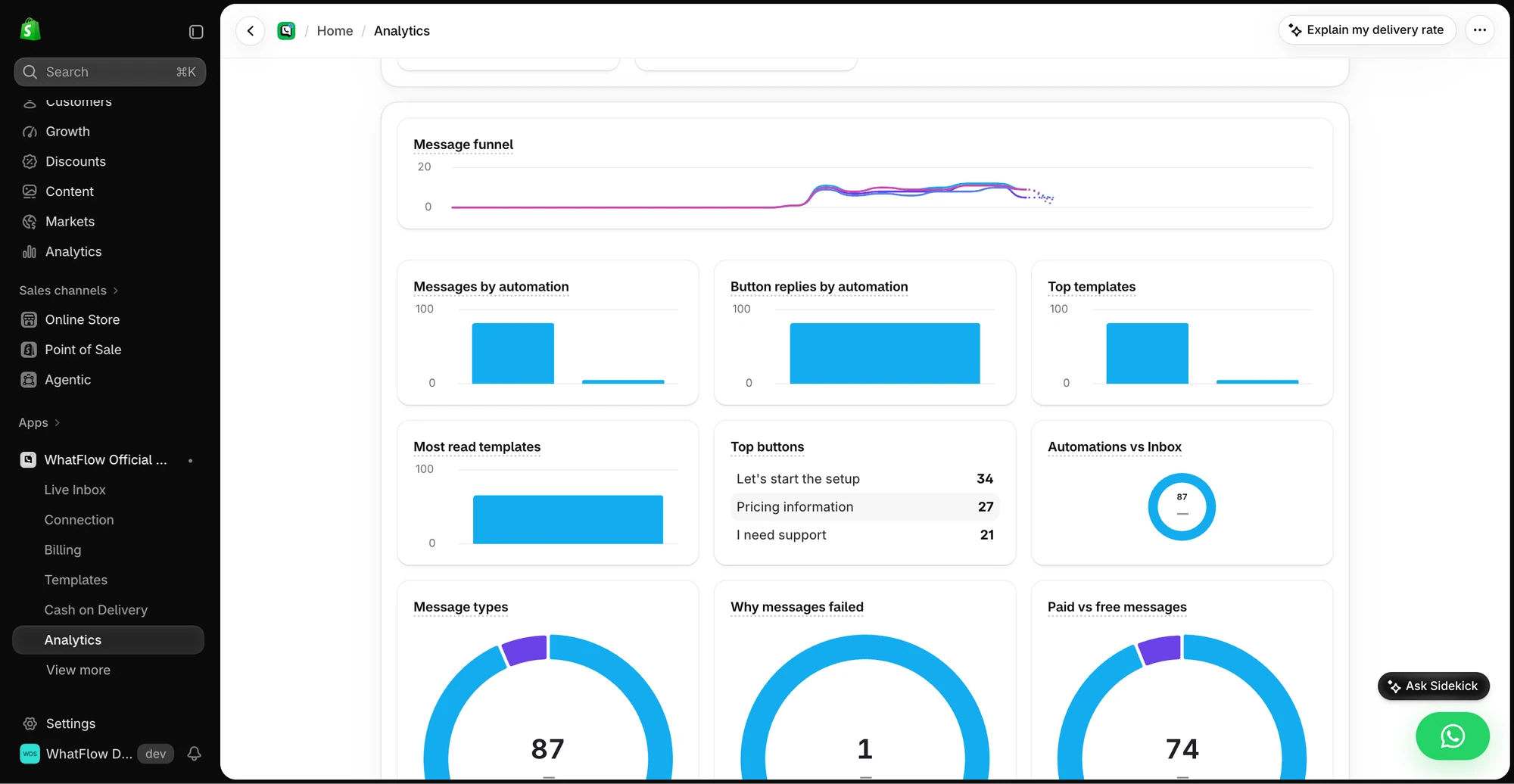
WhatFlow's campaign results show sent, delivered, failed and reply counts, and its analytics include a message funnel and automation reports.
Demo store data. The funnel separates delivery from replies so a read never stands in for a result.
It works the other way too. The Cloud API lets a business app mark a customer's incoming message as read. Customers notice when a message has clearly been seen and nobody answers. If your team opens a chat and can't answer yet, send a holding reply rather than leaving them on read:
Got it, checking with the warehouse now. I'll come back to you by 3pm with the tracking number.
A shared team inbox with assignment helps here: whoever opens the chat owns it, so it doesn't sit "seen" while everyone assumes someone else replied.
Run WhatsApp for your Shopify store with WhatFlow
Free plan available. Templates, COD confirmation, Shopify Flow automations and a shared team inbox with no seat fees. Every feature is included on every plan, including Free.
Blue ticks under a message are read receipts. A blue checkmark beside a business name is Meta verification. If you're after the second one, start with the WhatsApp business badge guide for Shopify.
Frequently asked questions
What do two grey ticks mean on WhatsApp?
Two grey ticks mean the message was delivered to the recipient's phone or one of their linked devices. It hasn't been marked as read yet, or the read receipt isn't available.
Why does WhatsApp show two grey ticks but never turn blue?
WhatsApp lists several reasons: the recipient turned off read receipts, hasn't opened the chat, blocked you, has connection problems, or has the wrong date and time on their phone. A read receipt also may not be sent the first time someone receives a message from you.
Can I treat blue ticks as confirmation of a COD order?
No. A read receipt only says the message was seen. Use a reply button such as Confirm or Cancel, or a typed reply, and match it to the Shopify order before you ship.
Does Meta charge for WhatsApp messages that are read or only delivered?
Meta's pricing documentation says businesses are charged when a template message is delivered. Whether the customer reads it doesn't change the charge.