
Publisher disclosure: this comparison is written by WhatFlow. Competitor capabilities are based on the linked public documentation; the WhatFlow screenshots come from our demo store. Examples are illustrative, and results depend on your store and configuration.
WhatFlow and PushOwl at a glance
| Consideration | WhatFlow | PushOwl |
|---|---|---|
| Built for | Shopify stores of any size, from first sale to large support teams. Admin extensions, native Shopify Flow triggers and actions, COD confirmation and a team inbox on the official Meta Cloud API. | Web push and email retention for ecommerce, including cart recovery, back-in-stock and price-drop alerts. One-way notifications to browser subscribers. |
| Pricing | Free plan, paid plans from $4.99/month (Plus is $9.99 for 5,000 sends). No seat fees. Meta's WhatsApp charges are billed separately. | Priced by audience and sending package. A browser subscriber isn't a WhatsApp contact, so the reachable audience differs. |
| Feature access | Every feature on every plan, including Free. Plans only change message allowances and rates. | Advertises web push and email flows for cart recovery, back-in-stock and price drops. Your package sets the allowances. |
| Team inbox | Shared WhatsApp inbox with assignment, filters and saved replies. No seat fees, so add the whole team. | Its pricing page doesn't describe a WhatsApp inbox, because push notifications don't take replies. |
| Storefront WhatsApp button | Theme-matched WhatsApp chat buttons, free forever. | A browser opt-in prompt for push notifications. |
WhatFlow vs PushOwl is a choice between a notification and a conversation. PushOwl sends browser push alerts that bring a shopper back to a page. WhatFlow sends WhatsApp messages from Shopify that customers can reply to, and gives your team an inbox to answer them. If your shoppers ask questions before they buy, WhatFlow is the better channel, and it starts free with every feature.
WhatFlow vs PushOwl at a glance
- Channel: WhatFlow uses WhatsApp on the official Meta Cloud API. PushOwl uses browser web push (and email).
- Replies: a WhatsApp message lands in a thread the customer can answer. A push notification is one-way.
- Shopify depth: WhatFlow has native Shopify Flow triggers and actions, COD confirmation and admin extensions.
- Team: WhatFlow's shared inbox has no seat fees.
- Price: WhatFlow has a Free plan with every feature; paid plans from $4.99/month.
- Rating: WhatFlow's Business API app is rated 5.0 out of 5 from 55 ratings on the Shopify App Store, as of November 5, 2026.
Bigger team? WhatFlow scales with you. It's the official Meta WhatsApp Cloud API, with Meta-approved templates and a business profile that's eligible for Meta's verified badge, an inbox with assignment and filters and no seat fees at any team size, and automation that runs inside Shopify Flow rather than in a side tool. Enterprise-ready, without enterprise pricing, and still free to start.
Why a WhatsApp alert beats a push alert for most stores
Say you restock a linen dress in size 12. PushOwl pings everyone who subscribed in their browser. Some click. Some of those have a question: "Is it lined? Will it arrive before the 14th?" There's nowhere to ask. They bounce.
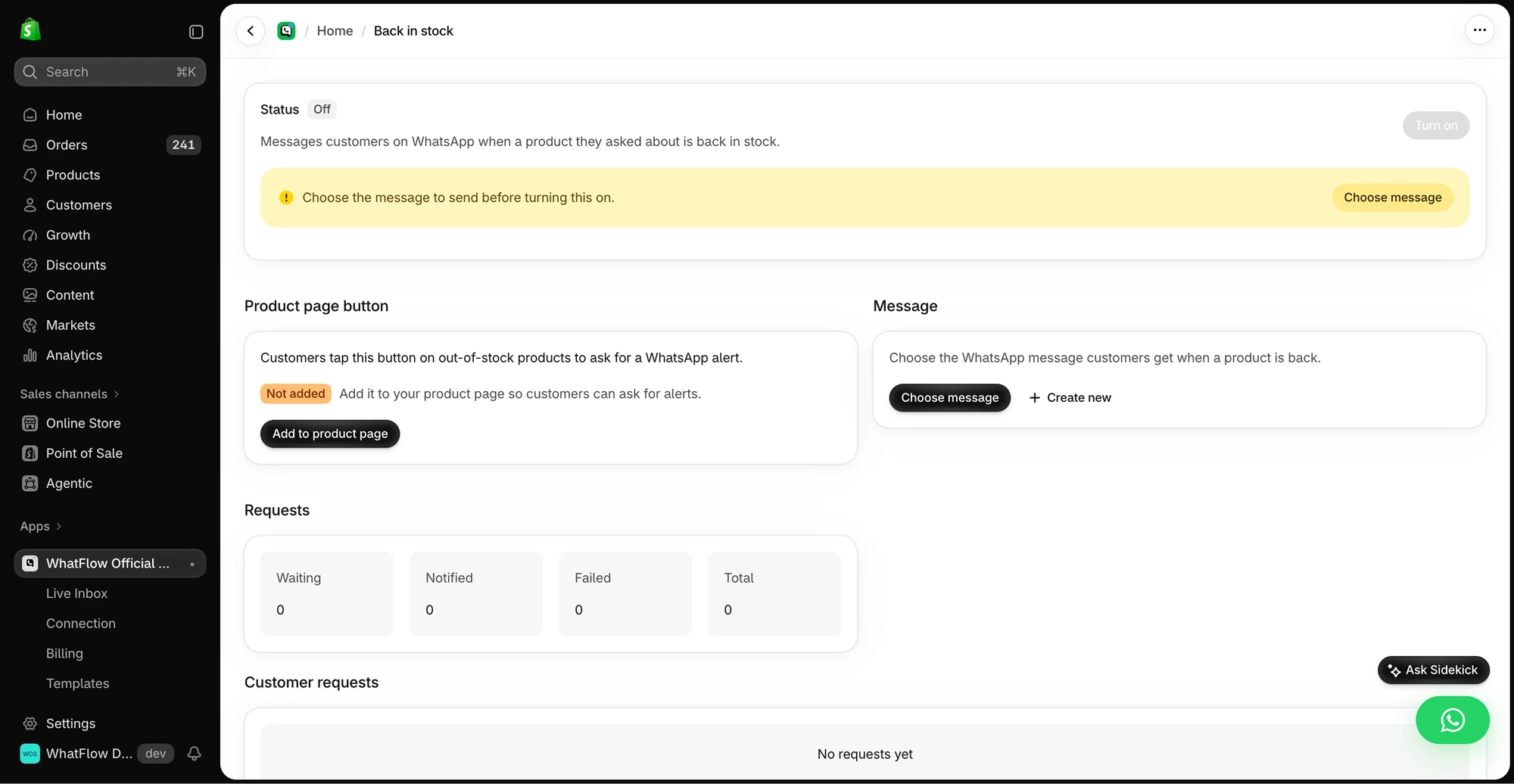
Send the same alert on WhatsApp with WhatFlow and the question comes straight back to you:
Good news: the Coral Linen Dress is back in size 12. Only 9 left. Tap to shop, or reply here if you'd like help with sizing.
Customer: Is it lined? I'm between a 10 and 12.
You: It's half-lined, and it runs slightly roomy, so most people between sizes go for the 10. Want me to hold one for you until tonight?
That's a sale a push notification can't make. Our guide to back-in-stock alerts on WhatsApp has more message examples, and WhatsApp vs web push covers the channel trade-offs.
How much does it cost?
WhatFlow's plans differ only by message allowance: Free (100 sends), Starter $4.99 (2,000), Plus $9.99 (5,000), Growth $29 (20,000). Every plan has every feature, and the inbox has no seat fees. Meta charges per delivered template message by country and category (Meta's pricing). Since October 1, 2026, Meta only treats the first 1,000 service replies per business number per month as free, and utility templates sent inside the customer service window are now charged too (Meta's pricing doc). Full details on the pricing page.
Say you send 5,000 WhatsApp messages a month (restock alerts, order updates, abandoned checkouts). That's Plus at $9.99 in app fees. PushOwl is priced on its own audience and sending units, which aren't comparable one for one: a browser subscriber isn't a WhatsApp contact.
The Shopify workflows push can't run
- COD confirmation: Confirm and Cancel buttons that tag or cancel the order in Shopify through Flow.
- Order and shipping updates customers can reply to.
- Abandoned checkout messages with the cart and link filled in from Shopify.
- Live catalog sharing from the inbox, so you can send the product card mid-chat.
- Free theme-matched WhatsApp buttons on your storefront.
Who answers the replies?
A WhatsApp channel only works if replies get answered. WhatFlow's team inbox has assignment, filters and saved replies, and no seat fees, so you can bring in your support person and a part-timer for sale weekends without changing plans.
What should you set up first in WhatFlow?
Don't switch everything on at once. A sensible order for a small Shopify team:
- The chat button. Free forever, theme-matched, and it starts bringing conversations in on day one.
- Saved replies. Write answers to your five most common questions (delivery time, returns, sizing, COD, order status).
- One order template. COD confirmation if you sell cash on delivery, otherwise a shipping update.
- One Shopify Flow workflow that reacts to a WhatsApp reply. The template-from-Flow guide shows the steps.
- Abandoned checkout, once you're comfortable with templates and opt-in.
Every step above is available on the Free plan.
When PushOwl might still make sense
Keep PushOwl if you have a big browser-subscriber list and want cheap one-tap nudges, like a price drop or flash sale, where nobody needs to ask anything. It's a decent complement. It isn't a replacement for a channel customers can talk back on.
The bottom line
If your notifications tend to turn into questions, put them on WhatsApp. WhatFlow gives you Shopify-triggered WhatsApp messages, COD confirmation, Flow automations and a no-seat-fee team inbox, free to start. Install WhatFlow and move your restock alert first; it's the easiest one to test.
Questions worth asking
Should a Shopify store use WhatsApp or web push?
Use WhatsApp when the customer may have a question or needs to act, like confirming a COD order or asking about size. WhatFlow sends those messages and gives your team an inbox to answer them. Web push works for simple 'come back and look' nudges to browser subscribers.
Can I use WhatFlow and PushOwl together?
Yes. Many stores keep web push for quick price-drop or back-in-stock pings and use WhatFlow for WhatsApp order messages, COD confirmation and conversations. Just agree which channel owns each alert so customers don't get the same news twice.
Does WhatFlow charge per inbox seat?
No. WhatFlow's team inbox has no seat fees, so your support, sales and fulfilment people can all answer WhatsApp without the bill changing. You pay for a message plan, and Meta bills its WhatsApp charges separately, as it would with PushOwl.
Is the WhatFlow Free plan limited?
No features are held back. The Free plan includes templates, Shopify Flow triggers and actions, COD confirmation, catalog sharing and the team inbox. Paid plans from $4.99/month only add message allowance at lower rates, and the theme-matched WhatsApp button is free forever.
Sources and methodology
We checked these primary sources on November 5, 2026. Vendor pages describe advertised capabilities, rather than independent performance tests. Confirm current pricing, plan limits and availability with each provider.
- PushOwl: official product and commercial information
PushOwl's pricing page, checked November 2026: web push and email plans with cart recovery, back-in-stock and price-drop flows.
- WhatFlow WhatsApp Business API on the Shopify App Store
WhatFlow's plans (Free, and paid from $4.99/month), included sends, Shopify Flow and admin features, and its 5.0/5 rating from 55 ratings, checked November 5, 2026.
- WhatsApp Business Platform pricing
Meta's per-message WhatsApp pricing by country and template category, billed separately from any app or platform fee.