
Publisher disclosure: this comparison is written by WhatFlow. Competitor capabilities are based on the linked public documentation; the WhatFlow screenshots come from our demo store. Examples are illustrative, and results depend on your store and configuration.
WhatFlow and JivoChat at a glance
| Consideration | WhatFlow | JivoChat |
|---|---|---|
| What the product is built around | Built for Shopify and WhatsApp: admin extensions, native Shopify Flow triggers and actions, COD confirmation and a team inbox. | A business communication workspace covering website chat, messengers, CRM and telephony. |
| Pricing and billing units | Free plan; paid plans from $4.99/month, priced by message allowance. Meta fees separate. | Per agent per month billed annually: Basic $28, Professional $42, Enterprise $56; the WhatsApp module is listed at $27 a month billed annually (as of November 2026). |
| Feature access | Every feature on every plan, including Free. Plans differ only by message allowance. | Professional lists WhatsApp integration, and the pricing page also presents a separate WhatsApp module. Confirm the combination for your account. |
| Team access | No seat fees at any team size, with assignment and filters. | Paid plans are per agent; a Free plan is offered with a limited number of agents. Channel modules are separate from the agent subscription. |
| Storefront entry point | Theme-matched WhatsApp chat buttons, free forever. | JivoChat website chat widget; placement on a Shopify theme is set up by you. |
| Shopify order automation | Order and shipping templates, abandoned checkout messages, COD confirmation that tags or cancels orders through Flow. | Conversation-centred; Shopify order context comes through integrations. |
For a Shopify store that sells and supports on WhatsApp, WhatFlow is the better choice than JivoChat. WhatFlow runs on the official Meta Cloud API, ties every chat to the Shopify order and Shopify Flow, and includes WhatsApp on every plan with no seat fees. JivoChat is a flexible all-in-one chat workspace, but it charges per agent and lists WhatsApp as a separate module, so the bill grows with every person and every channel.
WhatFlow vs JivoChat at a glance
- Built for: WhatFlow is a Shopify app built around WhatsApp. JivoChat is a communication workspace for website chat, messengers and calls.
- WhatsApp access: WhatFlow includes WhatsApp on every plan, including Free. JivoChat lists a WhatsApp module at $27 a month billed annually (as of November 2026).
- Team cost: WhatFlow has no seat fees. JivoChat paid plans are $28 to $56 per agent a month billed annually.
- Shopify automation: WhatFlow has native Shopify Flow triggers and actions, COD confirmation with order tagging and Shopify admin extensions.
- Rating: WhatFlow WhatsApp Business API is rated 5.0/5 from 55 ratings on the Shopify App Store (checked November 5, 2026).
- Enterprise-ready, not just for small shops: WhatFlow WhatsApp Business API runs on the official Meta Cloud API, with inbox assignment and filters, Shopify Flow automation at scale and no seat fees at any team size, so a 50-person team pays the same in seats as a two-person shop.
How much does JivoChat cost for WhatsApp?
JivoChat's pricing page, as of November 2026 (per agent per month, billed annually):
JivoChat plan | Price |
|---|---|
Free | $0 |
Basic | $28 |
Professional | $42 |
Enterprise | $56 |
WhatsApp module | $27 a month |
Professional lists WhatsApp integration, and the page also presents the WhatsApp module separately, so check which combination applies to your account. Here's a typical store team of five, three on support and two in the warehouse:
- JivoChat Professional plus WhatsApp module: 5 × $42 + $27 = $237 a month on annual billing, before Meta's WhatsApp fees.
- WhatFlow Plus: $9.99 a month with 5,000 sends included, before Meta fees. WhatsApp is the product, not an add-on.
Add a sixth person on JivoChat and it's another $42 a month. On WhatFlow it's $0. If volume grows, WhatFlow Growth is $29 for 20,000 sends (as of November 2026). See our pricing page, and if you're counting what add-ons do to the real bill, our guide to all-features plans vs feature gating lays it out.
Which one fits Shopify order work better?
Most WhatsApp messages to a Shopify store are about orders, so the useful tool sends order messages without anyone typing them and shows the order to whoever replies.
WhatFlow does that natively. Order confirmations, shipping updates and abandoned checkout reminders go out as WhatsApp templates filled with Shopify data. COD orders get a confirmation with reply buttons, and Shopify Flow tags or cancels the order based on the answer:
Hi Mariana, your order #6120 (R$ 189, pay on delivery) is ready to ship. Tap to confirm. [Confirm] [Change address] [Cancel]
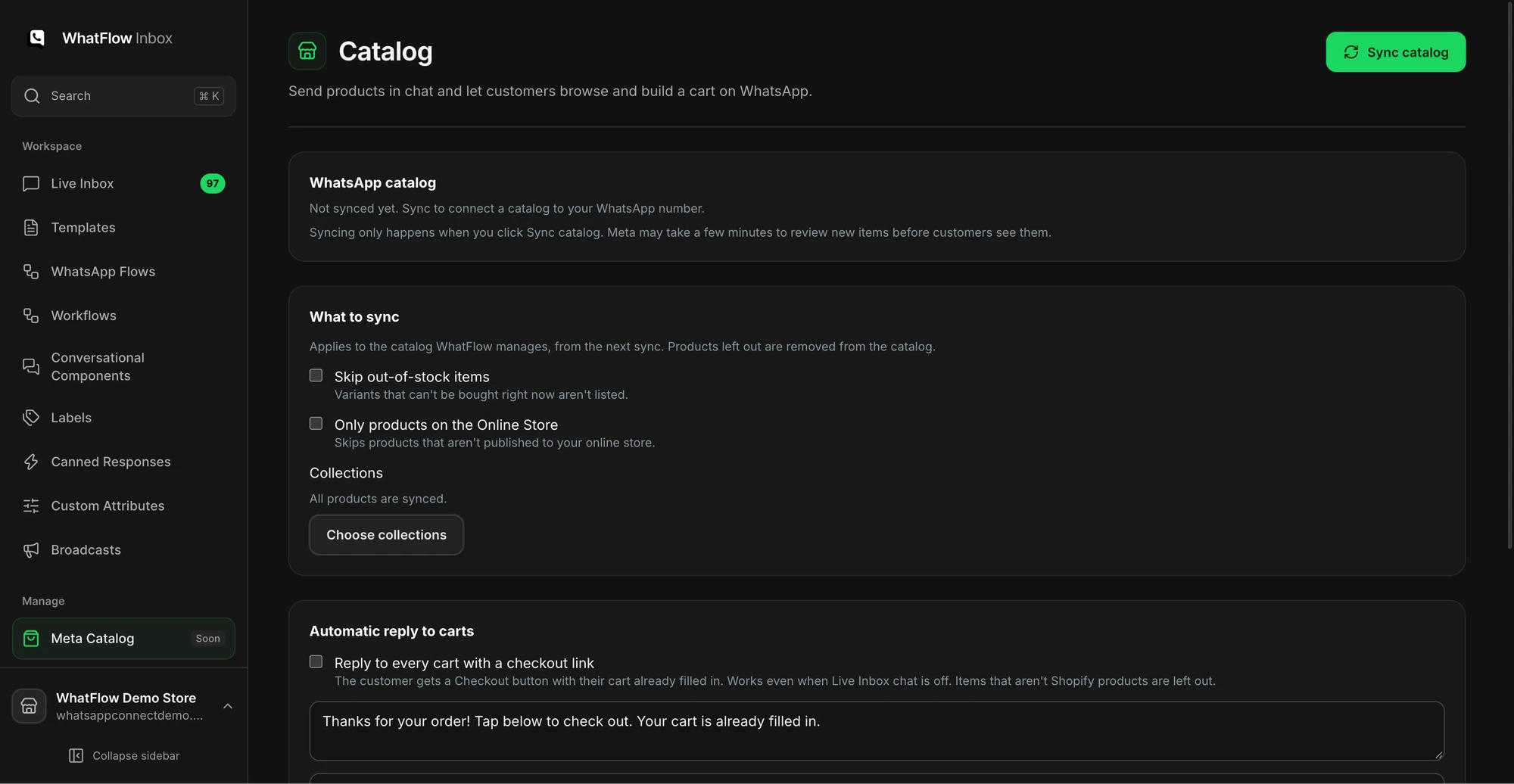
You can share products from your live catalog inside a chat, which is handy when a customer asks "do you have this in blue?". Our guide to WhatsApp catalog sharing for Shopify support shows how stores use it. Review-request links after delivery are built in too.
JivoChat's strength is breadth: website chat, messengers and telephony in one place. For a Shopify store whose real job is WhatsApp order conversations, that breadth is mostly extra cost.
What does the team inbox look like?
WhatFlow WhatsApp Business API is a serious team tool. The shared team inbox has assignment, filters and saved replies, and it costs the same in seats for 3 agents or 50: nothing.
When testing WhatFlow and JivoChat, ask: How do you prioritize chats before their service window closes? In WhatFlow, use Needs reply and Closing soon, claim a conversation, then check Shopify order context and leave a private note. The team inbox walkthrough gives you a repeatable test for two agents, with no per-seat fee.
A saved reply for the daily delivery question:
Your parcel is on its way. Here's the tracking link: [link]. Deliveries in São Paulo usually arrive in 2 to 3 working days.
Because seats are free, the packer and the founder can answer alongside support. On per-agent pricing they usually stay out, and customers wait while questions get relayed.
One honest trade-off: WhatFlow has no built-in AI bot or telephony. (For AI help with replies, WhatFlow's MCP connector lets Claude, ChatGPT or Cursor draft answers from Live Inbox chats for a person to approve.) If you need calls in the same tool, JivoChat covers that.
When might JivoChat still make sense?
Pick JivoChat if you want website chat, social messengers and phone calls in one workspace, your team works across all of them, and WhatsApp is one channel among several.
The bottom line
If WhatsApp is how your Shopify customers reach you, WhatFlow does the job better and costs a fraction of a per-agent bill plus a channel module. You get the official Meta Cloud API, native Shopify Flow, COD confirmation, catalog sharing and an inbox with no seat fees, with every feature on the Free plan. Start with WhatFlow, and consider JivoChat if phone and web chat become the bigger part of your support.
Questions worth asking
Is WhatFlow a good JivoChat alternative for Shopify?
Yes, for WhatsApp. WhatFlow runs on the official Meta Cloud API, connects WhatsApp to Shopify orders and Shopify Flow, and has a team inbox with no seat fees. JivoChat suits teams that want website chat, telephony and messengers in one workspace.
How much does JivoChat cost for WhatsApp compared with WhatFlow?
As of November 2026, JivoChat Professional is $42 per agent a month billed annually, and its WhatsApp module is listed at $27 a month billed annually. Five agents come to $237 a month. WhatFlow has a Free plan and paid plans from $4.99 a month with no seat fees.
Does WhatFlow charge per inbox seat?
No. WhatFlow's team inbox has no seat fees at any team size, so adding a packer or a seasonal helper costs nothing extra. You pay for your message plan and Meta's delivery fees.
Are WhatFlow features restricted on the free plan?
No. Every WhatFlow plan, including Free, has the full feature set, WhatsApp included. Plans differ only by message allowance and rate, and theme-matched WhatsApp buttons are free forever.
Sources and methodology
We checked these primary sources on November 5, 2026. Vendor pages describe advertised capabilities, rather than independent performance tests. Confirm current pricing, plan limits and availability with each provider.
- JivoChat pricing
JivoChat per-agent prices on annual billing, the Free plan and the WhatsApp module price. Checked November 5, 2026.
- WhatFlow WhatsApp Business API on the Shopify App Store
WhatFlow plan prices, included sends, Shopify workflows and the 5.0/5 rating from 55 ratings, checked November 5, 2026.
- WhatsApp Business Platform pricing
Meta's per-message delivery pricing, which applies on top of either tool's subscription.