A good refund message to a customer says the refund is approved or sent, gives the exact amount and order number, names where the money is going and gives an honest timeframe. Don't promise "3 to 5 days" when the customer's bank decides. Below are 22 refund message examples for WhatsApp and chat: approved, issued, partial, store credit, declined, cash on delivery and missing returns.
One thing up front, because people ask: WhatFlow doesn't process refunds. You refund in Shopify or with your payment provider, and WhatFlow sends the messages about it through approved templates, Shopify Flow or a reply from the team inbox.
What every refund message should include
The order number.
The exact amount, with currency. "Rs 4,250" or "AED 180", not "your money".
Where it's going. Original card, store credit, bank account or wallet.
When to expect it, honestly. The part you control (you've sent it) and the part you don't (the bank).
One way to follow up. "If it's not there by 4 December, reply here."
Leave out "Thanks for shopping with us, here's 10% off" in the same message. It makes the template marketing and reads like you're buying your way out.
Why refund timing isn't yours to promise
Here's the honest version: once you press refund, the money leaves your control. For Shopify Payments, Shopify says a refund can show as pending for up to 2 business days, and after that "the customer's bank controls when the funds are available", with an estimate of up to 10 business days (Shopify Help Center). Other gateways and wallets run on their own clocks.
So say what you did and when, then give a window and a date to check back. That date matters more than any promise. A customer who knows "if it's not there by Friday the 4th, message us" doesn't chase you on day two.
If you sell into the EU, there's also a legal clock. The EU's Your Europe guidance for sellers says you reimburse within 14 days of being told the customer is withdrawing, and you may wait until you've got the goods back or proof they've been sent. Check the rules wherever you sell.
Template or free-form?
If the customer messaged you in the last 24 hours, the customer service window is open and you can reply in your own words. The is the 24 hours after a customer's last message, when WhatsApp lets a business reply free-form. Most refund chats happen this way, because the customer asked.
Refund notices sent days later, after the return arrives or after finance processes it, need an approved template. Meta's pricing documentation says that outside the window only templates reach the customer.
A refund update tied to one order is normally utility. Meta's categorization guidelines use a refund notice as an order-management example and say mixed content, like an order update with a promo, is marketing. As of November 2026, Meta's list rate for a utility message is $0.0014 in India, $0.015 in Pakistan and $0.0157 in the UAE. Every market is on our pricing page. Our marketing vs utility explainer covers the edge cases.
Unless an example says otherwise: {{1}} = first name, {{2}} = order number, {{3}} = refund amount with currency.
Refund approved
Send this when you've agreed to refund but haven't pressed the button yet, for example while the return is in transit.
1. Approved, waiting for the return
Hi {{1}}, your refund for order {{2}} is approved. Once your parcel reaches our warehouse, we'll refund {{3}} to your original payment method and message you here the same day.
2. Approved, no return needed
Hi {{1}}, no need to send the item back. We've approved a refund of {{3}} for order {{2}} and will process it within 1 working day. You'll get another message from us when it's sent.
Only say "1 working day" if that's how fast your team really moves.
3. Free-form reply in an open chat
Thanks for the photos, Hamza. That stitching shouldn't have left our workshop. I've approved a full refund of Rs 4,250 for order #2214. You don't need to return the kurta. I'll confirm here once it's processed today.
Refund issued (with honest timing)
4. Card refund sent
Hi {{1}}, we've refunded {{3}} for order {{2}} to the card you paid with. Banks usually take a few business days to show it, and the timing is up to your bank. If you can't see it by {{4}}, reply here and we'll send you the refund reference.
{{4}} is a check-back date about 10 business days out.
5. Short version
Hi {{1}}, refund sent: {{3}} for order {{2}}, back to your original payment method. Your bank decides when it appears on your statement. Reply here if it hasn't shown up by {{4}}.
6. Customer asks "where's my refund?" (free-form)
I checked order #3051: we sent the refund of AED 180 on 18 November. From our side it's complete, so it's now with your bank. Banks can take up to 10 business days to post it. If it's still missing on 2 December, I'll send you the refund reference so your bank can trace it.
Partial refunds
Shopify lets you refund part of an order, and you can issue several partial refunds up to the order total (Shopify Help Center). The message has to explain the maths, or you'll get a "why not the full amount?" reply.
7. One item from a multi-item order
Hi {{1}}, we've refunded {{3}} for the {{4}} you returned from order {{2}}. The rest of your order stays as it is. The refund goes to your original payment method; your bank decides when it shows.
{{4}} is the returned item.
8. Shipping not refunded
Hi {{1}}, we've refunded {{3}} for order {{2}}. That's the price of the item; the original delivery charge of {{4}} isn't refundable under our returns policy, because the parcel was delivered as ordered. Questions? Reply here.
9. Bundle partial return
Hi {{1}}, you returned one product from the {{4}} bundle in order {{2}}. Because bundle items are discounted together, the refund is {{3}}, which is that item's share of the bundle price. Here's how we worked it out: {{5}}
Shopify can refund to the original payment method, to store credit, or to both (Shopify Help Center). Offer credit as a choice, not a trap. Where the customer is entitled to their money back, store credit is their option, not yours.
10. Offering the choice (free-form)
Your return is approved, Priya. You can have Rs 2,800 back on your card, or Rs 2,800 as store credit if you'd rather pick something else. Both are fine with us. Which do you prefer?
11. Store credit issued
Hi {{1}}, we've added {{3}} in store credit to your account for order {{2}}. It's ready to use at checkout when you're signed in, and it's valid until {{4}}.
If you set an expiry, Shopify advises checking your country's laws first. If you don't set one, delete the last clause.
12. Exchange difference refunded
Hi {{1}}, your exchange for order {{2}} has shipped. The new size cost less, so we've refunded the difference of {{3}} to your original payment method.
Refund declined, politely and with a reason
A no without a reason starts an argument. A no with the reason, the policy link and a next step usually ends it. Keep these free-form where you can, because a person should be on the other end.
13. Outside the return window
I'm sorry, Daniel. Order #1980 was delivered on 12 September, and our return window is 30 days, so I can't refund it. If there's a fault with the jacket, that's different: send me a photo and I'll check it with our team.
14. Used or washed item
Thanks for sending it back, Ayesha. When it arrived, the dress had been washed and the tags were removed, which our returns policy doesn't cover. I can't refund it, but I can send it back to you at no cost. Would you like that?
15. Final-sale item
Hi {{1}}, I've checked order {{2}}. The {{3}} was sold as final sale, which the product page and checkout both noted, so it isn't eligible for a refund. If it arrived faulty, reply with a photo and we'll look again.
Here {{3}} is the product name, not an amount. This one also works as a template if the customer's window has closed.
COD orders have no card to refund, so you send money by bank transfer or a mobile wallet. That means asking for payment details in chat, which is exactly what scammers do. Ask for the minimum, never ask for a PIN, OTP or card number, and confirm the details back before you send.
16. Asking for refund details
Hi {{1}}, your refund of {{3}} for COD order {{2}} is approved. Because you paid cash, we'll send it by bank transfer or mobile wallet. Please reply with the account holder's name and the account or wallet number. We'll never ask for a PIN, password or OTP.
17. Confirming details before paying (free-form)
Thanks, Bilal. Just to confirm before I send Rs 3,600: account name Bilal Ahmed, wallet number ending 4471. Reply YES and I'll transfer it today.
18. COD refund sent
Hi {{1}}, we've transferred {{3}} for order {{2}} to the account ending {{4}}. Transfer reference: {{5}}. If it hasn't arrived within 2 working days, reply here with a screenshot of your statement and we'll check with our bank.
You're allowed to wait for the item (in the EU, until it arrives or you've got proof it was sent). Chase politely and make it easy.
19. First nudge
Hi {{1}}, we approved the return for order {{2}} on {{3}}, but we haven't received the parcel yet. Have you sent it? If so, reply with the tracking number or a photo of the receipt and we'll keep an eye out.
{{3}} is the approval date here.
20. Return lost in transit (free-form)
Thanks for the receipt, Sara. The courier's tracking stopped on 14 November, so it looks lost on their side, not yours. I'm refunding you the Rs 5,100 today and I'll chase the courier myself.
21. Final reminder
Hi {{1}}, a last reminder about the return for order {{2}}. We can only refund once the item is back with us or you've sent proof of postage. If you've changed your mind and want to keep it, just reply and we'll close the return.
22. Return received, refund on its way
Hi {{1}}, your return for order {{2}} arrived today and passed inspection. We've refunded {{3}} to your original payment method. Your bank will post it in its own time; reply here if it's not there by {{4}}.
How to send refund messages with Shopify Flow and WhatFlow
WhatFlow WhatsApp Business API runs on Meta's official WhatsApp Cloud API, and every feature is on every plan, including Free. Refund messages come from three places.
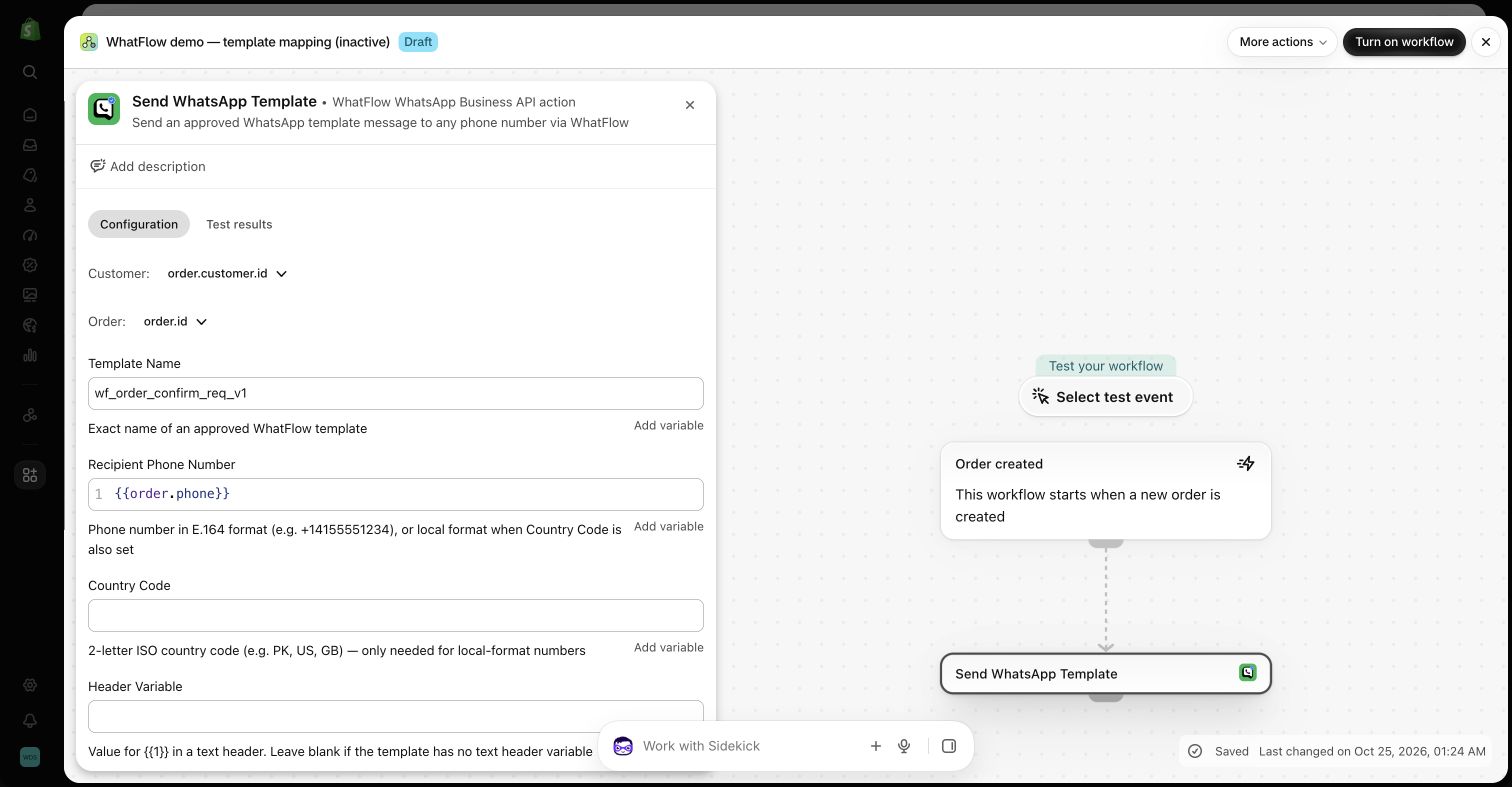
Automatically, from Shopify Flow. Shopify Flow's Refund created trigger starts a workflow when an order is partially or completely refunded (Shopify Help Center). Add WhatFlow's Send WhatsApp Template action, pick your approved refund template and map the variables to order fields. Check that the amount field you map is the refund, not the order total. Test it on a partial refund first.
WhatFlow's Send WhatsApp Template action in a demo Shopify Flow workflow. Nothing was sent.
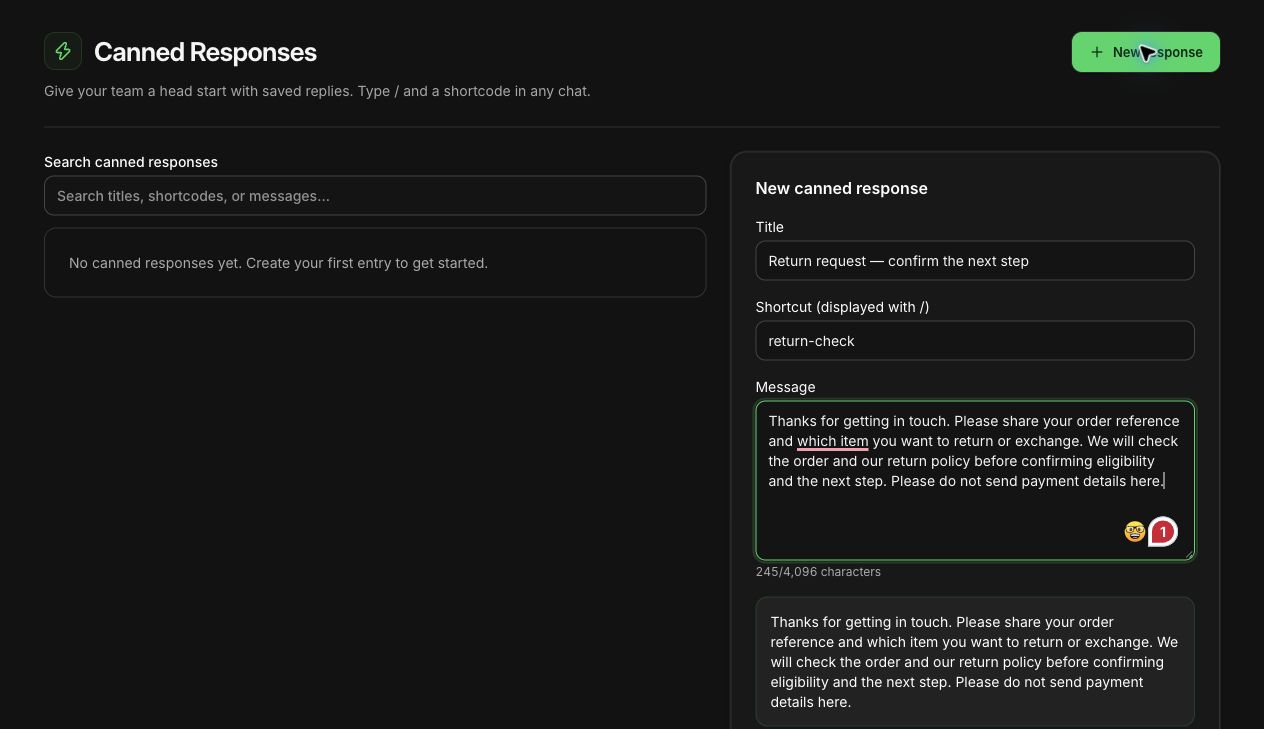
By hand, from the team inbox. Most refund conversations start with the customer, so they're free-form replies in WhatFlow's shared inbox. Save your most-used replies (approved, sent, declined) as canned responses and personalise each one before sending. WhatFlow has no seat fees, so finance and support can both be in the inbox without extra cost per person.
A canned reply draft in the WhatFlow demo store asking the customer for their order reference.
The inbox setup doc covers assignment, labels and canned responses.
When the window has closed. If the customer last wrote three days ago, pick an approved template from the inbox template picker instead of typing.
Common refund message mistakes
Promising the bank's timeline. "You'll have it in 3 days" becomes your problem on day 4.
No amount. "We've processed your refund" makes people check every transaction.
A discount in the refund notice. It changes the template category and reads as a bribe.
Declining without a reason. Give the rule, the date and a next step.
Asking COD customers for sensitive details. Account name and number only. Never a PIN or OTP.
Silence after "approved". If processing takes a week, send the "sent" message too.
Refunding twice. If you refund to store credit and then to the card, Shopify warns the order can be over-refunded.
Run WhatsApp for your Shopify store with WhatFlow
Free plan available. Templates, COD confirmation, Shopify Flow automations and a shared team inbox with no seat fees. Every feature is included on every plan, including Free.
Refunds usually follow something that went wrong, so the message before this one matters too. Our apology message examples cover the delay, the wrong item and the damaged parcel, and the order cancellation message examples handle refunds that start with a cancelled order.
Frequently asked questions
How do you write a refund message to a customer?
Say the refund is approved or sent, give the exact amount and the order number, say where the money is going (card, store credit, bank account or wallet) and give an honest timeframe. End with one way to reach you if it doesn't arrive.
How long does a refund take to reach the customer?
It depends on the payment method and the customer's bank. For Shopify Payments, Shopify says a refund can show as pending for up to 2 business days and the customer's bank then controls when the money appears, which can take up to 10 business days.
Is a WhatsApp refund update a utility or marketing template?
A refund update about a specific order with no promotion is normally utility; Meta's own order-management examples include a refund notice. Add a discount or a 'shop again' offer and Meta treats it as marketing.
Can WhatFlow issue refunds?
No. You issue the refund in Shopify or with your payment provider. WhatFlow sends the messages about it, through approved WhatsApp templates, Shopify Flow or a reply from the team inbox.
How do I refund a cash on delivery order?
There's no card to refund, so you pay the customer back by bank transfer or mobile wallet. Ask only for the details you need to send the money, confirm them back before paying, and never ask for a PIN, OTP or card number.
Copy-ready order cancellation messages for WhatsApp and SMS: customer requests, out of stock, failed payment checks, unconfirmed COD and partial cancels.