A good out of stock message says, in the first line, that the item isn't available, then gives the customer a real choice: wait for a stated date, swap to something similar, or get a refund. Below are 23 out of stock message examples for WhatsApp and SMS, from "is this in stock?" replies to sold-out orders, partial shipments, pre-orders and discontinued products.
These are the messages you send when something isn't available. The alert you send later, when it returns, is a different job, and we've got a separate library of back-in-stock message examples for that. This post covers the awkward bit before.
What should an out of stock message include?
The news, first. "The navy hoodie in M is sold out." Not three lines of thanks before it.
What you actually know. A date if your supplier confirmed one. "We don't know yet" if not.
Options, not a dead end. Wait, swap, refund, or a restock alert.
For paid orders, the money. Say whether they've been charged and what happens if they choose a refund.
One way to reply. Buttons or a "reply 1 / 2 / 3" line.
The mistake I see most often is the optimistic guess. "Should be back next week" becomes a complaint when next week comes and goes.
WhatsApp rules: template or free-form?
If a customer just messaged you asking about stock, you're inside the customer service window, the 24 hours after their last message, and you can reply in free-form text. If you're contacting someone who hasn't messaged you, for example to tell them their paid order can't ship, you need a Meta-approved template. Meta's pricing documentation covers both.
Keep order-specific stock news as utility. Meta's template categorization rules treat an order update, including a backorder update, as utility, but an order update mixed with a promo counts as marketing. So "your item's delayed, here's 10% off" is a marketing template. Offer the goodwill code in a free-form reply once the customer writes back. Our explainer on marketing vs utility templates goes into the grey areas.
Costs, as of November 2026: Meta charges per delivered template, and since October 1, 2026 that includes utility templates sent inside an open window. A utility template costs $0.0014 in India, $0.015 in Pakistan and $0.0107 in Saudi Arabia (full table on our pricing page). Free-form replies are free for the first 1,000 service messages per business number each month, then charged. And every template needs the customer's opt-in first, per the WhatsApp Business Messaging Policy.
Variables in the templates below: {{1}} = first name, {{2}} = order number, {{3}} = product, {{4}} = date or amount.
Replies to "Is this in stock?"
Save these as canned replies. Your team will send them dozens of times a week.
1. In stock (so you don't forget the happy version)
Yes! The Oud Noir 50ml is in stock and ships today if you order before 3pm. Here's the link: [link]
2. Out of stock, restock date confirmed
Sorry Sana, the linen kurta in size M is sold out right now. Our supplier has confirmed new stock on 5 December. Want me to message you here the day it lands?
3. Out of stock, no date yet
That one's sold out, and honestly I don't have a restock date yet. I can message you when it's back, or show you two similar styles we have now. Which would help?
4. One size or colour gone, others available
The black is sold out, but we have it in olive and sand in your size. Here's a photo of both on the same model: [photo]
5. Low stock (true, not a scare tactic)
Yes, we have it. Only 2 left in size 8, so if you want it I'd order today.
Only say "only 2 left" if it's true. Customers notice when the number never changes.
6. Available in another location
Our online warehouse is out, but the Gulberg store has 3 in stock. You can pick up there today, or we can transfer one and ship it in 3–4 days.
On Shopify, an item shows as out of stock online if the location that fulfils online orders is at zero, even when another location has stock (Shopify Help Center).
When an item sells out after the customer orders
This happens when stock counts drift, two people buy the last unit, or you've turned on "Continue selling when out of stock". Give the customer three choices and let them pick.
7. Wait, swap or refund (template with buttons)
Hi {{1}}, we're sorry: {{3}} in your order {{2}} sold out before we could pack it. You can wait for new stock (expected {{4}}), swap to a similar item, or get a full refund. Tap one below.
[Wait] [Swap] [Refund]
8. Same, no restock date
Hi {{1}}, {{3}} from order {{2}} is out of stock and we don't have a restock date yet. Would you like a similar item or a full refund? Reply here and we'll sort it today.
9. Customer chose to wait (free-form)
Thanks for waiting, Ahmed. I've kept your order open and you'll hear from me as soon as the stock arrives. If you change your mind before then, just say and I'll refund you in full.
10. Customer chose a swap (free-form)
Done. I've swapped the Rose Cleanser for the Calendula Cleanser, same size and price, and it ships tomorrow. Nothing extra to pay.
11. Swap costs less: refund the difference
The Calendula one is Rs 400 cheaper, so I've refunded Rs 400 to your card today. Your bank decides when it shows up.
12. Customer chose a refund (free-form)
All done. I've refunded Rs 3,200 to your original payment method today. Sorry again it sold out on us.
Hi {{1}}, {{3}} from your cash on delivery order {{2}} is out of stock. Nothing has been charged. Reply 1 to wait for new stock, 2 to see a similar item, or 3 to cancel.
Partial shipments
14. Rest of the order ships now
Hi {{1}}, most of order {{2}} ships today. {{3}} is out of stock and will follow separately once it arrives, at no extra delivery cost. You'll get a tracking link for each parcel.
15. Ask before splitting
Hi {{1}}, one item in order {{2}} ({{3}}) is out of stock until {{4}}. Should we send the rest now and that one later, or hold everything and ship together?
[Ship now] [Ship together]
16. Second parcel follow-up
Hi {{1}}, the last item from order {{2}}, {{3}}, has just shipped. Track it here: {{4}}. That's your full order.
Pre-orders and backorders
These are the messages for products you sell before you have them, usually with Shopify's "Continue selling when out of stock" setting. Our guide to pre-order updates on WhatsApp has the full sequence.
17. Pre-order confirmation
Hi {{1}}, thanks for pre-ordering {{3}} (order {{2}}). It's expected to ship around {{4}}. We'll message you here if that changes.
18. Pre-order delay
Hi {{1}}, an update on your pre-order {{2}}: {{3}} is now expected around {{4}}, later than we first said. Sorry about that. If you'd rather not wait, reply REFUND and we'll refund you in full.
19. Backorder on a single variant
Hi {{1}}, {{3}} is on backorder, so order {{2}} will ship around {{4}} instead of this week. Everything else in your order is ready. Reply if you'd like it sent now.
Discontinued products
20. Discontinued, with an honest alternative
Sorry, we've stopped making the Classic Tote. It's not coming back. The closest thing we have is the Market Tote: same canvas, slightly bigger, Rs 2,900. Want a photo?
21. Discontinued after the customer ordered
Hi {{1}}, our supplier has discontinued {{3}}, so we can't send it for order {{2}}. We've refunded {{4}} for that item. If you'd like, reply and we'll suggest something similar.
Restock date unknown: the follow-ups
22. Two weeks later, still no date (free-form, if the window is open; template if not)
Hi {{1}}, still no firm date on {{3}}, I'm afraid. Your order {{2}} is safe and you can still choose a refund any time. I'll update you as soon as I hear.
23. SMS version, short
Loom & Pack: the item in order #1042 is out of stock. Reply WAIT, SWAP or REFUND. No charge until it ships.
Templates can be created in any language WhatsApp supports, so keep an Urdu, Arabic or Portuguese version of examples 7, 13 and 18 if your customers write in those languages.
How to send out of stock messages with Shopify and WhatFlow
With WhatFlow WhatsApp Business API, built on Meta's official WhatsApp Cloud API:
Save examples 1 to 6 and 9 to 12 as canned replies in the WhatFlow team inbox, so whoever's on shift answers stock questions the same way. There are no seat fees, so add every person who answers chats.
Create templates 7, 13, 14, 17 and 18 in WhatFlow's template editor and submit them as utility.
Send them where they belong. One-off sold-out orders can go out from the Shopify order using manual messaging. For pre-orders, a Shopify Flow workflow can send the template when an order with a pre-order tag is created.
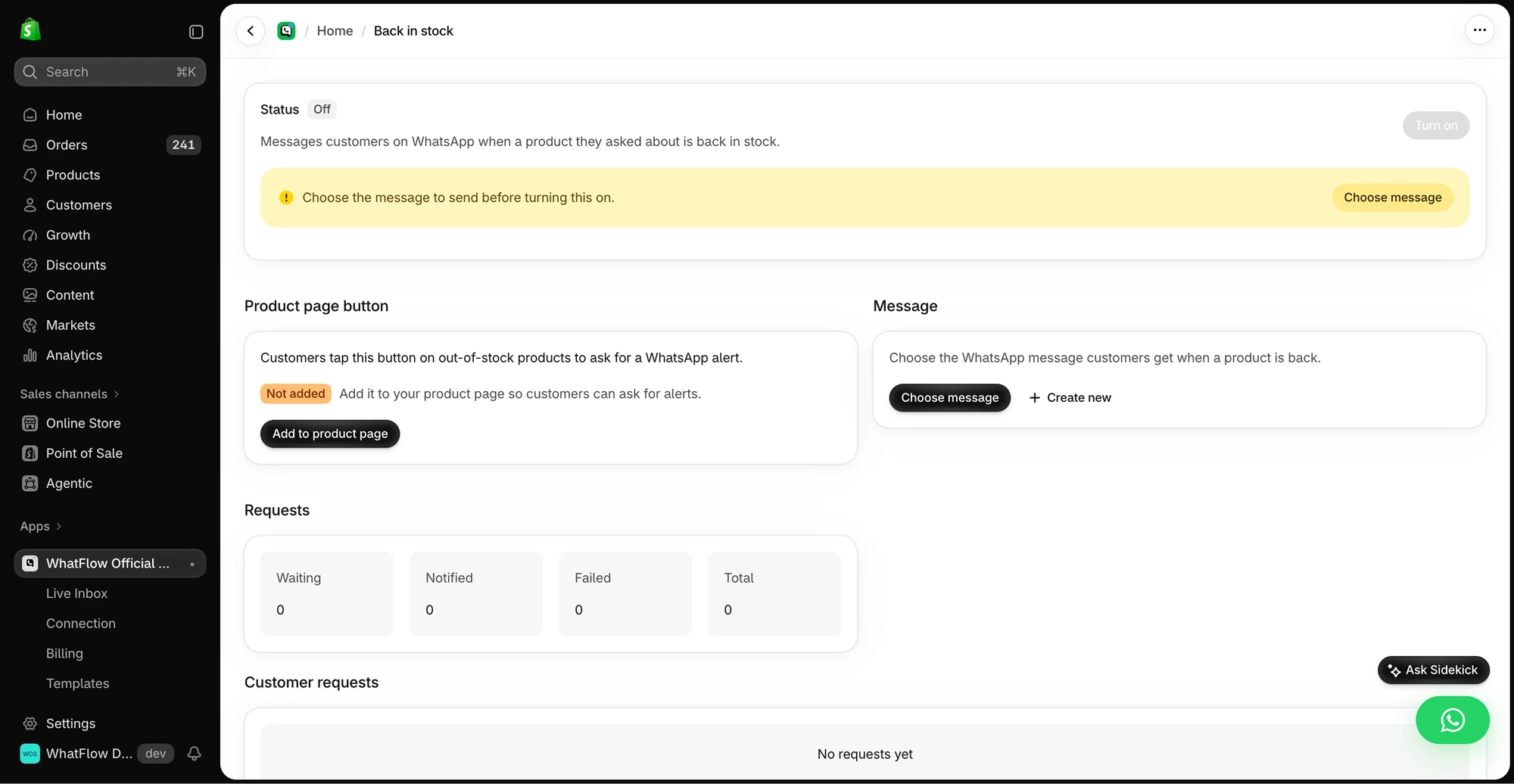
Turn "not in stock" into a restock request. WhatFlow's back-in-stock button lets shoppers ask for a WhatsApp alert on a sold-out variant; see setting up restock alerts in WhatFlow.
Back-in-stock button and request queue in the WhatFlow demo store. Sample data; nothing was sent.
Every feature here is on every WhatFlow plan, including Free.
Run WhatsApp for your Shopify store with WhatFlow
Free plan available. Templates, COD confirmation, Shopify Flow automations and a shared team inbox with no seat fees. Every feature is included on every plan, including Free.
Guessing the restock date. Say what your supplier confirmed, or say you don't know.
Swapping without asking. A "similar" item is the customer's call, not yours.
Holding money silently. If they've paid and you're waiting on stock, tell them they can refund any time.
Fake scarcity. "Only 1 left" that never changes kills trust.
Adding a discount to the template. It turns a utility message into marketing.
Frequently asked questions
How do you tell a customer an item is out of stock?
Say it plainly in the first line, then give a real next step: a restock date if you have one, an alternative that's in stock, or a way to be told when it's back. If they've already paid, offer to wait, swap or refund and let them choose.
What should I say when I don't know the restock date?
Say you don't know yet. Offer to message them when it's back, suggest a similar item, and avoid guesses like 'next week' that you can't back up.
Is an out of stock message a utility or marketing template on WhatsApp?
A message about a specific order the customer placed, such as a backorder update, is utility under Meta's categorization rules. Add a discount or a promotional product pitch and the template becomes marketing.
What's the difference between an out of stock message and a back-in-stock message?
An out of stock message tells a customer something isn't available right now and what their options are. A back-in-stock message is the alert you send later, to people who asked, when the item returns.
Order updates (including backorder updates) are utility; templates mixing order updates with promotional content are marketing (checked November 24, 2026).
Templates required outside the customer service window; per-message pricing; 1,000 free service messages per number per month; utility in the window charged since October 1, 2026.
Overselling is off by default; 'Continue selling when out of stock' allows pre-orders and backorders; multi-location stock behaviour (checked November 24, 2026).