A good loyalty program message tells the customer what they can do right now. The number they've reached is secondary. "You have 340 points" is trivia. "Your 340 points take $5 off your next order over $30, here's the link" is useful. Send loyalty messages only when something actionable changes, put the main condition next to the reward, and let your loyalty app be the source of truth for balances.
Why most loyalty messages get ignored
Because they announce mechanics instead of value. Points, tiers and rewards are three different things, and most programs blur them together:
Points earned: an activity happened. Usually nothing to do yet.
Tier change: future benefits changed. Maybe free shipping from now on, maybe early access.
Reward available: the customer can redeem something today.
Only the last one has an obvious next step, and it's the one that deserves a message. A tier change is worth telling people about if the new benefit is real and immediate. Points earned on their own almost never need a WhatsApp message. Put the balance on the order confirmation email and leave it there. Every extra message counts against the customer's patience; our guide to WhatsApp message frequency covers how much is too much.
Before writing anything, open your loyalty app and list the events it can actually report. Then pick the two or three where the customer has something to do.
For a one-off retention send, start with the eligible repeat buyers you can actually identify in Shopify, or upload an opted-in spreadsheet to WhatFlow Team Inbox. Personalize an approved template and test the product link before scheduling. If someone replies with a question, pick up that conversation in the same inbox instead of sending another automatic reminder. See the broadcast setup and checks.
Loyalty message examples
Reward available:
Hi {{1}}, your points have added up: you've got $5 off your next order over $30. It's applied when you log in at checkout, and it's valid until {{2}}. {{3}}
Tier change with a real benefit:
Hi {{1}}, you're now a Gold member. From your next order, shipping is free on everything, no minimum. Nothing to activate. {{2}}
Points about to expire (only if they actually expire):
Hi {{1}}, 600 of your points expire on 30 November. That's $10 off an order over $40. Use them here if you'd like: {{2}}
That last one tells the customer nothing they can use, and it's the kind of message that gets your number muted.
Put the condition next to the benefit
If the $5 reward needs a $30 minimum, say so in the same sentence. If it doesn't combine with sale prices, say that too. The worst loyalty experience is a customer who reads "$5 off", adds things to the cart, and finds out at checkout that the reward doesn't apply. That conversation usually ends up in your inbox, irritated.
Keep deadlines honest. If points don't expire, don't write "use them before it's too late". And when you change the program, update the message templates and your saved support replies on the same day, so WhatsApp, email and your FAQ page don't contradict each other.
Don't show a balance you can't keep current
This is the technical trap. If your WhatsApp message pulls a points balance at 9am and the customer redeems at 9:15, the next message might show a stale number. Some loyalty apps expose live fields to Shopify Flow; some don't.
If you can't be sure the number in the message is current, don't put it in. Link to the account page where the balance is always right:
Hi {{1}}, you've got a reward ready to use. See your current balance and options here: {{2}}
That's less exciting, but it never lies.
How to connect your loyalty app to WhatsApp
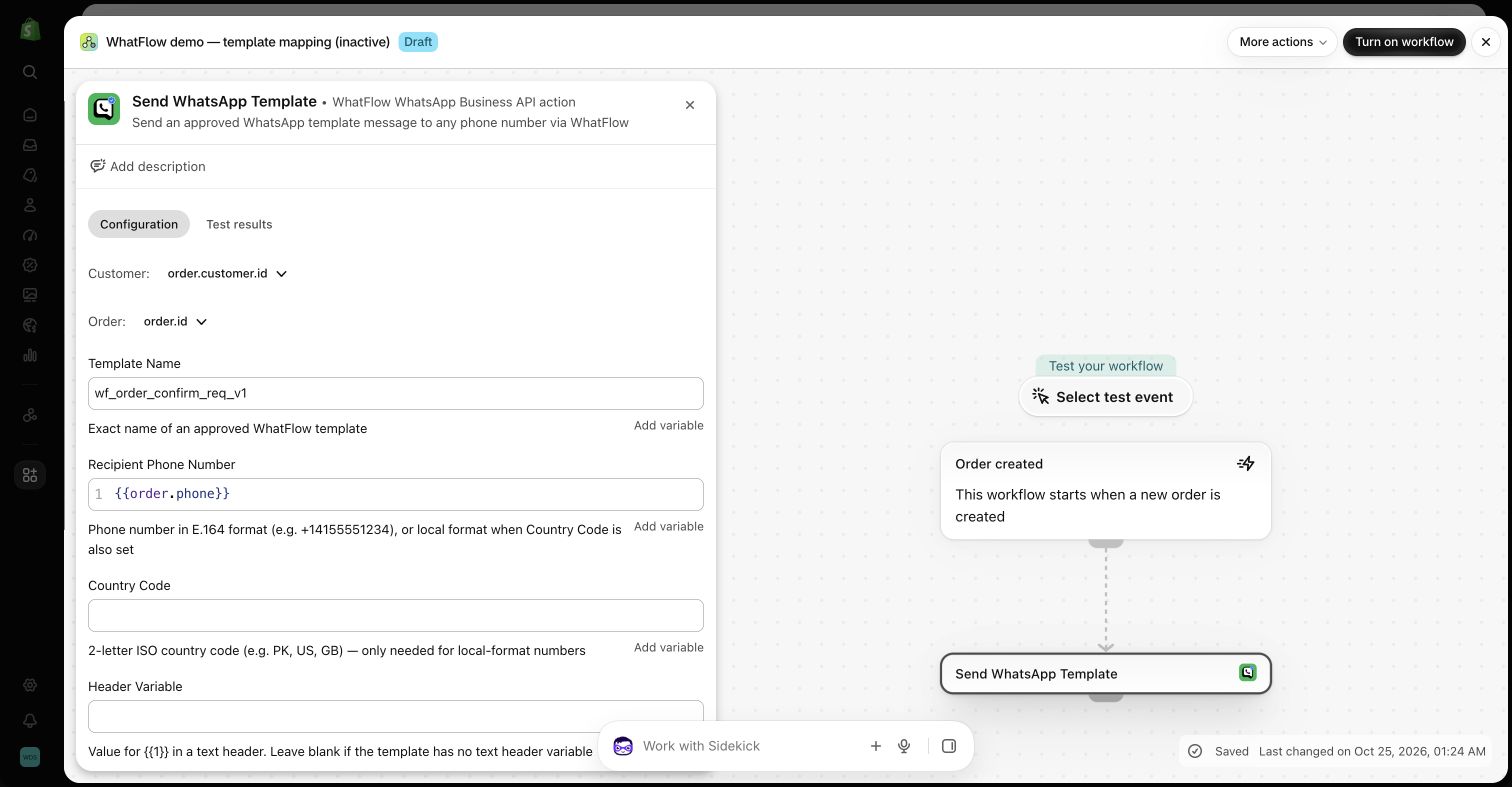
The cleanest route is Shopify Flow. Many loyalty apps publish triggers into Flow (reward earned, tier changed and so on). WhatFlow adds WhatsApp actions to Flow, so a workflow can look like this:
Trigger: loyalty app's "reward available" event.
Condition: customer has WhatsApp marketing consent; reward value is above a threshold you care about.
Action: WhatFlow sends your approved "reward available" template, mapping the customer's name and the reward link into the variables.
A WhatFlow template action in a Shopify Flow demo workflow, showing how variables are mapped. Demo only.
Check what your loyalty app actually exposes before you design the message. Not every app provides the same triggers or fields, and you can only use the data Flow receives. Our guide to evaluating Shopify app connectors walks through how to check this, and sending WhatsApp templates from Shopify Flow covers the WhatFlow side step by step.
Coordinate with the loyalty app's own emails
Your loyalty app probably sends its own emails already. Decide which channel owns each event. A sensible split:
Event
Email
WhatsApp
Points earned
Yes (in order email)
No
Reward available
Yes
Yes
Tier change
Yes
Only if the benefit is immediate
Points expiring
Yes
Yes, once, a few days before
If both channels fire on every event, the customer gets the same news twice and starts tuning out both. WhatsApp should carry the messages that are worth an interruption.
And WhatsApp rules still apply: the customer needs to have opted in to marketing messages, and outside the 24-hour customer service window you need an approved template. A friendly tone doesn't make a promotional message a service message. See the WhatsApp Business messaging policy.
Prepare for reward questions
The usual questions are predictable: why did my balance drop, can I use this on sale items, where do I enter the reward, my reward isn't showing. Write saved replies for each. For example:
Hi {{name}}, rewards don't stack with sale prices, which is why it didn't apply to the jacket. It'll work on anything at full price, and it's valid until {{date}}. Want me to check which items in your cart qualify?
Don't promise a manual balance correction unless someone who can make it has agreed. In WhatFlow's team inbox you can assign these chats to whoever manages the loyalty app, and adding that person doesn't cost a seat fee. Every WhatFlow plan, including Free, has the same features; plans differ only in messaging allowances. That matters more as you grow: a 30-person team on the official WhatsApp Cloud API pays the same in seats as a team of two.
Free plan available
Run WhatsApp for your Shopify store with WhatFlow
Templates, COD confirmation, Shopify Flow automations and a shared team inbox with no seat fees. Every feature is included on every plan, including Free.
Clicks tell you people were curious. Redemptions tell you the message worked. Confused replies and failed redemptions tell you where it didn't. If lots of people click "reward available" and few redeem, the problem is usually a hidden condition or a checkout step, not the copy. Fix that before you send more. And if you run a referral program alongside loyalty, write those referral messages to the same standard: one benefit, one condition, one link.
Frequently asked questions
What should a loyalty points message say?
Translate the points into something the customer can use: '340 points = $5 off your next order over $30.' Add the one condition that matters and a link to redeem.
How often should I send loyalty updates?
Only when something changes that the customer can act on: a reward becomes available, a tier changes, or points are about to expire. A monthly 'here's your balance' message with nothing to do is noise.
Can a loyalty app trigger WhatsApp messages through WhatFlow?
If the loyalty app exposes triggers in Shopify Flow, you can connect them to WhatFlow's Flow actions to send a WhatsApp template. Check which events and fields your loyalty app actually provides in Flow first.
Are loyalty messages marketing or utility on WhatsApp?
Meta decides the category when it reviews the template, and anything promotional is usually treated as marketing. Write it expecting the marketing category and send only to customers who opted in.