
Publisher disclosure: this comparison is written by WhatFlow. Competitor capabilities are based on the linked public documentation; the WhatFlow screenshots come from our demo store. Examples are illustrative, and results depend on your store and configuration.
WhatFlow and Chatfuel at a glance
| Consideration | WhatFlow | Chatfuel |
|---|---|---|
| Built for | Shopify stores of any size, from first sale to large support teams. Admin extensions, native Shopify Flow triggers and actions, COD confirmation and a team inbox on the official Meta Cloud API. | AI and conversational automation for WhatsApp, Instagram and Facebook, aimed at acquisition and automated replies. |
| Pricing | Free plan, paid plans from $4.99/month (Plus is $9.99 for 5,000 sends). No seat fees. Meta's WhatsApp charges are billed separately. | Business S is $18/month billed yearly ($216/year) with 20 AI credits a month. Meta's WhatsApp charges draw from the same credit balance; templates are billed at Meta's rate plus 10% (as of November 2026). |
| Feature access | Every feature on every plan, including Free. Plans only change message allowances and rates. | Business advertises AI sales and support, social comment automation, WhatsApp broadcasts, CRM sync and a shared team inbox. Credits limit AI usage. |
| Team inbox | Shared WhatsApp inbox with assignment, filters and saved replies. No seat fees, so add the whole team. | A shared team inbox is listed; check how many users your plan includes. |
| Storefront WhatsApp button | Theme-matched WhatsApp chat buttons, free forever. | Chatfuel focuses on social and ad entry points rather than a theme-matched Shopify button. |
WhatFlow vs Chatfuel: Chatfuel is AI chat automation for WhatsApp, Instagram and Facebook, billed with credits. WhatFlow is a WhatsApp app built for Shopify, with order templates, COD confirmation, native Shopify Flow triggers and a team inbox with no seat fees. If your WhatsApp is mostly about orders, delivery and customer questions, WhatFlow is the better fit, and every feature is on the Free plan.
WhatFlow vs Chatfuel at a glance
WhatFlow | Chatfuel | |
|---|---|---|
Built around | Shopify orders on WhatsApp | AI and social automation |
Shopify Flow | Native triggers and actions | No Shopify Flow connector listed on its site |
COD confirmation | Built in, tags orders via Flow | Not a listed feature; build it as a bot flow |
Billing | Message allowance; paid from $4.99/month | Credits; Business S $18/month billed yearly |
Meta charges | Billed by Meta separately | Paid from Chatfuel credits; templates at Meta's rate plus 10% |
AI replies | No built-in bot; connect Claude, ChatGPT or Cursor over MCP to draft replies a person approves | Core feature |
Chatfuel figures are from its pricing page as of November 2026. WhatFlow's Business API app is rated 5.0 out of 5 from 55 ratings on the Shopify App Store, as of November 5, 2026.
Bigger team? WhatFlow scales with you. It's the official Meta WhatsApp Cloud API, with Meta-approved templates and a business profile that's eligible for Meta's verified badge, an inbox with assignment and filters and no seat fees at any team size, and automation that runs inside Shopify Flow rather than in a side tool. Enterprise-ready, without enterprise pricing, and still free to start.
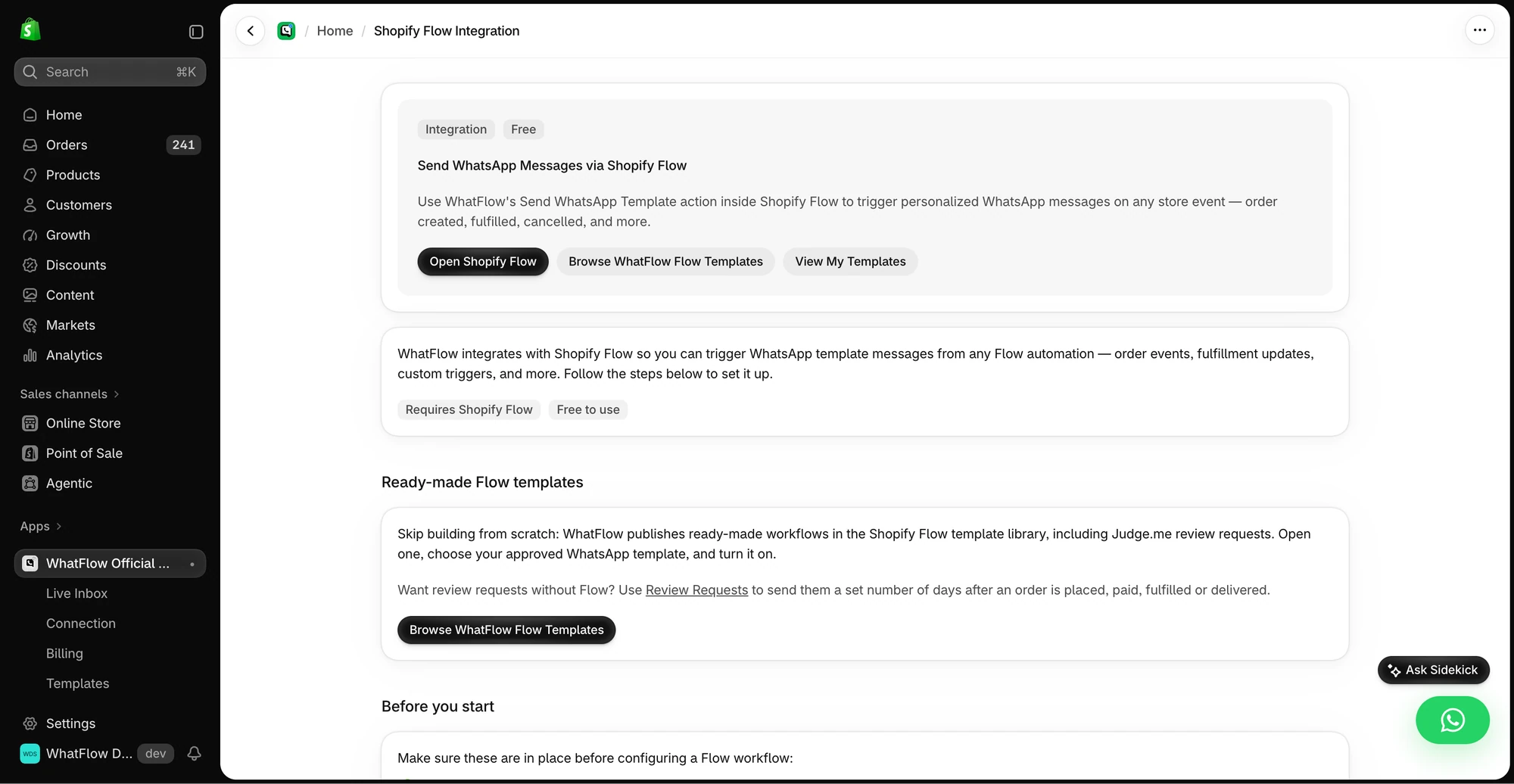
To give Chatfuel its due: it offers official WhatsApp API access, broadcasts and a shared team inbox. Where it differs is focus (AI and social) and how you pay (credits).
How much does it cost: WhatFlow vs Chatfuel?
Chatfuel Business S is $18/month billed yearly ($216 up front) with 20 AI credits a month. Meta's WhatsApp charges draw from the same credit balance, and template messages are billed at Meta's rate plus 10%. Unused credits don't roll over.
WhatFlow keeps it simpler. Plans are message allowances: Free (100 sends), Starter $4.99 (2,000), Plus $9.99 (5,000), Growth $29 (20,000). Meta bills its WhatsApp charges directly (Meta's pricing), with no markup from us in the plan price. Say you send 2,000 order messages a month: Starter at $4.99, billed monthly, whole team in the inbox. See the pricing page.
Where Shopify orders need a person, not a credit
Say a shopper asks three product questions, buys, then messages: "Can you send it to my office instead?" An AI reply can be friendly, but someone has to change the address on the right Shopify order before it ships. In WhatFlow that message lands in the team inbox, a Flow trigger can tag the order for review, and your teammate replies:
Done, Jorge. I've updated order #5547 to your office address on Calle Mayor. It ships this afternoon and you'll get tracking here.
More on that in handling address changes on WhatsApp.
What WhatFlow includes on every plan
- Templates mapped to Shopify order and checkout data.
- COD confirmation with Confirm and Cancel buttons, acted on through Flow.
- Abandoned checkout, shipping updates and review requests.
- Native Shopify Flow triggers and actions, with Shopify Sidekick to help draft them.
- Live catalog sharing, saved replies, assignment and filters.
- Free theme-matched WhatsApp buttons.
Moving your WhatsApp work to WhatFlow: a short checklist
- Keep Chatfuel running for whatever it already does well while you set up.
- Install WhatFlow and connect your WhatsApp number with Meta's Embedded Signup from Shopify admin.
- Rebuild your most-used WhatsApp message as a template in the WhatFlow editor, mapped to Shopify order fields.
- Add one Shopify Flow workflow, for example tagging an order when the customer taps Confirm.
- Add your team to the inbox (no seat fees) and load five saved replies for your most common questions.
- Once the first workflow runs cleanly for a week, move the next one.
Start with the message that costs you the most time today. For most COD stores, that's order confirmation.
When Chatfuel might still make sense
Pick Chatfuel only if your main goal is AI replies and automation on Instagram comments, Reels and ads, with WhatsApp as one channel among several. That's what its credits are built for.
The bottom line
For Shopify order messages and the questions that follow, WhatFlow is the focused choice: Shopify Flow, COD, catalog sharing and a no-seat-fee inbox on every plan, starting free. Install WhatFlow and start with your order confirmation template.
Questions worth asking
Is WhatFlow a Chatfuel alternative for Shopify?
Yes, if your WhatsApp work is mostly about Shopify orders. WhatFlow sends templates from Shopify data, runs COD confirmation and Shopify Flow automations, and gives your team a no-seat-fee inbox, all on the Free plan. Chatfuel suits stores that mainly want AI replies and social comment automation.
How does Chatfuel pricing work?
As of November 2026, Chatfuel's Business S plan is $18/month billed yearly with 20 AI credits a month, and Meta's WhatsApp charges are paid from the same credit balance, with templates at Meta's rate plus 10%. WhatFlow plans start free, paid from $4.99/month, with Meta billing its charges separately.
Does WhatFlow charge per inbox seat?
No. WhatFlow's team inbox has no seat fees, so your support, sales and fulfilment people can all answer WhatsApp without the bill changing. You pay for a message plan, and Meta bills its WhatsApp charges separately, as it would with Chatfuel.
Does WhatFlow include an AI chatbot?
WhatFlow has no built-in AI bot and doesn't bill AI by credits. You can connect the AI you already use through WhatFlow's MCP connector, so Claude, ChatGPT or Cursor can read chats and draft replies that a person approves before sending. Beyond that, it focuses on Shopify WhatsApp workflows (templates, COD confirmation, Flow triggers, catalog sharing) and a no-seat-fee inbox where your team answers, all on the Free plan.
Sources and methodology
We checked these primary sources on November 5, 2026. Vendor pages describe advertised capabilities, rather than independent performance tests. Confirm current pricing, plan limits and availability with each provider.
- Chatfuel: official product and commercial information
Chatfuel pricing page, checked November 2026: Business S $18/month billed yearly ($216/year), 20 AI credits, Meta charges drawn from credits, templates at Meta's rate plus 10%.
- WhatFlow WhatsApp Business API on the Shopify App Store
WhatFlow's plans (Free, and paid from $4.99/month), included sends, Shopify Flow and admin features, and its 5.0/5 rating from 55 ratings, checked November 5, 2026.
- WhatsApp Business Platform pricing
Meta's per-message WhatsApp pricing by country and template category, billed separately from any app or platform fee.