To improve SEO on Shopify, fix things in this order: confirm Google can crawl and index the store, make every collection and product page answer a specific search with unique copy, clean up images and speed, add genuine reviews, then publish a small number of guides built from real customer questions and link them all together. Shopify already handles most technical plumbing. Your job is mostly content and structure.
I run a Shopify app company, and I spend a lot of time inside other people's stores. The pattern is almost always the same. The theme is fine. The sitemap is fine. And the collection pages are a grid of products with a heading and nothing else, the product descriptions are the supplier's copy pasted in, and nothing links to anything. Those are fixable in a few weekends.
This checklist is the order I'd work through on a store with a few dozen to a few thousand products. Tick it off top to bottom.
Is Shopify good for SEO out of the box?
Yes, mostly. Shopify does the boring technical work for you, which is one of the better reasons to be on it:
Sitemap. Shopify generates sitemap.xml at the root of your domain and updates it when you add products, collections, pages, images or blog posts (Shopify Help Center).
robots.txt. Every store gets a default robots.txt that Shopify describes as optimal for SEO. It blocks cart, checkout, account and duplicate sorted or filtered collection URLs (Shopify Help Center).
Editable titles, meta descriptions, handles and alt text on products, collections, pages and blog posts.
Structured data. Most modern themes output Product and Article markup through Liquid. I cover what that means in schema markup for Shopify stores.
What Shopify can't do is write your pages. That's where most stores lose.
Step 1: Make sure Google can find and index the store
Do this before anything else. It takes an hour and it tells you where you actually stand.
Remove the password page. A store in private mode can't be crawled. If you're still building, that's fine, but don't expect any SEO progress until it's public.
Verify your domain in Google Search Console. Use your primary domain, not the address. Google's walks through it.
Submit your sitemap. In Search Console go to Indexing > Sitemaps, type sitemap.xml and submit.
Check the Pages report. Look for important URLs marked "Discovered, currently not indexed" or "Crawled, currently not indexed". A handful is normal. If half your products are there, the usual cause is thin or duplicate content, not a technical block.
Leave robots.txt alone unless you have a specific reason. Shopify's own help page warns that a bad edit "can result in loss of all traffic". I've never seen a small store's rankings fixed by editing it.
Set one primary domain and let Shopify redirect the others to it.
Step 2: How should I write titles and meta descriptions on Shopify?
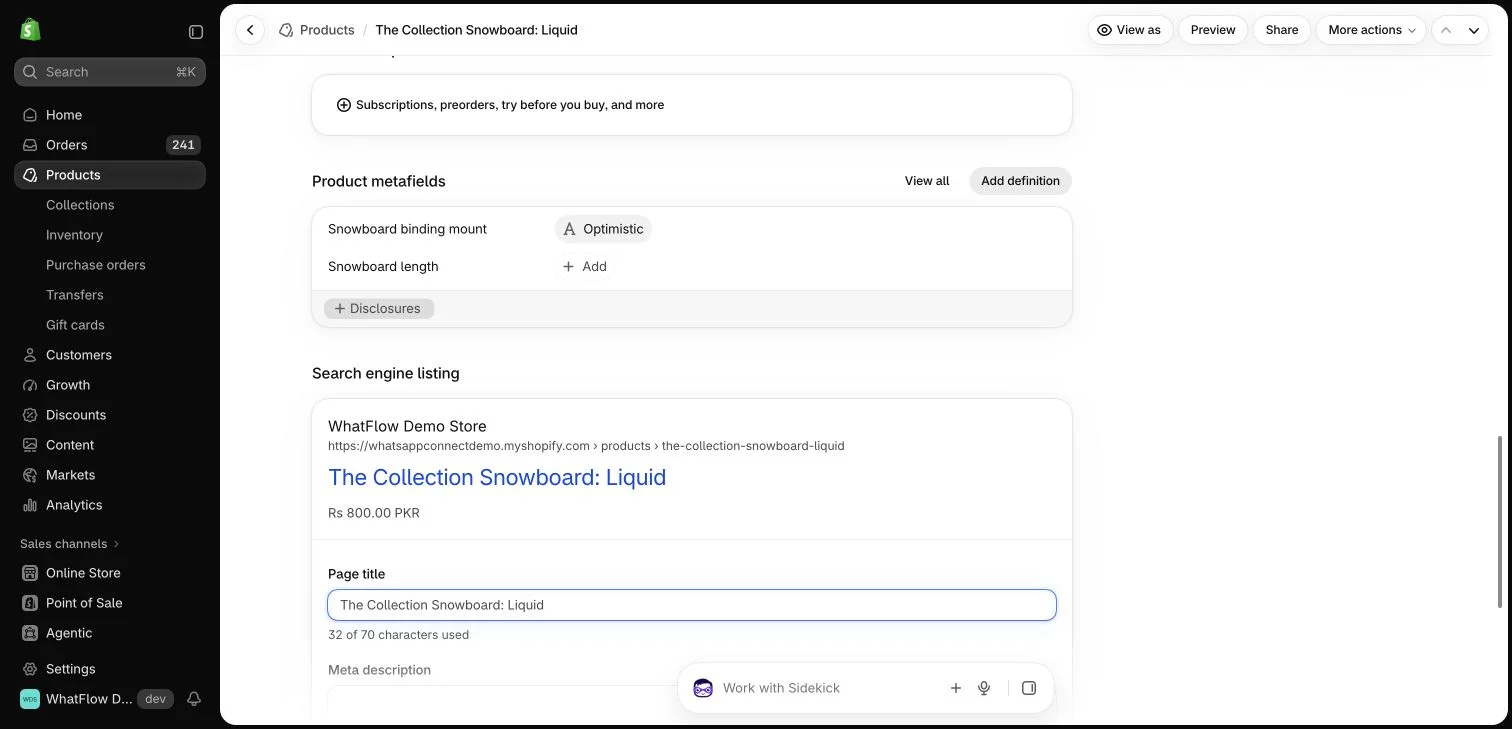
The title tag is the blue link in Google. Shopify recommends keeping it to 60 characters or fewer, and Google's title link documentation asks for titles that are unique, brief and accurate.
A pattern that works for most stores:
Page type
Title pattern
Example
Collection
Primary keyword + qualifier + brand
Linen Summer Dresses for Women · Noor Studio
Product
Product name + key attribute
Vitamin C Serum 15% with Ferulic Acid, 30ml
Blog post
The question or promise
How to Store Natural Soap So It Lasts Longer
Home
Brand + what you sell
Noor Studio · Handmade Linen Clothing
For meta descriptions, Shopify suggests around 160 characters of natural, readable text. Write it like a shop window sign: what's here, why it's worth the click. Google will sometimes swap in text from the page instead, which is fine. A good description still gets used often enough to be worth ten minutes.
The most common mistake I see: every product title tag is just the product name, identical to the H1, with "– Store Name" appended by the theme. That's acceptable for products. It's a waste on collections, which is where your best rankings come from.
Step 3: Turn collection pages into landing pages
Collection pages are the most underrated SEO asset on Shopify. "Linen dresses", "vitamin C serum", "oak dining tables": these are category searches with buying intent, and Google tends to rank category pages for them.
A collection page that ranks usually has:
A clear H1 that matches the search ("Linen Dresses", not "Summer Vibes ☀️").
A short intro above the grid (40–80 words) that tells the shopper what's in the collection and who it's for.
A longer section below the grid (200–500 words) with buying guidance: how to choose, sizing, materials, care, delivery notes.
Links to sibling and child collections, and to one or two guides.
Filters that help shoppers without spawning thousands of indexable URLs.
Step 4: Fix product pages, starting with your best sellers
Don't try to rewrite 800 product descriptions. Pull your top 20 products by revenue and your top 20 by Search Console impressions, and start there.
For each one, check:
The description is yours. Supplier copy appears on dozens of other sites. Rewrite it in your own words with details only you know: how it fits, what it smells like, what customers ask about it.
The answers to buying questions are on the page. Sizing, materials, what's in the box, delivery time to the customer's country, returns. If your support inbox gets the same question about a product three times a week, that answer belongs on the product page. Here's how to write product FAQs that answer real buying questions.
Variants are handled sensibly. One product with colour and size variants beats twelve near-identical products competing with each other.
The URL handle is short and descriptive./products/linen-wrap-dress beats /products/ldw-2291-v3-new. If you change a handle on an existing product, create a URL redirect from the old address straight away.
Out-of-stock products stay live if they'll come back. Show the status clearly. Only delete and redirect products that are gone for good.
A useful exercise: read your reviews for a product and note the words customers use. If twelve people say "runs small", your size guide should say it first. I go deeper on this in using review themes to improve product copy.
Step 5: Clean up images
Images matter twice: for Google Images, and for page speed.
Alt text. Describe what's in the image, in context. "Woman wearing sage linen wrap dress, side view" is good. "linen dress best linen dress buy linen dress" is keyword stuffing, and Google's image SEO guide calls that out directly. In Shopify, click the image on the product page and choose "Edit alt text".
File names. Rename before uploading: sage-linen-wrap-dress-side.jpg, not IMG_4471.jpg.
Size. Upload at a sensible resolution. Shopify's CDN serves resized versions, but a 9MB original still slows things down in some themes and apps.
Formats. Google supports JPEG, PNG, WebP and AVIF among others. Shopify converts to modern formats where the browser supports them, so you mostly don't need to worry about this.
The search engine listing section in Shopify admin, on a demo product. This is where you set the title tag, meta description and URL handle.
Step 6: How do I speed up my Shopify store?
Speed is part of page experience. Google's Core Web Vitals page sets "good" thresholds at Largest Contentful Paint within 2.5 seconds, Interaction to Next Paint under 200 milliseconds, and Cumulative Layout Shift below 0.1. Google doesn't publish how much weight these carry, and a fast page with weak content won't outrank a slower page that answers the question better. But a slow mobile store loses shoppers regardless of rankings.
On Shopify, speed problems almost always come from three places:
Too many apps injecting scripts. Every popup, widget and tracker adds weight. Uninstalling an app doesn't always remove its theme code, either. My lean Shopify app stack guide covers how to audit this.
Heavy hero media. Autoplay video and giant image sliders on the home page are the classic LCP killers.
Old or heavily customised themes. If your theme is several years old, moving to a current Online Store 2.0 theme often fixes more than any tweak.
Check your Core Web Vitals report in Search Console, which uses real-user data, rather than chasing a perfect lab score.
A note on chat widgets, since that's my world: a heavy third-party chat widget that loads on every page has a cost. A lightweight link-style WhatsApp button costs very little. That's one reason we made WhatFlow's theme-matched WhatsApp chat buttons free forever and kept them simple.
Step 7: Collect real reviews and show them properly
Reviews help SEO in two indirect ways. They add fresh, specific, customer-written text to product pages, and they can make a product eligible for review stars in search results if the markup is right. Google decides whether to show stars; valid markup only makes you eligible.
What to do:
Install one review app and make sure it outputs review markup that matches what's visible on the page.
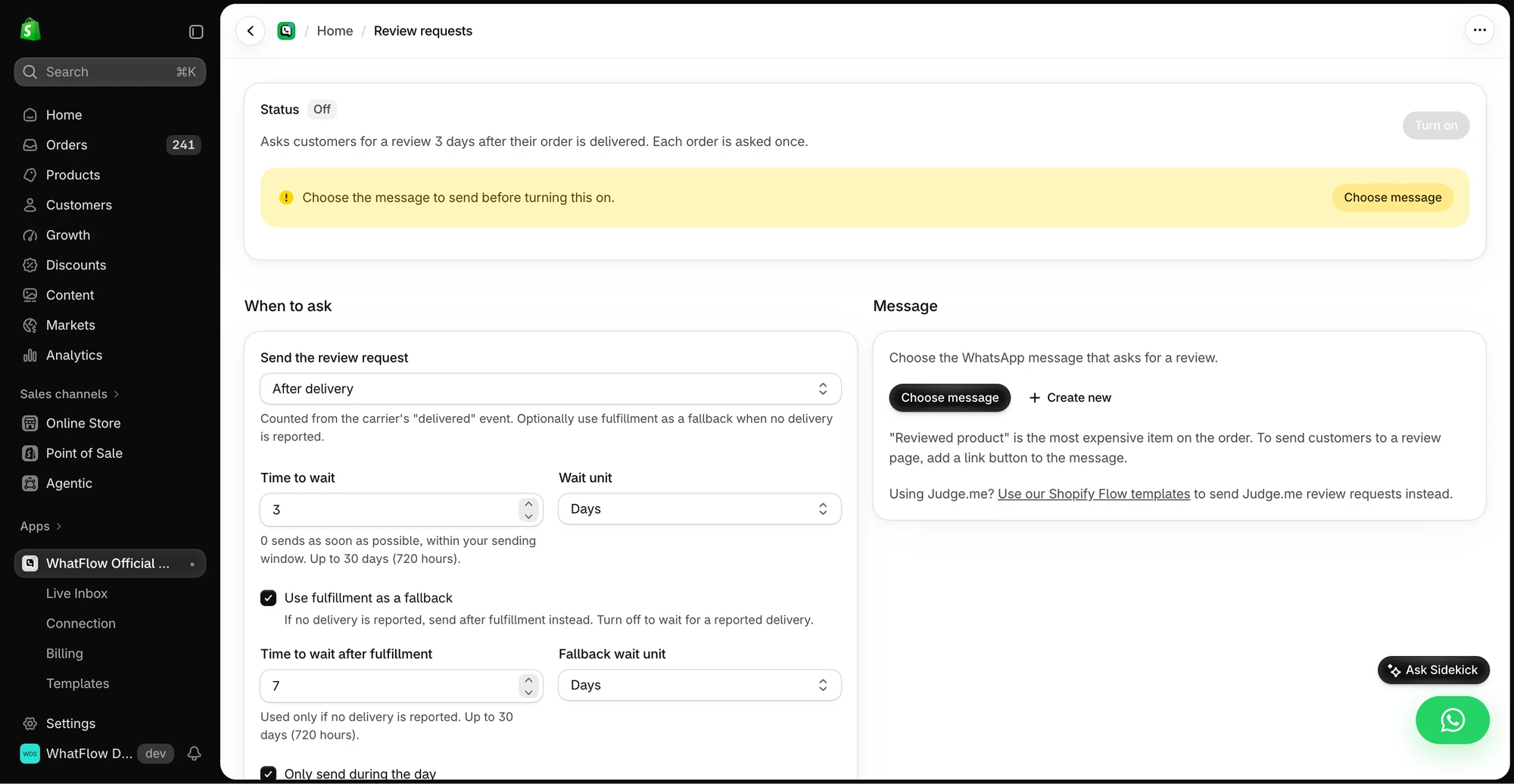
Ask every customer after delivery, not just the happy ones. Email works. WhatsApp often gets a faster response in markets where customers live in WhatsApp.
Don't fake, filter or incentivise reviews in ways that break platform rules.
Here's a simple review request that a WhatsApp app like WhatFlow can send a few days after delivery, using an approved template:
The review request setup shows delivery timing and the option to use fulfillment as a fallback.
Hi Aisha, it's Noor Studio. Your linen wrap dress was delivered on Tuesday. How's the fit? If you have a minute, a quick review helps other shoppers choose the right size: [review link]. Reply here if anything isn't right and we'll sort it.
Step 8: Publish content that answers real questions
Most Shopify blogs are a graveyard of "5 Summer Trends" posts. They don't rank and nobody reads them.
Content that works for a store is narrower and more useful:
Buying guides for each main collection ("How to choose a linen dress for hot climates").
Comparison pages for products customers confuse ("Vitamin C serum vs niacinamide: which first?").
Care and use guides that support the purchase ("How to wash linen without shrinking it").
Policy explainers written for humans ("How COD orders work with us").
Google's helpful content guidance leans hard on first-hand experience. You have that. You've packed the orders, answered the complaints, and know which products get returned and why. Write from that.
The best source of topics is your own inbox. Every repeated customer question is a search query someone else is typing into Google. I've written a process for mining your WhatsApp chats for content ideas. Once you have a library going, review it every quarter and update or merge anything that's gone stale.
Step 9: Build internal links on purpose
Internal links tell Google which pages matter and how they relate. They also keep shoppers moving.
A simple structure for most stores:
Main menu links to top-level collections.
Collections link to sub-collections, sibling collections and one or two buying guides.
Products link back to their main collection (breadcrumbs do this) and to a care or sizing guide.
Blog posts link to the collections and products they discuss, using descriptive anchor text ("our linen wrap dresses", not "click here").
The footer carries policies, contact, and your most important collections, not 60 links.
A quick audit: open your five most important collections and count how many other pages on your site link to each. If the answer is "only the menu", add links from related guides and products.
Step 10: Get your store and policies straight for AI answers too
More shoppers now ask ChatGPT, Gemini or Google's AI Mode what to buy. Google says there are no extra requirements to appear in its AI features beyond normal SEO: pages must be indexed and eligible to show a snippet. In practice that means everything above, plus clear "About", shipping, returns and contact pages so any system describing your store gets the facts right.
Meta descriptions on top 20 products and all collections
Collections
Intro copy above the grid
Collections
Buying guidance below the grid
Collections
Links to sibling collections and guides
Products
Original descriptions on top 20 products
Products
Sizing, materials, delivery and returns answered on page
Products
Short descriptive URL handles, with redirects for any changes
Images
Descriptive alt text on product images
Images
Descriptive file names on new uploads
Speed
Unused apps removed, leftover theme code cleaned
Speed
Core Web Vitals report checked on mobile
Reviews
Review app installed, requests sent after delivery
Content
3–5 guides written from real customer questions
Links
Each key collection linked from at least three other pages
Trust
About, contact, shipping and returns pages complete
How do I know if Shopify SEO is working?
Use Google Search Console, not your gut and not an SEO app's "score".
Check monthly:
Impressions and clicks per page in the Performance report. Impressions rising first is the normal pattern; clicks follow.
Queries per collection. If your "linen dresses" collection is getting impressions for "linen dresses for women", you're on the right track. If it's showing for nothing, the page probably needs more substance.
Indexing. Are new products getting indexed within a reasonable time?
Keep a simple log of what you changed and when. SEO results lag by weeks or months, and without a log you'll never know which change helped.
Free plan available
Run WhatsApp for your Shopify store with WhatFlow
Templates, COD confirmation, Shopify Flow automations and a shared team inbox with no seat fees. Every feature is included on every plan, including Free.
If you only have one afternoon: verify Search Console, submit the sitemap, and rewrite the copy on your three most important collections. That's the highest-return hour in Shopify SEO for most small stores. Then come back to product pages and content once you've seen what Google is already showing you for.
Frequently asked questions
Is Shopify good for SEO?
Yes. Shopify generates a sitemap, a sensible default robots.txt, canonical tags and editable titles and meta descriptions out of the box, so most stores start with sound technical foundations. What usually holds a Shopify store back is thin collection pages, copied product descriptions and weak internal linking, which are content problems, not platform problems.
How long does Shopify SEO take to work?
Fixes like submitting your sitemap and correcting titles can show up in Search Console within weeks, but rankings for competitive collection terms usually take months of steady work. Plan in quarters, not days, and track impressions and clicks per page in Google Search Console.
Do I need an SEO app for Shopify?
Most small stores don't need one to start. Shopify's built-in title, meta description, URL handle, alt text and redirect fields cover the basics; add an app only for a specific gap, such as bulk-editing alt text across hundreds of products.
Should I write a blog for my Shopify store?
Only if you can publish pages that answer real buyer questions better than what already ranks. Ten useful guides built from your customers' actual questions will do more than fifty generic posts.
Does changing a Shopify product URL hurt SEO?
It can if the old URL stops working. Whenever you change a product or collection handle, create a URL redirect from the old address to the new one in Shopify admin so links and rankings carry over.