Meta One bundles account benefits. Evaluate them separately from Shopify messaging workflows.
Meta One is Meta's paid subscription family, launched in September 2026, that bundles benefits across WhatsApp, Instagram, Facebook and Messenger. For a Shopify store, the business bundles (from $14.99 a month) matter mostly for the WhatsApp Business app: verification benefits, more linked devices and broadcast credits. If your store runs on the WhatsApp Business API, Meta One doesn't change your messaging costs or your badge route.
That's the short answer. The longer one depends on which WhatsApp setup your customers actually message, so let's sort that out first.
What is Meta One, and how is it different from Meta Verified and WhatsApp Plus?
Three products, three jobs. People mix them up constantly.
Product
What it is
Announced price (as of November 2026)
Useful for a Shopify store?
WhatsApp Plus
Single-app plan: themes, icons, special stickers, more pinned chats
$2.99/month
Not really. It's personalisation.
Meta Verified (business)
Subscription in the WhatsApp Business app: verified badge (if Meta verifies you), impersonation protection, support, linked devices
Not listed on WhatsApp's help page; check in the app
Yes, if you run the Business app
Meta One business bundles
Cross-app bundle: Essential, Advanced, Expert, Max
From $14.99, $49.99, $149 and $499/month
Sometimes, if you also want the Instagram and Facebook tools
Prices come from Meta's Meta One announcement, which also says plans, benefits, pricing and availability vary by region, app and account. Treat those as starting figures, not your bill. Open the offer in your own account and check the currency before you decide.
What do the Meta One business tiers include?
From Meta's announcement:
Essential (from $14.99/month): business management tools, Meta Business Agent on WhatsApp for automated replies, plus a verified badge, a verified channel on the WhatsApp Business app and impersonation protection. The verification items are pending successful verification.
Advanced (from $49.99/month): adds post scheduling, exportable analytics, team access without sharing a password, more WhatsApp linked devices, business broadcast credits and more Business Agent responses.
Expert and Max: the highest feature access and agent capacity, aimed at teams managing several accounts at scale.
Notice how much of this is about the WhatsApp Business app: linked devices, broadcast credits, a verified channel. Those are app-side limits. A store on the Cloud API with a shared inbox doesn't hit linked-device caps in the first place.
The badge catch nobody mentions
WhatsApp's Help Center is blunt about it: subscribing to Meta Verified or Meta One doesn't guarantee a verified badge. After you pay, Meta might verify you automatically, ask for documents, or leave you subscribed with no verification option at all. Badges also aren't permanent. Meta can remove one if you don't complete extra verification or stop meeting requirements.
So don't buy Meta One "for the tick" without reading the offer screen. If it doesn't show a verification step for your account, assume you won't get one.
If you already have a badge, WhatsApp's Meta Verified page says you keep your verified status without doing anything.
Which WhatsApp setup does your store actually use?
This decides almost everything. Say you sell handmade candles from Lahore. Your theme has a WhatsApp button, order updates go out automatically, and two people answer chats. Which number is that, and where does it live?
Message your store from a different phone using the button on your Shopify storefront. Note the number and the business name you see.
Check where that number is registered. Is it in the WhatsApp Business app on someone's phone, on the WhatsApp Business Platform through an app like WhatFlow, or both through coexistence?
Open the subscription offer on the account that owns that number. Meta Verified is reached from Settings or Business Tools in the WhatsApp Business app. If you don't see it, it isn't available to you yet.
For a Platform (API) number, the documented badge route is Official Business Account status, requested in WhatsApp Manager once your business portfolio is verified, two-step verification is on, the display name is approved and the number has been on the platform for 30 days.
The mistake I see most often: a merchant subscribes on a personal or old Business app number while the store's theme, order messages and ads all point to a different API number. Customers never see the badge.
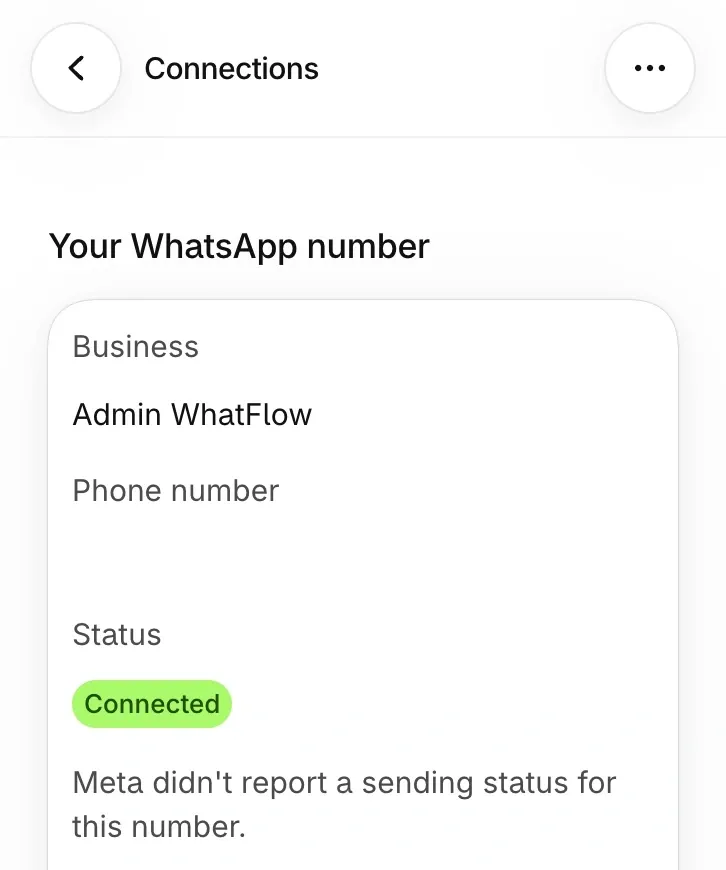
Demo store, sender number obscured. Compare the connected number with the one on your storefront before paying for any subscription.
When is Meta One worth it for a Shopify store?
My honest take:
Worth it: you run the store's WhatsApp from the Business app, you're getting impersonated (fake "support" accounts using your logo), and the offer in your account shows a verification step. Impersonation protection and a badge are real value there.
Maybe: you're heavy on Instagram and Facebook and want the scheduling, analytics and team access in Advanced. Judge it on those, not on WhatsApp.
Skip it: your store runs on the WhatsApp Business API and you mainly want a badge. Go the Official Business Account route instead, which our green tick guide walks through step by step.
One more thing on Meta Business Agent. Meta's pricing documentation says Business Agent messages are still charged even inside a free entry point window, where other messages are free. If an AI agent is the reason you're looking at Meta One, read the charges before you switch it on.
Where WhatFlow fits next to a Meta subscription
A badge tells a customer who you are. It doesn't confirm their COD order, send the tracking link or get the right teammate to answer. That part is your messaging stack.
WhatFlow WhatsApp Business API runs on Meta's official Cloud API, so your number is green-tick eligible through Meta's Official Business Account process. It connects to Shopify through Meta Embedded Signup and gives you a shared team inbox with assignment and no seat fees, so a 30-person support team costs the same in seats as two people. Order updates, COD confirmation and Shopify Flow automations run on every plan, including Free.
There's no built-in AI bot in WhatFlow. Instead it plugs into Shopify Sidekick and, over MCP, into Claude, ChatGPT or Cursor, with a draft mode so a person approves replies before they go out. No per-resolution AI fees.
Keep your budget lines separate: a Meta One or Meta Verified subscription (if any), Meta's per-message charges, and your app plan. WhatFlow's pricing page has a country rate table for Meta charges, which WhatFlow passes through with zero markup.
Run WhatsApp for your Shopify store with WhatFlow
Free plan available. Templates, COD confirmation, Shopify Flow automations and a shared team inbox with no seat fees. Every feature is included on every plan, including Free.
Confirm which number customers message, from a second phone.
Check whether that number lives in the Business app, on the API, or both.
Open the offer on that account and look for an actual verification step.
For an API number, plan the Official Business Account request instead.
Put the subscription, Meta message charges and your app plan on separate budget lines.
If verification is the main reason you're here, the WhatsApp blue badge guide for Shopify covers picking the right route and checking the badge shows on the right number.
Frequently asked questions
Does Meta One come with a WhatsApp verified badge?
Meta's business bundles list a verified badge, but WhatsApp's Help Center says subscribing to Meta Verified or Meta One doesn't guarantee one. After you subscribe, Meta may verify you automatically, ask for documents, or leave you without a verification option.
How much does Meta One cost for a business?
Meta's September 2026 announcement lists the business and creator bundles as Essential from $14.99 a month, Advanced from $49.99, Expert from $149 and Max from $499. Meta says plans, prices and availability vary by region, app and account, so check the offer inside your own account.
Is WhatsApp Plus the same as Meta Verified?
No. WhatsApp Plus is a $2.99-a-month single-app plan for themes, icons, stickers and pinning more chats. It's a personalisation plan, not a business verification product.
Do I need Meta One if my store uses the WhatsApp Business API?
Not for messaging. Meta's documented badge route for numbers on the WhatsApp Business Platform is Official Business Account status, which you request in WhatsApp Manager. Meta One is worth a look mainly if you also run the WhatsApp Business app or want its Facebook and Instagram benefits.