A WhatsApp business profile shoppers can recognise has five things: an approved display name that matches your Shopify store, your logo as the photo, a one-line description, your store's website, and support contact details. Then test it from a phone that has never messaged you, because that's what a new customer sees. WhatsApp's policy also requires the support contact details.
A customer gets a message about an order. The first thing they work out is who sent it. If the name is unfamiliar, the photo is blank and the website points somewhere else, a real order update looks exactly like a scam.
What fields does a WhatsApp business profile have?
Meta's business profile has these fields, as of November 2026:
Field
What to put there
Watch out for
Display name
Your store name as customers know it
Reviewed by Meta; changes are re-reviewed
Profile photo
Your logo, readable in a small circle
Wide logos get cropped
About
A short line, like "Handmade candles. Replies 9am to 7pm"
You edit these in WhatsApp Manager, or through your provider if it exposes profile settings.
The display name is the field that matters most
Meta reviews display names. Its docs say your display name appears at the top of chats and in the chat list only once it has passed verification. There's a second catch: if a customer saved your number or edited your name in WhatsApp, they see their own label instead.
You can change the display name up to 10 times in 30 days, and every change goes through review again. So don't tweak it during a sale. A pending change can leave customers seeing something you didn't expect.
Use the name on your storefront, packaging and receipts. Say your store is called "Saffron & Salt": don't register "S&S Trading LLC" because that's what's on the trade licence.
A step-by-step profile checklist
Display name: matches your storefront name and is approved.
Photo: logo, centred, readable at thumbnail size.
About line: says when you reply.
Description: two sentences on what you sell and what customers can ask about.
Website: your main Shopify domain, opening on a phone.
Email: your support address.
Address: only if customers visit or collect.
Category: set.
Number consistency: the same number on your chat button, order status page, emails and packaging.
Escalation path: a way to reach a person, especially if you use automated replies.
Here's a description that works for a small skincare store:
Clean skincare made in small batches. Message us for product advice, order updates and returns. A real person replies Mon to Sat, 9am to 7pm (GST).
And an About line:
Skincare help on WhatsApp. Replies within the hour on weekdays.
Test the profile from a customer's phone
This is the step everyone skips. Borrow a phone that has never messaged your store.
Open your storefront on mobile and tap the WhatsApp chat button.
Check the number and name that open match what you expect.
Tap the profile header and read every field as a stranger would.
Place a test order and check the order update arrives from the same name and number.
Check the WhatsApp button on the order status page, if your store has one.
Send a message after hours and see what happens.
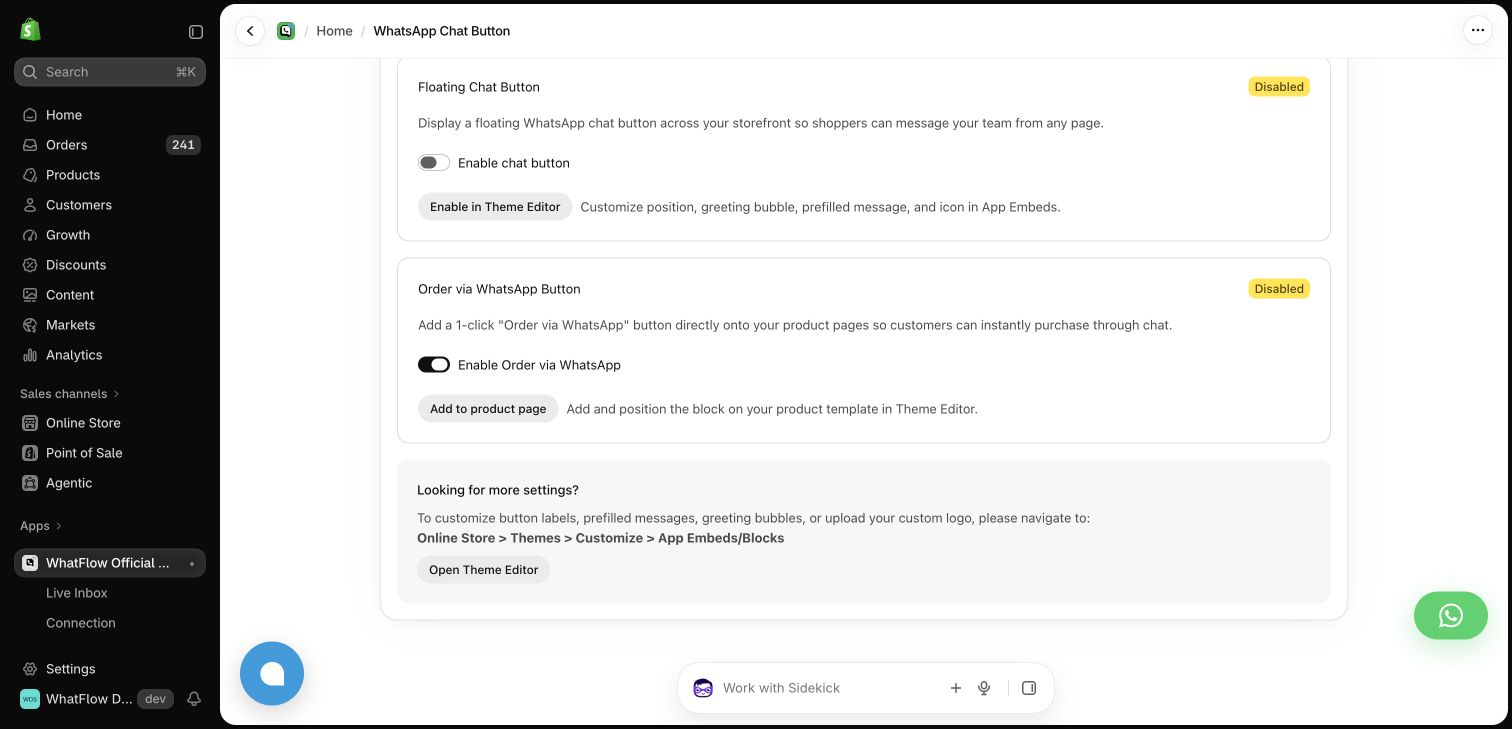
A stale number on any of those surfaces sends the customer to a dead end. WhatFlow's chat buttons are theme-matched and free forever, and the settings screen links each one to the Theme Editor, so you can open each placement and check the number it uses.
Demo store chat button settings. Check every button opens a chat with the same connected number.
In WhatFlow, the Connections screen also shows the connected number and display name, so you can compare it with what the test phone shows. The guide to adding a WhatsApp chat button to Shopify covers placement.
Keep a path to a person visible
WhatsApp's Business Messaging Policy requires a profile with customer support contact information. If you automate replies, the policy also expects a prompt, clear way to reach a person, such as an agent handoff, phone, email or a support form.
A shopper asking to change an address at 10pm needs either a person or a clear promise of when one will reply. An away message that says when you're back does the job. The away messages guide has examples.
Common profile mistakes
A legal name instead of the store name. Customers know your brand, not your company registration.
An old domain in the website field. If you moved from a myshopify.com address to your own domain, update it.
A personal email. It breaks when that person leaves, and it looks less trustworthy.
Different numbers in different places. One number on the chat button, another on packaging, a third in the order email. Pick one sending number and use it everywhere.
No reply hours. If you only answer in the daytime, say so in the About line. A clear expectation beats a silent chat.
A blank or blurry photo. It's the first thing people see in their chat list.
Should you get the verified badge?
Not first. Do the checklist above, then decide. A badge helps most when people are impersonating your brand, and it doesn't fix a confusing profile. The WhatsApp green tick guide explains Meta's current options, and if you've seen fake accounts using your name, read how to handle WhatsApp scams impersonating your store.
Run WhatsApp for your Shopify store with WhatFlow
Free plan available. Templates, COD confirmation, Shopify Flow automations and a shared team inbox with no seat fees. Every feature is included on every plan, including Free.
Profiles drift. Hours change, a support email gets retired, a new domain goes live. Put a 10-minute profile check in your calendar every quarter, and rerun the customer-phone test whenever you change your number, name or website.
Frequently asked questions
What should a WhatsApp business profile include?
At minimum: an approved display name that matches your store, your logo as the profile photo, a short description, your store's website, and support contact details. WhatsApp's Business Messaging Policy requires a business profile with customer support contact information.
Why do customers see a different name than my WhatsApp display name?
If a customer has saved your number in their contacts or edited your name in WhatsApp, they see the name they chose. Otherwise, Meta shows your display name at the top of the chat only once it has passed verification.
How often can I change my WhatsApp display name?
Meta allows up to 10 display name changes in a 30-day period, and each change goes through display name review again.
Do I need the green tick for customers to trust my WhatsApp profile?
No. A clear display name, your logo, a matching website link and a fast human reply build most of the trust. The verified badge is worth pursuing later if impersonation is a real problem for your brand.