WhatsApp for Shopify in the Netherlands: costs and rules (2026)
The Netherlands has Meta's highest WhatsApp marketing rate. What a Dutch Shopify store pays, the ACM spam rules, Dutch message examples and a setup plan.
WhatsApp for Shopify in the Netherlands costs $0.1597 per delivered marketing template, the highest marketing rate on Meta's card, and $0.05 per utility or authentication template (USD list rates as of November 2026). So be disciplined: use WhatsApp for replies and one order update, send campaigns only to small, recently active segments, and collect consent the way the ACM describes under article 11.7 of the Telecommunicatiewet.
I run WhatFlow, a WhatsApp app for Shopify. For Dutch stores my advice is blunter than for almost any other market: every marketing message has to earn its 16 cents. Here are the numbers, the rules and the setup I'd use.
How much does WhatsApp cost for a Shopify store in the Netherlands?
Meta charges per delivered template message, by category and by the recipient's country code. Every +31 number is billed at Dutch rates, wherever your store is based, and undelivered messages aren't charged. These are Meta's USD list rates for the Netherlands from Meta's WhatsApp pricing page, effective October 1, 2026:
Definitions first. A utility template is a pre-approved message about something the customer already started, such as an order. A service message is a free-form reply inside the customer service window, the 24 hours after the customer's last message. Since October 1, 2026, utility templates are charged even when that window is open, and service replies are free only for the first 1,000 a month per business number.
How does that compare? Marketing to the Netherlands costs more than Germany ($0.1365), about twice Italy ($0.0795) and two and a half times the UK ($0.0635). Utility is second only to Germany's $0.055.
Worked example: a homeware store in Utrecht
Say you sell homeware from Utrecht and ship 1,000 orders a month.
Dispatch update with tracking for every order: 1,000 × $0.05 = $50.00
1,400 service replies: first 1,000 free, 400 × $0.05 = $20.00
A campaign to your whole opted-in list of 5,000: 5,000 × $0.1597 = $798.50
Now the same month with discipline. Send the campaign only to the 1,000 customers who bought or messaged in the last 90 days: 1,000 × $0.1597 = $159.70. Meta's total drops from $868.50 to $229.70.
Think about what that campaign has to earn. Say your average order leaves you $25 of margin. The full-list send needs 32 extra orders just to cover Meta's charge; the segmented send needs 7. That's why I tell Dutch merchants to start small. The cost-per-order budgeting guide walks through the maths for your own numbers.
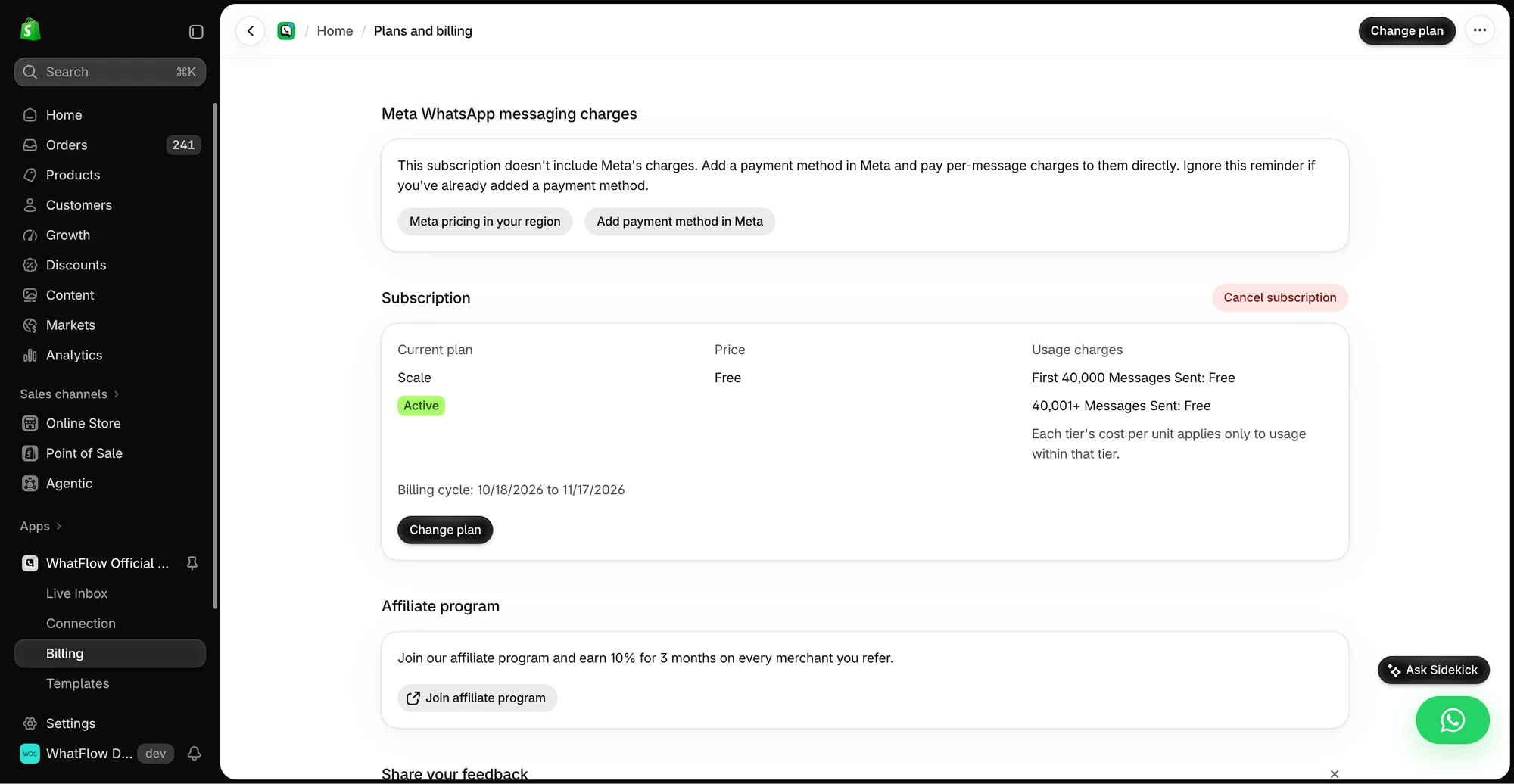
WhatFlow's app pricing is separate from Meta's. Counting every outgoing message, replies included, the disciplined month above is about 3,400 messages, which fits the Plus plan ($9.99 a month for 5,000). Every plan has every feature, Free included, and Meta's charges pass through with no markup. The WhatFlow pricing page has the country table and a calculator.
Five habits that keep a Dutch bill sane
Get customers to message you first. A WhatsApp button on product pages and a QR code in the parcel turn questions into service conversations, and the first 1,000 replies are free.
One utility message per order. Pick dispatch with tracking. Skip "order received" if Shopify's email already does it.
Never send to the whole list by default. Segment by recent purchase or recent chat.
Use click-to-WhatsApp ads for new customers. Once you reply in time, Meta's free entry point window can stay open for up to 7 days, with no Meta charge for messages to that person. The free entry window guide explains the conditions.
Bill in EUR if your books are in euros. You choose the currency when the Meta account is created, and Meta says it can't be changed afterwards.
WhatFlow Billing in a demo store: Meta's messaging charges shown apart from the app subscription. Sample data.
What do article 11.7 and the ACM say about WhatsApp marketing?
The Dutch spam rule sits in article 11.7 of the Telecommunicatiewet, and the Autoriteit Consument & Markt (ACM) publishes the guidance on it. GDPR (the AVG in Dutch) covers the personal data, and the Autoriteit Persoonsgegevens is the data protection authority. This isn't legal advice.
One caveat up front. The official law database, wetten.overheid.nl, showed me a browser security check instead of the article, so I couldn't read article 11.7 itself. Everything below comes from the ACM's guidance pages, which cite it. Check the official text on wetten.overheid.nl before relying on a specific detail.
WhatsApp is named, and consent comes first
The ACM's page on preventing spam in your advertising covers advertising "via e-mail, whatsappjes of andere elektronische berichten". No guesswork needed: WhatsApp is in scope. The rules it lists:
Send only to people who gave consent in advance.
Consent must be a deliberate choice: no pre-ticked boxes, no pressure, no consent buried in your terms. It has to be clearly about advertising.
You must be able to prove consent for up to 5 years after sending.
Make clear who the sender is. The ACM's FAQ on sending email says not to use an alias.
Every message needs a quick, free way to unsubscribe.
That 5-year point is the one I'd act on today. Tag each opted-in customer with the date and the wording version, and keep the record even after they unsubscribe.
The existing-customer exception
The ACM says existing customers may receive unsolicited messages about products or services connected to earlier purchases, as long as they can opt out and you're clearly the sender. Useful for email. On WhatsApp it doesn't help much, because the WhatsApp Business Messaging Policy requires opt-in before you message anyone and says you must honour opt-outs made on or off WhatsApp. Ask for the opt-in.
GDPR: proof and easy withdrawal
Article 7 GDPR says you must be able to demonstrate consent and that withdrawing must be as easy as giving it. Order updates don't need marketing consent; they follow from the purchase. The GDPR and WhatsApp consent checklist covers processors and privacy-notice wording.
The checkout box I'd use, unticked:
☐ Ja, ik wil aanbiedingen en nieuws van Studio Polder via WhatsApp ontvangen, ongeveer twee keer per maand. Afmelden kan altijd door STOP te sturen.
Returns, payments and the questions you'll get
The 14-day bedenktijd
Under the EU Consumer Rights Directive, online shoppers can cancel within 14 days of delivery without a reason. Your Europe explains that the customer usually pays return postage unless you offered to cover it or didn't say so beforehand, and that personalised and perishable goods are excluded. Dutch customers call this the bedenktijd. Save a reply:
Geen probleem! Je hebt 14 dagen na ontvangst om het artikel terug te sturen, zonder opgaaf van reden. Stuur me je ordernummer, dan krijg je de retourstappen hier.
iDEAL | Wero and pay-later
Shopify Payments offers iDEAL | Wero to customers with a Netherlands address paying in euros. Two details from Shopify's page change how you handle chat. Customers can't file chargebacks through their bank, so complaints come straight to you, and WhatsApp is where many will arrive. And if a payment is still processing, the order is created as "Payment pending", so check status before you ship and before you send a dispatch message. Shopify also asks for a legal notice with your company name, address and contact details. Klarna is shown to Dutch customers too, so save an answer for "kan ik achteraf betalen?" that points to Klarna for its terms.
Writing WhatsApp messages in Dutch
Use Meta's nl language code, listed in its supported template languages. There's also nl_BE if you sell to Flanders and want a Belgian version. Choose je or u and keep it consistent across site, email and WhatsApp. Je suits most consumer brands; u suits furniture, B2B or anything formal. Keep it short. Long, salesy Dutch reads badly on a phone.
Order confirmation (utility)
Hoi Sanne, bedankt voor je bestelling #5521! We pakken hem in en laten je weten wanneer hij onderweg is. Vragen? Stuur gewoon een berichtje terug.
Dispatch (utility)
Je bestelling #5521 is onderweg! Volg je pakket hier: [link]. Verwachte bezorging: donderdag.
Promotion (marketing, to a recent segment)
Alleen dit weekend: 20% korting op alle plaids en kussens: [link]. Geen aanbiedingen meer via WhatsApp? Stuur STOP.
Not everyone types STOP. Treat "afmelden", "geen berichten meer" or "uitschrijven" as opt-outs and add the number to your blocklist by hand. Have a native Dutch speaker read your templates before you submit them; translated Dutch is easy to spot.
Setup checklist: WhatsApp for Shopify in the Netherlands
WhatFlow WhatsApp Business API runs on the official Meta WhatsApp Cloud API and is built for teams of any size: a shared inbox with no seat fees, native Shopify Flow triggers and actions, every feature on every plan, and a 5.0/5 rating from 85 ratings on the Shopify App Store (checked November 24, 2026).
Connect with Embedded Signup from Shopify admin, using a Dutch number and your shop name as the display name (the ACM doesn't want aliases).
Choose EUR billing when the Meta account is created.
Create nl templates in Template Library and Message Editor, and check approval in Templates.
Switch on one dispatch update in Shipping Journey, and only for paid orders.
Add the unticked opt-in box at checkout and tag consenting customers with a date, using a Flow workflow.
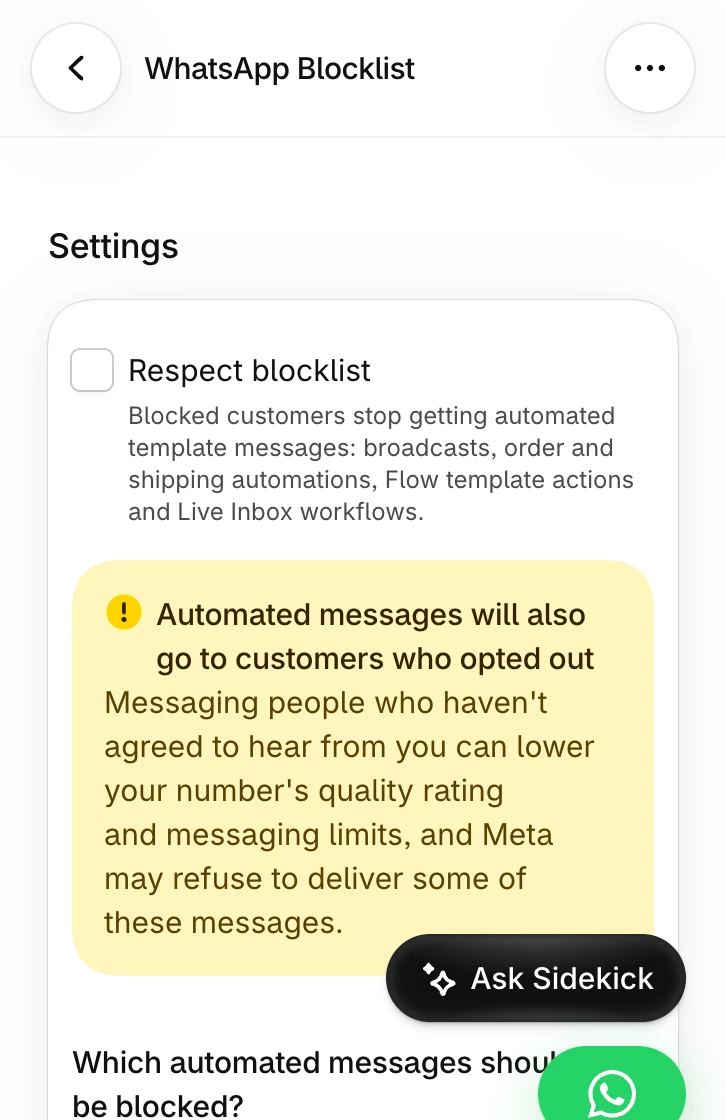
Turn on the blocklist and test STOP from your own phone.
Build segments before campaigns. Recent buyers first; the whole list rarely pays at $0.1597.
Blocklist settings in a WhatFlow demo store, with the warning shown when suppression is off.
As the chats pile up, the WhatFlow team inbox handles assignment and filters, and you can add colleagues without paying per seat.
Run WhatsApp for your Shopify store with WhatFlow
Free plan available. Templates, COD confirmation, Shopify Flow automations and a shared team inbox with no seat fees. Every feature is included on every plan, including Free.
Fix the opt-in and start keeping consent records this week, since the ACM expects proof for five years. Then approve one Dutch dispatch template and add a chat button so customers come to you. Hold campaigns until you have a recent, opted-in segment; at Dutch prices a careless send is expensive. Selling into Germany as well? WhatsApp for Shopify in Germany covers the second most expensive market on Meta's card.
Frequently asked questions
How much does a WhatsApp marketing message cost in the Netherlands?
As of November 2026, Meta's USD list rate for a delivered marketing template to a Dutch (+31) number is $0.1597, the highest marketing rate on Meta's card. Utility and authentication templates cost $0.05, and service replies cost $0.05 each after the first 1,000 free per business number per month.
Is WhatsApp marketing allowed in the Netherlands?
Yes, with prior consent. The ACM's guidance on article 11.7 of the Telecommunicatiewet names WhatsApp messages alongside email and says you may only send advertising to people who gave consent in advance, with an easy, free way to unsubscribe in every message.
How long do I need to keep proof of WhatsApp consent in the Netherlands?
The ACM says you must be able to prove consent for up to 5 years after sending a message. Store the date, the source and the exact opt-in wording for each customer.
Can I message existing Dutch customers without consent?
The ACM allows messages to existing customers about products or services linked to earlier purchases, with an opt-out in every message. WhatsApp's own policy still requires an opt-in, so on WhatsApp I'd ask first.
Should Dutch WhatsApp messages use je or u?
Match the rest of your brand. Je feels friendly and suits most consumer shops; u suits a more formal or B2B store. Pick one and use it in every template.