WhatsApp for Shopify in Italy: costs, consent and rules (2026)
What WhatsApp costs a Shopify store selling in Italy, what Codice Privacy art. 130 means for marketing, Italian message examples and a setup checklist.
WhatsApp for Shopify in Italy costs $0.0795 per delivered marketing template and $0.03 per utility or authentication template, at Meta's USD list rates as of November 2026. Italian law (Codice Privacy art. 130) wants consent before any promotional message, and its existing-customer exception only covers email. So build an opt-in list, use WhatsApp for order updates and replies, and write everything in natural Italian.
I run WhatFlow, a WhatsApp app for Shopify. Merchants setting up WhatsApp Business in Italy (or WhatsApp Business Italia, if you searched in Italian) usually ask me two things more than anything else: "what will Meta charge me?" and "can I message my old customers?" Here are straight answers to both, plus the setup I'd use.
How much does WhatsApp Business cost in Italy?
Meta charges per delivered template message, by category and by the recipient's country code. Every +39 number is billed at Italian rates, wherever your store is registered. Undelivered messages aren't charged. These are Meta's USD list rates for Italy from Meta's WhatsApp pricing page, effective October 1, 2026:
Quick definitions. A utility template is a pre-approved message about something the customer already started, such as an order. A service message is a free-form reply inside the customer service window, which is the 24 hours after the customer's last message to you. Since October 1, 2026, Meta charges for utility templates even when that window is open, and service replies are only free for the first 1,000 each month per business number.
Italy sits in the middle of Meta's European card. Marketing is cheaper than Germany ($0.1365) or the Netherlands ($0.1597), and a little above the UK ($0.0635).
Worked example: a 1,200-order month
Say you sell ceramics from a Shopify store in Puglia and ship 1,200 orders in a month, 200 of them cash on delivery (contrassegno).
Dispatch update with tracking for every order: 1,200 × $0.03 = $36.00
COD confirmation for the 200 contrassegno orders: 200 × $0.03 = $6.00
One campaign to 3,000 opted-in customers: 3,000 × $0.0795 = $238.50
1,500 service replies to customer questions: the first 1,000 are free, 500 × $0.03 = $15.00
Meta's total: $295.50 for the month. Notice where the money goes. The campaign is about 80% of the bill, while the messages that stop "dov'è il mio ordine?" chats cost $42. If you need to trim, trim the campaign audience, not the order updates. The campaign budgeting guide shows how to work out what a send has to earn back.
On the app side, those 4,400 templates plus 1,500 replies fit WhatFlow's Essential plan ($19 a month for 10,000 messages). Meta's charges are billed by Meta, separately, and WhatFlow adds zero markup. The WhatFlow pricing page has the full country table and a calculator if your mix looks different.
Four ways to spend less
Let customers write first. A WhatsApp button on product pages turns pre-sale questions into service conversations, and the first 1,000 replies a month cost nothing.
One utility message per order. Dispatch with a tracking link does more than confirmation plus dispatch plus delivered.
Click-to-WhatsApp ads. When someone messages from one of these ads and you reply in time, Meta's free entry point window can stay open for up to 7 days with no Meta charge for messages to that person. The free entry window guide covers the conditions.
Bill in euros. EUR is one of Meta's billing currencies. You pick it when the account is created, and Meta says the currency can't be changed after that, so decide before you connect.
What does Codice Privacy art. 130 mean for WhatsApp marketing?
Two layers apply in Italy: GDPR for the personal data, and article 130 of the Codice in materia di protezione dei dati personali (D.Lgs. 196/2003) for unsolicited communications. This isn't legal advice, but here's how I read the text for a Shopify store.
Consent first, and WhatsApp counts
Article 130 says automated promotional communications need the consent of the recipient (comma 1), and comma 2 extends that to electronic communications by email, fax, MMS, SMS "o di altro tipo" (or other types). WhatsApp isn't named. I'd treat it as one of those "other types" and plan accordingly.
The soft-spam exception is email only
Comma 4 is the exception merchants hope for: you can market your own similar products to a customer without fresh consent. But it only covers "le coordinate di posta elettronica", the email address the customer gave you during a sale, and only if you told them and they didn't refuse. A phone number collected at checkout isn't an email address. So the "they bought from me last year" argument doesn't work for WhatsApp in Italy.
Comma 6 lets the Garante per la protezione dei dati personali, Italy's data protection authority, order technical measures against repeat offenders. The Garante's own website wouldn't load for me while writing this, so read its marketing guidance at garanteprivacy.it directly before you plan anything ambitious.
GDPR: keep proof, make leaving easy
Article 7 GDPR says you must be able to show that someone consented, and withdrawing must be as easy as giving consent. For every opt-in, store the date, where it happened (checkout, chat button, pop-up) and the exact wording they saw. Order updates are a different matter: they rest on the contract, not on marketing consent. The GDPR and WhatsApp marketing checklist goes deeper on lawful bases and privacy-notice wording.
WhatsApp's own rule
The WhatsApp Business Messaging Policy requires opt-in before you message someone and says you must honour opt-outs whether they arrive on WhatsApp or anywhere else. So even if Italian law allowed something, Meta's policy still wouldn't.
Checkout wording I'd use, unticked by default:
☐ Voglio ricevere offerte e novità da Bottega Lunare su WhatsApp, circa due volte al mese. Posso disiscrivermi quando voglio rispondendo STOP.
Under the EU Consumer Rights Directive, a customer buying online can cancel within 14 days of delivery without giving a reason. Your Europe sets out the details: the customer normally pays return postage unless you offered to cover it or didn't tell them beforehand, and personalised or quickly perishable goods are excluded.
WhatsApp is where people will ask about it. Have a saved reply ready rather than typing the rules from memory at 10pm:
Certo! Hai 14 giorni dalla consegna per restituire l'articolo, anche senza motivo. Mandami il numero d'ordine e ti invio qui i passaggi per il reso.
Payment questions you'll get in chat
Shopify Payments supports Satispay for customers in Italy paying in euros (not for subscription products), and Scalapay lets Italian customers split an order of €5 to €4,999.99 into 3 or 4 interest-free instalments. Klarna is also shown to customers in Italy. If you switch these on, expect questions like "posso pagare in 3 rate?" and save a short answer that points to the provider for their terms.
If you offer contrassegno, a WhatsApp confirmation before dispatch is the single most useful message you can send. A customer taps "Confermo" or "Annulla", and a Shopify Flow workflow tags or cancels the order. The COD order verification page shows how WhatFlow handles it.
Writing WhatsApp messages in Italian
Write templates with Meta's it language code, listed in its supported template languages. Then decide on tu or Lei and use it everywhere. Tu suits most fashion, beauty and lifestyle shops. A furniture, jewellery or B2B store may prefer Lei. Mixing them between your website and WhatsApp feels odd to an Italian reader.
Keep templates short and use the customer's first name. Some starting points:
Order confirmation (utility)
Ciao Giulia, grazie per il tuo ordine #1048! Lo stiamo preparando e ti scriviamo appena parte. Per qualsiasi domanda rispondi pure qui.
Dispatch (utility)
Il tuo ordine #1048 è partito! Puoi seguirlo qui: [link]. Consegna prevista: giovedì.
COD confirmation (utility)
Ciao Marco, hai scelto il pagamento in contrassegno per l'ordine #2231 (€64,90). Confermi l'ordine? [Confermo] [Annulla]
Promotion (marketing)
Saldi invernali: fino al 30% su tutta la linea tavola, solo fino a domenica: [link]. Non vuoi più offerte su WhatsApp? Rispondi STOP.
Customers won't always write STOP. Treat "basta", "non scrivetemi più" or "cancellami" as opt-outs too and add the number to your blocklist by hand.
If Italian isn't your first language, have a native speaker read every template before you submit it. Meta reviews templates, and a stiff, machine-translated message reads like spam to the person receiving it.
Setup checklist: WhatsApp for Shopify in Italy with WhatFlow
WhatFlow WhatsApp Business API runs on the official Meta WhatsApp Cloud API. It works for a two-person shop and for a support team of fifty: a shared inbox with no seat fees, native Shopify Flow triggers and actions, every feature on every plan including Free, and a 5.0/5 rating from 85 ratings on the Shopify App Store (checked November 24, 2026).
Connect with Embedded Signup from Shopify admin, using an Italian number and your shop name as the display name.
Choose EUR billing when the Meta account is created.
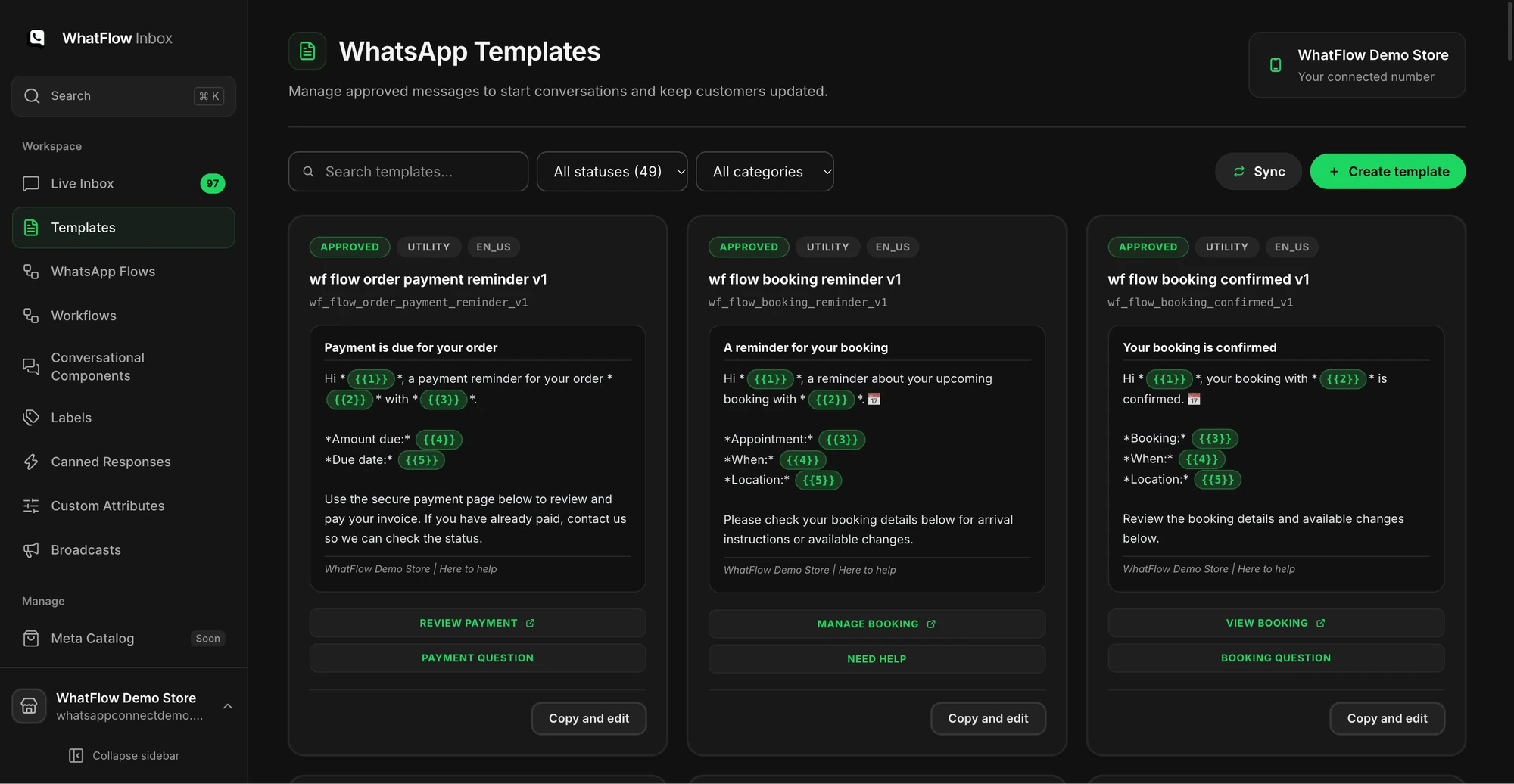
Create it templates. Start in Template Library, edit in Message Editor, then check category and approval in Templates.
Switch on one order update. Dispatch with tracking in Shipping Journey is my usual first pick.
Add COD confirmation if you offer contrassegno, with a Flow workflow that tags confirmed and cancelled orders.
Add the unticked opt-in box at checkout and tag consenting customers.
Turn on the blocklist and test STOP from your own phone before any campaign.
Template list in a WhatFlow demo store, filtered by language and approval status. Sample data; nothing was sent.
When chat volume grows, the WhatFlow team inbox lets you assign conversations, filter by agent and add people without adding seat fees.
Run WhatsApp for your Shopify store with WhatFlow
Free plan available. Templates, COD confirmation, Shopify Flow automations and a shared team inbox with no seat fees. Every feature is included on every plan, including Free.
Fix the opt-in wording this week, because art. 130 makes everything else depend on it. Then approve an Italian dispatch template and send it to yourself. At $0.03 a message, order updates are the easy win in Italy; campaigns can wait until you have a list people actually agreed to. Selling across the Alps as well? Read WhatsApp for Shopify in Germany before you add German customers to anything.
Frequently asked questions
How much does a WhatsApp marketing message cost in Italy?
As of November 2026, Meta's USD list rate for a delivered marketing template to an Italian (+39) number is $0.0795. Utility and authentication templates cost $0.03, and service replies cost $0.03 each after the first 1,000 free per business number per month.
Can I send WhatsApp promotions to past customers in Italy without consent?
I wouldn't. Article 130(4) of the Codice Privacy lets you market similar products to existing customers without consent only through the email address they gave you during a sale. WhatsApp also requires an opt-in before you message anyone, so ask for consent first.
Does Italian law cover WhatsApp marketing messages?
Article 130(2) of the Codice Privacy extends the consent rule to electronic communications by email, fax, MMS, SMS 'or other types'. WhatsApp isn't named, but I treat it as covered and collect consent before any promotional message.
Which language code should I use for Italian WhatsApp templates?
Use it, the code Meta lists for Italian in its supported template languages. Keep a separate English or German version if you also sell to tourists or to South Tyrol.
Do I need WhatsApp Business API or the free WhatsApp Business app in Italy?
The free app works for one phone and manual replies. Once you want order updates from Shopify, several agents on one number or approved templates, you need the WhatsApp Business Platform, which WhatFlow WhatsApp Business API connects to through Meta's Embedded Signup.
Consent for promotional electronic communications by email, fax, MMS, SMS or other types, the email-only existing-customer exception in comma 4 and the Garante's powers in comma 6.